
Views: 222 Author: Otechkabel Publish Time: 2026-05-15 Origin: Site


From years of working with overseas brands and OEM orders, I have seen how something as "simple" as connector gender can delay projects, cause returns, or even damage devices. Getting this right at the very beginning—on drawings, POs and samples—saves both time and money. [voltacharger]
When we explain USB gender to new customers, we always start with the mechanical definition. [cmd-ltd]
- Male USB connector (plug): The active part that inserts into a port. It has visible, protruding metal pins or a tongue that contacts the mating part. [voltacharger]
- Female USB connector (receptacle): The passive part that receives the plug. It has a recessed slot with metal contacts hidden inside. [cmd-ltd]
In OEM documentation, you will often see these written as "plug" (male) and "jack" or "receptacle" (female). For USB cables, most ends are male plugs, while most device-side ports on PCs, chargers and hubs are female receptacles. [cmd-ltd]
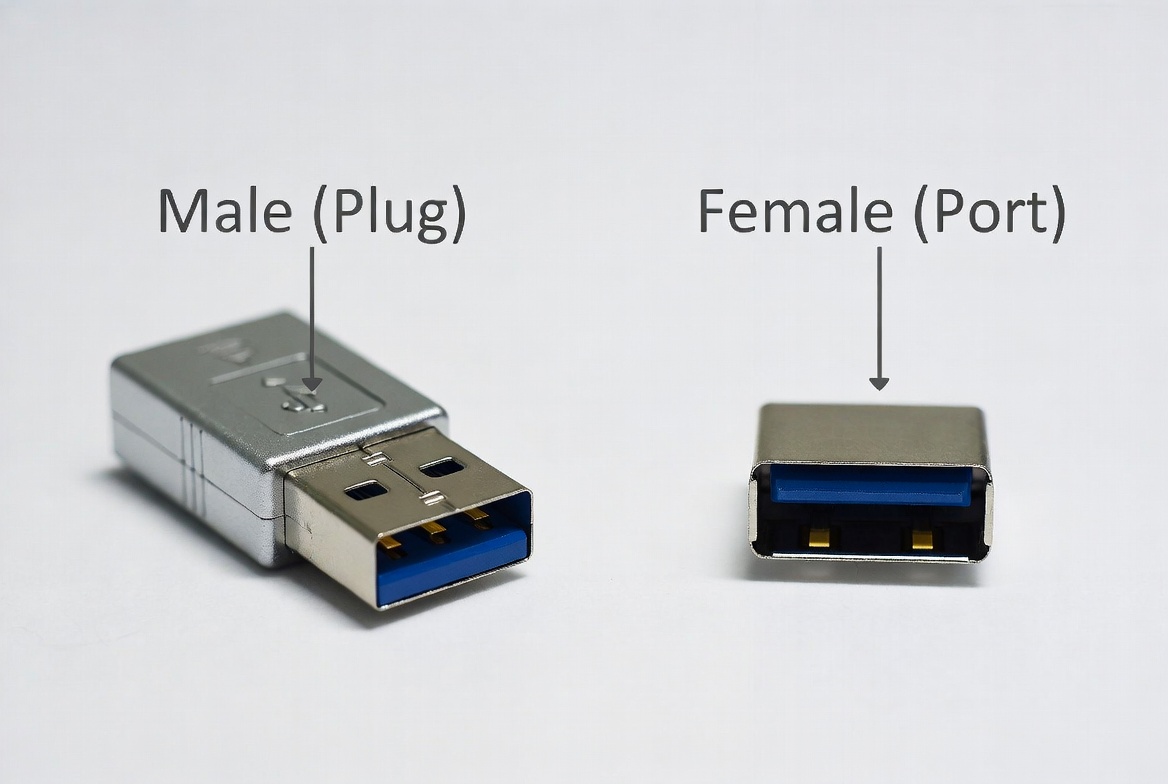
From a hands-on inspection perspective, you can identify USB gender in a few seconds if you know what to look for. [digilent]
When you hold a USB cable in your hand, the side that goes into a device is usually male. Typical male features include: [cmd-ltd]
- Protruding pins or metal tongue responsible for data and power transmission. [voltacharger]
- A more solid, projection-type shape that clearly sticks out and does not have a deep cavity. [voltacharger]
- For USB‑A, a rectangular plug with a metal shell and a visible inner plastic tongue, sometimes colored (blue for USB 3.0, black or white for USB 2.0). [digilent]
- For USB‑C, a slim, reversible plug with a symmetric oval-like profile and fine pins on the inner tongue. [voltacharger]
In our production environment, QC staff are trained to always confirm "pin outwards = male" as the first visual rule. [cmd-ltd]
The female side is usually fixed on equipment or panels, but you can also see female connectors on extension cables and adapters. Typical female features include: [cmd-ltd]
- A visible slot or cavity designed to receive the male plug. [voltacharger]
- Metal contacts are located inside the slot and are not easily touched by hand. [voltacharger]
- Often mounted on PCB, panel, chassis or wall chargers, so the connector does not move while plugging/unplugging. [voltacharger]
A simple way to explain to end users is: "If it has a hole to accept a plug, it is female; if it has a solid piece that goes into a hole, it is male." [cmd-ltd]
In real OEM projects, connector gender is not just a naming issue—it defines how the whole system is wired and used. [cmd-ltd]
The male connector is the active side that a user handles. It is responsible for: [voltacharger]
- Bridging signals and power from the cable to the female port on the device or charger. [voltacharger]
- Providing reliable contact pressure through the pins and shell for stable data and power. [voltacharger]
- Determining user ergonomics—how easy it is to plug/unplug, and how tight the fit feels.
Because of this, ODM/OEM customers often ask us to adjust shell design, plating and tolerance on the male plug to get the right balance between insertion force and retention. [digilent]
The female connector is the passive receiving point on devices and chargers. Its roles include: [voltacharger]
- Receiving signals and power from the male plug and routing them into the device circuitry. [voltacharger]
- Providing mechanical anchoring on PCB, chassis or panel so the port stays stable over thousands of mating cycles. [cmd-ltd]
- Protecting internal contacts inside a recessed housing, improving safety and durability. [voltacharger]
In other words, the male is what you hold, and the female is what you build into the hardware.
To make this easier to apply, here are a few common scenarios we see in overseas orders and user questions. [cmd-ltd]
- The computer USB‑A port on the front or back of a PC tower is female (slot). [cmd-ltd]
- The USB‑A plug on your data cable is male and inserts into that PC port. [cmd-ltd]
- The other end (USB‑C or Micro‑USB) that plugs into your phone is also male.

One frequent user question from our customers is about "USB male‑to‑female cables".
- A USB extension cable typically has a USB‑A male plug on one end and a USB‑A female receptacle on the other.
- It is used to extend reach, not to change signal direction or power role.
This is where many buyers mix terms like "male‑to‑male" and "male‑to‑female" and risk ordering the wrong part. We always recommend providing a simple drawing or photo when placing OEM orders to avoid this. [morningscore]
For completeness, it is important to separate connector type (shape) from connector gender (plug vs receptacle). [cmd-ltd]
| USB connector type | Typical male usage (plug) | Typical female usage (port) |
|---|---|---|
| USB‑A | Cable plug, flash drive | PC port, charger, hub |
| USB‑B | Printer cable plug | Printer device port |
| Micro‑USB | Phone data cable plug | Older phones, devices |
| USB‑C | Phone/PC cable plug | Modern phones, laptops |
In every row, the shape changes, but the gender rule (male = plug, female = port) stays the same. [cmd-ltd]

From a factory and engineering standpoint, we use a simple internal checklist whenever we handle drawings or new RFQs from overseas customers. Adopting a similar process can dramatically reduce misunderstandings. [neilpatel]
1. Confirm connector naming in writing.
- Use terms like "USB‑A male plug" or "USB‑C female receptacle on panel". [prefixbox]
2. Match written specs to drawings.
- Make sure the drawing clearly shows plug vs socket; if not, return for clarification.
3. Review the application scenario.
- Ask: "Which side is on the device? Which side is on the cable?"
4. Check mating component.
- Verify that your male plug matches the customer's specified female port model or standard (e.g., USB‑A 2.0, USB‑A 3.0). [digilent]
5. Create and approve a labeled sample.
- We often ship a pre‑production sample with gender labels so customers can plug it into their devices before mass order.

Based on support emails and user reviews we have seen in the market, there are several typical confusions around USB gender. [morningscore]
- Calling the "port" on a PC a male connector.
Users often describe "the male USB on my computer", but it is actually a female port.
- Assuming connector color equals gender.
Blue vs black inner plastic is about USB 3.0 vs 2.0 speed, not male/female. [digilent]
- Ordering male‑to‑male when they need male‑to‑female.
This is especially risky for powering devices where a wrong cable can cause damage.
- Mixing up gender with protocol (2.0/3.0/PD).
Gender only describes mechanical connection, not data rate, power delivery or version. [voltacharger]
When we see these issues in an inquiry, we always ask follow‑up questions and, if needed, request photos of the customer's existing cable and device.
From a manufacturer's perspective, connector gender also influences safety, durability and user experience.
- Female ports hide contacts inside a recessed slot, which reduces accidental shorting or touching of live contacts. [voltacharger]
- Devices generally expose female ports, while the more exposed male pins stay on removable cables that can be replaced if damaged.
- Most insertion cycles happen between a male cable plug and a female device port.
- High‑quality OEM cables use precise tolerances, good plating, and robust strain relief to maintain performance after thousands of plug/unplug cycles. [neilpatel]
Correct gender matching leads to:
- Fewer failed connections and "wiggling" plugs.
- Better compatibility with existing chargers, hubs and docks.
- Lower return rates and higher customer satisfaction for brands.
This is why serious brands and distributors typically specify connector type, gender, version and application scenario clearly in all product documentation. [innovationvisual]
For buyers and engineers, understanding gender helps you order the right cable configuration for your project.
| Cable type | Connector A | Connector B | Typical use case |
|---|---|---|---|
| USB‑A male to USB‑C male | Male | Male | Phone/PC charging & data |
| USB‑A male to Micro‑USB male | Male | Male | Legacy devices, cameras |
| USB‑A male to USB‑A female | Male | Female | USB extension cable |
| USB‑C male to USB‑C male | Male | Male | Modern phones, laptops, hubs |
| USB‑C male to USB‑A female | Male | Female | USB‑C adapter for traditional USB |
When sending us OEM requirements, it is very helpful if you describe both ends like this: "USB‑A male to USB‑C male, 1 m, USB 3.0, for fast charging and sync".
As a dedicated Chinese manufacturer of USB, VGA, HDMI, DVI, SATA and other custom cables, we support overseas brand owners, wholesalers and device manufacturers with end‑to‑end OEM services. Our engineering team works daily with connector gender, versions, pinouts and custom assemblies, so we understand how a small mis‑specification can impact your whole supply chain. [cmd-ltd]
If you are unsure about the correct USB connector type and gender for your project, we can review your drawings or photos, suggest optimal designs, and provide samples before mass production. That is also why we invest in educational content like this: to give buyers and users a clear, trustworthy reference.
If you are planning a new project or updating your existing product line and still feel uncertain about USB cable gender, connector types or specifications, do not guess. A wrong connector choice can delay launches and create avoidable costs.
Contact our engineering and sales team with your drawings, target devices and required cable length, and we will help you confirm the right USB connector type, gender and technical standard before you place an order. Together we can design a robust, user‑friendly cable solution that matches your brand and market requirements.
A1. Look at the shape: if it has a solid plug with visible pins or a tongue, it is male; if it has a recessed slot that receives a plug, it is female. [cmd-ltd]
A2. Most cables use male plugs on the cable and female ports on devices, but there are also female connectors on extension cables and adapters, and panel‑mount female ports on equipment. [cmd-ltd]
A3. No. Gender only describes the mechanical connection (plug vs port). Data speed and power delivery depend on the USB version (2.0, 3.0, 3.1, PD), cable construction and chipset design. [digilent]
A4. The blue color is typically used to indicate USB 3.0 connectors and higher data rates, not male or female. You can have both male and female USB 3.0 connectors with blue plastic. [digilent]
A5. Always specify connector type and gender for both ends (for example, "USB‑A male to USB‑C male"), share photos or drawings, and request a sample for verification before placing a bulk OEM order. [prefixbox]
1. "How to distinguish whether a USB cable is male or female?" – PCM Cable.
2. "The Most Comprehensive Guide to USB Cable Identification" – Volta Charger. [voltacharger]
3. "How to identify your USB connector or USB cable type" – CMD Ltd. [cmd-ltd]
4. "How to Identify the Right USB Cable for Blazing-Fast Data Transfer – USB 3.0 vs 2.0" – Digilent Blog. [digilent]
5. "SEO for E-Commerce Product Pages: 12 Top Tips" – Neil Patel. [neilpatel]
6. "Product page SEO [how to]" – Morningscore. [morningscore]
7. "SEO for Product Pages: 9 Essentials that Work for E-Commerce" – Prefixbox. [prefixbox]


