


Views: 222 Author: Otechkabel Publish Time: 2026-04-25 Origin: Site


From an industry and OEM manufacturing perspective, understanding USB voltage behavior is critical if you design devices, source custom cables, or simply want to charge safely and efficiently. [analog]
In this guide, I will break down how USB power really works, when voltage conversion actually happens, and how to choose the right USB cable and assembly partner to support today's fast‑charging, high‑power applications. [renesas]

At its core, a traditional USB Type‑A or Type‑B port was designed to supply a fixed 5 V DC output for low‑power peripherals such as mice, keyboards, and flash drives. [instructables]
According to common USB 2.0 host implementations, a typical PC USB port offers 5 V with around 500 mA of current, which translates to about 2.5 W of available power. [analog]
Key points about legacy USB power:
- Nominal voltage: 5 V DC at the port. [pcm-cable]
- Typical current (USB 2.0 host): up to 500 mA (0.5 A). [instructables]
- Power budget: about 2.5 W, suitable for low‑power devices only. [analog]
- No built‑in voltage conversion: the port does not boost or buck voltage by itself. [pcm-cable]
This is why older USB chargers and ports cannot power higher‑wattage devices like laptops—they simply do not offer higher voltage rails or enough current. [renesas]
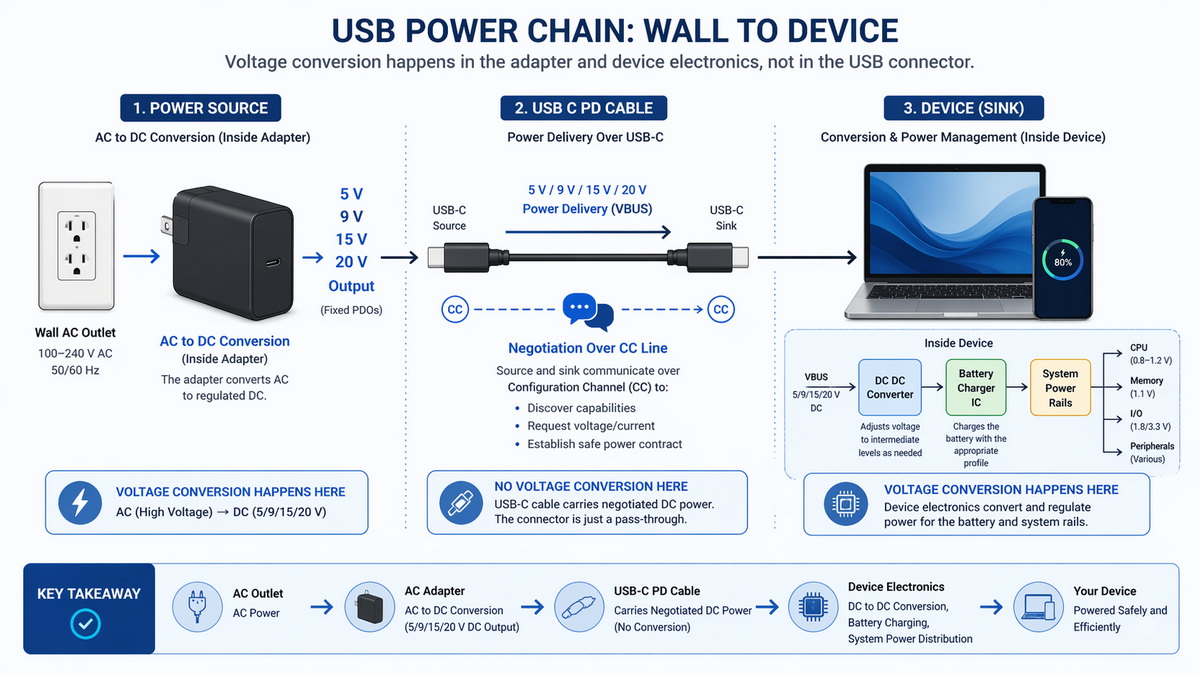
The phrase "USB port voltage conversion" is a bit misleading. In practice, conversion happens in dedicated power electronics, not in the bare metal connector itself. [hexosys]
Typical voltage conversion points in a USB power system:
- Inside the charger or power adapter: AC–DC conversion from mains to 5 V, 9 V, 15 V, 20 V, or higher for USB‑C PD. [hexosys]
- Inside the device (sink): DC–DC regulators step down from 5–20 V to internal rails like 3.3 V, 1.8 V, or battery‑charging levels. [hexosys]
- On the mainboard or dock: power negotiation controllers and DC–DC converters manage different USB ports and load profiles. [startech]
So, when a modern USB‑C port "switches" between 5 V, 9 V, 15 V, or 20 V, it is actually the power management ICs and DC–DC converters behind the port that are performing controlled voltage conversion, guided by communication protocols such as USB Power Delivery. [ti]
The original USB power model was simple: fixed 5 V, limited current, no negotiation beyond basic enumeration. [analog]
As users started charging tablets, laptops, and high‑performance accessories, the industry needed more flexible power. That is where USB Power Delivery (USB PD) fundamentally changed the game. [startech]
- Voltage: fixed at 5 V. [pcm-cable]
- Current: typically 500 mA (USB 2.0) or up to around 900 mA (USB 3.0) at the host. [analog]
- Total power: 2.5–4.5 W, depending on implementation. [pcm-cable]
- Use cases: low‑power devices, slow phone charging, basic peripherals. [instructables]
There is no native mechanism for the port to offer, say, 9 V or 12 V directly—any such rails require external converters and proprietary implementations. [analog]
USB Power Delivery is a protocol layered on top of USB‑C that allows devices to negotiate voltage, current, and even power direction. [ti]
Key features of USB PD:
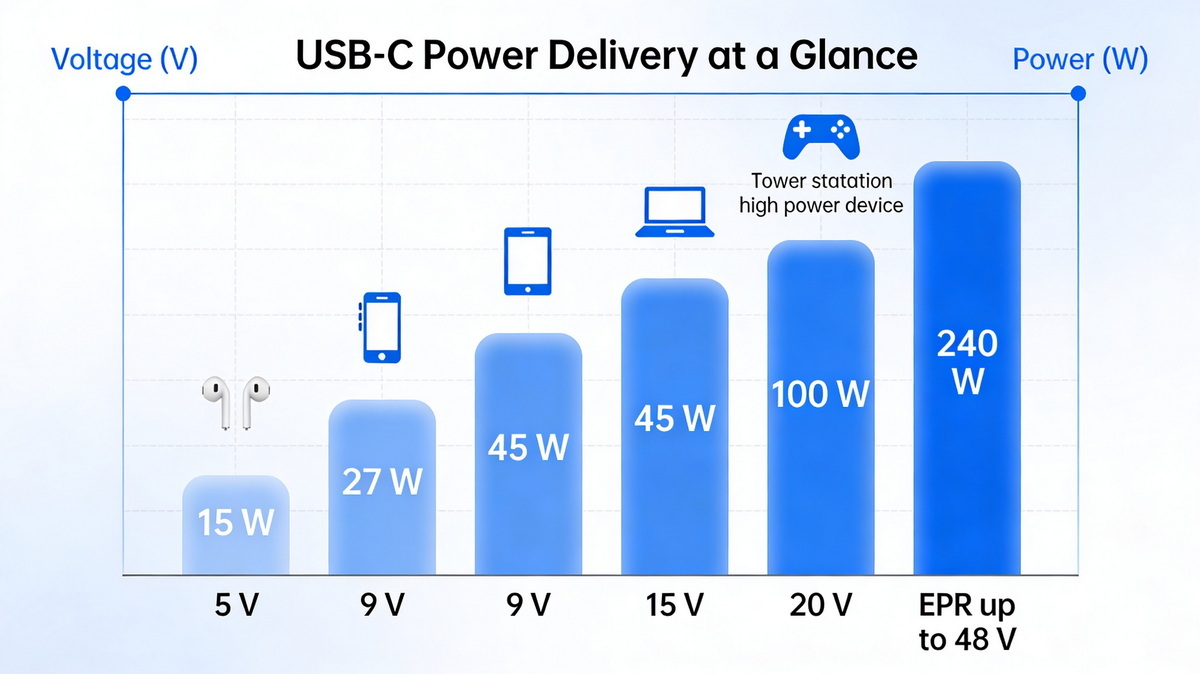
- Selectable voltages: common PD profiles include 5 V, 9 V, 15 V, and 20 V (and up to 48 V in extended modes). [renesas]
- High power: PD can reach up to 240 W in its latest extended power range (EPR), enabling laptop and monitor powering over a single cable. [renesas]
- Bidirectional power: a device can be a source or a sink, allowing laptops, phones, and docks to charge each other. [hexosys]
- Dynamic negotiation: voltage and current are agreed through communication over the CC (configuration channel) line in a USB‑C cable. [ti]
In other words, modern USB‑C PD ports absolutely support controlled voltage conversion, but it is driven by intelligent electronics and standards—not by the connector alone. [ti]
From a user's perspective, it helps to know what voltage levels are typical on various USB power setups. [startech]
| USB scenario | Typical voltage levels | Typical max power (approx.) |
|---|---|---|
| Legacy USB 2.0 port on PC | 5 V fixed | 2.5 W |
| USB 3.x port (no PD) | 5 V fixed | 4.5–7.5 W |
| Basic 5 V USB wall charger | 5 V fixed | 5–12 W |
| USB‑C with USB PD (SPR) | 5 V, 9 V, 15 V, 20 V | Up to 100 W |
| USB‑C with USB PD (EPR extended) | Up to 48 V (e.g., 28 V, 36 V, 48 V profiles) | Up to 240 W |
[startech]
For end users and engineers alike, the key takeaway is that only PD‑aware USB‑C ports and chargers will offer dynamic voltage conversion across multiple levels; legacy ports remain locked at 5 V. [renesas]
From an OEM cable manufacturer's standpoint, safe voltage handling is not optional—it is a core part of product design and compliance. [standards.iteh]
Why controlled voltage conversion is critical:
- Battery protection: lithium‑ion and lithium‑polymer batteries require tightly controlled charging voltages (often around 4.2 V per cell). [analog]
- Thermal management: inappropriate voltage or current can cause overheating, throttling, or premature component aging. [hexosys]
- Regulatory compliance: products must meet standards for safety, EMC, and insulation, which depend on predictable voltage behavior. [ourpcb]
In modern PD designs, continuous monitoring and renegotiation help prevent dangerous conditions, while cables are specified for specific current levels and insulation strength. [openpr]
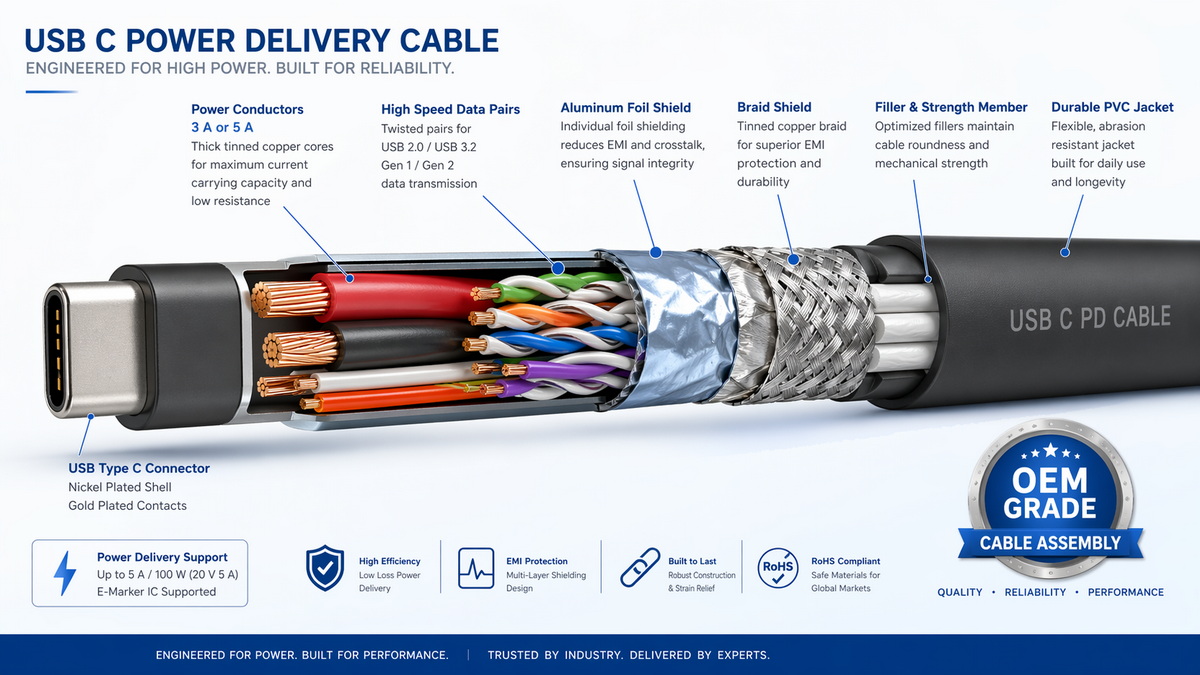
While the cable itself does not "convert" voltage, it must be engineered to carry the negotiated voltage and current safely and with low loss. [ourpcb]
- Correct wire gauge (AWG): thicker conductors for high‑current PD profiles. [openpr]
- Insulation and jacket materials: designed for voltage ratings, flexibility, and environmental conditions. [standards.iteh]
- Shielding and impedance: critical for high‑speed data signals, especially USB 3.x and USB‑C. [ourpcb]
- Connector integrity: robust soldering, strain relief, and overmolding to withstand repeated bending and plugging. [openpr]
As an OEM cable supplier, we engineer USB, HDMI, VGA, DVI, and SATA cable assemblies with precise conductor layout, shielding schemes, and testing protocols to ensure that the cable does not become the weak link in a high‑power USB system. [ourpcb]
In real‑world projects and user feedback, I often see situations where people believe the USB port has magically converted voltage, when in fact another component did the work. [instructables]
A design might use a 5 V USB input but then step down to 3.3 V using a linear regulator or buck converter on the board. [analog]
From a user's perspective, "USB powered my 3.3 V board," but internally the device's DC–DC stage handled voltage conversion, not the port. [hexosys]
A USB‑C charger negotiates 20 V at several amps over USB PD to charge a notebook. [startech]
Here, the charger's controller sets its DC output to 20 V, the USB‑C port passes this through per PD rules, and the laptop's internal power electronics step this down to battery charging voltages. [ti]
A USB‑C dock connects to a laptop and simultaneously powers displays, USB peripherals, and Ethernet while also charging the laptop. [startech]
Internally, the dock contains multiple DC–DC converters and power switches that distribute and convert the incoming USB‑C PD power to the various rails required by each port. [ourpcb]
In all these cases, USB is the transport layer for power, while discrete converters and controllers perform the actual voltage changes. [renesas]
If you are an engineer, buyer, or power user working with USB devices, follow this practical checklist to avoid damage and ensure reliable operation. [ourpcb]
1. Identify your USB type and capabilities
- Confirm whether you are using legacy USB‑A/B, USB 3.x, or USB‑C with PD. [iniushop]
- Read device and charger specs to know supported voltage and power levels. [renesas]
2. Verify voltage compatibility
- Ensure your device explicitly supports higher PD voltages (9 V, 15 V, 20 V, etc.) before relying on them. [ti]
- Use only chargers and cables certified for PD if you require fast charging or high power. [belkin]
3. Check cable ratings
- For high‑power applications, choose cables with sufficient current rating (e.g., 3 A or 5 A USB‑C cables). [hexosys]
- Confirm compliance with relevant standards and look for reputable manufacturers with documented test processes. [standards.iteh]
4. Avoid DIY hacks without proper design
- Simply wiring a higher‑voltage device to a basic 5 V USB port can overload the port or under‑power the device. [instructables]
- Always include proper DC–DC conversion and over‑current/over‑voltage protection in custom designs. [hexosys]
5. Monitor thermal behavior and stability
- If a cable, adapter, or device gets unusually hot, stop using it and verify ratings. [analog]
- Heat is often an early warning sign of mismatched voltage/current or poor‑quality components. [hexosys]
As a manufacturer serving overseas brands, wholesalers, and device makers, we approach USB cable design with a strong focus on standard compliance, durability, and real‑world power handling. [standards.iteh]
- Standards‑based design: We align our cable assemblies with current USB, USB‑C, and PD requirements, as well as relevant safety standards (e.g., UL, CSA, and regional cable norms). [standards.iteh]
- End‑to‑end process control: From conductor selection and insulation compounding to overmolding, electrical testing, and final inspection, each step is controlled and documented. [openpr]
- Application‑specific customization: OEM clients often require tailored lengths, connector combinations (USB to HDMI, USB‑C to SATA, etc.), and branding, all while meeting defined power and signal integrity targets. [openpr]
By combining USB power expertise with robust cable manufacturing processes, we help our partners bring safer, faster‑charging products to market, whether they are designing PC accessories, industrial equipment, or consumer electronics. [openpr]
To conclude the core question:
- Traditional USB ports (USB‑A/B without PD):
- Provide a fixed 5 V output.
- Do not natively convert voltage to other levels. [pcm-cable]
- USB‑C ports with USB Power Delivery:
- Support multiple negotiated voltage levels (e.g., 5 V, 9 V, 15 V, 20 V, and beyond). [ti]
- Achieve this through integrated power controllers and DC–DC converters, not through the bare connector. [renesas]
So, when people say "the USB port converted the voltage," they are really describing the behavior of the entire USB power system—charger, controller ICs, DC–DC converters, and appropriately rated cables working together. [pcm-cable]
If you are:
- Designing a new device that relies on USB‑C PD for power. [startech]
- Sourcing cables for high‑current USB‑C charging or industrial USB applications. [ourpcb]
- Integrating USB with other interfaces like HDMI, VGA, DVI, or SATA in a single product line. [openpr]
…then it is worth partnering with a specialized cable manufacturer that understands both power delivery and high‑speed signaling requirements. [ourpcb]
A capable partner will help you verify voltage and current targets, choose optimal materials and constructions, and validate your design through rigorous electrical and mechanical testing. [standards.iteh]
If your next project depends on reliable USB power behavior, correct voltage handling, and high‑quality cable assemblies, now is the time to involve an experienced OEM cable team. [renesas]
Whether you need custom USB‑C PD cables, hybrid cable assemblies (USB plus video or data), or tailored packaging and branding for your global market, working directly with a professional manufacturer helps you:
- Shorten development cycles. [openpr]
- Reduce field failures and warranty costs. [standards.iteh]
- Deliver safer, more efficient charging and connectivity experiences to your end users. [analog]
Contact our engineering team today to discuss your USB power and cable assembly requirements, and we will help you design a solution that is safe, standards‑compliant, and ready for global markets. [ourpcb]
No. Only USB‑C ports that implement USB Power Delivery or similar fast‑charge protocols support multiple negotiated voltages; classic USB‑A/B ports remain fixed at 5 V. [pcm-cable]
Not safely. A standard USB port provides about 5 V, so powering a 12 V device requires a dedicated DC–DC converter or an external adapter designed for that voltage. [instructables]
No. USB‑C is just the connector shape. Only devices and chargers that specifically list USB Power Delivery (PD) support will negotiate higher voltages and higher power levels. [iniushop]
Check the cable's rated current (3 A or 5 A) and look for compliance markings or documentation from a reputable manufacturer, especially if you need 100–240 W PD levels. [openpr]
In general, no—if both charger and device follow proper USB PD or standardized charging protocols, they will negotiate safe voltage and current levels automatically. [renesas]
Different ports and chargers support different PD voltage and power profiles; some may offer only 5 V at limited current, while others provide up to 20 V and higher wattage. [startech]
1. Premier Cable – "Can the USB port convert voltage?" (2024).
<https://www.pcm-cable.com/info/can-the-usb-port-convert-voltage-95039998.html> [pcm-cable]
2. Analog Devices – "USB Battery Charging Guide."
<https://www.analog.com/en/resources/technical-articles/usb-battery-charging-guide.html> [analog]
3. Renesas – "USB Power Delivery: The Technology – Convenience and Safety."
<https://www.renesas.com/en/support/engineer-school/usb-power-delivery-02> [renesas]
4. Hexosys – "How Power Delivery Works on USB‑C: A Comprehensive Guide" (2025).
<https://www.hexosys.com/blog/how-power-delivery-works-on-usbc.html> [hexosys]
5. StarTech – "USB Power Delivery: How One Cable Enables Simultaneous Connectivity and Power."
<https://www.startech.com/en-us/blog/usb-power-delivery-explained> [startech]
6. OurPCB – "Cable Assembly Manufacturing Process Guide (2026)."
<https://www.ourpcb.com/blog/cable-assembly-process-guide-2026> [ourpcb]
7. iTeh Standards – "Rubber Insulated Cable Standards Updated: March 2026 Release."
<https://standards.iteh.ai/articles/blog/manufacturing-engineering/rubber-cable-standards-mar-2026> [standards.iteh]
8. OpenPR – "Coaxial Cable Manufacturing Plant DPR 2026: Process Details."
<https://www.openpr.com/news/4438591/coaxial-cable-manufacturing-plant-dpr-2026-process-details> [openpr]
9. Instructables – "How to Power Nearly Anything Off a USB Port."
<https://www.instructables.com/How-to-power-nearly-anything-off-a-USB-port/> [instructables]
10. TI – "A Primer on USB Type‑C and Power Delivery Applications."
<https://www.ti.com/lit/slyy109> [ti]


