
Views: 222 Author: Otechkabel Publish Time: 2026-05-23 Origin: Site


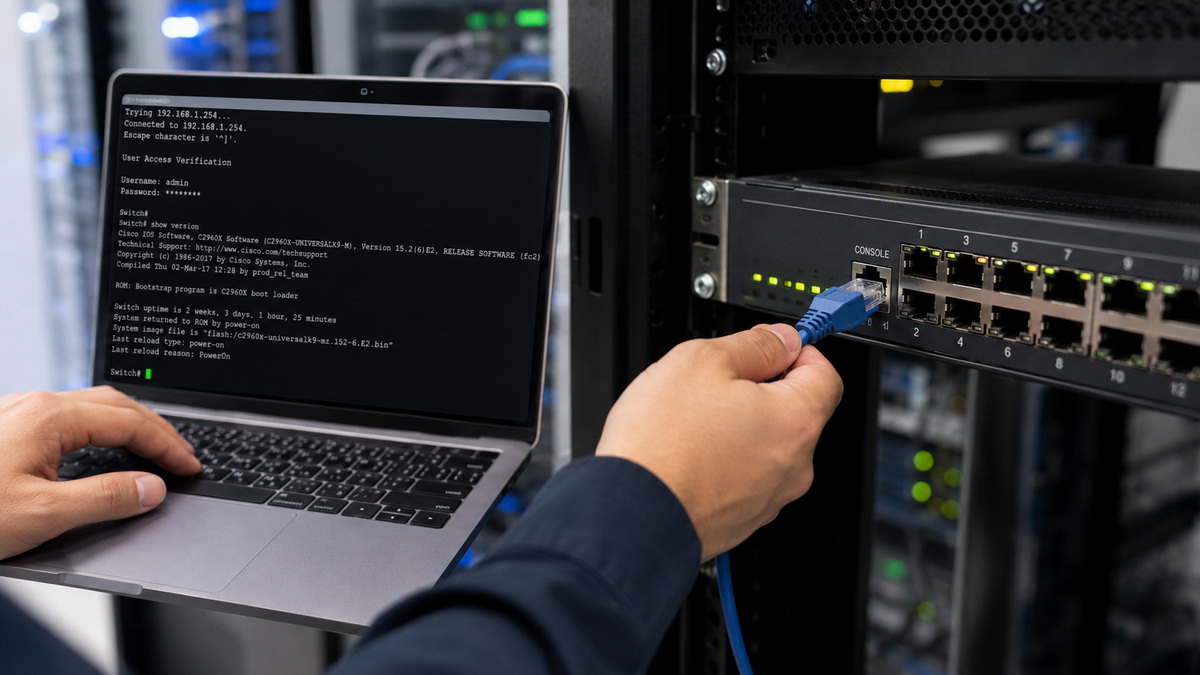
A console cable is a special-purpose cable used to access the management (console) port of network devices such as routers, switches, firewalls, and wireless controllers. [pcm-cable]
From an engineer's point of view, a console cable is the tool you reach for when:
- A new switch is fresh out of the box and has no IP address yet
- Remote access (SSH, Telnet, web GUI) is not configured or has failed
- You need low‑level access to recover a device after misconfiguration
Traditionally, console cables were RJ45–to–DB9 serial cables (sometimes called "rollover" cables) that connected a PC's serial COM port to the device's console port. Today, because most laptops no longer have RS‑232 ports, manufacturers and OEMs also supply: [pcm-cable]
- USB‑to‑RJ45 console cables
- USB‑to‑USB‑C console cables for newer equipment
- USB console adapters with integrated chipsets for driver compatibility
The key point: a console cable is designed for device management, not for normal Ethernet data traffic between network endpoints. [pcm-cable]
A crossover cable is a type of Ethernet cable used to connect two similar devices directly, such as: [network-switch]
- PC ↔ PC
- Switch ↔ switch
- Router ↔ router
In a crossover cable, the transmit (TX) and receive (RX) pairs are swapped between the two ends so that each device's transmitter connects to the other device's receiver. [microcenter]
Technically, a classic crossover cable is wired with:
- One end using the T‑568A wiring scheme
- The other end using the T‑568B wiring scheme
This crosses the orange and green pairs while leaving the blue and brown pairs straight‑through. [microcenter]
In modern networks, many switches, NICs, and routers support Auto‑MDI/MDI‑X, which automatically adjusts TX/RX pairs, so a standard patch (straight‑through) cable often works even between similar devices. As a result, physical crossover cables are now mostly used in: [network-switch]
- Legacy environments without Auto‑MDI/MDI‑X
- Lab setups or education environments where wiring behavior must be demonstrated
| Aspect | Console Cable | Crossover Cable |
|---|---|---|
| Main purpose | Device management and configuration via console/serial port | Direct data connection between two similar Ethernet devices |
| Typical connection | PC or laptop ↔ network device console port | PC ↔ PC, switch ↔ switch, router ↔ router without Auto‑MDI/MDI‑X |
| Internal wiring | Often rollover style (pins reversed end‑to‑end), RS‑232 or USB‑serial mapping | Crossover between TX/RX pairs (T‑568A on one end, T‑568B on the other) |
| Data type | Console/serial session, text‑based CLI | Ethernet frames / normal LAN traffic |
| Usage frequency today | Still essential; no full replacement by software tools | Decreasing; often replaced by straight‑through cables plus Auto‑MDI/MDI‑X |
| Typical connectors | RJ45–to‑DB9, USB‑to‑RJ45, USB‑to‑USB‑C | RJ45–to‑RJ45 |
| Who uses it most | Network engineers, system integrators, field technicians | Network engineers in special cases, lab engineers, educators |
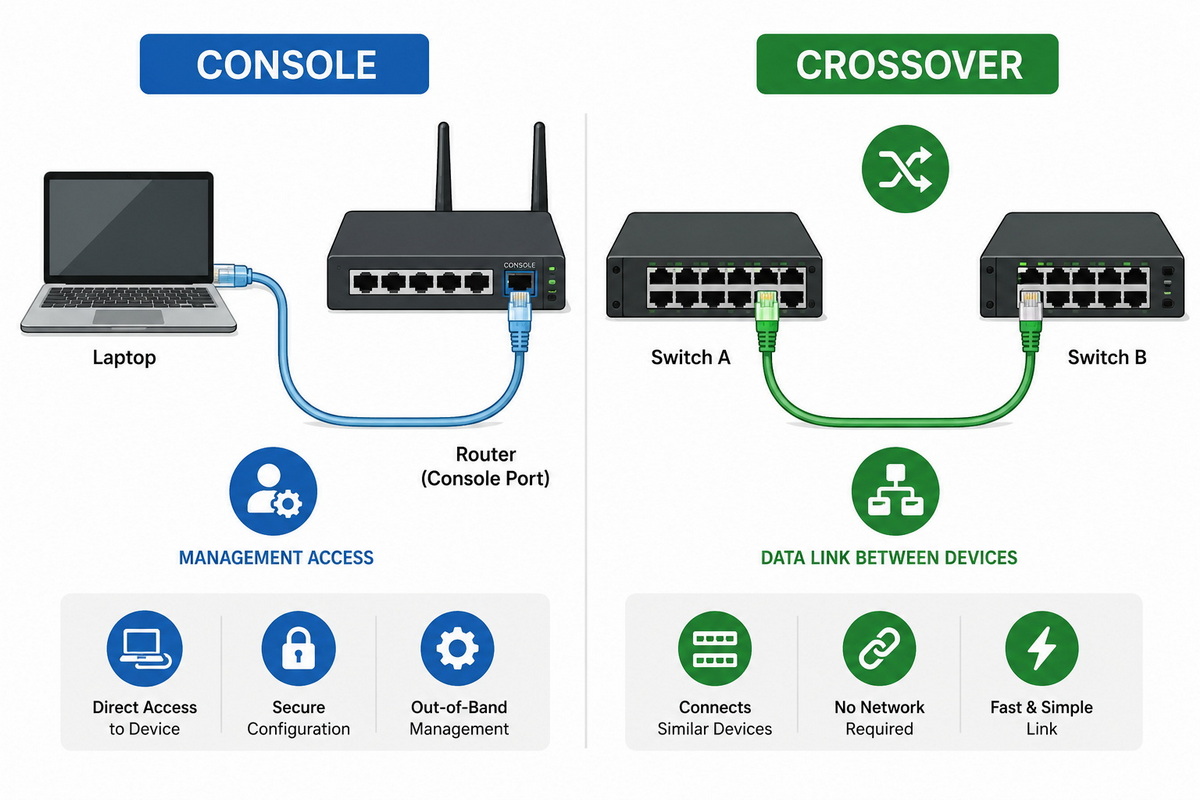
Although both types of cables connect devices, they operate at different layers and serve different goals. [network-switch]
1. Different function
- A console cable carries serial console traffic for text‑based management (for example, configuring a Cisco or H3C switch from the CLI). [pcm-cable]
- A crossover cable carries Ethernet LAN traffic between peers for normal data communication. [network-switch]
2. Different wiring logic
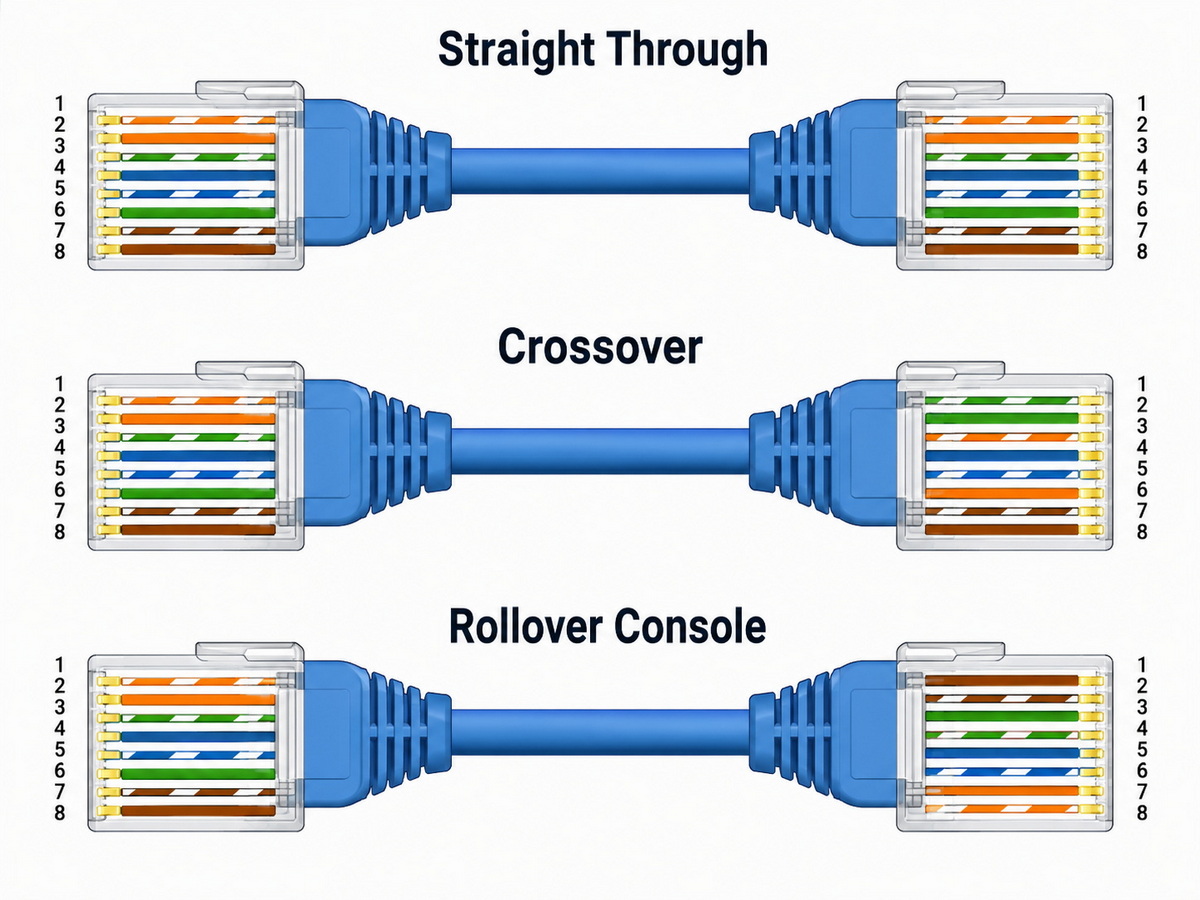
- Console cables, especially classic RJ45–DB9 types, often use a rollover wiring where pin 1 on one side connects to pin 8 on the other, pin 2 to pin 7, etc. [pcm-cable]
- Crossover cables only swap two twisted pairs (TX and RX) while keeping the rest straight‑through, following Ethernet standards (T‑568A vs T‑568B). [microcenter]
3. Different ports
- Console cables connect to console or management ports, which are not standard Ethernet ports even when they use an RJ45 jack. [pcm-cable]
- Crossover cables connect to standard Ethernet ports (RJ45) for data networking. [network-switch]
4. Different failure modes
- If you plug a console cable into a normal Ethernet port, no IP network will come up because the port is not meant for LAN data.
- If you use a crossover cable where a console cable is required, your PC will never see a serial console session.
In other words, from a professional POV: you reach for a console cable when you want to "talk to the brain" of the network device, and for a crossover cable only when you need a direct data link between similar peers and no auto‑negotiation is available. [network-switch]
When deploying a new access switch in a server room, many engineers still do first‑time configuration via console: [pcm-cable]
1. Unbox the switch and mount it in the rack.
2. Connect a USB‑to‑RJ45 console cable from the laptop to the switch's console port.
3. Open a terminal emulator (for example, PuTTY, Tera Term) and set baud rate, data bits, and parity as specified by the vendor.
4. Configure hostname, admin credentials, management VLAN, and IP address.
Without a console cable, this first step often cannot be done reliably, especially if the device has no DHCP or default IP preconfigured. [pcm-cable]
In an older network where two switches lack Auto‑MDI/MDI‑X support, an engineer may temporarily connect them back‑to‑back using a physical crossover cable: [network-switch]
- One side is wired as T‑568A and the other as T‑568B so that TX and RX pairs cross. [microcenter]
- This allows the switches to exchange Ethernet frames without needing an intermediate device.
This type of scenario is now less common, but it is still relevant in brownfield environments and in lab setups for training new technicians. [microcenter]
When choosing between a console cable and a crossover cable, network professionals use a simple decision logic:
1. Are you trying to configure or troubleshoot the device at a low level?
- Yes → You need a console cable (or USB console adapter). [pcm-cable]
- No → Continue.
2. Are you connecting two different types of Ethernet devices (PC ↔ switch, router ↔ switch)?
- Yes → Use a straight‑through patch cable, not a crossover. [network-switch]
3. Are you connecting two similar Ethernet devices (PC ↔ PC, switch ↔ switch, router ↔ router) and there is NO Auto‑MDI/MDI‑X?
- Yes → You may need a crossover cable. [microcenter]
4. Are you unsure whether the device supports Auto‑MDI/MDI‑X?
- Most modern devices do, so standard patch cables will usually work; check the datasheet or vendor documentation to confirm. [network-switch]
A practical tip I often share with procurement teams: always keep a small kit containing at least one console cable, one USB console adapter, and several high‑quality patch cables. This kit solves 90% of on‑site connectivity issues.
For buyers and engineers, understanding the basic wiring patterns is crucial when specifying OEM cables.
- Straight‑through (patch) cable
- Same wiring standard (T‑568A or T‑568B) at both ends.
- Used for almost all standard connections, especially with Auto‑MDI/MDI‑X. [network-switch]
- Crossover cable
- One end T‑568A, one end T‑568B.
- TX and RX pairs (orange and green) are crossed, blue and brown stay straight. [microcenter]
- Used mainly for direct connections between similar devices without Auto‑MDI/MDI‑X. [network-switch]
- Rollover (console) cable
- Pin 1 on one end goes to pin 8 on the other, pin 2 to 7, etc. [pcm-cable]
- Typically used with RJ45–DB9 console cables for serial access.
When working with an OEM manufacturer, specifying the exact pinout, connector type, cable length, and jacket material (PVC, LSZH, etc.) ensures compatibility with your installed base.
As laptops drop legacy serial ports and networks migrate to higher speeds, console access is evolving. [pcm-cable]
- USB console ports: Many new enterprise switches and routers now include a native USB console port, allowing direct USB‑to‑USB or USB‑C–to–USB connections. [pcm-cable]
- Integrated USB‑serial chipsets: USB console cables integrate chipsets (for example, FTDI, Prolific) to emulate a serial COM port on modern operating systems. [pcm-cable]
- Reduced need for physical crossover cables: With widespread Auto‑MDI/MDI‑X, standard patch cables handle most device‑to‑device connections. [network-switch]
For global brands and distributors, this means that console cables and high‑quality patch cables are often higher‑priority SKUs than traditional crossover cables in new product lines.
When you source console or crossover cables from an OEM manufacturer, consider the following points:
1. Electrical and mechanical standards
- Confirm compliance with relevant Ethernet and serial standards. [microcenter]
- Check conductor material (pure copper vs CCA), shielding options, and jacket ratings.
2. Connector quality
- Gold‑plated contacts for corrosion resistance in RJ45 connectors.
- Robust strain relief and molding on DB9 and USB connectors to avoid failure at high bend points.
3. Compatibility
- Match pinouts with the specific vendors you support (e.g., Cisco, H3C, Huawei, HP). [pcm-cable]
- Request sample testing with your actual equipment before mass production.
4. Labeling and customization
- Clear labeling such as "CONSOLE", "CROSSOVER", or "PATCH" printed on the jacket to avoid confusion in the field.
- Color‑coding (for example, light blue for console, red for crossover) to help technicians identify cables at a glance.
5. Certifications and QA
- Ask for test reports and, where relevant, ISO‑certified production processes. [blog.saleslayer]
These details not only reduce installation errors but also help your brand present a more professional and trustworthy product line in the market.
If you are a brand owner, wholesaler, or equipment manufacturer looking for a reliable partner in China to supply console, crossover, and other network cables (USB, VGA, HDMI, DVI, SATA, etc.), consider collaborating with an experienced OEM cable factory.
You can:
- Customize pinouts, cable lengths, colors, and branding to match your product ecosystem.
- Develop complete accessory kits that bundle console cables, patch cables, and adapters for your hardware.
- Work with engineering teams who understand both networking requirements and manufacturing constraints, reducing communication costs and lead times. [blog.saleslayer]
No. A console cable is used to access the console port of a network device for management, while a crossover cable is used to connect two similar Ethernet devices for data transmission. [network-switch]
No. A crossover cable cannot replace a console cable because it does not provide a serial/console connection, and the console port is not a standard Ethernet data port. [network-switch]
In most cases, no. Auto‑MDI/MDI‑X allows you to use standard patch cables even for direct connections between similar devices, so physical crossover cables are now mostly used in legacy or lab environments. [network-switch]
Because many laptops lack serial ports, you typically need a USB‑to‑RJ45 or USB‑to‑USB‑C console cable or an external USB‑to‑serial adapter that emulates a COM port. [pcm-cable]
Look at labeling on the jacket, check the color‑coding, and review the vendor's spec sheet. Straight‑through cables use the same wiring standard on both ends, crossover cables use T‑568A on one end and T‑568B on the other, and console cables usually follow a rollover or serial pinout. [microcenter]
1. PCM Cable – "Is a console cable a crossover cable?"
<https://www.pcm-cable.com/info/is-a-console-cable-a-crossover-cable-102460651.html> [pcm-cable]
2. Network‑Switch – "Patch vs Crossover Cable: Wiring, Use & When to Choose"
<https://network-switch.com/blogs/networking/patch-cable-vs-crossover-cable> [network-switch]
3. Micro Center – "What is the Difference Between a Patch Cable and a Crossover Cable"
<https://www.microcenter.com/tech_center/article/4992/what-is-the-difference-between-a-patch-cable-and-a-crossover-cable> [microcenter]
4. Moz – "What is Google E‑E‑A‑T? Guidelines and SEO Benefits"
<https://moz.com/learn/seo/google-eat> [moz]
5. Sales Layer – "SEO for Manufacturing Companies: The 2026 Strategy Guide"
<https://blog.saleslayer.com/seo-for-manufacturing-companies> [blog.saleslayer]
6. BCM Marketing – "SEO strategies for industrial companies"
<https://www.bcm.marketing/en/bcm-blog/seo-marketing-b2b/> [bcm]
7. LS Digital – "E‑E‑A‑T Guidelines 2025: How to Build Google-Friendly Content"
<https://www.lsdigital.com/blog/e-e-a-t-guidelines-2025/> [lsdigital]


