
Views: 222 Author: Rebecca Publish Time: 2026-02-13 Origin: Site


Content Menu
● How to Connect an LED Light to a Cable: Complete Safety and Wiring Guide
● Understanding LED Lights and Cable Basics
>> Basic LED light wiring concepts
>> Anatomy of typical cables used with LEDs
● Safety Preparation Before Connecting LED Lights to Cables
>> Essential tools and materials
>> Core safety rules you must follow
● How to Connect an LED Light to a Cable (Step-by-Step)
>> Step 1 – Strip and prepare the LED and cable ends
>> Step 2 – Connect LED leads to the cable
>> Step 3 – Insulate and secure the connection
>> Step 4 – Test the LED and verify stability
● Choosing the Right Cable for Your LED Light
>> Match cable size to LED power and distance
>> Pay attention to voltage and insulation ratings
● Example – How to Connect an LED Light to a USB Cable
>> USB cable color coding and preparation
>> Wiring the LED or LED strip to USB power
● Practical Precautions and Troubleshooting Tips
>> Quick troubleshooting checklist
● When to Use Professional OEM LED Cable Assemblies
>> Benefits of OEM LED cable solutions
>> Why work with a specialized cable manufacturer
● Clear Call to Action for OEM and Project Buyers
● FAQ: How to Connect LED Lights to Cables
>> 1. Do I need a resistor when connecting an LED to a cable?
>> 2. Can I connect multiple LED lights to one cable?
>> 3. What happens if I reverse the polarity when wiring LEDs?
>> 4. Is it safe to power an LED strip directly from a USB port?
>> 5. When should I call an electrician instead of doing it myself?
Connecting an LED light to a cable looks simple, but doing it correctly is critical for safety, lifespan, and stable performance in home, commercial, and industrial projects. This guide explains step by step how to connect an LED light to a cable, how to choose the right cable, and how to avoid common safety risks, whether you are a DIY user or an OEM buyer working with professional cable assemblies.

LED lights are widely used in homes, offices, vehicles, signage, and industrial automation. Many failures come from incorrect wiring and poor cable connections. With some basic preparation and the right techniques, you can build reliable LED connections that perform well over the long term.
Correct wiring starts with understanding the basic structure of LED lights and cables. Knowing how polarity, voltage, and cable structure work together will help you avoid common mistakes.
Most low-voltage LED lights and strips have a positive (anode) and negative (cathode) connection that must match the polarity of your power source. If you reverse polarity, the LED usually will not light and, in some cases, can be damaged. Many LED strips clearly mark the “+” and “–” pads or tracks to guide correct connection.
For single LEDs or modules, the longer lead is usually the anode and the shorter lead the cathode, but you should still check the datasheet whenever possible. When LEDs are used with a constant-voltage supply (for example 5 V USB or 12 V adapter), you often need a current-limiting resistor or proper driver to prevent overcurrent.
For general LED projects, you will commonly encounter several cable types:
- Two-core power cables for simple positive/negative connections.
- Multi-core control cables for RGB or RGBW LED strips and smart lighting systems.
- USB cables with four wires: red (+5 V), black (ground), white (data−), green (data+).
In most lighting applications you only use the power pair, while the data conductors are unused or removed for simplicity. The cable you choose must match the voltage and current of your LED load and meet insulation requirements for the installation environment.
Working with electricity always requires basic safety measures, even for low-voltage LED systems. Good preparation and the right tools significantly reduce risk.
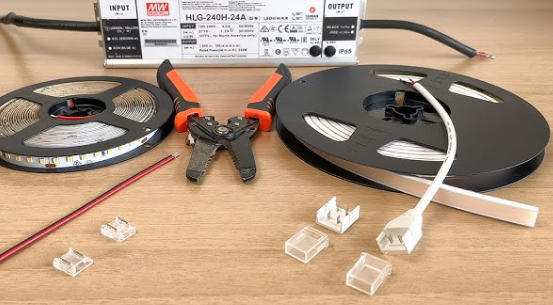
Before starting, prepare the following tools and materials to ensure a reliable connection:
- LED light or LED strip with clear voltage and current ratings
- Suitable cable rated for the required current and voltage
- Wire cutters and stripping pliers for clean, accurate preparation
- Wire terminals, connectors, or soldering tools, depending on the method
- Insulating tape or heat-shrink tubing for insulation and strain relief
- Multimeter (recommended) to verify polarity and continuity
Using proper tools minimizes damage to conductors and reduces the risk of loose or intermittent connections.
Follow these basic rules every time you connect an LED light to a cable:
- Disconnect power before touching or preparing any wires.
- Never work on live circuits, even at low voltage.
- Keep the work area dry, clean, and free from metal debris.
- Avoid exposed copper; always insulate joints and terminals.
- If you are not sure about mains-voltage wiring, consult a qualified electrician.
These precautions help prevent electric shock, short circuits, and fire hazards, especially when LED systems are integrated into building wiring or high-power drivers.
This step-by-step process applies to most low-voltage LED lamps and LED strips connected to a two-core cable. Adjust details as needed for your specific product and installation.
1. Ensure the power source is completely switched off or unplugged.
2. Use a stripping tool to remove a short section of insulation (typically 6–8 mm) from the ends of the LED leads and the cable conductors.
3. Avoid nicking or cutting the copper strands; damaged conductors are more likely to break or overheat.
4. Twist the copper strands gently so they stay compact and easy to insert into terminals.
Correct stripping length is important: too short and the joint is weak; too long and exposed copper increases the risk of short circuits.
You have several connection options depending on your project and skill level:
- Screw terminals or spring terminals: insert the LED positive and cable positive into one terminal, and LED negative and cable negative into another, then tighten securely.
- Crimp connectors: insert both conductors into a crimp sleeve and compress with a proper crimping tool for a permanent mechanical connection.
- Soldered joints: twist matching conductors together, apply solder until the joint is fully wetted, then insulate.
Always match polarity: positive to positive, negative to negative, following the markings on the LED and the power supply.
Once the conductors are firmly connected, you must insulate and mechanically protect the joint:
- Wrap each exposed joint with insulating tape, or
- Slide heat-shrink tubing over the joint before connecting, then heat it to shrink and seal the connection.
Good insulation prevents accidental contact, moisture ingress, and short circuits, which are common causes of LED flicker and premature failure.
After completing the connection and insulation:
1. Reconnect the power supply and switch it on.
2. Confirm the LED lights up at normal brightness without flicker.
3. Lightly move the cable near the joint to check for any intermittent behavior.
4. If the LED does not light, disconnect power and check polarity, terminal tightness, and conductor integrity.
Proper testing at this stage helps you find wiring issues quickly before the system is permanently installed.
Cable selection is critical for safety, voltage drop control, and long-term reliability. A suitable cable supports both electrical performance and mechanical durability.
When deciding on wire gauge and type, consider:
- Total power of the LED load (watts)
- System voltage, such as 5 V, 12 V, or 24 V
- Cable length between power source and LED
- Installation environment (indoor, outdoor, in-wall, flexible use)
For low-voltage LED systems, many installations use 18 AWG or thicker wiring for moderate loads and lengths to manage current and minimize voltage drop. Longer runs and higher currents require larger cross-sections to keep temperature within safe limits and to ensure LEDs receive stable voltage.
The cable you choose should clearly indicate:
- Maximum voltage rating
- Maximum temperature rating
- Insulation type and thickness
For mains-voltage LED drivers and fixtures, you must use cables that comply with local electrical standards and insulation requirements. For USB-powered LEDs, standard USB cables are designed for 5 V but must still be treated carefully to avoid damaged insulation or exposed copper.
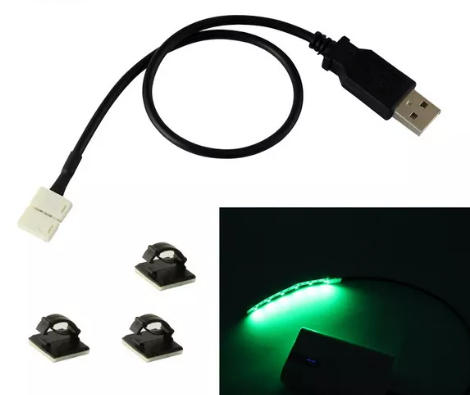
Many users want to power small LED modules or strips directly from a USB port or power bank. This is convenient because USB provides a 5 V DC output that is widely available on computers, chargers, and portable batteries.
A typical USB cable contains four wires:
- Red: +5 V power
- Black: ground
- White: data−
- Green: data+
To use a USB cable only for power:
1. Cut the USB cable to the required length.
2. Strip about 2.5 cm of the outer jacket, then expose the inner conductors.
3. Identify the red (+5 V) and black (ground) wires.
4. Cut or insulate the white and green data wires, as they are not needed for simple lighting.
For individual LEDs or a low-power LED strip:
1. Calculate and add a suitable resistor, or ensure the strip is designed for 5 V operation.
2. Connect the LED positive (or strip positive pad) to the red USB wire.
3. Connect the LED negative (or strip negative pad) to the black USB wire.
4. Solder the joints or use appropriate connectors, then insulate with heat-shrink or tape.
5. Plug the USB connector into a USB port or power bank to verify operation.
If you want to add on/off control without unplugging the USB, you can place a small switch in series with the red wire and mount it in an accessible position.
Good practice and quick troubleshooting can save time and protect your equipment. Simple checks often solve most LED wiring problems.
Some of the most frequent errors when connecting an LED light to a cable include:
- Reversed polarity (connecting positive to negative)
- Using an undersized cable that overheats under load
- Leaving joints uninsulated or poorly taped
- Overloading a power supply beyond its rated wattage
- Ignoring manufacturer instructions and datasheets
Avoiding these mistakes significantly improves the safety and lifespan of your LED installation.
If your LED does not work as expected, check the following first:
- Is the power supply on and delivering correct voltage?
- Are the positive and negative connections correctly matched?
- Are there any loose or broken conductors at the terminals?
- Is the total load within the power rating of the driver or USB port?
Using a simple multimeter to check continuity and voltage can quickly confirm whether the problem is with the wiring, the LED, or the power source.
For personal DIY projects, simple manual wiring is usually enough. However, brands, wholesalers, and equipment manufacturers often need something more robust, repeatable, and certified.
OEM cable assemblies for LED systems can provide:
- Consistent quality and performance across large production runs
- Custom connector types, such as DC plugs, waterproof connectors, and automotive plugs
- Pre-cut, pre-stripped, and fully tested cables that reduce on-site labor
- Proper wire gauge and insulation selected for specific voltages, currents, and environments
This approach is especially valuable for products sold in international markets where compliance with safety standards and long-term reliability are essential.
A professional cable manufacturer that also produces USB, HDMI, VGA, DVI, SATA, and other signal and power cables can support complex projects that combine power and data in the same system. When you work with a specialized OEM partner, you can request tailored lengths, over-molding, labeling, and packaging that match your brand and simplify your assembly line.
If you are a brand owner, wholesaler, or equipment manufacturer, you do not need to handle every LED cable connection manually on your production line. By partnering with a professional cable manufacturer such as OTECHKABEL, you can get custom LED cable assemblies, USB power cables, and signal cables that are pre-tested, safe, and ready for plug-and-play installation. Share your drawings, sample cables, or application requirements with our engineering team today to receive tailored OEM or ODM solutions and a fast quotation for high-quality, reliable cable assemblies that support your next LED lighting project.
Contact us to get more information!
If you are wiring individual LEDs to a constant-voltage source like 5 V or 12 V, you typically need a current-limiting resistor to prevent excessive current. Pre-built LED strips usually integrate resistors or drivers, so an extra resistor is not required when they are used at their rated voltage.
Yes, you can connect multiple LEDs to one cable if the power supply can handle the total current and the cable gauge is adequate for that current over the planned distance. Always check the combined wattage and stay within the safe range recommended by the driver manufacturer.
In many low-voltage systems the LED simply will not light if polarity is reversed, but repeated incorrect connections can stress the components or damage drivers. Always verify “+” and “–” markings on the LED and match them to your cable conductors.
Powering low-power 5 V LED strips or modules from USB can be safe if the total current stays within the USB port or power bank rating. You must only use the red (+5 V) and black (ground) wires and ensure all connections are insulated to prevent short circuits.
If the LED system connects to mains voltage, is installed inside walls or ceilings, or must comply with strict building codes, you should work with a qualified electrician. Professional installation is also recommended for high-power LED drivers and large commercial lighting projects to ensure compliance and safety.


