


Views: 222 Author: Otechkabel Publish Time: 2026-05-12 Origin: Site


USB‑to‑TTL conversion lets a modern computer (USB interface) talk directly to low‑voltage digital devices that use UART‑style TTL signals, such as microcontrollers, routers, and development boards. Instead of using legacy RS‑232 or onboard USB, engineers often plug in a USB to TTL converter cable or module to handle:
- Firmware flashing
- Bootloader access (e.g., routers, IoT devices)
- Debug logging and diagnostics
- Prototype communication with MCUs and SoCs
In production environments, we see USB‑to‑TTL cables used daily in test jigs, programming fixtures, and field maintenance kits, so reliability and signal integrity matter just as much as basic connectivity.
To build a stable USB‑TTL link, you need three basic elements.
- USB to TTL converter
A module or cable that converts USB data from the PC into TTL‑level UART signals (TX/RX) at 3.3 V or 5 V logic.
- TTL target device
Microcontroller board, IoT device, router console port, or any system exposing UART pins.
- Jumper wires / cable assembly
To connect VCC (if needed), GND, TX, and RX between converter and device.
From our manufacturing experience, the most common issues we see in customer projects are mismatched voltage levels and unclear pin labeling, both of which can be avoided with a bit of planning.
The original guide outlines the basic workflow. Below is an expanded, field‑tested version with additional checks that engineers actually perform on the bench.
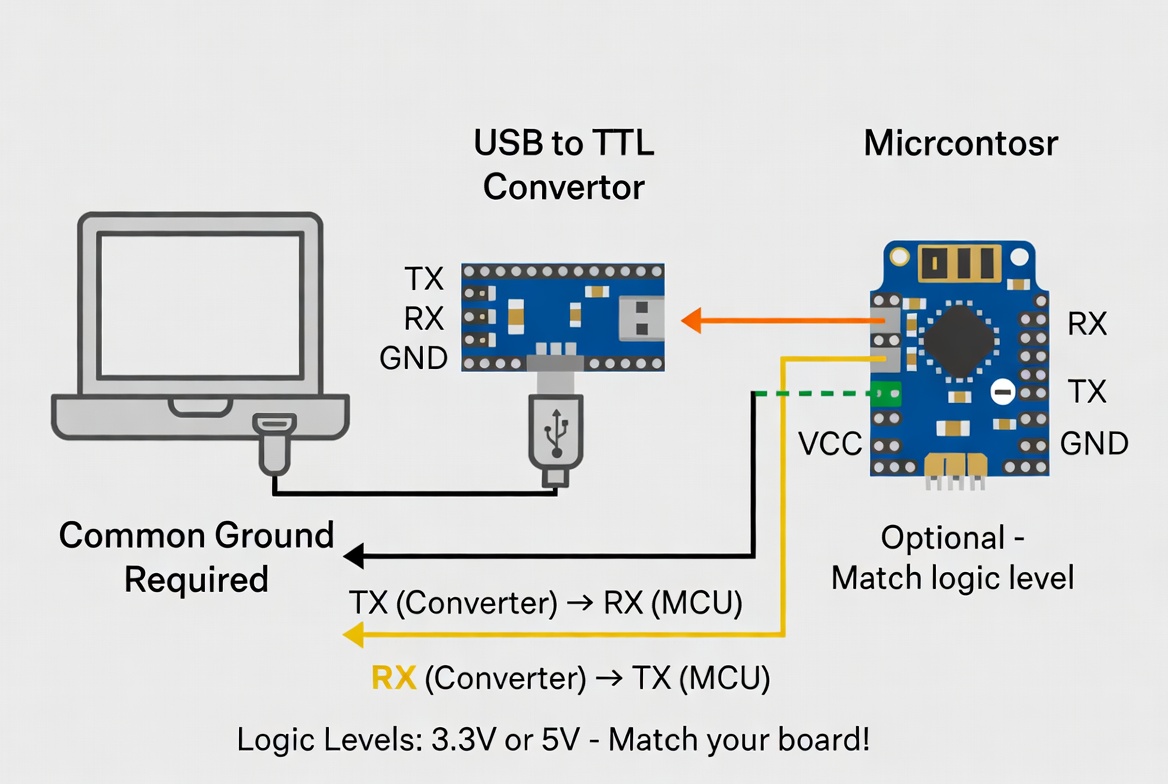
Not all converters are equal. When choosing one, verify:
- Supported voltage levels: 3.3 V, 5 V, or jumper‑selectable.
- Supported OS and driver: Windows, macOS, Linux compatibility.
- Chipset: FTDI, CP210x, CH34x, or similar with stable driver support.
In our OEM projects, we recommend clearly specifying the required logic level and preferred chipset in your BOM to avoid later compatibility issues.
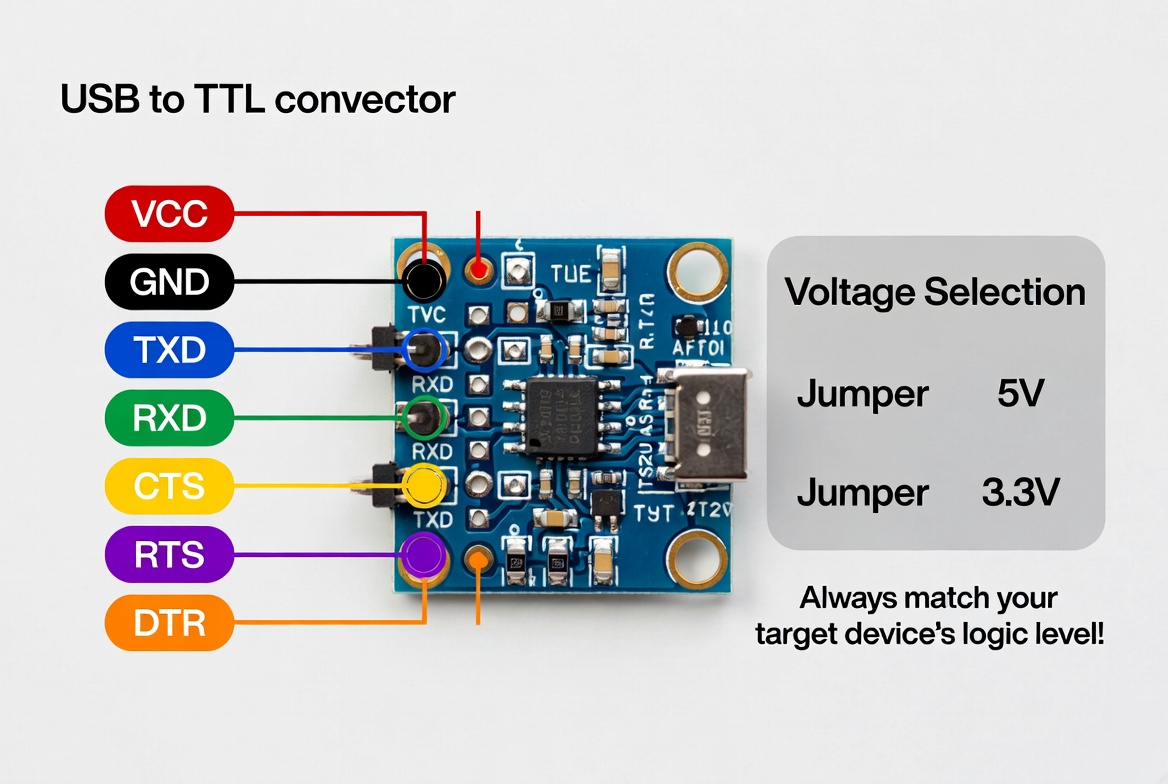
Most USB‑TTL boards expose these pins:
- VCC – Power output/input (often 3.3 V or 5 V)
- GND – Signal ground
- TXD (TX) – Transmit data from converter to device
- RXD (RX) – Receive data from device to converter
- Optional: CTS/RTS, DTR, RESET
Always confirm the pinout from the module's datasheet or silkscreen, especially if you are integrating it into a custom cable or fixture.
Pro tip:
On some low‑cost boards, silkscreen labels may be mirrored relative to the header orientation. When in doubt, trace the TX/RX pins back to the chip to confirm.
Before wiring:
1. Check whether your USB‑TTL converter provides power on VCC.
2. Confirm the operating voltage of the target device (often 3.3 V for MCUs, 5 V for older boards).
You have two common options:
- Option A – Converter powers the target
- Connect VCC (converter) → VCC (target)
- Connect GND ↔ GND
- Option B – Target is self‑powered
- Do not connect VCC between converter and target
- Connect GND ↔ GND only
The original article correctly notes that voltage must match to avoid damaging the device. In our factory testing lines, we almost always use Option B: the DUT (device under test) has its own power, and we connect only GND, TX, RX to reduce risk.
Connect GND (converter) to GND (target) using a short, secure wire.
A poor or missing ground connection is one of the most common causes of:
- Unstable communication
- Random disconnects
- Intermittent garbage characters in the console
In longer cable runs or noisy environments, we also recommend twisted pairs and proper shielding to keep the ground reference clean.
For UART, transmit on one side must go to receive on the other:
- TX (converter) → RX (device)
- RX (converter) → TX (device)
If your board labels "TX" as "TX of target," some beginners mistakenly wire TX→TX. When that happens, you'll usually see no output in your terminal.
Quick check:
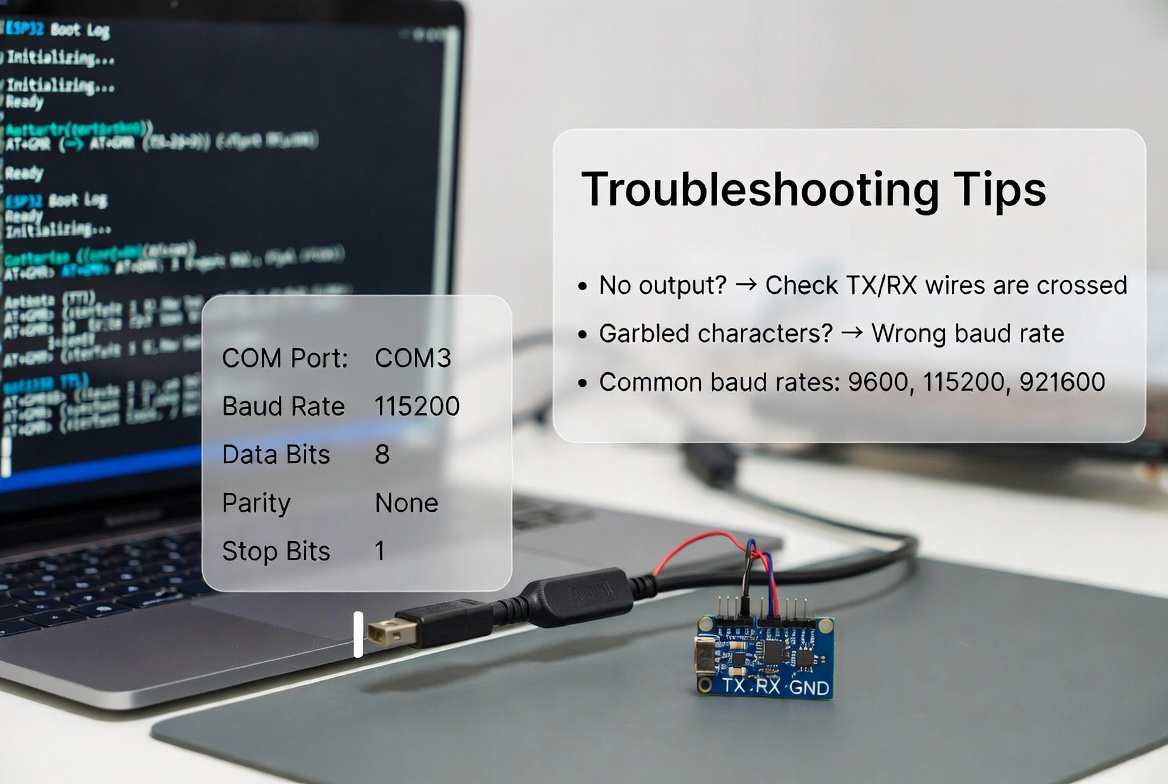
- If you see absolutely nothing in the terminal, first verify TX/RX are crossed correctly.
- If you see garbled characters, check baud rate and ground.
Some professional devices use hardware flow control or reset lines:
- CTS/RTS – Hardware flow control for high‑baud or high‑reliability links.
- DTR/RTS → RESET – For auto‑reset during firmware upload (common in some MCUs).
The original guide suggests consulting the target documentation before wiring additional control pins, which is essential for avoiding unintended resets or lockups.
Once wiring is complete:
1. Plug the USB connector into your PC.
2. Let the OS install drivers automatically, or install the driver from the chipset vendor if needed.
3. Confirm that a virtual COM port appears (e.g., COM3 in Windows, /dev/ttyUSB0 in Linux).
In large fleets of test PCs, we've seen inconsistent behavior when mixing different chipsets, so standardizing on one family (e.g., FTDI or CP210x) can simplify driver management.
Open your preferred serial terminal (PuTTY, Tera Term, minicom, screen, etc.) and configure:
- Port: The COM/tty port assigned to the converter
- Baud rate: Common defaults are 9600, 115200, or vendor‑specified
- Data bits: 8
- Parity: None
- Stop bits: 1
- Flow control: None or hardware, depending on your device
If the baud rate does not match, the output will look like random characters, even if the wiring is correct.
To verify a working link:
- Power on the target device.
- Open the serial terminal and reset or boot the device.
- Look for boot logs or prompt messages.
- Send a simple command if the device has a shell or REPL.
If nothing appears:
- Re‑check TX/RX crossing.
- Confirm ground is connected.
- Verify baud rate and serial parameters.
- Check that the target device's UART pins are actually enabled.
From supporting global OEM projects, we've observed a consistent set of avoidable errors.
Driving a 3.3 V input with 5 V signals can damage sensitive MCUs. A safer practice is to:
- Use a converter that matches the device's level exactly, or
- Use a converter with level‑selection jumpers, or
- Add a proper level shifter if you must bridge 5 V and 3.3 V domains.
Long jumper wires running across a noisy environment introduce:
- Crosstalk
- EMI sensitivity
- Intermittent reset or mis‑reads
For professional deployments, replacing loose jumpers with a custom shielded cable assembly greatly improves reliability.
Some boards label pins from the cable's perspective, others from the device's perspective. When documentation is unclear, verify:
- Board schematics if available
- Pin mapping against the converter chip's datasheet
In OEM projects, we help customers lock in a clear, standard pinout printed directly on the cable overmold or tag, which reduces field errors significantly.
As a manufacturer of USB, VGA, HDMI, DVI, SATA, and custom data cables, we see USB‑TTL assemblies used in several scenarios:
- Router and modem console access
Field technicians plug a USB‑TTL cable into the device's UART header to recover configuration or update firmware.
- Embedded development and debugging
Engineers connect to a microcontroller's UART for print‑based debugging during early hardware bring‑up.
- Mass firmware programming
Production lines use multiple USB‑TTL channels in parallel to flash firmware into batches of boards before enclosure assembly.
In all these cases, robust cabling (correct shielding, strain relief, and labeled connectors) drastically reduces downtime and support calls.
Off‑the‑shelf modules are fine for lab experiments, but OEMs and large‑scale integrators often need more:
- Custom connector types (PH, XH, JST, IDC, board‑specific headers)
- Fixed pin ordering matched to the device's footprint
- Built‑in ESD protection and shielding for harsh environments
- Cable length and jacket options tailored to enclosures and racks
- Overmolded housings for durability and branding
As a specialized cable manufacturer in Shenzhen, we design and build USB‑to‑TTL cables that drop directly into your device or test fixture, reducing wiring mistakes and improving overall system robustness.
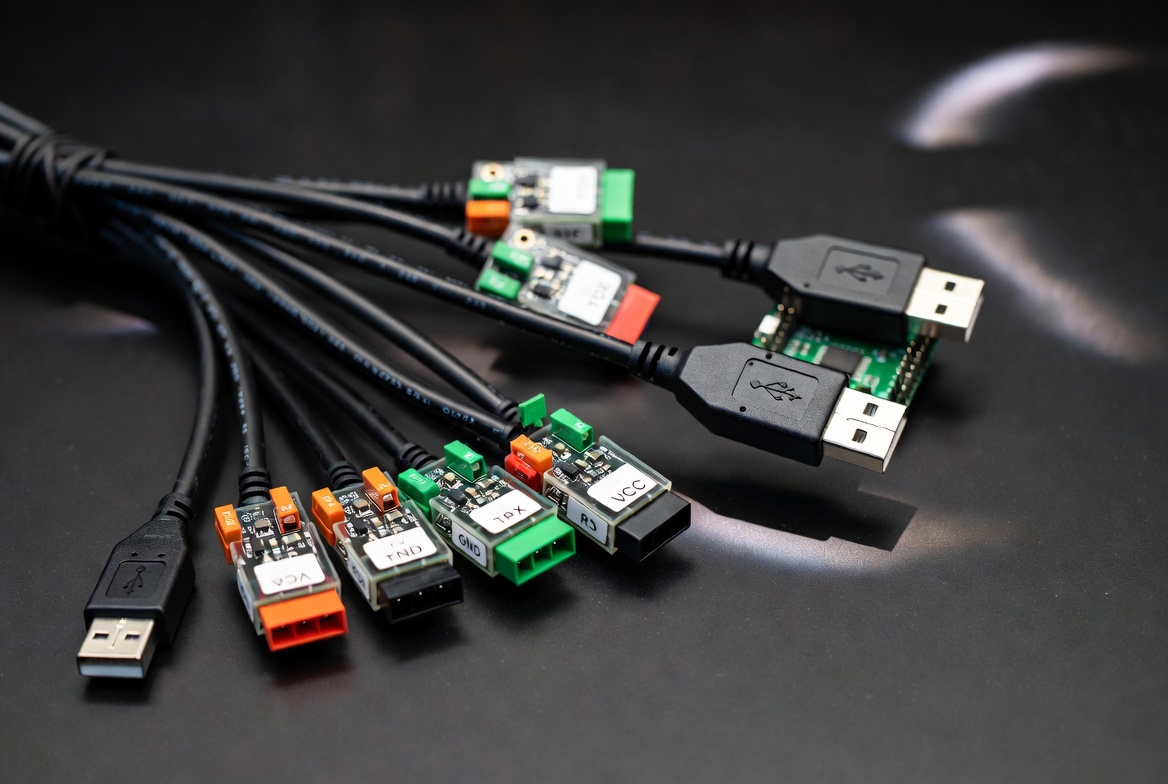
If you regularly work with USB to TTL connections in your products, test fixtures, or field tools, a generic module is often not enough for long‑term reliability.
As a dedicated cable manufacturer, Shenzhen Otechkabel Electronic Co., Ltd can:
- Design custom USB to TTL cables matched to your board pinout
- Integrate shielding, strain relief, and labeling for stable performance
- Provide OEM and ODM services for branded, ready‑to‑ship assemblies
If you're developing or scaling a product that relies on USB‑to‑TTL integration, contact us with your drawings, sample boards, or specifications and we'll help you engineer a cable solution that's accurate, robust, and production‑ready.
No. If the target device has its own power supply, you typically connect only GND, TX, and RX, leaving VCC unconnected to avoid back‑powering or damaging the device.
Check the converter's datasheet, silkscreen, or product page; many boards mark 3.3 V/5 V jumpers or specify their fixed logic level in documentation.
Garbled output is usually caused by a baud rate mismatch or incorrect serial settings (data bits, parity, stop bits), assuming TX/RX and GND are wired correctly.
Sometimes, but only if the converter can supply sufficient current and its VCC voltage exactly matches the board's requirement; for anything beyond light loads, use a dedicated power source and connect only GND, TX, RX.
Whenever you move beyond lab prototypes into field use or production, a custom cable with correct shielding, fixed pinout, and proper strain relief will improve reliability and greatly reduce wiring errors and service issues.
1. PCM‑Cable.com – "How to connect USB to TTL?" (Original step‑by‑step guide used as base content)
https://www.pcm-cable.com/info/how-to-connect-usb-to-ttl-83858115.html
2. Nautilus Marketing – "How to Write Killer Blogs: The Complete Guide to " (Guidance on structure, clarity, and citing sources)
https://nautilusmarketing.co.uk/how-write-killer-blogs-complete-guide-e-e-a-t/ [nautilusmarketing.co]
3. Moz – "How to Write AI Content Optimized for " (Recommendations for adding unique expert insights and SEO best practices)
https://moz.com/blog/ai-content-for-eeat [moz]
4. Tyler Tafelsky – "SEO Content Strategy: A Field Guide for Growing Organic Traffic" (Best practices for headings, readability, and internal links)
https://tylertafelsky.com/blog/seo-content-strategy-field-guide/ [tylertafelsky]
5. Stellar Content – (Topic coverage and content depth strategies)
https://www.stellarcontent.com/blog/seo/the-complete-guide-to-google-e-a-t-what-is-it-why-is-it-and-how-do-you-create-it/ [stellarcontent]


