
Views: 222 Author: Rebecca Publish Time: 2026-02-12 Origin: Site


Content Menu
● Types of Connectors for Wire Termination
>> Push-In / Lever Wire Connectors
● Essential Tools and Materials
● How to Connect Wire to a Crimp Connector
>> Step 1 – Prepare and Strip the Wire
>> Step 2 – Insert Wire into the Crimp Terminal
>> Step 3 – Crimp Using the Correct Die
>> Step 4 – Inspect and Test the Crimp
● How to Solder Wire to a Connector
>> Step 1 – Set Up a Safe Workstation
>> Step 2 – Strip and Tin the Wire
>> Step 3 – Prepare and Heat the Connector Terminal
>> Step 4 – Make the Solder Joint
>> Step 5 – Inspect the Soldered Connection
● Screw and Push-In Wire Connectors
>> Push-In / Lever Wire Connectors
● Safety and Quality Best Practices
● Common Mistakes When Connecting Wires to Connectors
● Professional OEM Perspective – Why Process Control Matters
● Example: Connecting Wires in a Low-Voltage Device
● Quick Reference Table – Connector Types and Typical Use
● When to Work With a Professional Cable Manufacturer
● FAQs: Wire-to-Connector Connection
>> Q1: What is the best way to connect wire to a connector for long-term reliability?
>> Q2: How do I know if my crimp is good?
>> Q3: Is soldering better than crimping?
>> Q4: Can I use pliers instead of a crimping tool?
>> Q5: Why is strip length so important?
Connecting a wire to a connector is a critical step in building safe and reliable USB, HDMI, VGA, DVI, and SATA cable assemblies. Poor terminations can lead to signal loss, overheating, and costly failures in the field, especially for high-speed data and power applications.
In this guide, you will learn clear, practical methods to connect wires to different connector types, common mistakes to avoid, and best-practice tips used by professional cable manufacturers serving global brands.

This guide is designed for anyone who needs to connect wires to connectors in a consistent and reliable way. It is especially useful for:
- Electronics engineers and technicians working with custom harnesses
- OEM and ODM buyers evaluating cable assembly suppliers
- DIY users assembling or repairing consumer electronics cables
Different applications require different connector technologies, but the basic principles of connecting wires remain similar.
Crimp connectors use mechanical deformation to create a gas-tight, vibration-resistant bond between conductor and terminal. They are widely used in automotive, industrial, and consumer cable assemblies.
Typical use cases:
- Automotive harnesses
- Signal and power leads in control cabinets
- Modular connectors in equipment harnesses
Soldered connections rely on molten solder to wet both the wire and connector terminal, creating a strong electrical and mechanical joint. Soldering is common in PCB headers, audio connectors, and custom pigtails.
Screw terminals clamp the wire under a metal plate or directly under the screw head. These connectors are common in terminal blocks, power supplies, and building wiring.
Modern push-in or lever connectors simplify wiring by allowing direct insertion of stripped conductors into spring-loaded contacts. They are popular in lighting fixtures and junction boxes for fast installation.
Before connecting any wire to a connector, prepare the correct tools and materials to guarantee quality and safety.
You will typically need:
- Wire strippers matched to the wire gauge
- Cable cutters for clean cuts
- Crimping tool appropriate to the connector series
- Soldering iron, solder, and optional flux for solder terminations
- Heat-shrink tubing or insulating sleeves for strain relief
- Multimeter or continuity tester for final verification
Always match the connector to the wire gauge and insulation diameter; undersized or oversized connectors can loosen over time or overheat.
Crimping is one of the most reliable and scalable methods when performed correctly with the right tools.
1. Cut the wire to length using sharp cable cutters to avoid deforming the conductor.
2. Use a gauge-matched wire stripper to remove just enough insulation for the crimp barrel, according to the connector datasheet.
3. Ensure no conductor strands are nicked or cut, as this reduces cross-section and increases resistance.
- Insert the stripped conductor fully into the wire barrel until the insulation aligns with the insulation support area.
- Confirm that all strands sit inside the barrel with no loose wires outside.
1. Place the terminal into the correct cavity of the crimp tool.
2. Ensure both conductor and insulation sections align with the corresponding parts of the die.
3. Squeeze the handles until the ratchet releases, guaranteeing full compression.
A good crimp should be firm, symmetrical, and free from cracks or open seams.
Basic checks:
- Perform a gentle pull test; the wire should not slip out.
- Verify that insulation is slightly compressed under the strain-relief wings.
- Ensure no bare copper is exposed beyond the barrel.
Soldering is ideal for many PCB headers, barrel connectors, and some custom signal cables where a permanent joint is needed.
- Work in a clean, well-ventilated area, with eye protection and a heat-resistant surface.
- Pre-heat your soldering iron and clean the tip before use.
1. Strip 4–6 mm of insulation from the conductor.
2. Optional: Apply flux to the stripped end to improve solder wetting.
3. Briefly heat the wire with the iron and feed solder until the strands are uniformly coated, without forming a large solder blob.
- Clean the connector pads or cups to remove contamination.
- Apply a small amount of solder to the terminal if appropriate.
1. Insert the tinned wire into the terminal or place it against the pad.
2. Heat the junction with the soldering iron until both wire and terminal reach solder-melting temperature.
3. Feed solder into the joint so it flows smoothly around the contact area.
4. Remove the iron and hold the assembly still until the solder solidifies with a shiny appearance.
A high-quality joint should be shiny, smooth, and concave, without cracks or voids.
Avoid:
- Dull, grainy surfaces indicating a cold joint
- Excess solder forming a ball or bridging adjacent pins
- Movement during cooling, which causes micro-cracks
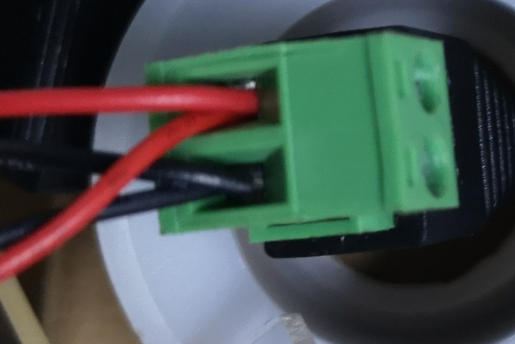
Screw terminals are straightforward but must be tightened correctly to avoid hot spots.
Procedure:
1. Strip the wire to the recommended length, typically 6–10 mm.
2. Twist strands gently so they stay together.
3. Insert the bare wire under the clamp plate or screw head, ensuring no copper protrudes.
4. Tighten the screw firmly, but avoid overtightening that could shear strands.
5. Tug lightly on the wire to verify retention and inspect for exposed conductor.
Push-in connectors speed up installation and reduce user error when used correctly.
Procedure:
1. Strip the wire to the specified length.
2. Open the lever or spring clamp to 90 degrees if applicable.
3. Insert the stripped wire fully into the port until it stops.
4. Close the lever to clamp the conductor securely.
5. Check each conductor with a gentle pull to confirm it is locked in place.
Safety and reliability are central to any professional wire-to-connector process.
Key best practices:
- Always disconnect power before touching any wiring.
- Use connectors and wires rated for the operating voltage, current, and environment.
- Strip only the required length to avoid exposed copper and potential short circuits.
- Avoid mixing wire gauges in a single connector unless explicitly allowed.
- Perform continuity and insulation resistance checks on completed assemblies.
Even experienced users can fall into repeatable errors that degrade performance.
Frequent mistakes include:
- Using the wrong connector size for the wire gauge, leading to loose contacts
- Over-stripping or under-stripping insulation, increasing the risk of shorts or weak mechanical support
- Crimping with pliers instead of a proper crimp tool, causing inconsistent compression
- Cold solder joints due to insufficient heating time or contaminated surfaces
- No strain relief, which allows vibration or cable movement to stress the joint
For OEM cable manufacturers producing USB, VGA, HDMI, DVI, and SATA assemblies, consistent wire-to-connector quality is driven by standardized process control.
This typically includes:
- Connector-specific work instructions with stripping and crimp height parameters
- Calibrated crimp tools and regular crimp pull-force testing
- Clear inspection criteria for solder joints and terminations
- 100% continuity testing for finished harnesses
By enforcing these controls, manufacturers help ensure every cable shipped to branding partners and distributors behaves consistently in real-world applications.
Consider a simple low-voltage device where you must connect a 2-core cable to a power input terminal block.
Practical workflow:
- Select a screw terminal connector rated for the device voltage and current.
- Strip each conductor to 7–8 mm and twist strands.
- Insert each conductor into its marked terminal, then tighten screws.
- Confirm there is no exposed copper and that polarity matches the device markings.
- Test with a multimeter before applying full load.
This example illustrates how standard techniques in this guide translate directly into reliable field installations.
| Connector type | Typical use cases | Key advantages | Key considerations |
|---|---|---|---|
| Crimp connector | Automotive, industrial harnesses, power leads | High reliability, vibration-resistant, scalable for mass production | Requires correct crimp tool and die, process must be controlled |
| Solder connector | PCB headers, audio, custom signal cables | Strong electrical joint, compact, precise pin-to-wire routing | Needs skill and heat control, risk of cold joints if done poorly |
| Screw terminal | Panels, power supplies, building wiring | Easy to rework, no special tool needed | Screws can loosen, avoid over-stripping and exposed copper |
| Push-in / lever | Lighting, junction boxes, quick field wiring | Very fast installation, user-friendly, compact | Requires precise strip length and gauge match |
If your project involves high-volume production, high-speed data, or safety-critical applications, partnering with a professional cable factory can significantly reduce risk.
Benefits include:
- Engineering support for connector selection and cable design
- Pre-qualified materials and standardized termination processes
- Automated or semi-automated crimping and soldering for consistent results
- Full testing and traceability on finished assemblies
If you are planning a new project or upgrading existing equipment and need reliable, custom USB, VGA, HDMI, DVI, or SATA cable assemblies, do not leave connection quality to chance. Reach out to our professional engineering and sales team with your drawings, specifications, or samples, and we will help you select the right connectors, design robust terminations, and deliver fully tested cable assemblies tailored to your brand and application requirements.
Contact us to get more information!
A1: For most industrial and automotive applications, a correctly executed crimp using connector-specific tooling offers an excellent balance of mechanical strength, electrical performance, and repeatability.
A2: A good crimp passes a pull test, shows no exposed conductor, and has a uniform, fully compressed barrel without cracks, gaps, or twisted strands.
A3: Neither method is universally better. Crimping is preferred for high-vibration and high-volume production, while soldering is often ideal for PCB terminations and precise low-volume assemblies when handled by trained personnel.
A4: Using pliers is not recommended, because it produces inconsistent compression and can lead to weak connections, overheating, or intermittent faults over time. Proper crimp tools are designed to apply controlled force and geometry.
A5: If you strip too short, the conductor does not fully engage the contact and resistance increases. If you strip too long, bare copper may be exposed, causing arcing or short circuits, especially in tight spaces.


