


Views: 222 Author: Otechkabel Publish Time: 2026-05-17 Origin: Site


For many homeowners, RV users, and installers, the standard Starlink cable is simply too short to place the dish where the sky view is best. As an OEM cable producer of USB, VGA, HDMI, DVI, SATA and custom network cables, our engineering team has helped overseas ISPs and system integrators solve similar "last‑meters" problems for years. In this guide, I'll explain how Starlink cabling works, what extension options are actually safe, and which mistakes cause dropped connections, water ingress, or fried hardware. [starlink]

From an installer's point of view, a Starlink cable is not just "a long wire" — it's a PoE data and power lifeline between your dish and router. [linketric]
- Starlink uses a proprietary cable and connector form factor in many kits, but the underlying principle is Power over Ethernet (PoE) over a multi‑pair copper cable. [starlink]
- The cable carries both DC power and high‑speed data, so length, conductor size, shielding and waterproofing all directly affect performance and reliability. [linketric]
In practice, every extra meter adds a bit of voltage drop and signal loss. If you push this too far with thin, poor‑quality cable or leaky connectors, you'll see intermittent drops, dish reboots, and lower throughput, especially during bad weather. [spacetek.com]
Before you buy any adapter or cut a cable, step back and define your real need.
Ask yourself:
- How many extra meters/feet do I truly need beyond the stock cable?
- Is this for a permanent home installation, a farm/outbuilding, or a mobile RV/van?
- Will the route cross roofs, exterior walls, underground conduits, or trees and poles?
A simple example from actual users: the original cable is about 10–15 feet too short to reach the ideal roof mount or a clear parking spot for an RV. In those cases, a well‑designed extension or coupler is enough; overspec "extreme" lengths only add cost and risk. [reddit]
Understanding Starlink's baseline lengths helps you decide how far you can safely go. [starlink]
- Many current kits ship with around 15 m (50 ft) of detachable PoE cable between dish and router. [starlink]
- Installer experience suggests keeping total runs under ≈45 m (150 ft) on the stock supply when using copper only, unless you add mid‑span power or change topology. [spacetek.com]
- Networking standards such as Ethernet allow up to 100 m per segment, but in Starlink applications power delivery becomes the limiting factor before data does. [linketric]
As an OEM cable manufacturer, we typically design outdoor PoE cable assemblies assuming a comfortable margin below the theoretical maximum to ensure stable performance in hot or cold conditions. [linketric]
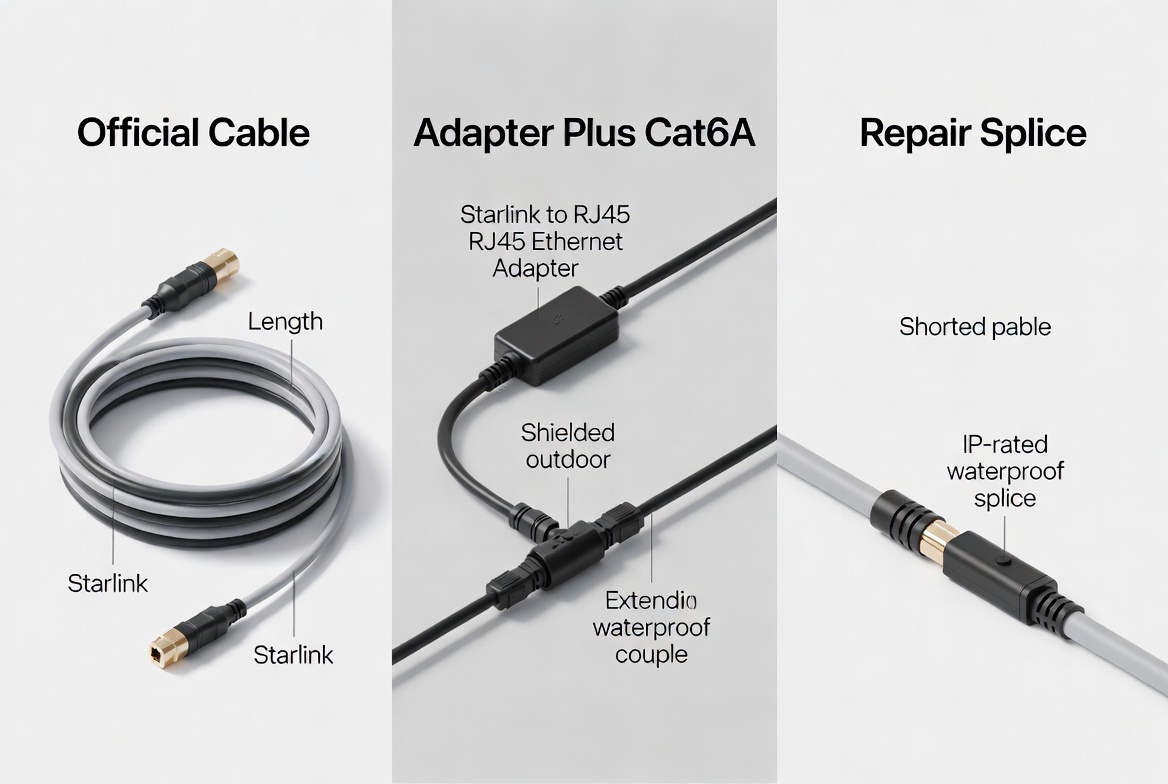
This is the most plug‑and‑play approach. [starlink]
- Check whether Starlink or an authorized reseller offers longer cables for your kit generation.
- Match connector type, cable spec, and IP rating to the original.
- Avoid no‑name cables with unknown copper gauge or shielding, as they often fail under outdoor conditions.
For most homeowners who just need 5–20 m more, this is the safest and cleanest solution.
Where official lengths are still not enough or not available, many advanced users and installers use adapter kits that convert the Starlink proprietary connector to a standard RJ45 interface. [spacetek.com]
A typical safe setup looks like this:
1. Starlink dish → Starlink‑compatible waterproof adapter → shielded Cat6/Cat6A outdoor cable.
2. Outdoor cable → waterproof RJ45 coupler or junction box near the building entry.
3. Indoor Cat6/Cat6A run → Starlink router or compatible router/PoE injector.
Key best practices from the field: [spacetek.com]
- Prefer shielded Cat6A (U/FTP) or high‑quality Cat6 with thicker copper conductors (lower AWG) to reduce voltage drop and crosstalk. [linketric]
- Keep the copper run conservative (for example under ≈45 m / 150 ft after the adapter) where the original Starlink power supply still feeds the dish. [spacetek.com]
- Use IP67/IP68‑rated connectors and couplers for any outdoor join to prevent water ingress and corrosion. [spacetek.com]
As a cable factory, these are exactly the kinds of shielded outdoor assemblies we produce for ISPs and WISPs who deploy PoE radios on towers and rooftops.
In some user reports, people cut a damaged Starlink cable and add shielded RJ45 ends plus a waterproof coupler to restore length or gain a small extension. [facebook]
This approach can work when:
- You only need a modest extra distance (for example, 3–5 m).
- You terminate pairs correctly to T568B and maintain shielding continuity.
- You use high‑quality, shielded, outdoor‑rated couplers in sealed enclosures.
However, from a professional standpoint, every splice is a potential failure point, so this is best reserved for repair scenarios or short additions. [youtube]
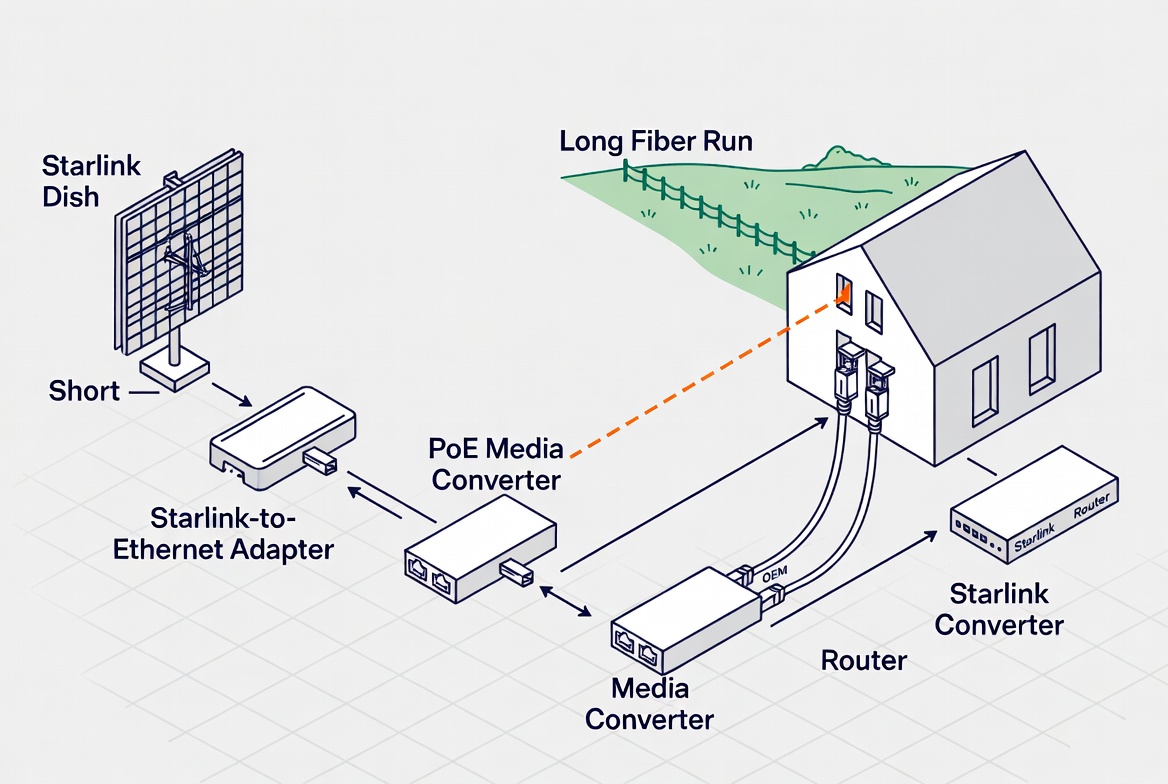
For large properties, commercial sites or long farm runs, the most robust method is often to convert Starlink's signal to fiber, run fiber for the distance, and then convert back at the far end. [linketric]
This design:
- Eliminates copper‑based voltage drop over long distances.
- Provides excellent immunity to lightning‑induced surges and EMI.
- Supports runs far beyond 100 m with proper SFP modules.
In OEM projects, we frequently supply SFP patch cables and pre‑terminated fiber plus PoE media‑converter kits to integrators who want "one‑box" solutions for this type of deployment. [linketric]
Below is a practical workflow you can follow or hand to your installer.
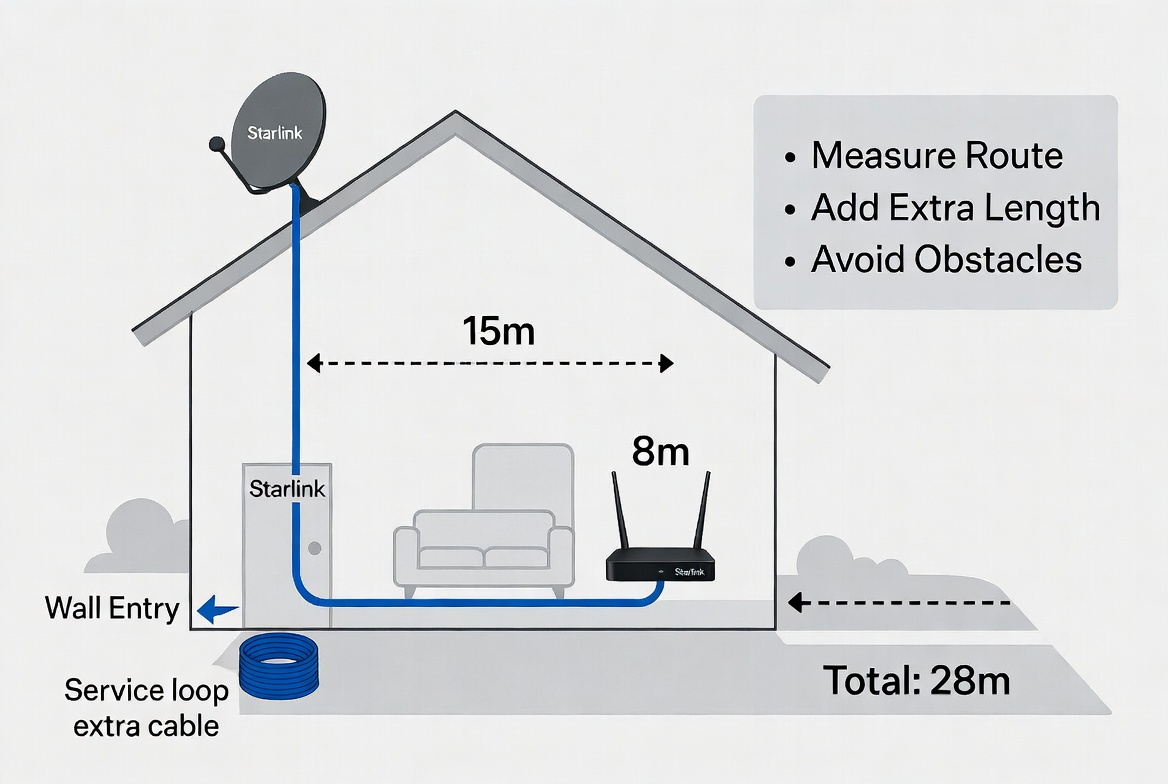
1. Walk the actual path of the cable, including all turns, drops and wall penetrations. [spacetek.com]
2. Add 10–15% extra length for service loops and future re‑routing.
3. Identify zones with strong sun, standing water, rodents or mechanical damage risk.
This "measure twice, buy once" approach avoids the common mistake of coming up just a few feet short and then improvising unsafe splices. [spacetek.com]
- For short to medium extension: shielded outdoor Cat6/Cat6A with UV‑resistant jacket.
- For harsh environments: consider gel‑filled or double‑jacket outdoor cable.
- For all outdoor joins: IP67/IP68‑rated couplers or junction boxes with gaskets. [linketric]
- For very long runs: multimode or single‑mode fiber plus media converters. [linketric]
As a manufacturer, we strongly recommend specifying conductor gauge (e.g., 23/24 AWG), shielding type and jacket material in your purchase order, especially for OEM and bulk orders.
When terminating or joining cables:
- Respect pair order and twist to maintain Ethernet performance.
- Use shielded RJ45 connectors and ensure the drain wire/shield bonds correctly at the proper grounding point. [linketric]
- Avoid daisy‑chaining multiple random couplers; one well‑sealed junction is better than three mediocre ones.
Poor terminations are one of the most common causes of intermittent Starlink issues after extension.
Before you bury conduit or close a wall, always test:
- Basic continuity (all pairs connected correctly).
- Actual PoE voltage at the far end under load. [linketric]
- A sustained speed or iPerf test to verify throughput and stability over time. [linketric]
Professional installers often log these test results with time, date, and cable ID for future troubleshooting. [linketric]
From both a user and a manufacturing engineer's view, outdoor reliability is all about protection and grounding. [spacetek.com]
- Use drip loops and avoid low points where water can sit on connectors.
- Keep connectors off the ground and away from direct spray where possible.
- When running shielded cable, terminate shields and drain wires according to local grounding rules to avoid dangerous ground loops. [linketric]
Our factory routinely supplies pre‑terminated, labeled outdoor harnesses with integrated strain relief and sealant caps to minimize installer error in these critical areas.
Typical situation: your dish must go on a high roof for clear sky view, but the standard cable stops short of your ideal router location.
Recommended:
- Use an official longer Starlink cable if available for your hardware generation. [starlink]
- If not available, use a Starlink‑to‑RJ45 adapter plus a single run of shielded Cat6A with one IP‑rated outdoor coupler.
This keeps the architecture simple and reliable for non‑technical homeowners.
RV owners often need the dish 10–30 m away from the vehicle to avoid trees or structures. [facebook]
Recommended:
- Use a rugged detachable extension cable with spool for easy deployment and storage.
- Add clearly labeled "Dish End" / "RV End" tags to avoid mis‑patching in the dark.
- Choose abrasion‑resistant jackets and strain relief, since the cable will be deployed and pulled frequently.
OEM‑grade assemblies designed for mobile use significantly reduce the risk of accidental damage compared to ad‑hoc home‑made cords.
For long runs across fields or between buildings, you're beyond the comfort zone of standard copper PoE.
Recommended:
- Convert Starlink to fiber near the main building, run fiber to the remote building, then convert back and inject PoE locally. [linketric]
- Use outdoor‑rated armoured fiber in conduit for extra physical protection.
- Keep all power electronics (injectors, routers) in dry, accessible enclosures.
This mirrors what ISPs and wireless operators do for tower feeds, and is where professional OEM fiber + PoE kits pay off.
After supporting many OEM customers and reviewing community posts, the same issues recur: [reddit]
- Using cheap, unshielded indoor Ethernet cable outdoors, which quickly fails.
- Exceeding safe length with thin cable, causing low voltage at the dish and random reboots.
- Making multiple unsealed splices wrapped only in electrical tape instead of proper IP‑rated housings.
- Burying cables directly without conduit in rocky or rodent‑heavy soil.
Avoiding these mistakes usually costs less than the downtime and replacement hardware they eventually cause.
If you are an installer, ISP, or Starlink‑focused integrator, partnering with a specialized OEM cable factory gives you flexibility that retail kits cannot.
As Shenzhen Otechkabel Electronic Co., Ltd, we:
- Manufacture custom‑length shielded outdoor cables, RJ45 harnesses, and hybrid assemblies under client brand labels.
- Match connector standards, shielding schemes, and jacket materials to your regional climate and regulatory needs.
- Provide batch‑tested, serialized assemblies that reduce field failures and speed up deployment.
This is the same expertise we apply to USB, VGA, HDMI, DVI, SATA, and industrial wiring looms for global brands.
If you are planning a Starlink installation or integrating Starlink into your product or service, you don't have to guess your way through cable length, shielding, and outdoor reliability.
Contact Shenzhen Otechkabel Electronic Co., Ltd to discuss custom Starlink‑compatible cable assemblies, outdoor Ethernet harnesses, fiber jumpers, and OEM‑branded solutions tailored to your project. Our engineering team can help you specify the right length, material and connector configuration so that your Starlink extension works reliably from day one.
A1: Many installers recommend keeping total copper runs under about 45 m (150 ft) with the original power supply to avoid voltage drop issues, even though Ethernet itself can reach 100 m. [linketric]
A2: It is strongly recommended to use shielded, outdoor‑rated Cat6/Cat6A with proper IP‑rated connectors; indoor unshielded cable is not designed for UV, moisture, or outdoor electrical noise. [spacetek.com]
A3: It is technically possible using correct shielded RJ45 terminations and waterproof couplers, but every splice adds risk, so this method is best left to repairs or small extensions and experienced installers. [youtube]
A4: If your required distance pushes towards or beyond typical PoE limits, or spans multiple buildings, fiber plus media converters is the more robust, surge‑resistant option. [linketric]
A5: While we specialize in OEM batches for brands and integrators, we also support engineering samples and small pilot runs so you can validate a design before scaling.
1. PCM‑Cable: "How to extend the length of my Starlink cable?" (knowledge article). [https://www.pcm-cable.com/info/how-to-extend-the-length-of-my-starlink-cable-97464765.html]
2. Starlink Support: "How much cable do I have and how do I route it indoors?" Starlink official help center. [starlink]
3. Linketric: "How to Extend Your Starlink Cable Safely Without Losing Signal Quality." Installer best‑practice guide. [linketric]
4. SpaceTek: "Starlink Cable Extension Adapters: Your Guide to Seamless Connectivity." Product and usage overview. [spacetek.com]
5. Community discussion: Reddit / Facebook threads and YouTube tutorial on extending and repairing Starlink cables, including use of waterproof couplers and shielded RJ45 terminations. [facebook]


