


Views: 222 Author: Otechkabel Publish Time: 2026-05-28 Origin: Site


As an engineer working in cable manufacturing, I get this question from buyers and technicians all the time: "Is D‑Sub the same as VGA?" The short answer is: they are closely related, but not exactly the same thing. Understanding the difference matters when you are selecting display cables, planning new equipment, or supporting legacy systems. [aliexpress]
Below is an in‑depth, user‑friendly guide that explains D‑Sub and VGA from a real‑world, manufacturing and system‑integration perspective, and shows you how to choose the right cable for your project.
D‑Sub (D‑subminiature) is a connector family, not a video standard. It describes the physical connector shape and pin layout, originally defined as a rugged, compact interface for computers and industrial devices.
Key points about D‑Sub connectors: [blog.csdn]
- D‑shaped shell that ensures proper orientation and mechanical stability.
- Available in multiple sizes and pin counts: DE‑9, DE‑15, DB‑25, DC‑37, etc.
- Used for many signal types: analog, digital, serial, parallel, control, and video.
- Common in computers, industrial equipment, printers, CNC machines, and legacy networking gear.
In other words, when you hear "D‑Sub", think mechanical connector standard, not a specific signal or protocol.
VGA (Video Graphics Array) is a video display standard introduced by IBM in 1987. It defines how analog video signals are transmitted between a graphics source (like a GPU) and a display. [blog.csdn]
Core characteristics of VGA: [romtronic]
- Analog video interface for RGB plus horizontal/vertical sync.
- Historically supported resolutions like 640×480, later extended up to around 1920×1080 on quality cables and hardware.
- Originally designed for CRT monitors, but widely used for early LCDs and projectors as well.
- Carries video only – no embedded audio or Ethernet.
VGA became the de facto PC display interface for decades, which is why many people casually call the connector itself a "VGA connector". [romtronic]

In most PCs and monitors from the 1990s and 2000s, the VGA port uses a 15‑pin D‑Sub connector (DE‑15). This is where the confusion starts. [aliexpress]
- VGA uses a specific D‑Sub connector: the HD‑15 / DE‑15, 3 rows × 5 pins. [blog.csdn]
- This DE‑15 connector is what people often call a "VGA connector" or "VGA port". [aliexpress]
- However, not every D‑Sub connector carries VGA video. DE‑9, DB‑25, and other D‑Subs are used for completely different interfaces (RS‑232, parallel, etc.).
So, all classic VGA ports are D‑Sub, but not all D‑Subs are VGA. [aliexpress]
- D‑Sub: purely a mechanical/connector standard that can carry analog or digital signals, depending on what the designer chooses.
- VGA: a specific analog video signaling standard that is commonly implemented over the DE‑15 D‑Sub connector. [romtronic]
From a cabling perspective, when customers ask for a "D‑Sub cable" but their application is display, we always clarify whether they mean a DE‑15 VGA cable, a DE‑9 serial cable, or another configuration. This eliminates mismatches and costly returns.
- D‑Sub: Connector style, defined by shell, size, and pin layout.
- VGA: Video standard defining analog RGB and sync signals. [romtronic]
- D‑Sub
- Can carry analog or digital signals.
- Used for data, control, serial communication, and video.
- VGA
- Specifically analog video signals (no digital video). [romtronic]
- Does not include audio in the standard.
- D‑Sub connectors:
- RS‑232 serial ports (DE‑9).
- Parallel printer ports (DB‑25).
- Industrial I/O and control connections.
- Legacy networking and specialized equipment. [blog.csdn]
- VGA (DE‑15 D‑Sub):
- PC to monitor connections.
- Projectors in meeting rooms and classrooms.
- Some KVM switches and older docking stations. [origin-ic]
- VGA over DE‑15 can support up to around 1920×1080 on quality cables and hardware, but performance depends heavily on cable quality, length, and shielding. [romtronic]
- The D‑Sub standard itself does not limit resolution; it only defines the connector, not the bandwidth.
To put things into a modern context, here is how D‑Sub/VGA compares with a typical digital interface like HDMI.
| Feature | D‑Sub (connector family) | VGA (analog video over DE‑15) | HDMI (modern digital) |
|---|---|---|---|
| What it defines | Mechanical connector standard (romtronic) | Analog video standard (romtronic) | Digital audio‑video interface (romtronic) |
| Typical connector | DE‑9, DE‑15, DB‑25, etc. (blog.csdn) | DE‑15 (often called "VGA port") (aliexpress) | Type‑A, Type‑C, mini HDMI |
| Signal type | Analog or digital, multi‑purpose (romtronic) | Analog RGB + sync only (romtronic) | Digital video + audio + control (romtronic) |
| Main use cases | Serial, parallel, industrial control (romtronic) | PC to monitor, older projectors (romtronic) | TVs, monitors, consoles, laptops (romtronic) |
| Audio support | Depends on design, not standardised (romtronic) | No native audio (romtronic) | Integrated multichannel audio (romtronic) |
| Typical max resolution in practice | Not defined; depends on implementation (romtronic) | Up to about 1920×1080 on quality setups (romtronic) | 4K and beyond, depending on version (romtronic) |
| Current lifecycle status | Still common in industrial/legacy equipment (romtronic) | Legacy for display; being phased out in consumer devices (romtronic) | Mainstream and forward‑compatible (romtronic) |

Even though HDMI and DisplayPort dominate consumer and high‑end professional displays, D‑Sub/VGA remains relevant in several niches. [szyztech.com]
You will still see VGA and D‑Sub connectors in:
- Education: School projectors and classroom PCs.
- Public sector and government: Long lifecycle hardware that must be supported for years.
- Industrial & embedded systems: HMIs, test benches, and PLC‑connected displays.
- Legacy KVM and server rooms: Where VGA‑based switching infrastructure is already installed.
From an OEM perspective, buyers often require mixed‑generation connectivity in a single product line: for example, offering HDMI and DisplayPort on the front panel but retaining one DE‑15 VGA for legacy compatibility. This is especially common in industrial PCs and medical imaging devices. [origin-ic]
As a cable manufacturer, we always guide customers through a few practical questions before recommending a D‑Sub or VGA cable assembly.
- Check if your port is labeled "VGA", "RGB", or simply shows a monitor icon.
- Count the pins: a classic VGA port is 15‑pin, 3 rows × 5, in a D‑shaped shell. [aliexpress]
- If you see 9 pins (DE‑9), it is usually RS‑232 serial, not VGA. [blog.csdn]
Analog VGA signals are sensitive to distance: [origin-ic]
- For ≤ 5 m, standard, well‑shielded VGA cable is usually sufficient.
- For 5–15 m, choose thicker conductors, full shielding, and low‑loss cable.
- Beyond that, consider signal amplifiers, extenders, or converting to digital.
In our production, we optimize conductor gauge, shielding braid, and insulation to maintain signal integrity at the specified length and resolution.
Different scenarios need different mechanical designs:
- Office/education: Standard molded VGA/D‑Sub cable is typically enough.
- Industrial:
- Overmolded connectors for strain relief.
- Screw‑lock D‑Sub shells for vibration resistance.
- Optional custom keying or labeling.
- OEM integration: Custom harnesses, panel‑mount D‑Sub connectors, or hybrid cables (e.g., VGA + audio + USB in one assembly).
Working with an OEM like us allows you to match the cable design to the real operating environment, not just the connector type.
Most organizations are gradually migrating from VGA/D‑Sub to HDMI, DisplayPort, DVI, or USB‑C. However, this transition rarely happens overnight. [origin-ic]
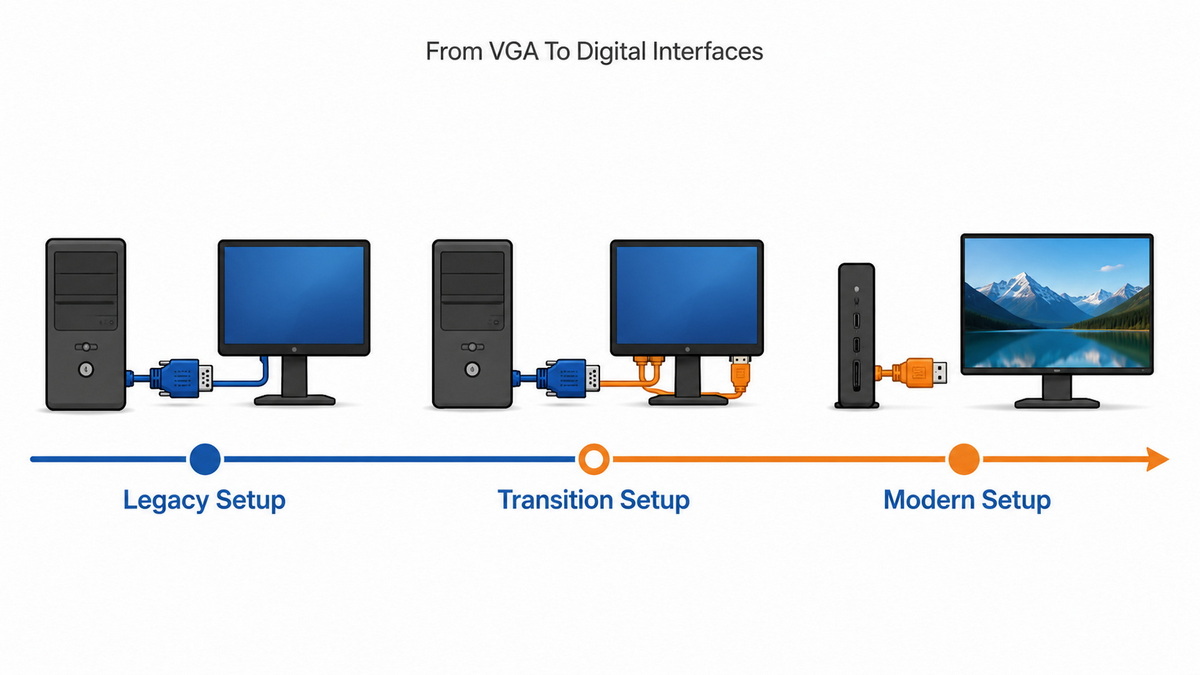
Practical steps we see successful customers take:
1. Audit existing equipment
- Identify how many displays, projectors, and PCs still rely on VGA.
2. Standardize adapters and cables
- Use HDMI‑to‑VGA or DisplayPort‑to‑VGA adapters where replacement is not yet possible.
3. Specify dual‑interface devices
- Choose monitors and embedded boards that include both VGA (DE‑15) and digital ports for the transition period.
4. Plan for full digital in new builds
- For new projects, specify HDMI/DP/USB‑C first and keep VGA only where absolutely required. [origin-ic]
As an OEM, we frequently design mixed‑cable kits (for example, one VGA cable plus one HDMI cable in the same product box) to support phased upgrades.
Drawing on real feedback from installers and overseas buyers, here are the most common mistakes we see and how to avoid them:
- Mistake 1: Ordering "D‑Sub cable" without pin count
- Always specify DE‑15 VGA, DE‑9 serial, or another exact type. This prevents receiving the wrong assembly.
- Mistake 2: Ignoring screw locks
- On vibrating machines or mobile carts, screw‑lock D‑Sub shells are essential to avoid intermittent signal loss.
- Mistake 3: Using thin or unshielded cables for long runs
- Cheap, thin VGA cables can cause ghosting, blurring, and color shift at higher resolutions and longer distances. Choose proper shielding and conductor size. [origin-ic]
- Mistake 4: Assuming adapters are "signal‑transparent"
- Passive adapters have limits; for reliable conversions (e.g., HDMI to VGA), use active converters specified for your resolution. [romtronic]
If you are not sure, sharing photos of your ports, target resolution, and environment with your cable supplier will lead to much better recommendations and fewer returns.
Because D‑Sub is a flexible connector family, many of our OEM customers also use it for non‑video applications: [blog.csdn]
- Control signals (e.g., multi‑axis control lines gathered in one DB‑25).
- Sensor bundles in test fixtures.
- Custom pinouts for proprietary systems where robust locking and easy field replacement are more important than miniaturization.
In these projects, we work from the customer's pinout diagram, then design the internal cable, shielding, and labeling to match their exact application.
Choosing and standardizing the right cables is easier when you work directly with a manufacturer that specializes in display and data cables.
An experienced OEM cable partner can:
- Help you differentiate between D‑Sub connector variants and signal standards (VGA vs serial vs custom).
- Design application‑specific VGA/D‑Sub assemblies, from low‑cost office cables to rugged industrial harnesses.
- Supply USB, HDMI, DVI, SATA, and other interface cables alongside your VGA needs, so your sourcing is consolidated.
- Support branding, labeling, and packaging tailored to your target markets.
This combination of technical expertise and flexible production is what keeps legacy interfaces like VGA reliable, even as the industry moves toward all‑digital solutions. [blog.saleslayer]
If you are an overseas brand owner, wholesaler, or equipment manufacturer, this is the ideal time to audit your current use of D‑Sub/VGA and plan how it fits into your transition toward HDMI, DisplayPort, and USB‑C.
Work with an OEM cable specialist who can:
- Review your existing product line and legacy requirements.
- Recommend optimized VGA/D‑Sub assemblies for today's systems.
- Design future‑ready cable sets that combine legacy and digital interfaces in one consistent package.
By doing this, you protect your installed base while keeping your next generation of devices competitive and easy to support.
No. D‑Sub is a connector family, while VGA is an analog video standard that typically uses a 15‑pin D‑Sub (DE‑15) connector. [aliexpress]
Because VGA was the most common use of the DE‑15 D‑Sub connector on PCs and monitors for many years, most users simply associated that connector shape with VGA. [romtronic]
Yes. The D‑Sub standard only defines the mechanical connector. Engineers can route analog or digital signals (or a mix) through the pins, depending on the design.
For modern consumer devices, digital interfaces like HDMI and DisplayPort are superior. However, in education, industry, and legacy environments, VGA is still widely used and must be supported. [szyztech.com]
Check the port label and pin count. A 15‑pin, 3‑row D‑Sub labeled "VGA" or showing a monitor icon needs a VGA cable. 9‑pin or 25‑pin D‑Sub ports are typically serial or parallel and require different cable types. [blog.csdn]
1. PCM‑Cable. "Is D‑Sub the same as VGA?" [Read article].
2. AliExpress Wiki. "D Sub Cable vs VGA: What's the Difference and Which One Should You Use?" [Read article]. [aliexpress]
3. Romtronic. "Is D‑sub Better than HDMI?" [Read article]. [romtronic]
4. Origin Design & Graphics (ODG). "D‑Sub vs HDMI vs DisplayPort – Which Cable Should You Use?" [Read article]. [origin-ic]
5. CSDN / Zhihu转载. "显示器接口" – Overview of display connector types (VGA, DVI, HDMI, DP). [Read article]. [blog.csdn]
6. Sales Layer. "SEO for Manufacturing Companies: The 2026 Strategy Guide." [Read article]. [blog.saleslayer]
7. BCM Marketing. "SEO strategies for industrial companies." [Read article]. [bcm]
8. iO Digital. "Google E‑E‑A‑T: creating content that puts people first." [Read article]. [iodigital]
9. Ahrefs. "E‑E‑A‑T: How to Build Trust and Boost Web & AI Visibility." [Read article]. [ahrefs]
10. SZYZTech. "D‑sub(VGA)已经过时了吗?其实它在这些领域依旧受到重用." [Read article]. [szyztech.com]


