


Views: 222 Author: Rebecca Publish Time: 2026-02-22 Origin: Site


Content Menu
● Main keywords and search intent
● What are RJ12 and RJ45? (Quick definitions)
>> RJ12: a 6‑position telephone connector
>> RJ45: the standard Ethernet connector
● Is RJ12 physically compatible with RJ45?
>> Can you plug an RJ12 connector into an RJ45 jack?
>> Can you plug an RJ45 connector into an RJ12 jack?
● Electrical and functional compatibility: can RJ12 carry Ethernet?
>> Cable construction and shielding
● Using RJ12 to RJ45 adapters and converters
>> What is an RJ12 to RJ45 adapter?
● Typical use cases of RJ12 with RJ45
>> 1. Reusing telephone wiring for Ethernet (home and small office)
>> 2. PBX and multi‑line telephone systems
>> 3. POS terminals, keypads, and control equipment
>> 4. Custom OEM cables and harnesses
● RJ12 vs RJ45: key differences at a glance
● When is it safe to mix RJ12 and RJ45?
>> Unsafe or not recommended scenarios
● Practical wiring and pinout considerations (for technicians and OEMs)
>> Common RJ45 Ethernet wiring (T568A/B)
● Best practices and recommendations
● Clear answer: is RJ12 compatible with RJ45?
● Take action: plan your RJ12–RJ45 cabling with professional support
● FAQs about RJ12 and RJ45 compatibility
>> 1) Can I use an RJ12 cable instead of RJ45 for Ethernet?
>> 2) Will plugging an RJ12 plug into an RJ45 port damage my device?
>> 3) Why do some phone systems use RJ45 for telephones?
>> 4) Can one cable carry both phone and Ethernet using RJ12 and RJ45?
>> 5) What should I tell an OEM cable supplier when I need RJ12 to RJ45 cables?
When you look at an RJ12 telephone plug and an RJ45 Ethernet plug, they seem almost the same – which leads many users to ask whether RJ12 is compatible with RJ45 and if they can be used interchangeably in real networks. In reality, the two connectors serve different purposes, use different wiring, and are only partially compatible in very specific, low‑speed scenarios, usually with the help of adapters or custom cabling.
In this in‑depth guide, you will learn when RJ12 can physically fit into an RJ45 jack, what risks this creates, how to use adapters safely, and what to consider when you design or purchase OEM cable assemblies for telecom and Ethernet applications.

Primary keyword: Is RJ12 compatible with RJ45
Secondary keywords (suggested long‑tail targets):
- RJ12 vs RJ45 compatibility
- RJ12 plug in RJ45 jack
- RJ12 to RJ45 adapter
- RJ12 and RJ45 difference
- Can I use phone cable for Ethernet
Before discussing compatibility, it is important to understand what each connector is designed for and where it is used.
RJ12 is a modular connector mainly used for telephone and low‑speed control lines.
- Structure: 6 positions, usually 6 contacts (6P6C).
- Typical use: Multi‑line telephones, PBX systems, some POS (point‑of‑sale) terminals and control equipment.
- Signal type: Voice (analog), low‑speed serial, or simple control signals.
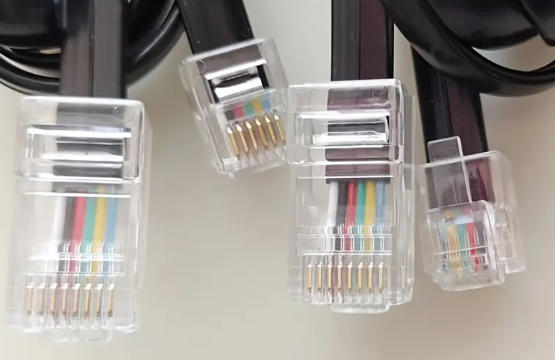
Because it uses a 6‑position housing, the RJ12 plug is narrower than a standard RJ45 plug.
RJ45 is the familiar modular connector used on twisted‑pair Ethernet cables (Cat5e, Cat6, Cat6A, etc.).
- Structure: 8 positions, 8 contacts (often called 8P8C).
- Typical use: Ethernet networks connecting computers, routers, switches, IP cameras, and many other network devices.
- Signal type: High‑speed digital data, supporting up to 10 Gbps or even higher depending on cable and equipment.
Because it has 8 positions, the RJ45 plug and jack are wider than RJ12, and the pin layout is optimized for differential Ethernet pairs using standards such as T568A and T568B.
The key confusion comes from the fact that modular connectors are similar in shape and use the same latch mechanism. Physically, they sometimes can be inserted into each other's jacks, but that does not mean they are electrically or functionally compatible.
- An RJ12 plug is narrower and can often fit into the center of an RJ45 jack because both use the same style of plastic body and latch.
- When you insert an RJ12 plug into an RJ45 jack, only some of the contacts in the RJ45 jack will align with the pins of the RJ12 plug; the outermost RJ45 contacts remain unused.
However, this “compatibility” is mechanical only and is not recommended for the following reasons:
- The RJ12 plug can wear or damage the plastic and contacts of the RJ45 jack over time.
- There is no guarantee that the pin mapping matches what your device expects.
- RJ12 cables are usually not twisted‑pair Ethernet cables, so they are unsuitable for high‑speed data.
The answer is no in normal use:
- The RJ45 plug is wider than the RJ12 jack.
- It will not fit mechanically, so you cannot insert RJ45 into RJ12.
So, RJ12 may fit into RJ45 (not recommended), but RJ45 does not fit into RJ12 at all.
Even if an RJ12 plug can be inserted into an RJ45 jack, you must consider electrical compatibility, signal type, and cable construction.
- RJ12 is mainly used for analog voice and low‑bandwidth control lines.
- RJ45 (Ethernet) carries high‑frequency differential data and depends on twisted pairs, controlled impedance, and stringent noise performance.
A typical telephone cable used with RJ12 is not built to Cat5e/Cat6 specifications and may not support reliable Ethernet transmission, especially at modern speeds.
RJ12 provides 6 contacts, while RJ45 provides 8 contacts.
- For legacy 10/100 Mbps Ethernet, only 4 conductors (2 pairs) are electrically required, so in theory a 6‑wire cable can carry Fast Ethernet if it is twisted pair of sufficient quality.
- For Gigabit Ethernet (1000Base‑T) and higher, all 8 conductors are used, so a 6‑wire RJ12 cable cannot support this mode.
Some users have reported 100 Mbps operation after crimping RJ45 plugs onto an old 6‑wire cable, but this is an unsupported hack, not a recommended engineering solution.
Ethernet cables are designed with:
- Twisted pairs to reduce crosstalk.
- Controlled impedance and capacitance.
- Often shielding for noisy environments.
Many RJ12 telephone cords use flat, untwisted wire, which is very poor for Ethernet signaling and prone to interference and errors.
Conclusion:
- RJ12 and RJ45 are not electrically compatible for standard Ethernet without proper design, and even then only at limited speeds.
- You should not rely on a telephone cable with RJ12 plugs to carry Ethernet unless you know its construction and accept reduced performance and reliability.
In real projects, there are cases where you want to reuse existing telephone wiring or connect a device with an RJ12 port to a network or another RJ45‑style connection. This is where adapters, baluns, or custom cables come into play.
An RJ12 to RJ45 adapter or modular adapter is a small device with an RJ12 connector on one side and an RJ45 connector on the other, sometimes with a short cable between them.
Its main functions are:
- Mechanical adaptation between 6P6C and 8P8C connectors.
- Pin mapping, so specific RJ12 pins connect to the correct RJ45 pins expected by telecom or data equipment.
These adapters are widely used in:
- Telephone and PBX systems, where RJ45 patch panels carry multiple voice lines and adapt down to RJ11/RJ12 handsets.
- POS systems, where proprietary devices use RJ12 but the cabling backbone uses RJ45 modular outlets.
- Test and maintenance, where network testers with RJ45 interfaces are connected to telephone circuits via an adapter.
It is important to understand the limitations:
- A passive adapter does not upgrade the cable; a low‑grade telephone cord remains low‑grade even with an RJ45 plug on it.
- It cannot turn a voice‑grade cable into a high‑speed Ethernet cable.
- It cannot change the number of available conductors (you still have 6, not 8).
For true Ethernet over telephone wiring, you must ensure the underlying cable is twisted pair of appropriate category and that the distance and speed are within acceptable limits.
Here are common real‑world scenarios where RJ12 and RJ45 interact and what you should do in each case.
Some buildings have old 4‑pair structured cabling terminated in RJ45 at the patch panel but RJ11/RJ12 at the wall plate. In these cases:
- The in‑wall cable may already be Cat5e or similar, originally used for phones.
- You can often replace the wall jacks or use RJ11/RJ12 to RJ45 adapters to repurpose the cable for Ethernet, as long as all 4 pairs are present and properly terminated.
If the in‑wall cable is only flat telephone wire, it is not suitable for reliable modern Ethernet, especially at 1 Gbps.
Many PBX and key phone systems use RJ45 jacks on patch panels to distribute phone lines, then break out into RJ11/RJ12 for individual devices.
- In this case, RJ45 is simply being used as a generic modular connector, not for Ethernet.
- RJ12 plugs connect through adapters or custom pinouts to reach the right pairs on the RJ45 patch panel.
Here, RJ12 and RJ45 can work together safely because the entire system is designed for voice‑grade signals and wiring.
Various POS terminals, access control devices, and industrial controllers use RJ12 connectors for low‑voltage serial or control signals.
- Sometimes, the system backbone or patching is done using RJ45 jacks for flexibility.
- Adapters or custom cables map RJ12 pins to RJ45 pins.
These are low‑speed applications, so cable requirements are less strict than for Ethernet.
For OEM applications, you may need hybrid assemblies that combine RJ12 and RJ45 connectors on the same harness or panel.
Examples:
- A control box with RJ12 ports connecting to a central panel with RJ45.
- A multi‑function cable where one leg carries Ethernet (RJ45) and another carries phone or serial (RJ12).
In these scenarios, working with an experienced cable and harness manufacturer ensures correct pin mapping, shielding, and strain relief.

To make compatibility easier to understand, here is a simplified comparison table.
| Feature | RJ12 | RJ45 |
|---|---|---|
| Full name | Registration Jack 12 | Registration Jack 45 |
| Positions / contacts | 6P6C (6 positions, 6 contacts) | 8P8C (8 positions, 8 contacts) |
| Typical use | Telephones, PBX, POS, low‑speed control | Ethernet networks, IP devices, some multi‑line voice panels |
| Signal type | Analog voice, low‑speed data | High‑speed digital data (Ethernet) |
| Cable type (typical) | Flat or simple twisted telephone cable | Cat5e / Cat6 / Cat6A twisted‑pair cable |
| Max typical bandwidth | Low (kHz range; voice or low‑speed data) | Up to 10 Gbps or more depending on category and length |
| Physical width | Narrower | Wider |
| Plug into RJ45 jack? | Often physically fits, but not recommended | No, too wide for RJ12 jack |
| Direct Ethernet support | No, except limited cases with suitable cable and custom wiring | Yes, designed for Ethernet |
You can safely mix RJ12 and RJ45 only when you fully control and understand:
1. Signal type (voice, low‑speed data, or Ethernet).
2. Cable construction (flat vs twisted pair, category rating).
3. Pin mapping (which pin connects to which).
- Voice‑only or low‑speed control networks using structured cabling and proper adapters.
- PBX / POS setups where manufacturer documentation provides clear pinouts for RJ12 and RJ45.
- Test and maintenance, where RJ12 lines are temporarily connected to RJ45‑based testers via a dedicated adapter.
- Plugging an RJ12 telephone cord directly into an Ethernet switch expecting full‑speed data.
- Using flat RJ12 cords to carry high‑speed Ethernet just because they fit mechanically.
- Guessing pinouts without documentation, especially in mixed voice/data environments.
For installers, engineers, and OEM buyers, understanding pinouts is critical when dealing with RJ12–RJ45 transitions.
RJ12 is typically wired as 6P6C, using three pairs:
- Pair 1: center pins (usually line 1).
- Pair 2: next outer pins (line 2).
- Pair 3: outermost pins (line 3 or control).
Different systems may assign specific functions (power, serial RX/TX, etc.) to these pins, so always check device documentation.
Ethernet uses standardized wiring schemes, most commonly T568B or T568A, distributing four twisted pairs across 8 pins.
- For 10/100 Mbps Ethernet, only pins 1–2 and 3–6 carry data.
- For Gigabit Ethernet and above, all 8 pins carry data.
When designing an adapter or custom cable between RJ12 and RJ45, you must decide:
- Which RJ12 pair connects to which RJ45 pair.
- Whether the application is voice or data, and at what voltage and bandwidth.
For OEM projects, providing a clear pinout diagram with the cable or product documentation significantly reduces installation errors and support requests.
If you are a network administrator, installer, or OEM buyer, follow these best practices when dealing with RJ12 and RJ45 together.
1. Do not assume compatibility just because connectors look similar or fit physically.
2. Avoid plugging RJ12 directly into active Ethernet ports unless the system is specifically designed for this use.
3. Use labeled adapters or custom cables with documented pinouts for RJ12–RJ45 transitions.
4. Verify cable type and category rating if you plan to carry data, not just voice.
5. For new installations, standardize on RJ45 structured cabling and use RJ11/RJ12 only at the device side where truly needed.
Putting everything together:
- Mechanically: An RJ12 plug can often be inserted into an RJ45 jack, but this is not recommended and may damage the jack over time. An RJ45 plug does not fit into an RJ12 jack.
- Electrically: RJ12 and RJ45 are not directly compatible for Ethernet; they use different numbers of conductors and are designed for different bandwidths and signal types.
- Practically: They can be interconnected safely and reliably only through properly designed adapters or custom cables, usually for voice or low‑speed data, and sometimes for limited‑speed Ethernet when the underlying cable supports it.
If you need a robust and maintainable solution, always treat RJ12 and RJ45 as different interfaces and design your cabling or OEM assemblies accordingly.
If your project involves mixed telephone and Ethernet wiring, PBX systems, POS devices, or custom control equipment, now is a good time to standardize your connectors, adapters, and cable assemblies.
Define your requirements clearly and work with a specialized cable manufacturer who can:
- Help you choose the correct combination of RJ12 and RJ45 connectors for each device and panel.
- Design and document reliable pinouts for all RJ12–RJ45 transitions in your system.
- Select the right cable categories, shielding, and jacket materials for your installation environment.
- Deliver fully tested OEM cable assemblies and harnesses that your installers can deploy quickly and confidently.
By planning your RJ12–RJ45 cabling together with an experienced OEM partner, you reduce installation errors, avoid port damage, and ensure stable performance for both voice and data services across your entire network.
Contact us to get more information!
In general, you should not use an RJ12 cable as a replacement for an RJ45 Ethernet cable. The telephone‑grade cable used with RJ12 usually lacks the required twisting, category rating, and conductor count for reliable Ethernet, especially at 1 Gbps and above. Limited 10/100 Mbps operation may sometimes work over high‑quality twisted telephone cable, but it is not a recommended professional solution.
Occasional insertion is unlikely to damage the electronics directly, but it can stress or deform the contacts and plastic housing of the RJ45 jack over time. More importantly, the wiring is not guaranteed to match, so you may have unpredictable behavior or no connection at all. It is better to use a proper adapter or the correct connector.
Many PBX and enterprise phone systems use RJ45 patch panels and jacks for flexibility while still carrying voice or low‑speed signals. Adapters or special patch cords then connect these RJ45 outlets to RJ11 or RJ12 handsets. In such cases, RJ45 is being used as a generic modular connector, not as an Ethernet interface.
In structured cabling, a multi‑pair cable can be split so that some pairs carry voice and others carry data, often with RJ45 connectors and special break‑out adapters. However, this requires careful planning, correct pinouts, and cables of sufficient category rating. Mixing services without design can lead to crosstalk, noise, and troubleshooting headaches.
When requesting custom RJ12–RJ45 cables or harnesses, always provide:
- The exact connector types (RJ12 6P6C, RJ45 8P8C, shielded or unshielded).
- The required pin mapping between connectors.
- The signal type and speed (voice, RS‑232/RS‑485, Ethernet, etc.).
- The cable category and length, plus any special jacket or environmental requirements.
With this information, an experienced OEM supplier can design and manufacture a reliable, repeatable solution for your application.
1. https://www.pcm-cable.com/info/what-is-the-difference-between-rj12-and-rj45-c-88514832.html
2. https://www.optcore.net/rj11-rj12-rj45-difference/
3. https://leadsdirect.co.uk/technical-library/pinouts-wiring-diagrams/what-is-the-difference-between-rj10-rj11-rj12-and-rj45-connectors/
4. https://www.starte-cable.com/info/differences-and-pinout-configuration-of-rj9-rj-95419878.html
5. https://www.pcm-cable.com/info/what-is-rj12-to-rj45-88530912.html
6. https://www.pcm-cable.com/info/is-rj12-compatible-with-rj45-88514850.html
7. https://www.showmecables.com/blog/post/ethernet-vs.-phone-cables-%E2%80%93-whats-the-difference


