


Views: 222 Author: Rebecca Publish Time: 2026-02-23 Origin: Site


Content Menu
>> Key characteristics of telephone lines
>> Key characteristics of network cables
● Telephone Line vs Network Cable: Side‑by‑Side Comparison
● How to Judge a Telephone Line vs Network Cable
>> 2. Check cable thickness and shape
>> 3. Inspect printing on the jacket
● Can a Network Cable Be Used as a Telephone Line?
● Can a Telephone Line Be Used as a Network Cable?
● Signal Transmission: Analog vs Digital
● Performance in Real‑World Networking
● Practical Selection Guide for Home and Office Users
● OEM and Project Considerations for Telephone vs Network Cabling
● Example Scenarios: Choosing Between Telephone Line and Network Cable
>> Scenario 1: Small office with legacy PBX and new internet
>> Scenario 2: Home renovation with structured cabling
● Installation and Best‑Practice Tips
● Clear Action Call for OEM Buyers and Project Planners
● FAQ:
>> 1: What is the main difference between a telephone line and a network cable?
>> 2: Can I plug a telephone cable into a network port?
>> 3: Is it safe to use a network cable as a telephone line?
>> 4: Which cable should I choose for VoIP phones?
>> 5: Do I need to replace old telephone lines when upgrading my internet?
Telephone lines and network cables look similar at a glance, but they are designed for very different signals, speeds, and applications. Understanding these differences helps you choose the right cabling for voice systems, home and office networks, and OEM projects in telecom and data communications.

A telephone line is a low‑frequency cable used mainly for transmitting analog voice signals and DSL broadband over the public telephone network. It typically uses RJ11 or RJ12 connectors and carries narrowband audio in the 300 Hz to 3.4 kHz range.
- Typical connector: RJ11 or RJ12, with 2–6 conductors.
- Signal type: analog voice and low‑speed data (such as dial‑up or DSL).
- Frequency range: around 300 Hz to 3.4 kHz, optimized for human speech.
- Speed: suitable for phone calls and legacy data links, but limited compared with modern Ethernet.
- Common applications:
- Landline telephones
- PBX and office phone systems
- Fax machines and alarm systems
- DSL modems (line from wall to modem)
A network cable (Ethernet cable) is a twisted‑pair cable designed for high‑speed digital data transmission in local area networks. It uses an RJ45 connector and can support data rates from 10/100 Mbps up to multi‑gigabit speeds, depending on the category (such as Cat5e, Cat6, Cat6a, Cat7, Cat8).
- Typical connector: RJ45 (8P8C) with 8 conductors.
- Signal type: digital Ethernet data for LAN and internet connectivity.
- Frequency range: from around 100 MHz up to well over 1,000 MHz for higher categories.
- Speed: from 10/100 Mbps to 1 Gbps, 2.5/5 Gbps, 10 Gbps or higher, depending on cable and equipment.
- Common applications:
- Connecting PCs, servers, switches, and routers
- IP cameras, IP phones, Wi‑Fi access points
- Industrial controllers and IoT devices
- Power over Ethernet (PoE) power and data over one cable
The table below highlights the most important differences between a telephone line and a network cable for quick evaluation.
| Parameter | Telephone line (RJ11/RJ12) | Network cable (RJ45 Ethernet) |
|---|---|---|
| Main use | Analog voice, fax, DSL | Digital data networking (LAN, internet) |
| Connector type | RJ11/RJ12, 2–6 pins | RJ45, 8 pins (8P8C) |
| Signal type | Analog, narrowband | Digital, broadband |
| Frequency range | About 300 Hz–3.4 kHz | Around 100 MHz and above (category‑dependent) |
| Typical speed | Up to a few Mbps via DSL, lower for voice only | 10/100/1000 Mbps and multi‑Gbps (depending on cable and devices) |
| Number of twisted pairs | 1–2 pairs common | 4 pairs |
| Interference resistance | Lower, more noise‑sensitive | Higher, optimized twisting and insulation |
| Typical cable categories | Simple flat or basic twisted telephone cord | Cat5e, Cat6, Cat6a, Cat7, Cat8 |
| Primary environments | Homes, small offices, legacy PBX systems | Home/office LANs, data centers, industrial networks |
| PoE capability | Not designed for power delivery | Supports PoE / PoE+ / higher PoE levels (system‑dependent) |
Visually, telephone cords and Ethernet cables can be confusing, especially for non‑specialists. However, a few quick checks make identification simple.
- Telephone line:
- Narrower transparent plug (RJ11/RJ12).
- Usually 2 or 4 visible metal pins (sometimes up to 6).
- Network cable:
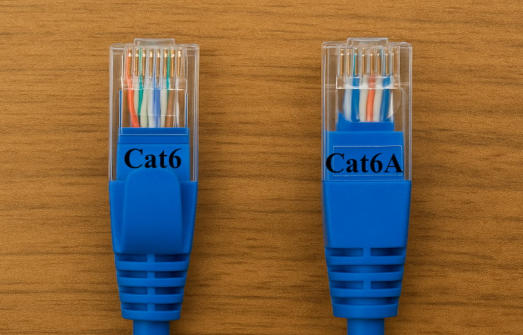
- Wider transparent plug (RJ45).
- 8 visible metal pins in a single row.
- Telephone cable: Often flat or very thin, with fewer internal conductors.
- Network cable: Typically thicker and rounder because it contains 4 twisted pairs and more insulation.
- Telephone line: May be marked with terms like “Telephone”, “RJ11”, or simple pair counts.
- Network cable: Commonly marked as “Cat5e”, “Cat6”, “Cat6a”, and similar signs, plus AWG size and standard codes.
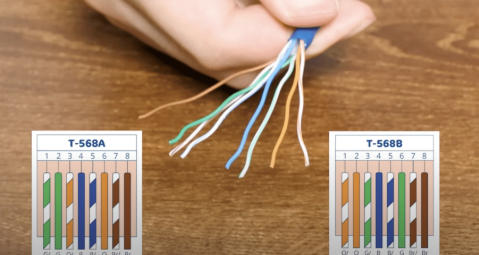
In many cases, a network cable can be repurposed as a telephone line, because a phone line only needs two conductors. Ethernet cables include four pairs (eight conductors), so using just one pair for analog voice is technically possible.
Typical scenarios:
- Using spare pairs in a Cat5e or Cat6 cable run to carry one or more analog phone lines in a building.
- Terminating RJ45 wall jacks but patching them to telephone distribution using appropriate adapters or punch‑down panels.
Important considerations:
- You must keep voice pairs and data pairs clearly separated in your wiring plan.
- For modern VoIP systems, telephones usually use Ethernet data, not analog voice, so they connect directly via RJ45 instead of repurposed pairs.
The short answer is: not reliably, and in most cases, it is not recommended.
Reasons include:
- Most telephone lines only have 1–2 pairs, which is not enough for standard Gigabit Ethernet that uses all 4 pairs.
- The cable construction and twisting may not meet Ethernet standards for crosstalk and noise, leading to instability or very low speeds.
- Long runs over low‑grade telephone cable can have high signal loss, especially if there are multiple joints or damaged sections.
In a few limited cases, very low‑speed Ethernet has been made to work over higher‑quality 2‑pair cable, but this is outside standards and not suitable for professional networks. For stable modern networking, you should always use a proper Ethernet cable.
Telephone lines and network cables also differ in how they carry information.
- Telephone line: Transmits analog voice signals and, in some cases, digital DSL signals over the same pair.
- Network cable: Transmits purely digital Ethernet frames using specific encoding, modulation, and error correction at much higher frequencies.
These differences affect:
- Maximum cable length before quality noticeably degrades.
- Susceptibility to electromagnetic interference and external noise.
- Supported protocols, such as POTS and DSL on telephone lines versus Ethernet, IP, and PoE on network cables.
When used for internet access, the performance gap between telephone lines and network cables is significant.
Using a telephone line:
- Traditional dial‑up and early DSL offered speeds in the kbps to low Mbps range.
- Line quality and multiple splices or adapters quickly reduce speed and stability.
Using a network cable:
- Modern Ethernet delivers stable 100 Mbps, 1 Gbps or more per link under proper installation.
- Twisted pairs, controlled impedance, and quality connectors ensure lower signal loss and better noise immunity.
For business users, cloud applications, video conferencing, IP telephony, and large file transfers almost always require Ethernet‑grade cabling.
If you are equipping a small office, home office, or renovation project, choosing between telephone line and network cable becomes a practical decision.
- You only need basic analog or legacy phone services.
- You are connecting fax machines, alarm panels, or simple intercoms that require POTS or similar low‑bandwidth connections.
- The building already has stable telephone wiring and no need for high‑speed data over those same lines.
- You need reliable internet or data connectivity for computers, IP phones, cameras, and other smart devices.
- You plan to deploy PoE devices, such as IP cameras, access points, or VoIP phones.
- You want your cabling infrastructure to support future higher speeds with minimal rework.
A simple rule is: voice‑only applications can usually stay on telephone lines, while any serious data application should use network cable.
For brand owners, wholesalers, and equipment manufacturers, selecting the correct cable type is part of overall system engineering and cost optimization.
Key factors to consider:
- Required bandwidth and protocol, such as POTS, DSL, or Ethernet 100/1000/10G.
- Installation environment, including indoor or outdoor use, resistance to UV and flame, and any special safety demands.
- Connector systems, including RJ11 or RJ12 patch cords, RJ45 patch cords, keystone jacks, and pre‑terminated harnesses.
- Future migration, for example upgrading from analog PBX to VoIP or from Fast Ethernet to higher‑speed networks.
A professional cable manufacturer can supply both custom telephone line assemblies and structured Ethernet cabling solutions, matching conductor gauge, shielding, jacket material, and connector quality to the exact project needs.
- PBX uses analog extensions.
- Internet is delivered via fiber or VDSL with Ethernet output from the router.
Recommended approach:
- Keep existing telephone lines with RJ11 connectors for PBX extensions.
- Use Cat5e or Cat6 network cables for all PC and IP device connections.
- Avoid running internet data over old telephone pairs except as a temporary workaround.
- You want phone, internet, and IP TV in multiple rooms.
Recommended approach:
- Run Cat6 or higher network cable to each room.
- Use patch panels and RJ45 wall outlets.
- Distribute both VoIP or analog phone and Ethernet data via the structured cabling, using suitable adapters and patching.
This approach gives maximum flexibility for future changes without rewiring.
Good installation practices are as important as choosing the right cable.
For telephone lines:
- Avoid unnecessary junctions and long parallel runs next to power cables that increase noise.
- Keep cable lengths reasonable to limit attenuation, especially for DSL lines.
For network cables:
- Respect maximum segment lengths for the cable category, typically 100 meters for copper Ethernet.
- Maintain twist integrity close to the connector to preserve performance.
- Use quality RJ45 connectors and keystone jacks rated for the same category as the cable.
- Test each link with appropriate Ethernet cable testers before completing a project.
If you are planning a new installation or upgrading an existing system, choosing between telephone line and network cable is only the first step. You also need the right cable category, conductor size, shielding structure, and connector system to match your performance and budget targets.
As a manufacturer of USB, VGA, HDMI, DVI, SATA, and custom communication cables, our team can help you specify and produce tailored telephone line and network cable assemblies for your brand or project. Whether you are a distributor, system integrator, or equipment OEM, you can send us your drawings, performance requirements, and quantity plan to receive engineering suggestions and competitive OEM quotations.
Contact our sales and engineering team now to discuss your cabling requirements, request samples, or start developing a custom cable solution that fits your telecom and networking applications.
Contact us to get more information!
The main difference is that a telephone line is designed for analog voice and low‑speed data, while a network cable is designed for high‑speed digital Ethernet communication. Telephone lines usually use RJ11 or RJ12 connectors with fewer conductors, and network cables use RJ45 with four twisted pairs to support higher bandwidth.
A telephone cable's RJ11 plug can physically fit into an RJ45 network port because it is narrower, but it will not provide a proper Ethernet connection. The pinout and number of conductors are different, and attempting to use it for data networking may result in no link or extremely unstable performance.
In many situations it is safe and common to use spare pairs of a network cable for analog telephone lines, as long as the wiring is planned correctly. Installers must separate voice and data pairs clearly, maintain proper terminations, and ensure that the central equipment, such as PBX, DSL splitter, or VoIP gateway, is wired to the correct pairs.
Most VoIP phones use Ethernet for both power and data, so they should be connected with standard Cat5e or Cat6 network cables and RJ45 connectors. Telephone lines with RJ11 or RJ12 connectors are mainly for legacy analog phones, while modern IP phones benefit from structured Ethernet cabling and, where needed, PoE.
If your internet is still delivered over DSL, the line from the wall to the modem remains a telephone line, but internal networking inside the home or office should ideally use Ethernet cables. When upgrading to fiber or high‑speed broadband, you should plan to deploy Cat5e or Cat6 cabling for your local network to avoid bottlenecks caused by old telephone wiring.
1. https://nl.pcm-cable.com/news/the-difference-between-telephone-line-and-netw-65800731.html
2. https://www.showmecables.com/blog/post/ethernet-vs.-phone-cables-%E2%80%93-whats-the-difference
3. https://www.owirecable.com/news/the-difference-between-a-network-line-and-a-telephone-line
4. https://www.starte-cable.com/info/difference-between-network-cable-and-telephone-32406113.html
5. https://www.lightoptics.co.uk/blogs/news/telephone-jack-definition
6. https://www.fiber-optic-transceiver-module.com/differences-between-phone-network-cable.html
7. https://mem.uandes.cl/difference-between-ethernet-and-phone-cable/


