
Views: 222 Author: Rebecca Publish Time: 2026-02-19 Origin: Site


Content Menu
● Basic Features of the USB-C Port
>> 3. Multifunction Capability
● Advantages of USB-C: Why It Became the New Standard
>> 1. Fast Charging and High Power Delivery
>> 2. High-Speed Data Transfer
>> 3. Widely Adopted Across Industries
>> 1. Driving Device Design Innovation
>> 2. Towards a Unified Connection Standard
>> 3. Building a USB-C Ecosystem
● How USB-C Ports Differ from Other USB Connectors
● Understanding USB-C Alt Mode and USB4
● Practical Tips: How to Identify a USB-C Port on Your Device
● OEM and B2B Perspective: Why USB-C Cable Quality Matters
● Best Practices for End Users: Using USB-C Safely and Efficiently
● When Should You Choose a USB-C Cable vs Other Interfaces?
● Take the Next Step: Customize Your USB-C Cable Solutions
>> 1. Is every USB-C port capable of fast charging and video output?
>> 2. What is the difference between USB-C and USB4?
>> 3. Can USB-C replace HDMI completely?
>> 4. Is it safe to use any USB-C cable with my laptop or phone?
>> 5. Why does my USB-C port not connect to an external monitor?
The USB-C port has become the new standard for charging, data transfer, and video output across laptops, smartphones, tablets, and many other devices, thanks to its compact, reversible, and highly versatile design. For brands, wholesalers, and OEM/ODM buyers, understanding how USB-C works and how to choose the right USB-C cables directly impacts product reliability, user experience, and after-sales performance.

A USB-C port (USB Type-C) is a small, oval-shaped connector with a reversible plug, meaning it can be inserted either way up, unlike older USB-A or USB-B ports. It supports power delivery, high-speed data transfer, and video or audio signals through a single interface, making it a truly multifunctional connection standard.
Key characteristics of the USB-C port include:
- Reversible insertion, with no “up” or “down” side
- Compact size, around 8.4 mm × 2.6 mm, suitable for thin, lightweight devices
- One port that can handle charging, data, video, and audio
- Compatibility with advanced standards such as USB 3.2, USB4, Power Delivery (PD), and Alt Mode (DisplayPort, HDMI, or Thunderbolt on the same connector)
The USB-C port adopts a symmetrical, double-sided design that allows users to plug in the connector without worrying about orientation. This helps reduce port damage, connection errors, and support issues related to incorrect insertion on end-user devices.
User benefits include:
- Faster and more intuitive plugging
- Fewer mechanical insert or remove failures
- Better durability for frequent connections in mobile devices
Compared with the traditional USB-A port, the USB-C port is smaller and thinner, enabling manufacturers to design slimmer and lighter devices. With an approximate size of 8.4 mm × 2.6 mm, USB-C frees valuable internal space for other components such as larger batteries or more advanced cooling solutions.
Typical devices using compact USB-C ports include:
- Ultrabooks and lightweight laptops
- Tablets and 2-in-1 convertibles
- Flagship and mid-range smartphones
- Portable monitors, cameras, and game consoles
Unlike legacy ports that often handled a single function, USB-C can integrate multiple roles into one interface. Depending on implementation, a single USB-C port can support:
- High-speed data transfer (USB 3.x, USB4)
- Charging and power delivery via USB Power Delivery (PD)
- Video output via DisplayPort Alt Mode, HDMI Alt Mode, or Thunderbolt
- Audio transmission for headsets or docking stations
For device manufacturers and cable buyers, this means one USB-C cable can replace multiple legacy cables, simplifying product design and user setup.
USB-C supports high levels of power delivery through the USB Power Delivery (PD) specification, far exceeding the power supported by older USB 2.0 ports. This allows phones, tablets, and even laptops to be charged via one unified USB-C power adapter.
Power-related advantages include:
- Fast charging for compatible smartphones and notebooks
- Bidirectional power flow, where a device can both receive and supply power
- Support for advanced power profiles and dynamic power allocation in modern PD implementations
For example, a 65 W USB-C PD charger can power many ultrabooks while also fast-charging USB-C smartphones, reducing the need for multiple bulky adapters.
Depending on the protocol implemented, USB-C ports can support very high data rates, making them suitable for large file transfers, external SSDs, and high-performance peripherals.
Typical speed levels include:
- USB 3.0 / USB 3.2 Gen 1: up to 5 Gbps
- USB 3.2 Gen 2: up to 10 Gbps
- USB4 or Thunderbolt: up to 40 Gbps
For buyers and engineering teams, pairing the correct USB-C cable type, such as full-featured or active cables, with the device's port capabilities is critical to ensure that real-world performance matches expectations.
USB-C has been adopted by major laptop, smartphone, and accessory manufacturers, forming a widely accepted global standard. Regulatory pushes in some regions for standardized charging solutions are further accelerating USB-C adoption on consumer electronics.
Practical benefits of wide adoption include:
- Easier sharing of chargers and cables across different brands
- Fewer compatibility issues for end users
- Reduced electronic waste due to fewer proprietary connectors

Because USB-C is compact and versatile, it allows manufacturers to design thinner, lighter, and more integrated devices. With fewer ports needed on each product, manufacturers can improve waterproofing, structural rigidity, and internal layout.
Design advantages include:
- Fewer physical openings in the chassis
- More room for batteries, speakers, or antennas
- Cleaner industrial design with a simpler input and output layout
USB-C is gradually replacing legacy connectors such as USB-A, Micro USB, Mini DisplayPort, and many proprietary charging ports, moving the industry toward a more unified I/O ecosystem. This simplifies purchasing, logistics, and after-sales support for both consumers and B2B buyers.
For brands and wholesalers, a unified standard means:
- Less product code fragmentation for cables and chargers
- Easier inventory management and demand forecasting
- More consistent end-user experience across different product lines
As USB-C continues to spread, an ecosystem of hubs, adapters, docking stations, and specialty cables is rapidly growing. This gives OEMs and importers more flexibility to target different application scenarios, such as gaming, industrial control, professional video, and education.
Typical ecosystem accessories include:
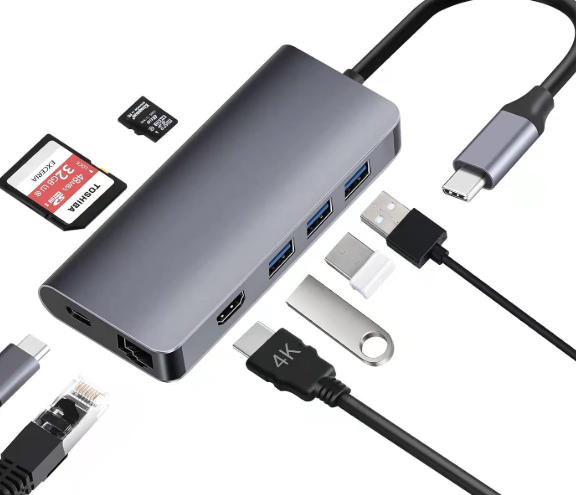
- Multiport USB-C hubs for USB-A, HDMI, RJ45, SD card, and more
- USB-C docking stations for dual or triple displays
- USB-C to HDMI, DisplayPort, VGA, or DVI adapters
- USB-C extension, panel-mount, and industrial-grade cables
To help users and buyers quickly understand the unique value of USB-C, the table below compares it with legacy USB types:
| Feature | USB-A | Micro USB | USB-C |
|---|---|---|---|
| Shape | Rectangular | Narrow and asymmetrical | Oval and symmetrical |
| Reversible plug | No | No | Yes |
| Typical power | Up to 2.5 W (USB 2.0) | Low to moderate | Up to 100 W or higher with PD |
| Max data rate | Up to 5–10 Gbps (USB 3.x) | Typically lower | Up to 40 Gbps with USB4 or Thunderbolt |
| Video support | Limited, via adapters | No | Yes, via Alt Mode and Thunderbolt |
| Usage trend | Legacy | Phasing out | Current and future mainstream standard |
For professional buyers and technical teams, it is important to know that not every USB-C port supports all functions. Many laptops, tablets, and docking stations use Alt Mode and USB4 features that require specific cable and port capabilities.
USB-C Alt Mode (Alternate Mode) allows the USB-C port to carry non-USB protocols such as DisplayPort, HDMI, or Thunderbolt through the same physical connector. This is what enables video output and advanced docking functionality.
Key points about Alt Mode include:
- It uses the high-speed differential lanes of USB-C for other protocols.
- It allows one cable to deliver video, data, and power at the same time.
- It requires Alt Mode capable ports and cables, not just any USB-C connector.
USB4 is built on Thunderbolt technology and runs over USB-C connectors, providing up to 40 Gbps bandwidth and intelligent resource allocation between data and video. Thunderbolt versions also use USB-C and can combine PCIe, DisplayPort, and USB in a single connection.
For OEM buyers, this means that cable selection becomes more critical as speed and functionality increase. Full-featured USB-C cables with proper shielding, conductor size, and chipsets are required to guarantee compatibility and performance in these advanced scenarios.
Even though many devices use USB-C, not all ports offer the same capabilities. Recognizing labels and icons around the port helps users understand what functions they can expect.
Common USB-C port indicators include:
- A battery or lightning icon often indicates charging support or PD.
- A DisplayPort symbol indicates video output via DisplayPort Alt Mode.
- A Thunderbolt logo suggests Thunderbolt and advanced data or video features.
- “SS” or speed labels near the port may refer to SuperSpeed USB versions.
If a USB-C port is unmarked, users should check the device manual or technical specifications to confirm whether it supports data only, power only, or full data plus power plus video.
For professional USB, VGA, HDMI, DVI, and SATA cable manufacturers and OEM suppliers, cable performance and stability directly influence brand reputation and device failure rates. When sourcing USB-C cables in bulk, several technical factors should be considered.
Key factors for high-quality USB-C cables include:
- Conductor material and gauge for stable high-current PD charging
- Shielding and twisting of high-speed pairs to minimize signal loss and electromagnetic interference
- Full-featured pin assignment when both data and video are required
- Compliance with USB-IF specifications and relevant safety and reliability standards
Typical OEM use case example:
A laptop brand may want a single USB-C port to handle charging, 4K external display, and USB 3.2 data via a dock. The cable used in this bundle must support PD, DisplayPort Alt Mode, and high-speed data to avoid overheating, flickering displays, or connection errors. In this scenario, choosing a fully compliant, well-constructed USB-C cable is essential.
Even though USB-C is user-friendly, correct usage improves longevity and safety for both devices and cables.
Recommended best practices include:
1. Match charger and device ratings: Use certified USB-C PD chargers that match or slightly exceed the wattage recommended by the device manufacturer.
2. Avoid very cheap, uncertified cables: Poor-quality cables may overheat, cause unstable charging, or even damage ports or batteries.
3. Check port capabilities before buying accessories: Confirm whether your USB-C port supports Alt Mode if you want to connect an external monitor.
4. Keep ports clean and dry: Dust or moisture can affect contact quality and cause intermittent connection issues or corrosion over time.
While USB-C is becoming the universal port, some applications still rely on HDMI, DisplayPort, or legacy USB for specific reasons. Choosing the right cable type helps ensure stability and compatibility.
- Choose USB-C to USB-C when both host and device support USB-C for charging and data.
- Choose USB-C to HDMI or DisplayPort when connecting laptops or tablets to external displays.
- Choose USB-C to USB-A when you need compatibility with older PCs, chargers, or peripherals.
- Choose USB-C to SATA or USB-C to USB adapter solutions for external drives and storage devices.
For large importers and OEM customers, working with a specialized cable manufacturer makes it easier to combine multiple interfaces (USB-C, HDMI, VGA, DVI, SATA, and more) into an optimized product portfolio tailored to different markets and device generations.
If you are a brand owner, wholesaler, or device manufacturer looking for reliable USB-C cables and cable accessories, partnering with an experienced cable factory is essential to ensure consistent performance and compliance. You can customize USB-C cables with different data rates, power levels, video capabilities, and mechanical designs to meet your target market and device roadmap.
Contact our professional team today to discuss your USB-C cable OEM or ODM project, including USB, VGA, HDMI, DVI, and SATA solutions. Share your specifications, application scenarios, and branding requirements so we can help you design and manufacture stable, durable, and cost-effective cable products that enhance your devices and satisfy your customers.
Contact us to get more information!
No. Some USB-C ports only support data and basic charging, while others include Power Delivery and Alt Mode for fast charging and video. Users should check the device specifications or port icons to confirm supported functions.
USB-C is the physical connector shape and interface, whereas USB4 is a protocol that can run over USB-C and offer higher bandwidth and more advanced features. Not all USB-C ports support USB4, because that depends on the device chipset and internal design.
USB-C can carry video through DisplayPort or HDMI Alt Mode, and in many laptops and tablets it already replaces dedicated HDMI ports. However, HDMI remains very common on TVs, projectors, and legacy equipment, so USB-C to HDMI adapters and cables will continue to be important.
Using non-certified or very low-quality USB-C cables may cause overheating, unstable charging, or limited performance. It is safer to choose specification-compliant cables from reputable manufacturers, especially for high-wattage charging and high-speed data transfer.
Not all USB-C ports support Alt Mode video output. If the port does not show a DisplayPort or Thunderbolt symbol and the specifications do not mention DisplayPort or HDMI Alt Mode, it may be data-only, in which case a USB-C to HDMI cable will not work for video.
1. https://www.pcmag.com/explainers/what-is-usb-c
2. https://www.cdw.com/content/cdw/en/articles/hardware/types-usb-cables.html
3. https://en.wikipedia.org/wiki/USB-C
4. https://www.anker.com/blogs/cables/what-does-a-usb-c-port-look-like
5. https://www.hp.com/us-en/shop/tech-takes/what-is-usb-c
6. https://kb.plugable.com/understanding-usb-c-alt-mode
7. https://www.totalphase.com/blog/2019/11/how-displayport-alt-mode-is-enabled-over-a-usb-type-c-cable/
8. https://www.dell.com/support/kbdoc/en-nz/000141238/guide-to-usb-type-c
9. https://www.usb.org/sites/default/files/USB%20Type-C%20Spec%20R2.0%20-%20August%202019.pdf


