


Views: 222 Author: Rebecca Publish Time: 2026-02-18 Origin: Site


Content Menu
● Standard Names for a Female USB Connector
>> Male vs. Female – Quick Definition
● Main Types of Female USB Connectors
>> USB Type‑B Female, Mini, and Micro
● How Female USB Connectors Work
>> Mechanical and Electrical Interface
● Where Female USB Connectors Are Used
>> Consumer Electronics and IT Devices
>> Industrial, Automotive, and Embedded Systems
● Common Female USB Cable Assemblies
>> USB Male to Female Extension Cables
>> Panel‑Mount Female USB Connectors and Cables
● How to Correctly Specify a Female USB Connector
● Practical Examples of Female USB Naming in the Market
>> Catalog and Distributor Terminology
>> Industry Guidance and Tutorials
● UX Tips: How to Communicate “Female USB Connector” to End Users
>> Clear Language for Non‑Technical Users
● Why Correct Naming Matters for Projects
>> Reducing Design and Production Risk
>> Supporting Future‑Ready Designs
● Work With an OEM Partner for Custom Female USB Cables and Connectors
● Call to Action: Get Custom Female USB Solutions for Your Next Project
● FAQs About Female USB Connectors
>> (1) What is the technical name for a female USB connector?
>> (2) Are all female USB connectors the same?
>> (3) What does “USB male to female” mean on a cable?
>> (4) How do I choose the right female USB connector for a new product?
>> (5) Is a USB‑C female connector better than a Micro‑USB female connector?
In electronics, the female USB side is the connector on a device that receives a male USB plug.
In practical usage, it is commonly called a USB receptacle, USB socket, or USB port, especially on laptops, TVs, hubs, or chargers.
For buyers and engineers, understanding the correct naming, types, and applications of female USB connectors is critical to selecting the right cable assemblies, panel-mount connectors, and PCB-mounted jacks for projects in consumer, industrial, and professional equipment.

In professional documentation, the female USB connector is usually described with one or more of the following terms:
- USB receptacle
- USB socket
- USB port
- Female USB connector
When specifying a product, engineers typically combine gender, type, and mounting style, for example: “USB 3.2 Type‑C female, SMT, right‑angle receptacle”.
- A male USB connector is the plug that protrudes and is usually found at the ends of cables, flash drives, and dongles.
- A female USB connector is the port or receptacle fixed on a device that receives the male plug.
A simple analogy is key and lock: the male connector is the key, and the female port is the lock, designed to fit together in one orientation for a secure connection.
Different USB standards and form factors lead to several families of female USB connectors, each optimized for specific devices and applications.
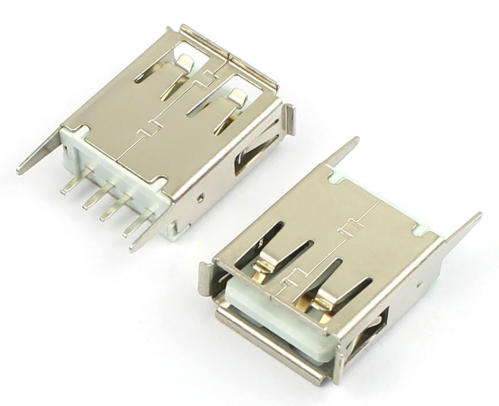
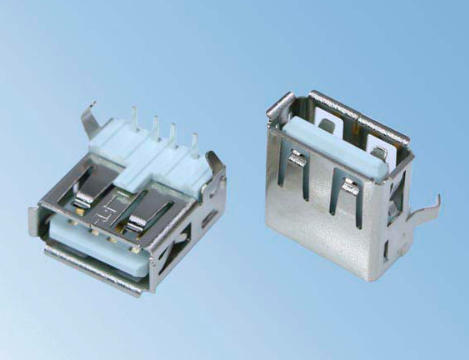
The USB‑A female connector is the classic rectangular “host” port found on computers, USB hubs, TVs, game consoles, and many chargers.
Key characteristics:
- Rectangular shape with a flat internal tongue carrying contacts.
- Used on host devices to accept cables and peripherals.
- Available for USB 2.0, USB 3.x, and some proprietary charging formats.
Component and cable catalogs often list these as “USB 2.0 Type‑A receptacle, right‑angle, through‑hole” or “USB Type‑A 3.0 stacked female connector”.
USB‑B female connectors are widely used on printers, older peripherals, and some industrial equipment.
- USB‑B female: Larger square‑like socket typically on printers and scanners.
- Mini‑USB female: Smaller connector, once popular on cameras and older portable devices, now largely phased out.
- Micro‑USB female: Thin, compact connector used on many legacy phones, cameras, development boards, and small electronics.
Even though many consumer devices have moved to USB‑C, mini and micro female receptacles still appear in legacy designs, development boards, and cost‑sensitive products.
The USB Type‑C female receptacle is the mainstream connector for new laptops, phones, and tablets.
Key features:
- Reversible: male plug can be inserted in either orientation.
- High performance: supports a wide range of data rates and power profiles, depending on implementation.
- Compact and robust: designed for slim devices and frequent mating cycles.
Suppliers offer many variants of Type‑C female jacks, including horizontal or vertical options, SMT or through‑hole, waterproof versions, and power‑only or full‑function designs.
A female USB connector provides a mechanically secure and electrically reliable interface for the male plug during data and power transfer.
Core functions include:
- Guiding and retaining the male plug with a keyed, polarized housing.
- Providing contact surfaces for power, ground, and data pins.
- Maintaining alignment to avoid damage and intermittent connections.
Modern female connectors are engineered for thousands of mating cycles, and Type‑C receptacles are specifically designed for high durability in portable devices.
High‑quality female USB connectors incorporate design features that help protect devices and maintain reliability:
- Shielding to reduce electromagnetic interference.
- Grounding and shell contact to handle electrostatic discharge and noise.
- Robust solder or press‑fit terminals to withstand mechanical stress.
In many products, the USB receptacle is supported by the enclosure or a metal bracket, which improves strain relief and impact resistance.
Some specialized female USB connectors are designed for harsh or outdoor environments, offering waterproof sealing, reinforced housings, or high‑current capabilities.
Female USB ports appear in nearly every modern consumer and office device.
Typical examples include:
- Computers and laptops with USB‑A and USB‑C host ports.
- Smartphones and tablets, mostly with USB‑C and some legacy Micro‑USB.
- TVs, set‑top boxes, and game consoles for storage and accessories.
- Chargers, docking stations, hubs, and power strips with multiple female USB ports for charging and expansion.
Female USB receptacles are widely used in industrial controls, test equipment, medical devices, and automotive infotainment systems as standard data and power interfaces.
In these environments, designers may choose:
- Panel‑mount female USB connectors for front panels and enclosures.
- Board‑mount receptacles, either through‑hole or SMT, for PCBs.
- Ruggedized or waterproof female USB connectors for outdoor or high‑vibration applications.
A USB male to female cable has a male plug at one end and a female receptacle at the other, extending an existing USB connection or adapting it to a more convenient port location.
Typical uses include:
- Extending the reach of a flash drive or dongle from a rear panel to a more accessible position.
- Providing a desktop access port from a PC placed under the desk.
- Allowing devices with USB‑OTG support to connect peripherals via a short adapter with a female port.
Product descriptions usually read as “USB Type‑A male to Type‑A female extension cable” or “USB‑C male to USB‑C female extension or adapter”.
For equipment front panels, it is common to use panel‑mount female USB connectors either as standalone jacks or attached to a cable.
Key features:
- Flange or D‑shaped housing with mounting holes for fastening to the panel.
- Rear termination via USB plug, board header, or discrete wires.
- Availability in USB‑A, USB‑B, USB‑C, and sometimes Micro‑USB variants.
These solutions are ideal when you want a clean, robust female USB interface on an enclosure while keeping internal wiring flexible and easy to assemble.
When preparing a specification or RFQ for a female USB connector or cable assembly, include the following points to avoid ambiguity:
1. USB type and version
- Type‑A, Type‑B, Micro‑B, Mini‑B, Type‑C, and so on.
- Desired data capability, such as USB 2.0, USB 3.x, or USB4, or indicate power‑only if no data lines are required.
2. Gender and role
- Clearly indicate female, receptacle, or port.
- If specifying a cable, describe the gender for each end.
3. Mounting style
- PCB through‑hole, SMT, mid‑mount, vertical, right‑angle, or panel mount.
4. Electrical performance
- Rated current, especially for power‑oriented designs.
- Voltage rating and insulation properties.
5. Environmental and mechanical requirements
- Operating temperature range and protection level if needed.
- Durability requirements such as mating cycles.
A clear, detailed description helps engineers, buyers, and manufacturing partners communicate effectively and ensures the delivered connector matches the design intent.
In distributor catalogs and component databases, female USB connectors are described using standardized terminology.
Typical examples include:
- “USB Type‑C receptacle, female, 24‑pin, SMT, horizontal”
- “USB 2.0 Type‑A single‑port right‑angle receptacle”
- “USB jack, Type‑C, power only, SMT, vertical, female”
Recognizing key terms such as receptacle, socket, jack, and female helps you quickly filter and select the correct parts when sourcing connectors or working with OEM cable manufacturers.
Educational resources and connector guides consistently describe female USB connectors as ports, receptacles, or female jacks.
Connector guides emphasize that female USB ports are fixed sockets on devices, while male plugs are attached to cables and accessories.
Tutorials for makers and engineers often label footprints and symbols as “USB‑A female”, “Micro‑USB female”, or “USB‑C receptacle” on schematics and PCBs.
For consumer‑facing documentation, simple terms improve user experience and reduce confusion.
Best practices:
- In manuals or on product pages, use “USB port (female)” the first time, followed by “USB port” in the rest of the text.
- When describing cables, use wording such as “one end is a USB‑A plug (male), the other end is a USB‑A port (female)”.
- Avoid jargon like “receptacle” if your primary readers are end users rather than engineers.
Users often rely on simple descriptions and labels to locate the right port.
You can improve clarity by:
- Using clear port labels on products, such as “USB‑A OUT”, “USB‑C IN/OUT”, or “USB‑C PD”.
- Providing a brief comparison or description of different connector shapes so users can easily identify Type‑A, Type‑B, Micro‑B, and Type‑C on their devices.
Using precise terminology for female USB connectors lowers the risk of errors in design and production.
Accurate naming helps prevent:
- Ordering incompatible parts, such as the wrong USB type or gender.
- Mismatches between connector footprints and PCB layouts.
- Mechanical interference with enclosures due to incorrect mounting style or component height.
Clear naming also supports consistent documentation across drawings, bills of materials, and assembly instructions.
As products transition from USB‑A and Micro‑USB to USB‑C, the choice of female connector directly influences the product lifecycle and user perception.
Proper naming and selection allow you to:
- Design backward‑compatible solutions that use both legacy and modern female connectors where needed.
- Offer practical cable sets, such as USB‑A male to USB‑C female or USB‑C male to USB‑A female, to support older and newer devices.
- Plan product updates and new generations without confusing users about which ports and cables they need.
If you need custom USB, VGA, HDMI, DVI, or SATA cable assemblies, working with an experienced OEM cable manufacturer ensures that every female connector in your project is correctly specified and consistently produced.
A capable OEM partner can help you:
- Select between different female USB receptacle types, including Type‑A, Type‑B, Micro‑USB, and Type‑C, with the right mounting and performance options.
- Design custom male‑to‑female extension cables, adapter cables, and panel‑mount harnesses that match your mechanical and electrical requirements.
- Combine USB connectors with other interfaces such as HDMI, VGA, DVI, and SATA in one integrated cable or harness for your equipment.
If you are a brand owner, wholesaler, or equipment manufacturer looking for reliable female USB connectors and cable assemblies, now is the right time to standardize your specifications and streamline your sourcing.
Contact our OEM cable team to share your drawings, target markets, and annual volume, and get tailored solutions for USB, VGA, HDMI, DVI, and SATA cables.
Our engineers and production team will work with you from concept to mass production so that every female USB connector in your project delivers stable performance, long‑term durability, and a user‑friendly interface that your customers can trust.
Contact us to get more information!
The most common technical names are USB receptacle and USB socket, and in everyday language it is often called a USB port on the device.
When specifying a part, you can combine these terms, for example “USB Type‑C female receptacle” or “USB‑A female socket”.
Female USB connectors are not all the same.
They differ by type (such as Type‑A, Type‑B, Micro‑USB, Mini‑USB, and Type‑C), by supported speed grade, by mounting style, and by electrical rating, so they are not interchangeable in most designs.
“USB male to female” describes a cable where one end has a male USB plug and the other end has a female USB port.
This type of cable is often used to extend the reach of a USB device or to create a more accessible connection point on a desk or equipment front panel.
To choose the right female USB connector, start by defining the USB type, data speed, and current you need.
Then select the appropriate mounting style, consider environmental and durability requirements, and ensure the footprint and mechanical dimensions match your PCB and enclosure design.
For new designs, a USB‑C female connector is usually the better option.
It offers a reversible plug orientation, supports higher data rates and power levels when implemented properly, and is now widely adopted on phones, laptops, and accessories.


