


Views: 295 Author: Otechkabel Publish Time: 2026-08-25 Origin: Site


Content Menu
● HDMI 2.1 vs 2.0 vs 1.4: Quick Comparison
>> HDMI 1.4: 10.2 Gbps for Legacy Systems
>> HDMI 2.0: 18 Gbps for Mainstream 4K
>> HDMI 2.1: 48 Gbps for High-Performance Video
● Resolution and Refresh Rate Differences
>> HDR Is More Than a Cable Feature
>> ARC vs eARC
● Understanding HDMI Cable Categories
● How to Select the Right HDMI Cable
>> Choose HDMI 1.4-Class Performance When
>> Choose HDMI 2.0-Class Performance When
>> Choose HDMI 2.1-Class Performance When
>> Five Questions to Ask Before Ordering
● OEM HDMI Cable Considerations
● FAQ
>> Is HDMI 2.1 always better than HDMI 2.0?
>> Can an HDMI 2.1 cable work with HDMI 2.0 and HDMI 1.4 devices?
>> Do I need an HDMI 2.1 cable for PS5 or Xbox Series X?
>> Does a 48 Gbps HDMI cable guarantee 4K at 120Hz?
>> What is the difference between Premium High Speed and Ultra High Speed HDMI cables?
>> Why does an HDMI cable work at 4K at 60Hz but not 4K at 120Hz?
>> Are all cables marketed as "HDMI 2.1 cables" the same?
| Feature | HDMI 1.4 | HDMI 2.0 / 2.0b | HDMI 2.1 |
|---|---|---|---|
| Maximum bandwidth | 10.2 Gbps | 18 Gbps | 48 Gbps |
| Common cable category | High Speed HDMI Cable | Premium High Speed HDMI Cable | Ultra High Speed HDMI Cable |
| Typical video capability | 4K at 30Hz | 4K at 60Hz | 4K at 120Hz and 8K at 60Hz |
| HDR capability | Suitable for basic and legacy use | Supports common 4K HDR workflows | Supports Dynamic HDR in compatible systems |
| Audio return feature | ARC | ARC | eARC |
| Gaming features | Basic | Standard 4K gaming | VRR, ALLM, QFT, and QMS |
| Best for | Full HD, legacy AV, basic 4K | Mainstream 4K video and displays | Premium gaming, advanced home theater, and high-refresh-rate displays |
HDMI 1.4-class High Speed cables are suitable for up to 10.2 Gbps transmission, including Full HD, 3D, and 4K at 30Hz. HDMI 2.0-class Premium High Speed cables are designed for 18 Gbps applications, including 4K at 60Hz and HDR. HDMI 2.1-class Ultra High Speed cables are built for demanding systems that require up to 48 Gbps, including 4K at 120Hz and 8K at 60Hz.
Bandwidth is the most important technical difference between HDMI 1.4, HDMI 2.0, and HDMI 2.1. It defines how much data can move through the connection at one time.
A higher-resolution picture, a higher refresh rate, deeper color, HDR metadata, and advanced audio all require more bandwidth. When the cable or any device in the signal chain cannot support the required data rate, the result may be a black screen, flickering, image dropouts, limited refresh-rate options, or a lower resolution setting.
HDMI 1.4 remains a practical choice for older equipment and basic AV installations. It is commonly used with Full HD televisions, legacy projectors, early 4K displays, Blu-ray players, office monitors, and standard set-top boxes.
Typical HDMI 1.4 applications include:
- 1080p televisions and monitors
- 1080p projectors
- Standard Blu-ray players
- Earlier game consoles
- 4K displays operating at 30Hz
- Basic presentation systems
- Entry-level digital signage
For stable Full HD transmission, a well-made High Speed HDMI cable is often enough. However, it is not the right choice for 4K at 60Hz, 4K at 120Hz, 8K video, or advanced gaming functions.
HDMI 2.0 increased available bandwidth to 18 Gbps. This made 4K at 60Hz a practical standard for TVs, monitors, streaming devices, office displays, and commercial AV systems.
HDMI 2.0 is suitable for many common applications:
- 4K TVs and monitors at 60Hz
- Streaming devices and media players
- 4K HDR movies and television content
- Conference-room display systems
- Retail and commercial digital signage
- PS4 Pro and Xbox One X systems
- Standard 4K home-entertainment installations
For brands serving the mainstream 4K market, an 18 Gbps product can offer a strong balance between performance, cost, compatibility, and customer demand.
HDMI 2.1 increases maximum bandwidth to 48 Gbps. It is designed for applications that require much higher data transfer rates, including 4K at 120Hz and 8K at 60Hz.
HDMI 2.1 is especially relevant for:
- PS5 and Xbox Series X gaming systems
- Gaming PCs with compatible graphics cards
- 4K 120Hz televisions and monitors
- 8K televisions and displays
- Advanced home-theater installations
- AV receivers and soundbars with eARC
- Premium gaming accessory lines
- High-specification commercial AV projects
The extra bandwidth is valuable because it gives compatible systems room to transmit high-resolution, high-refresh-rate, HDR, and advanced audio signals more reliably.
Resolution determines how much visual detail appears on screen. Refresh rate determines how often the image updates each second.
A 4K image contains far more pixels than a 1080p image. Increasing the refresh rate from 60Hz to 120Hz doubles the number of frames transmitted each second. This is why 4K at 120Hz needs much more bandwidth than 4K at 60Hz.
| Application | Recommended HDMI Performance | Main Reason |
|---|---|---|
| 1080p television or office monitor | HDMI 1.4 / High Speed | Cost-effective for Full HD systems |
| 4K movie streaming at 60Hz | HDMI 2.0 / Premium High Speed | Suitable for mainstream 4K and HDR content |
| 4K console gaming at 120Hz | HDMI 2.1 / Ultra High Speed | Supports high refresh rate output |
| 8K video at 60Hz | HDMI 2.1 / Ultra High Speed | Requires high-bandwidth transmission |
| TV-to-soundbar advanced audio | HDMI 2.1-compatible system with eARC | Supports enhanced audio return |
| Long-distance high-bandwidth installation | Active cable or active optical HDMI solution | Improves transmission reliability over distance |
The complete system matters. A high-bandwidth HDMI cable cannot make an older TV display 4K at 120Hz. It also cannot compensate for a receiver, switch, splitter, or adapter that supports only 4K at 60Hz.
The connection always performs according to the lowest-capability component in the signal path.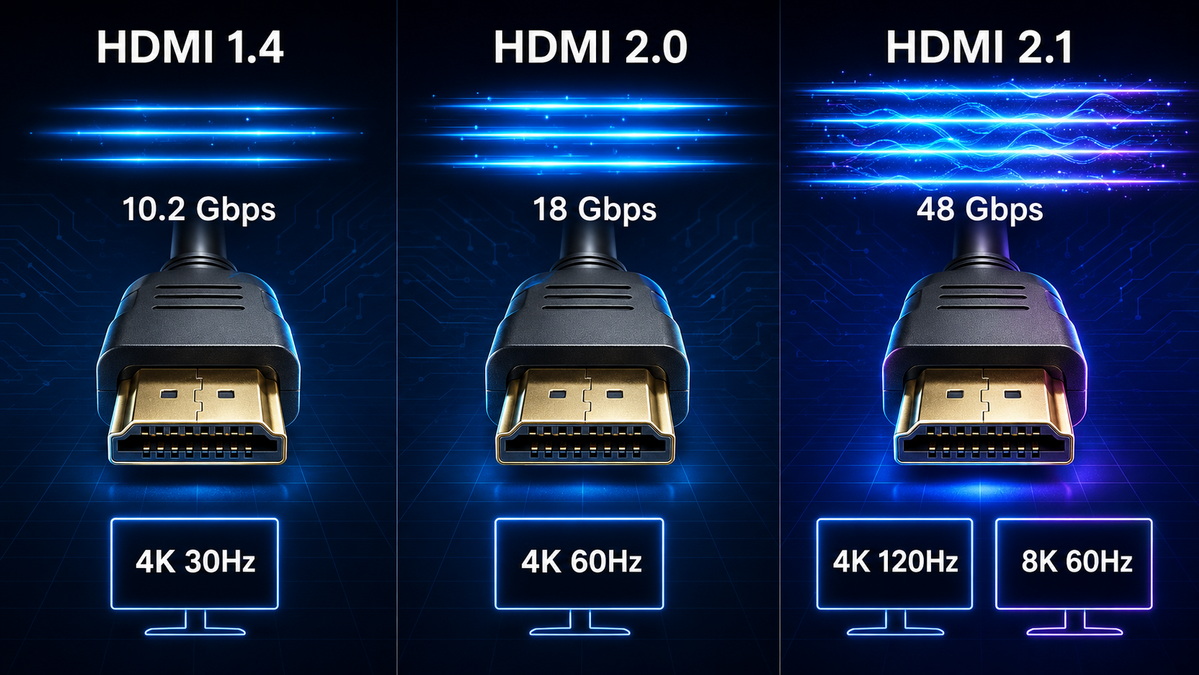
HDMI 2.1 is often associated with 8K, but its biggest practical benefit for many users is smoother high-frame-rate gaming.
Variable Refresh Rate, often called VRR, helps a compatible display match its refresh timing to the graphics output of the console or PC.
This can reduce:
- Screen tearing
- Stuttering
- Frame pacing issues
- Perceived delay during fast movement
VRR can be particularly useful in racing games, first-person shooters, sports games, and action titles where the frame rate changes during gameplay.
Auto Low Latency Mode, known as ALLM, allows a compatible console or device to request a low-latency display mode automatically.
In a typical setup, a TV may switch into Game Mode when gameplay starts. This reduces the need for users to manually adjust picture settings each time they use a console.
Quick Frame Transport, or QFT, is designed to reduce latency by moving frames more quickly through a compatible HDMI connection.
This feature is most relevant for interactive content, gaming, virtual racing, and other applications where response time matters.
Quick Media Switching, or QMS, is designed to reduce the black-screen delay that can happen when switching between different frame rates.
For example, a streaming device may switch between 24Hz movie content and 60Hz interface content. In a fully compatible system, QMS can make those transitions feel smoother.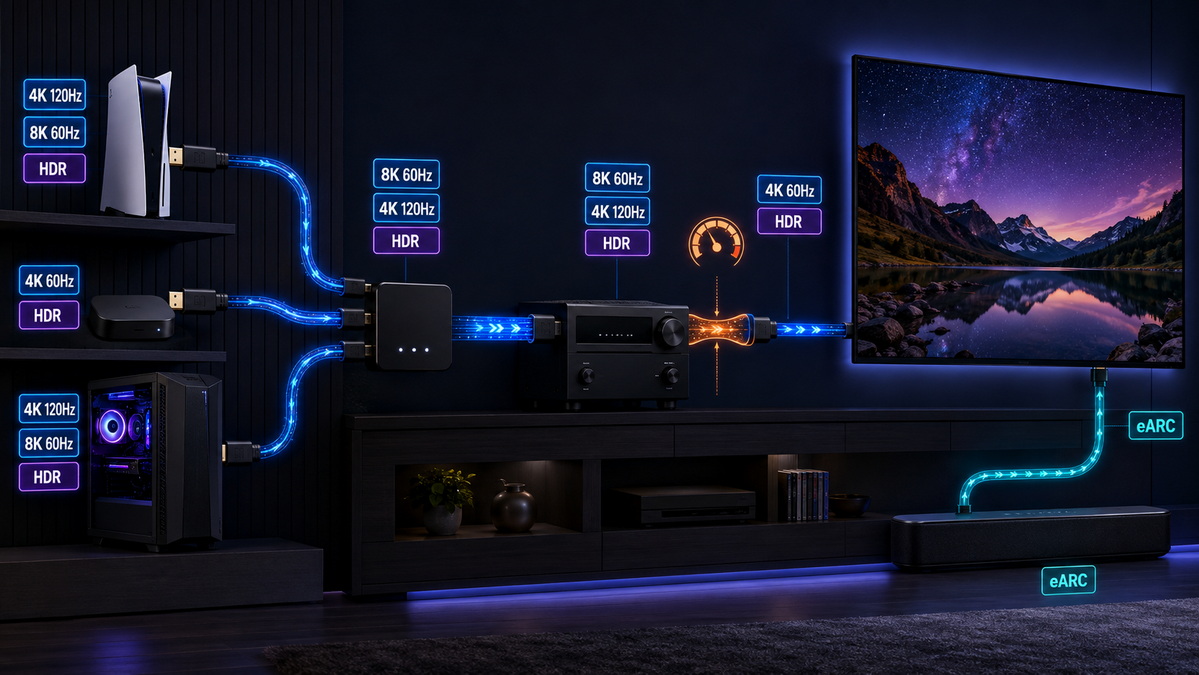
HDR improves contrast between bright and dark areas while allowing richer color and more detailed highlights. HDMI 2.0 is widely used for 4K HDR content, while HDMI 2.1 supports Dynamic HDR in compatible systems.
However, HDR performance depends on the entire setup. Buyers should check:
- Source device HDR output support
- Television or monitor HDR capability
- AV receiver or switch pass-through performance
- Cable bandwidth and transmission quality
- Resolution and refresh-rate setting
- Color depth and chroma setting
- Selected HDR format
A cable can only carry the signal that the connected devices are able to create and display.
ARC allows a television to send audio back to a soundbar or AV receiver through the HDMI cable. This reduces the need for an extra audio cable.
eARC stands for Enhanced Audio Return Channel. It is designed for more advanced audio formats and higher-quality audio transmission in compatible systems.
For a home-theater installation, eARC can be valuable when the TV is the main source hub for streaming apps, game consoles, and media devices. The TV can send audio back to a compatible soundbar or receiver while maintaining a simpler cable layout.
Many buyers search for "HDMI 2.1 cable" or "HDMI 2.0 cable." However, a more accurate approach is to identify the cable by its required performance category.
| Cable category | Target bandwidth | Typical use |
|---|---|---|
| High Speed HDMI Cable | Up to 10.2 Gbps | Full HD, 3D, and 4K at 30Hz |
| Premium High Speed HDMI Cable | Up to 18 Gbps | 4K at 60Hz, HDR, and expanded color |
| Ultra High Speed HDMI Cable | Up to 48 Gbps | 4K at 120Hz, 8K at 60Hz, eARC, and advanced gaming |
A product description should communicate real performance clearly. For example, "Ultra High Speed HDMI Cable, 48 Gbps, designed for 4K at 120Hz and 8K at 60Hz systems" is more useful than a broad statement with no bandwidth, length, or application details.
As cable length increases, high-bandwidth HDMI transmission becomes more difficult. Signal attenuation, impedance variation, electromagnetic interference, connector quality, and assembly precision can all affect stability.
A short passive cable may perform reliably at 48 Gbps. A longer passive cable with the same outer appearance may not achieve the same result unless its materials, conductor structure, shielding, and manufacturing process are carefully controlled.
For longer installations, active copper HDMI cables or active optical HDMI cables may be more appropriate.
Use the following approach when selecting an HDMI cable for a consumer product, commercial installation, private-label range, or OEM program.
- The application is limited to 1080p.
- The display supports 4K only at 30Hz.
- The installation uses older AV equipment.
- Cost-sensitive legacy compatibility is the main priority.
- The product is intended for standard office, education, or basic display use.
- The target application is 4K at 60Hz.
- The system uses mainstream HDR content.
- The cable is for streaming devices, TVs, monitors, or digital signage.
- The project needs reliable 18 Gbps transmission.
- The market does not require 4K at 120Hz or 8K capability.
- The target system supports 4K at 120Hz.
- The product is designed for PS5, Xbox Series X, or gaming PCs.
- The buyer needs 8K at 60Hz capability.
- The installation uses eARC-compatible premium audio equipment.
- The product range is designed for high-end retail, gaming, or advanced AV markets.
1. What resolution and refresh rate must the cable support?
2. What is the required cable length for each SKU?
3. Does the system need 18 Gbps or 48 Gbps transmission capability?
4. Will the cable connect directly to a display, or pass through a receiver, switch, splitter, hub, or adapter?
5. What verification process is required for the target market and intended application?
For overseas brands, wholesalers, and equipment manufacturers, the right HDMI product starts with a detailed specification rather than a generic cable request.
A practical HDMI cable specification should define:
- Required bandwidth level
- Target resolution and refresh rate
- Passive, active copper, or active optical construction
- Cable length and tolerance
- Connector type and plating requirement
- Jacket material and outer diameter
- Shielding structure
- Color and branding requirement
- Packaging style
- Labeling and barcode requirements
- Sample testing method
- Target application and customer group
For example, a gaming accessory brand may require a 2-meter braided Ultra High Speed HDMI cable for 4K at 120Hz systems. A commercial AV supplier may need a 10-meter active optical HDMI cable for a conference-room display. These products may both be called HDMI cables, but they need very different engineering, materials, testing, packaging, and positioning.
Shenzhen Otechkabel Electronic Co., Ltd. produces USB cables, VGA cables, HDMI cables, DVI cables, SATA cables, adapters, hubs, splitters, and switches for international brands, wholesalers, and manufacturers. Product specifications can be developed around the intended usage environment, performance target, cable structure, appearance, packaging, and private-label requirements.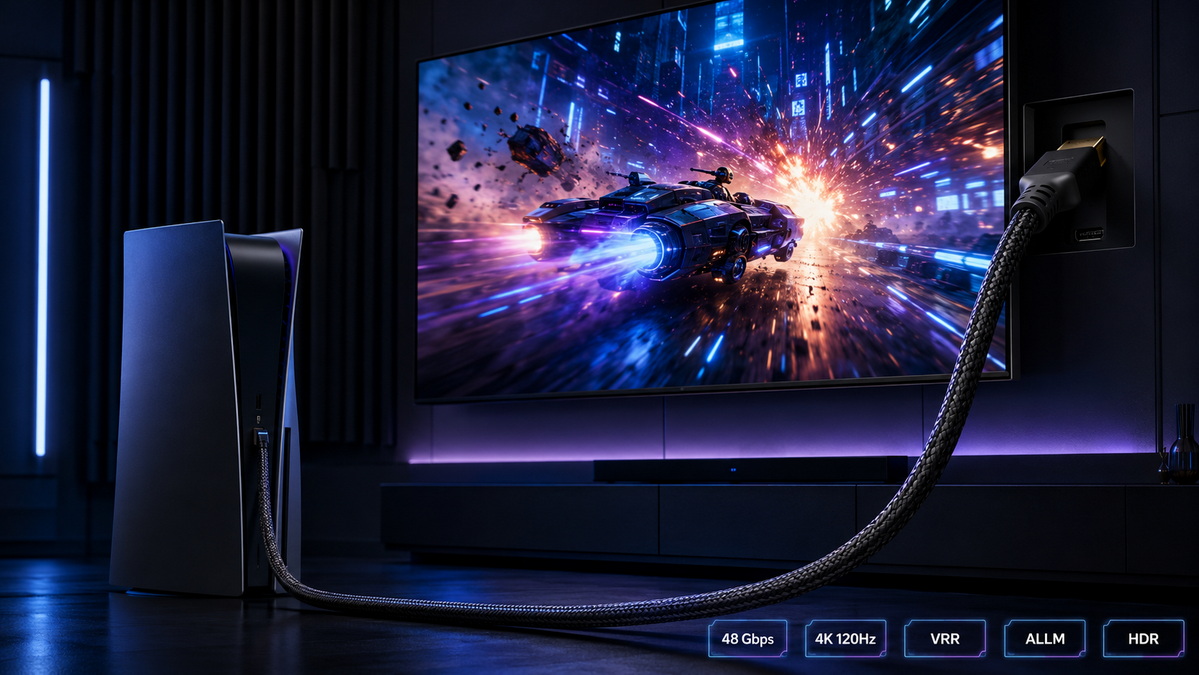
The HDMI 2.1 vs HDMI 2.0 vs HDMI 1.4 decision should begin with the actual system requirement, not simply the newest version number.
HDMI 1.4 remains useful for Full HD, legacy AV equipment, and basic 4K at 30Hz. HDMI 2.0 provides a dependable solution for mainstream 4K at 60Hz, HDR streaming, office displays, digital signage, and standard home entertainment. HDMI 2.1 is the better choice for 4K at 120Hz gaming, 8K at 60Hz content, eARC audio systems, and premium high-bandwidth installations.
The most reliable purchasing approach is to match the cable category, bandwidth, length, and validation standard to the intended use. This helps reduce compatibility claims, unnecessary cost, product returns, and performance problems after installation.
For private-label and OEM HDMI cable programs, clear product specifications and application-based testing are essential to building a cable range that performs consistently in the target market.

Not always. HDMI 2.1 is better for high-bandwidth applications such as 4K at 120Hz gaming and 8K at 60Hz video. For normal 4K at 60Hz streaming, a quality 18 Gbps Premium High Speed HDMI cable is usually sufficient.
Yes. An Ultra High Speed HDMI cable can connect with earlier HDMI devices. The final signal performance will be limited by the lowest-capability device, port, cable, adapter, switch, splitter, or receiver in the connection.
An Ultra High Speed HDMI cable is recommended when using supported 4K at 120Hz modes. The console, display, input port, and any connected AV equipment must also support the required signal format.
No. A 48 Gbps cable can carry the required bandwidth, but it cannot upgrade older equipment. The source device, display, HDMI ports, receiver, switch, and settings must all support 4K at 120Hz.
Premium High Speed HDMI cables are intended for up to 18 Gbps transmission, including 4K at 60Hz and HDR. Ultra High Speed HDMI cables are intended for up to 48 Gbps transmission, including 4K at 120Hz and 8K at 60Hz.
4K at 120Hz requires much more bandwidth than 4K at 60Hz. The issue may be the cable, display port, AV receiver, switch, splitter, adapter, source-device setting, or cable length.
No. Cable quality can vary significantly. Buyers should compare stated bandwidth, cable length, construction, shielding, connector quality, verification process, and supported application rather than relying only on a marketing label..
1. HDMI Licensing Administrator, Inc. [HDMI Cables – Different Cable Types]
2. HDMI Forum. [HDMI Forum Releases Version 2.0 of the HDMI Specification]
3. HDMI Forum. [HDMI Forum Releases Version 2.1 of the HDMI Specification]
4. HDMI Licensing Administrator, Inc. [Premium High Speed HDMI Cable]
5. HDMI Licensing Administrator, Inc. [Ultra High Speed HDMI Cable]
6. HDMI Licensing Administrator, Inc. [What Is the Best HDMI Cable for System Installations]
7. HDMI Forum. [HDMI Forum Announces Version 2.1 of the HDMI Specification]


