


Views: 222 Author: Rebecca Publish Time: 2026-02-10 Origin: Site


Content Menu
● What Is a USB to RS485 Converter?
● USB vs RS485: Why We Need Conversion
>> USB side: host‑centric, short range
>> RS485 side: multi‑drop, long distance
● Internal Working Principle of a USB to RS485 Converter
>> 2. UART to RS485 differential signaling
>> 3. Direction control and data flow
● Key Electrical Concepts: Differential Signaling, Termination, and Biasing
>> Differential signaling on A and B lines
● Typical Application Scenarios for USB to RS485 Converters
>> Industrial automation networks
>> Remote monitoring and SCADA
>> Modbus and building automation
>> Lab, R&D, and instrumentation
● Step‑by‑Step: How to Use a USB to RS485 Converter Safely
● Common Problems and Troubleshooting Tips
● Choosing the Right USB to RS485 Converter and Cable
>> Recommended cable characteristics
● Example Use Case: Modbus Device Commissioning
● Quick Specification Snapshot
● Take the Next Step: Custom USB–RS485 Connectivity for Your Projects
● FAQs: USB to RS485 Converter
>> 1. What is the maximum distance for RS485 communication using a USB to RS485 converter?
>> 2. How many devices can I connect to one USB to RS485 converter?
>> 3. Do I always need to install drivers for USB to RS485 converters?
>> 4. What happens if I reverse the A and B lines?
>> 5. Why are termination resistors important in RS485 networks?
As an industrial cable and connectivity OEM, understanding how a USB to RS485 converter works helps you design more reliable systems and choose the right cables for automation, monitoring, and data collection projects.

A USB to RS485 converter is an interface device that connects a modern USB port on a PC, laptop, or embedded computer to legacy or industrial RS485 networks. It translates USB serial data into RS485 differential signals so engineers can communicate with PLCs, sensors, meters, and controllers over long distances.
Typical features include:
- USB interface with an integrated USB‑to‑UART chip.
- RS485 transceiver supporting 2‑wire half‑duplex communication.
- Support for multiple baud rates within a device‑specific range.
- Protection circuits, such as surge protection and ESD protection, and sometimes lightning‑proof design for industrial environments.
Because RS485 supports long‑distance, multi‑drop communication, USB to RS485 converters are widely used in industrial automation, remote monitoring, building management, and Modbus networks.
USB is a host‑based serial bus designed for short‑distance connections between a computer and peripherals. Key characteristics:
- Point‑to‑point communication between host and device.
- Cable length typically up to several meters for common devices.
- 5 V power and complex signaling handled by a USB controller or interface IC.
Modern laptops often have only USB ports and lack native RS485 interfaces, which creates a compatibility gap for industrial users.
RS485 is a differential, balanced serial standard designed for noisy industrial environments. It is widely used because it offers:
- Two‑wire differential signals, usually labeled A and B, or D+ and D‑.
- Transmission distances up to about 1200 meters with suitable cabling.
- Multi‑drop networking with many devices on a single bus.
- Better noise immunity thanks to differential signaling and proper termination.
USB to RS485 converters bridge these very different physical and logical worlds in a compact module or cable.
Inside the converter, a USB‑to‑serial IC enumerates as a virtual COM port on the host computer. Its responsibilities include:
- Handling USB signaling and protocol.
- Presenting a standard serial interface, often as a COM port, to the operating system.
- Converting USB data packets into UART‑style serial streams on TX and RX lines.
For the user, this looks like a standard serial port that can be configured for baud rate, data bits, stop bits, and parity.
On the RS485 side, a line transceiver converts the single‑ended TX/RX from the UART into differential A/B signals. Its main functions are:
- Driving the differential pair with opposite polarities.
- Receiving differential signals while rejecting common‑mode noise.
- Controlling the direction for half‑duplex communication.
Most USB to RS485 converters work in asynchronous half‑duplex mode, meaning only one side talks at a time on the shared bus.
Because RS485 is often half‑duplex, the converter must control when its driver is enabled or disabled to avoid bus conflicts. This can be done automatically in hardware or via driver control. A typical data flow is:
1. Host application sends serial data through the virtual COM port.
2. The USB‑to‑serial IC converts it to UART TX signals.
3. The RS485 transceiver drives the A/B lines with the corresponding differential signal.
4. Remote RS485 devices read and process the data.
5. When remote devices respond, the RS485 transceiver switches to receive mode, and the converter passes data back through UART to USB.
This layered approach ensures that the host can communicate with RS485 networks using standard serial software without worrying about low‑level signaling.
RS485 uses differential signaling: one line goes high while the other goes low, and the receiver looks at the voltage difference. Benefits include:
- High noise immunity, since common‑mode noise affects both lines similarly and tends to cancel out.
- Reliable communication over long distances and in high‑EMI environments.
To prevent signal reflections on long cables, RS485 buses usually require termination resistors at each end. Best practices include:
- Placing a resistor, typically 120 ohms, between A and B at each end of the main bus.
- Avoiding unnecessary terminations at every node, which can overload the driver.
Biasing resistors ensure a known idle state when no driver is active. They typically pull A high and B low, or the opposite depending on design, preventing the bus from floating and reducing noise‑related false triggering.
For OEM cable design, it is important that the RS485 cable pair is twisted, impedance‑matched, and shielded as needed to complement proper termination and biasing.
In industrial automation, RS485 is widely used to connect PLCs, drives, I/O modules, and sensors over long distances. A USB to RS485 converter allows engineers to:
- Monitor and configure field devices from a laptop.
- Log production data or process parameters.
- Perform diagnostics during commissioning or maintenance.
Remote monitoring systems often use RS485 to aggregate data from meters, environmental sensors, and controllers. The converter acts as an interface between PC or HMI and field devices, enabling:
- Real‑time data acquisition over long distances.
- Integration of legacy RS485 devices into central monitoring systems.
- Upgrading older serial equipment to modern USB‑based infrastructure.
Modbus RTU over RS485 is a common protocol in HVAC, energy metering, and building automation. Using USB to RS485 converters, integrators can:
- Test Modbus registers from a laptop.
- Configure inverters, power meters, and building management controllers.
- Run commissioning tools without dedicated RS485 hardware in the laptop.
In laboratory and R&D environments, USB to RS485 converters connect PCs to data loggers, analyzers, and custom boards. They provide a flexible interface for experimentation and development while keeping the host side simple.
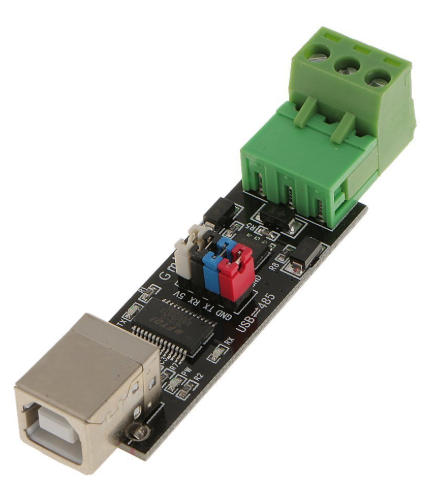
This practical procedure helps engineers and technicians avoid common mistakes when connecting USB to RS485 converters in the field.
1. Check specifications and environment
- Confirm supported baud rates, the maximum number of nodes, and operating temperature range.
- Verify that the converter's isolation and protection levels match your installation conditions.
2. Install drivers if required
- Many converters are plug‑and‑play on modern operating systems, but some require specific drivers from the chip vendor.
- After installation, verify that a new COM port appears in the device manager or equivalent system tool.
3. Wire the RS485 side correctly
- Connect A on the converter to A or the “+” terminal on the device, and B to B or the “−” terminal.
- Connect signal ground when required for a stable reference between devices.
- Ensure the polarity is consistent across all nodes, as reversed A and B is a frequent cause of communication failure.
4. Configure termination and biasing
- Enable or add termination resistors only at the two ends of the main RS485 trunk.
- Check that biasing resistors are present where needed to define a stable idle state on the bus.
5. Set communication parameters in software
- Match baud rate, data bits, stop bits, and parity between the converter's COM port, the master software, and all RS485 devices.
- Ensure the correct COM port is selected in your application and remains fixed for that connection.
6. Test communication and monitor status indicators
- Many industrial converters provide TX and RX LEDs to indicate data flow and simplify diagnosis.
- Send a simple query and check for a valid response before scaling up to multiple nodes or higher data volumes.
Connection issues with USB to RS485 converters are often caused by simple wiring or configuration mistakes. Use this checklist before assuming hardware failure.
- Incorrect COM port
Make sure your software is using the correct COM port assigned to the converter.
- Bad or reversed wiring
Check A and B polarity and ensure there are no loose or damaged wires. Improper wiring is one of the most common causes of communication problems.
- Missing or incorrect termination
Confirm that termination resistors are installed only at the ends of the bus and have the correct value. Over‑termination can overload drivers, while missing termination can cause reflections.
- Driver or operating system issues
Update or reinstall drivers if the converter is not recognized or if it does not create a COM port properly. Try different USB ports if recognition is unstable.
- Baud rate and format mismatch
Ensure that all devices and the converter use the same baud rate, data bits, stop bits, and parity settings. Even a small mismatch can prevent communication.
For more complex issues, using an oscilloscope or protocol analyzer to inspect A and B waveforms can help identify interference, reflections, or voltage level problems.
For brands, distributors, and equipment manufacturers, selecting the right converter and cable combination is crucial for long‑term reliability.
- Isolation and protection
Opto‑isolation and surge protection help protect host equipment in harsh industrial sites and improve safety.
- Supported baud rate and buffer size
Check whether the converter supports the required data rate and provides adequate send and receive buffers for your protocol and data volume.
- Node capacity
Some industrial converters support a high number of nodes on a network. Confirm that the converter specification matches your planned system size.
- Operating temperature and humidity
Ensure the converter is rated for the actual environment, such as extended temperature range and non‑condensing humidity.
- Twisted pair for A and B differential lines to maintain signal integrity over long runs.
- Appropriate impedance for RS485 and matched termination at both ends of the bus.
- Shielding where strong electromagnetic interference is present in the installation.
- Robust connectors and strain relief for frequent plugging and unplugging in industrial settings.
Providing complete USB–RS485 connectivity solutions, including converters and custom RS485 cable assemblies, can significantly improve system stability and user experience.
A typical field scenario illustrates how a USB to RS485 converter works in practice.
- An engineer needs to configure several Modbus RTU power meters installed across a factory floor.
- The meters are connected on a 2‑wire RS485 bus with proper termination at both ends.
- The engineer plugs a USB to RS485 converter into a laptop, connects A and B to the bus, and selects the converter's COM port in Modbus configuration software.
- After setting the correct baud rate, device addresses, and protocol parameters, the engineer reads parameters, updates settings, and logs energy data directly from the laptop.
This combination of USB and RS485 allows modern tools to interact seamlessly with legacy and industrial equipment, reducing commissioning time and improving diagnostic capability.
Use this table for a concise technical overview that buyers and engineers can scan quickly.
| Parameter | Typical Value / Note |
|---|---|
| USB interface | USB Type‑A or Type‑C, plug‑and‑play after driver setup |
| RS485 interface | 2‑wire half‑duplex, terminals labeled A/B or D+/D‑ |
| Baud rate range | Model‑dependent, commonly from low to medium speeds |
| Max communication distance | Up to about 1200 m with suitable RS485 cabling |
| Max nodes on bus | Dozens of devices, sometimes up to around 200 nodes |
| Operating temperature | Industrial‑grade range for harsh environments |
| Driver support | Common desktop operating systems and driver packages |
If you are a brand owner, wholesaler, or equipment manufacturer looking for dependable USB–RS485 connectivity, working with a dedicated cable and assembly producer allows you to match interfaces to your exact application. You can customize USB connector types, RS485 terminals, cable lengths, and protective features so that each assembly fits your devices and installation environment. Reach out to our engineering team to discuss your RS485 network, cabling needs, and OEM branding options, and we will help you design and produce a robust USB–RS485 solution tailored to your products and markets.
Contact us to get more information!
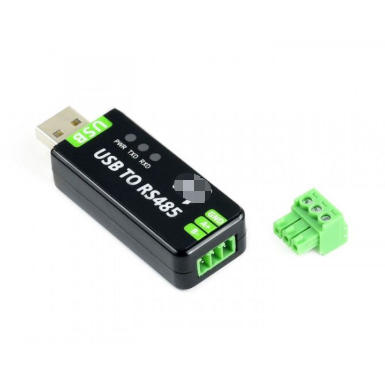
With proper cabling, termination, and transceivers, RS485 networks can reach up to about 1200 meters from the converter to the farthest node. The actual distance depends on cable quality, baud rate, and installation environment.
Many industrial‑grade converters support connecting multiple RS485 devices on a single bus, and some specify a capacity of up to around 200 similar nodes. The exact number depends on transceiver loading, network topology, and device specifications.
Some converters are recognized automatically by modern operating systems, while others use dedicated chips that require driver installation. Without the correct driver, the operating system may not create a usable COM port, and communication will not work.
Reversing the A and B lines usually prevents communication and may cause devices to behave unpredictably. Correcting the polarity of the A and B connections generally restores normal operation, assuming no other faults are present.
Termination resistors at each end of the main bus reduce signal reflections and improve signal integrity. They are especially important on long cables and at higher baud rates, where reflections can easily distort the signal and cause communication errors.


