


Views: 240 Author: Otechkabel Publish Time: 2026-07-21 Origin: Site


Content Menu
>> Sideband and Alternate Mode Pins
● Video Output and Alternate Modes
● Quality Factors in Manufacturing
● Market and Compliance Considerations
● Why USB-C Matters for OEM Projects
● FAQ
USB-C is now one of the most important connector standards in consumer electronics, laptops, accessories, and industrial devices. Its reversible design, compact size, and multi-function architecture have made it the preferred interface for modern connectivity.
But USB-C is often misunderstood. Many users assume that all USB-C products work the same way, yet the actual performance depends on the internal pin configuration, cable construction, power capability, and supported protocols. A cable may charge a phone, transfer data, or output video, but not necessarily all three.
For brand owners, wholesalers, and manufacturers, this difference matters. A clear understanding of USB-C pinout helps reduce compatibility issues, improves product positioning, and supports better sourcing decisions.
USB-C is a connector standard, not a single performance level. The same physical port can support simple charging, standard USB data, fast charging, high-speed data transmission, and video output, depending on how it is designed.
This is why two USB-C cables that look identical can behave very differently. One cable may only support charging and USB 2.0 data, while another may support higher power delivery, faster data rates, and display signals. The connector shape alone does not guarantee function.
A full USB-C connector uses 24 pins arranged symmetrically so the plug can be inserted in either direction. This reversible design is one of the defining advantages of USB-C.
The pins are divided into several functional groups:
- Power pins for charging and device supply.
- Ground pins for return current and stability.
- Configuration pins for orientation detection and power negotiation.
- USB 2.0 data pins for legacy compatibility.
- SuperSpeed differential pairs for higher data rates.
- Sideband pins for alternate functions such as video output.
- VCONN support for active cable electronics.
Each pin group plays a different role, and the final capability depends on how the device and cable are built.
The VBUS pins carry electrical power from the source to the connected device. Depending on the device and power delivery profile, USB-C can support basic charging or much higher charging output.
The GND pins complete the circuit and help maintain safe and stable operation. Good grounding is especially important in high-current applications because it helps reduce instability and electrical noise.
The CC1 and CC2 pins are among the most important parts of USB-C. They detect plug orientation, identify the power role of the connection, and handle negotiation between the source and the sink.
These pins are what make USB-C smart. They allow the system to decide how power should be delivered, whether a cable is properly attached, and what type of connection is being made.
The D+ and D- pins support USB 2.0 communication. They are still widely used because they provide backward compatibility and work in many basic charging and data cables.
Even in modern products, these pins remain important. Some cables use USB-C only for charging and standard data, and in those cases the USB 2.0 lines may be the main data path.
USB-C also includes high-speed differential pairs for advanced data transmission. These lines are used for faster USB standards and other performance-focused applications.
The exact speed depends on the full system design. The cable, host device, and connected accessory must all support the same level of performance. If one part is limited, the entire connection is limited.
The SBU1 and SBU2 pins are used for sideband functions. These are especially important for alternate modes such as video output.
In many real-world applications, these pins help support display-related signals or accessory functions. They are one of the reasons USB-C can replace multiple older connectors with a single interface.
USB-C also uses VCONN in certain cable types to power active electronics inside the cable. This matters for advanced or e-marked cables that need internal identification or signal handling.
For manufacturers, this means cable design is not just about wire count. It also affects identification, compatibility, and electrical behavior.
USB-C charging starts with connection detection through the CC pins. Once the device and charger recognize each other, they can negotiate the available power profile.
Basic USB-C charging may begin at standard low-power levels, while advanced power delivery can support much higher output for laptops, monitors, and docking devices. The actual charging result depends on the cable rating, charger capability, and device requirement.
This is why a USB-C cable should never be selected by appearance alone. A visually identical cable may have a very different internal structure and power capacity.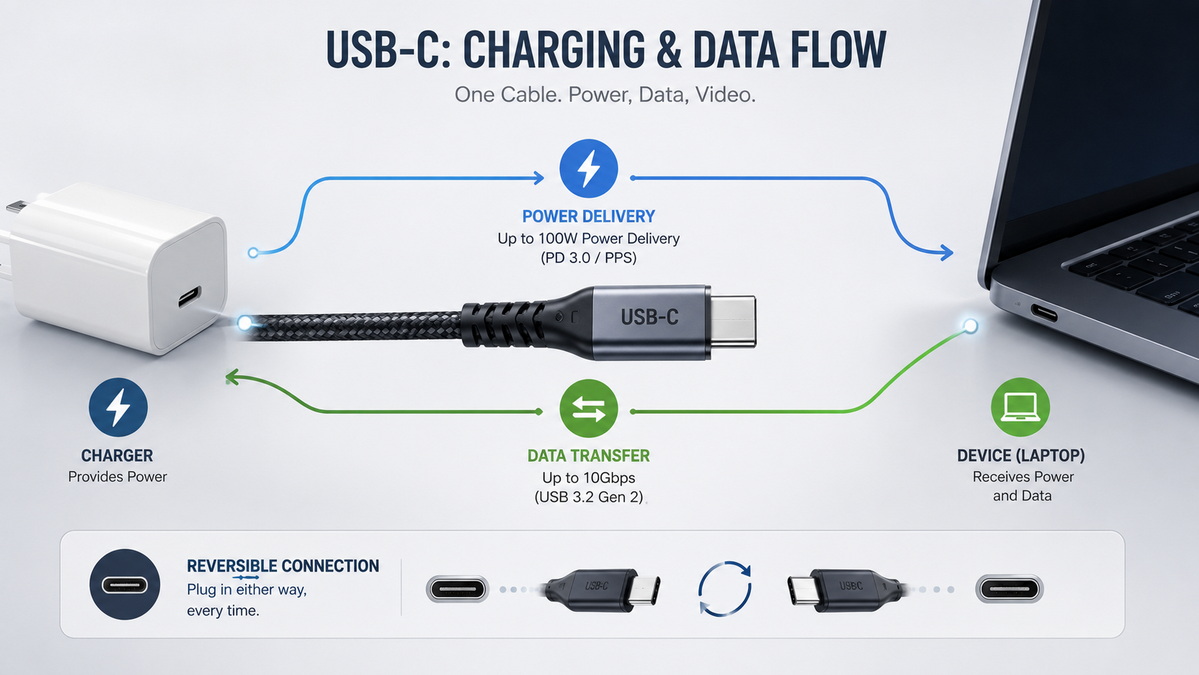
USB-C supports more than one type of data transmission. The simplest cables support only USB 2.0 data, while more advanced cables support faster high-speed transmission.
For buyers and engineers, the key point is that USB-C is not automatically high-speed. If the application requires external storage, high-performance docking, or other demanding use cases, the cable and port must be specified accordingly.
In practical use, the final speed is determined by the lowest-performing part of the connection. That means a high-speed port still cannot perform at full capacity if the cable is not designed for that level.
One of USB-C's most useful features is its ability to carry video signals through alternate modes. This allows a single cable to handle charging, data, and display functions in certain systems.
Display output is common in laptops, monitors, docking stations, and multi-function accessories. However, video support is not universal. A cable must be built to support the required signal paths, and the connected devices must also support the same mode.
This is one of the most common reasons for customer confusion. A USB-C cable that charges a device perfectly may still fail to support video output.
Not all USB-C cables are designed for the same use case. Choosing the right one requires matching the cable to the actual product requirement.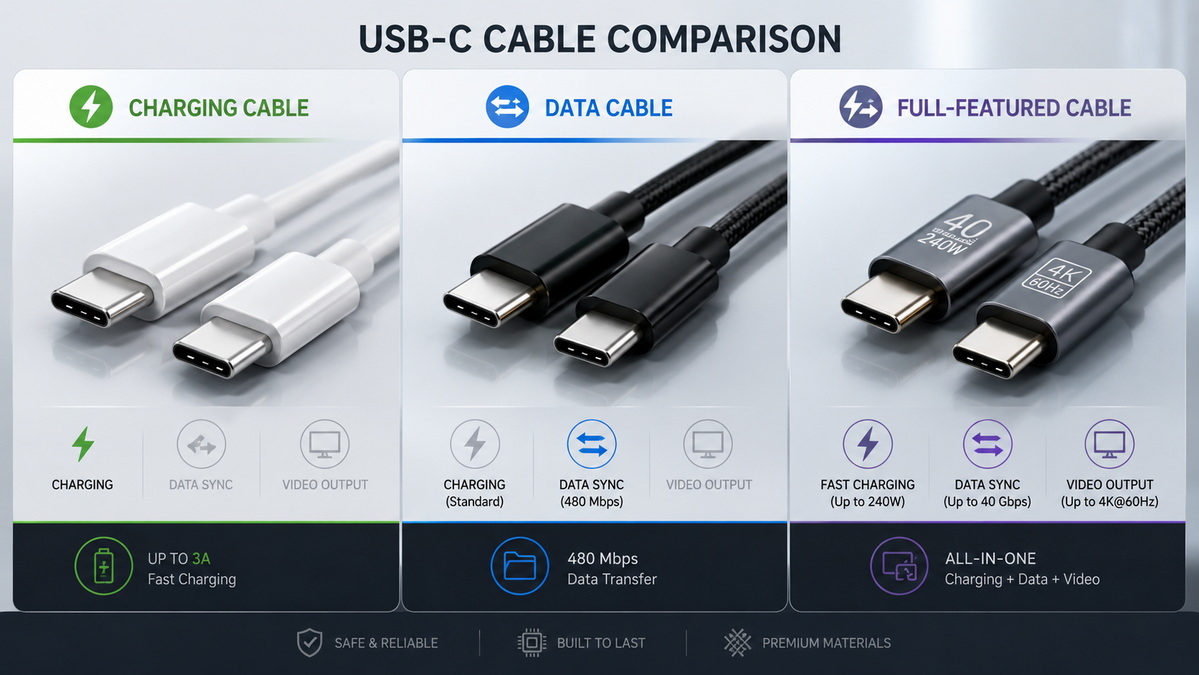
| Cable Type | Best Use | Common Limitation |
|---|---|---|
| Charging cable | Phones, small accessories, power-only use | May not support fast data or video |
| Data cable | Device sync, storage, general connectivity | May not support higher wattage |
| High-power cable | Laptops, docks, monitors | May require stronger construction or identification support |
| Full-featured cable | Multi-purpose devices | Higher cost and stricter quality control |
For sourcing teams, this table is a useful starting point when matching product design to market demand.
Before choosing a USB-C cable for OEM or wholesale use, it is important to confirm the following:
- Required charging wattage.
- Required data speed.
- Whether video output is needed.
- Whether the cable must support active electronics.
- Whether the product will be used with phones, laptops, docks, or industrial devices.
- Whether the destination market has any compliance or labeling requirements.
These questions help prevent product mismatch and reduce after-sales complaints.
The quality of a USB-C cable depends on more than just the connector shell. Internal conductor quality, shielding, soldering consistency, overmolding, strain relief, and test control all affect final performance.
Poor construction can cause unstable charging, weak data transfer, intermittent video support, or early wear at the connector ends. This is especially important in OEM supply, where the buyer's brand reputation depends on the end-user experience.
A reliable manufacturing process should include clear specification control, consistency checks, and final electrical testing before shipment.
USB-C has become more important in international markets because many regions now expect it as the standard charging interface for a wide range of products. That means manufacturers and importers must pay attention not only to product performance, but also to documentation and labeling.
For export-oriented buyers, compliance clarity helps reduce risk and improves market acceptance. It also makes it easier for brands to position their products with confidence in competitive markets.
For OEM projects, USB-C is not just a connector choice. It is part of the user experience, the certification strategy, and the product's commercial positioning.
A good OEM partner should help define:
- The required cable function.
- The right internal construction.
- The proper power and data support.
- The packaging and labeling language.
- The testing standard before mass production.
This approach saves time and creates a better result for both the brand and the end customer.
USB-C pinout knowledge is essential for anyone involved in cable sourcing, accessory development, or OEM product planning. It helps ensure the right match between device requirements and product performance.
Shenzhen Otechkabel Electronic Co., Ltd can support custom development for USB cables, adapters, hubs, splitters, and switches tailored to the needs of overseas brands, wholesalers, and manufacturers.
USB-C pinout is the internal arrangement of pins inside a USB-C connector. It determines how the connector handles power, data, orientation, and alternate functions.
No. Some USB-C cables support charging only, while others support both charging and data transfer. The actual capability depends on the internal wiring and design.
No. USB-C is the connector type, while USB 3.0 is a data standard. A USB-C cable can support different USB standards depending on how it is built.
Yes, but only if the port and cable support the relevant alternate mode. Not every USB-C product includes video support.
Higher-priced cables often use better materials, support higher power or data levels, and include additional internal components needed for advanced features.
6. How should an OEM choose a USB-C cable?
The choice should be based on power needs, data needs, video support, cable length, and the final product application.
1. USB-IF. Cables and Connectors.
[https://www.usb.org/cable_connector]
2. USB-IF. Document Library.
[https://www.usb.org/documents]
3. USB-IF. USB Type-C Specification Materials.
[https://www.usb.org/sites/default/files/USB%20Type-C%20Spec%20R2.0%20-%20August%202019_0.pdf]
4. IEC. IEC 62680-1-3:2026 USB Type-C Cable and Connector Specification.
5. European Commission. EU common charger rules.
6. VESA. DisplayPort Alt Mode over USB Type-C.
7. VESA. DisplayPort on USB Type-C.
[https://www.displayport.org/pr/vesa-brings-displayport-new-usb-type-c-connector/]
8. Texas Instruments. An Engineer's Guide to USB Type-C.
[https://www.ti.com/lit/eb/slyy228/slyy228.pdf]
9. Microchip. Introduction to USB Type-C.
10. Cambrionix. USB Type-C Pinout.


