


Views: 222 Author: Otechkabel Publish Time: 2026-05-26 Origin: Site


No, a console cable is not the same as a standard RJ45 Ethernet cable. They may use the same RJ45 connector shape, but the wiring, function, and typical use cases are very different. [pcm-cable]

From my own work helping overseas buyers source USB to RJ45 console cables for Cisco and other network devices, this is one of the most common points of confusion I see. The short answer is: [teksource.com]
- A console cable is designed for serial console access to routers, switches, firewalls, and other "headless" devices. [reddit]
- An RJ45 Ethernet cable (Cat5e/Cat6 patch cord) is designed for network data transmission over Ethernet. [pcm-cable]
Even when both ends use an RJ45 plug, the electrical signals and pin assignments are completely different, so you must never treat them as interchangeable. [moxa]
A console cable is a special-purpose cable used to connect a PC, laptop, or USB port to the console port of a network device for configuration and troubleshooting. [reddit]
Typical features:
- One end: RJ45 console connector (or proprietary RJ45-style serial port) [moxa]
- Other end: DB9 serial or USB (USB‑A / USB‑C) [teksource.com]
- Function: low‑speed serial communication (terminal access), not Ethernet [pcm-cable]
- Use case: Initial setup, password recovery, OS upgrades, and out‑of‑band management on routers, switches, and industrial devices. [reddit]
In practice, a console cable replaces older RS‑232 DB9 serial cables and lets technicians plug directly into the console port from modern laptops. [reddit]
RJ45 is a connector/interface standard, not a cable type by itself. It is most commonly used for: [pcm-cable]
- Ethernet twisted‑pair network cables (Cat5e, Cat6, Cat6a, etc.)
- Standard LAN connections between PCs, switches, routers, and wall outlets [pcm-cable]
A typical Ethernet cable with RJ45 connectors at both ends carries high‑speed network data following standards such as 100BASE‑TX or 1000BASE‑T. [pcm-cable]
So while a console cable might use an RJ45 plug on one side, it is not an Ethernet cable. [pcm-cable]
To help engineers, buyers, and installers avoid mistakes, here is a clear side‑by‑side view:
| Aspect | Console cable | RJ45 Ethernet cable |
|---|---|---|
| Primary purpose | Serial console access for device configuration and management pcm-cable | Ethernet data transmission in a local network pcm-cable |
| Typical connectors | RJ45 (console) ↔ DB9, or RJ45 ↔ USB pcm-cable | RJ45 ↔ RJ45 (both ends) pcm-cable |
| Signal type | Serial (e.g., RS‑232‑like) low‑speed text terminal reddit | Differential Ethernet signal (100/1000 Mbps, etc.) pcm-cable |
| Pinout | Custom / vendor‑specific mapping for serial signals moxa | Standard T568A/B pinouts for Ethernet pairs moxa |
| Typical speed | Very low (e.g., 9600 bps or similar) | Fast (100 Mbps, 1 Gbps, or higher) |
| Use in production traffic | No, used only for setup / troubleshooting pcm-cable | Yes, carries actual network traffic pcm-cable |
| Interchangeable? | Not interchangeable with Ethernet patch cord reddit | Not suitable for console port unless specifically designed |
This is why you cannot simply plug any RJ45‑RJ45 cable between a console port and a device and expect it to work. [moxa]
In field deployments, we often see three recurring issues:
1. Using a standard Ethernet patch cable as a console cable
- Network engineers sometimes assume "RJ45 = RJ45," grab a Cat6 patch cord, and connect a console port to a laptop adapter.
- This fails because console ports use different pin assignments and carry serial signals, not Ethernet signals. [moxa]
2. Using a USB‑to‑RJ45 Ethernet adapter as a console cable
- A USB‑to‑RJ45 network adapter is an external NIC, not a console interface. [reddit]
- It expects Ethernet signaling and will not understand serial console data from a router or switch. [reddit]
3. Vendor‑specific RJ45 console pinouts
- Brands like Cisco and industrial manufacturers often have unique pinouts for RJ45 console ports. [moxa]
- A generic straight‑through RJ45 cable may not align the correct TX/RX/GND pins, so communication fails even though the connectors fit. [moxa]
When you are planning OEM or bulk purchases, these details directly affect compatibility, return rates, and support tickets.
From a technician's perspective, using a console cable is a simple, repeatable workflow:
1. Connect the console end
- Plug the RJ45 console connector into the console port of the router, switch, firewall, or industrial controller. [moxa]
2. Connect to the PC
- Use the USB or DB9 end on your laptop or terminal server.
- With modern laptops, USB‑A or USB‑C console cables are typically the easiest. [teksource.com]
3. Install drivers (for USB)
- Many USB console cables use standard USB‑to‑serial chipsets; some devices require a driver for the OS to detect the COM port. [reddit]
4. Open a terminal application
- Use tools like PuTTY, Tera Term, or similar software.
- Configure the correct serial settings (e.g., 9600 8N1 is common, but always confirm vendor documentation). [reddit]
5. Access device CLI
- Once connected, you can perform initial configuration, backup/restore, firmware updates, or troubleshooting directly via text‑based CLI. [reddit]
This is very different from connecting via SSH over Ethernet, which requires the network stack to be already configured.
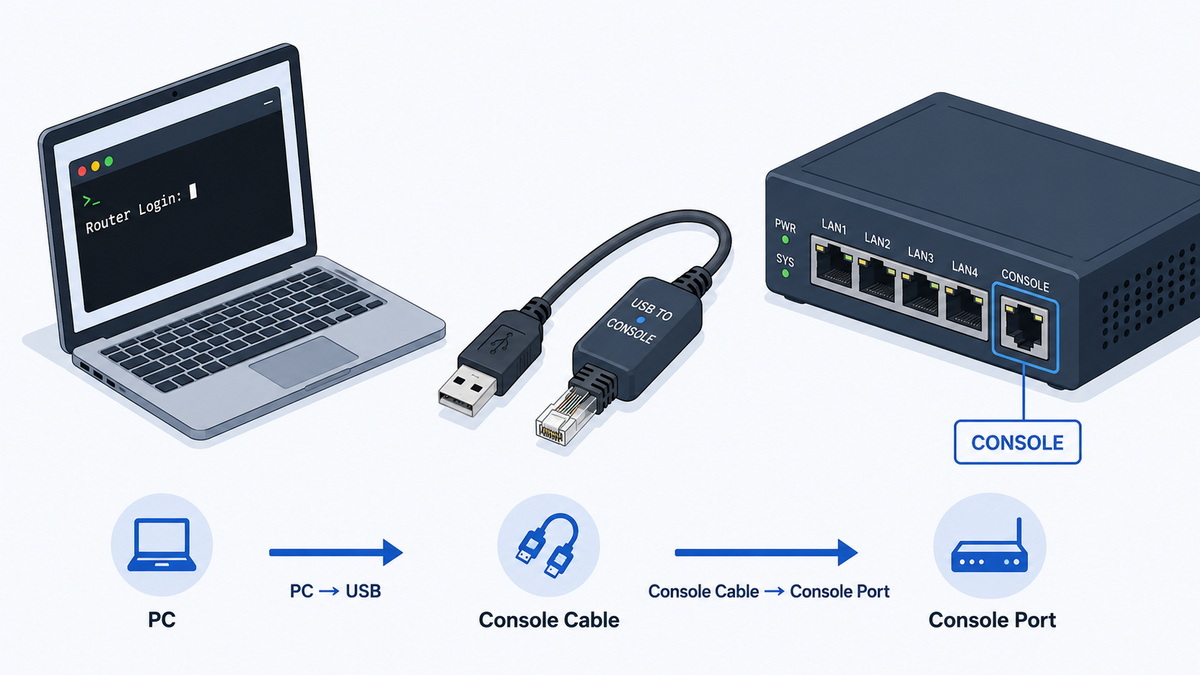
- Commissioning a new router/switch with no IP configuration yet [moxa]
- Recovering a device after configuration errors or firmware issues
- Managing out‑of‑band in data centers or remote cabinets
- Working on industrial equipment that exposes only a serial console port [moxa]
- Connecting PCs, servers, and switches in a LAN
- Running production network traffic (office, factory, or data center)
- Uplink connections between switches, routers, and firewalls
- Connecting to PoE devices like IP cameras, APs, and VoIP phones [pcm-cable]
In other words: console is for management; RJ45 Ethernet is for live traffic. [pcm-cable]
Based on feedback from overseas installers and OEM customers, here are practical best practices:
- Always read the device labeling. Look for "Console," "Mgmt," or a specific icon; do not assume any RJ45 port is Ethernet. [moxa]
- Match the cable to the port type. RJ45 "Console" ≠ RJ45 "LAN." Use the correct console cable model the manufacturer recommends. [moxa]
- Avoid random RJ45‑RJ45 combinations. Many console cables are not straight‑through; they have carefully designed pinouts. [moxa]
- Standardize on USB console cables. For global teams, stocking USB‑to‑RJ45 console cables reduces compatibility issues with laptops (no legacy COM port). [jin-hua.com]
- Label your cables. Mark console cables clearly to prevent colleagues from accidentally using them as network patch cords (or vice versa).
These habits save time during commissioning and reduce the risk of misdiagnosing a simple cable mismatch as a device failure.
As an OEM supplier of USB, VGA, HDMI, DVI, SATA, and network‑related cables, we see three common requirements from overseas brands and distributors: [sana-commerce]
1. Vendor‑specific pinouts and firmware compatibility
- Large brands often require custom pin mappings tailored to their routers, industrial gateways, or serial devices. [moxa]
- We work from the customer's wiring diagram to ensure exact pinout matching, which is critical for reliable console access.
2. Mechanical and environmental robustness
- For data centers, cables must be flexible yet durable for frequent plugging and unplugging.
- For industrial or outdoor cabinets, jackets often need stricter temperature and bending radius performance.
3. Branding and certification
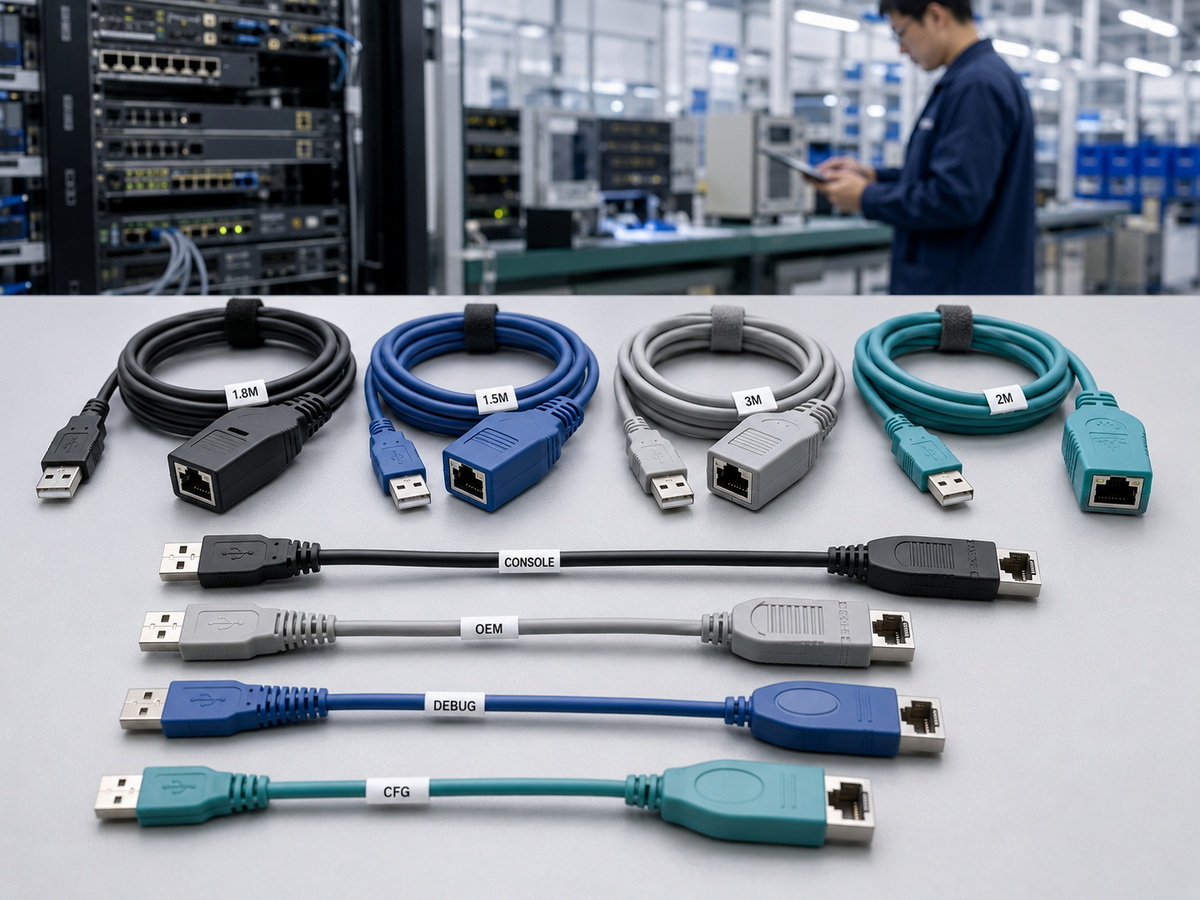
- OEM customers typically request custom overmolds, color coding, logos, and labeling to match their device portfolio.
- Depending on the target markets, we help them meet RoHS and other regulatory requirements.
Well‑designed console cables lower the overall total cost of ownership because they reduce installation time, avoid incompatibility, and extend lifecycle.
If you are a brand owner, wholesaler, or device manufacturer, use this simple checklist when defining your console cable specification:
1. Confirm the device console port type
- RJ45, USB‑mini, USB‑C, or proprietary connector?
- If it is RJ45, ask for the exact pin assignment (TX, RX, GND, and handshaking lines). [moxa]
2. Define the host side
- Which interface will your end users most likely have: USB‑A, USB‑C, or legacy DB9?
- Many customers now prefer a USB‑A or USB‑C to RJ45 console cable as a single integrated solution. [jin-hua.com]
3. Select length and jacket type
- Typical console lengths: 1.5 m, 2 m, 3 m, depending on racks and cabinets. [jin-hua.com]
- Choose jacket materials and flexibility according to your installation environment.
4. Plan for labeling and documentation
- Ask your OEM partner to print part numbers or port icons directly on the cable ends.
- Provide a one‑page "How to use this console cable" guide in your product manual to reduce support requests.
A structured approach like this turns the console cable from a small accessory into a value‑adding part of your device ecosystem.
When engineers land on a product or knowledge page about console cables, they typically look for three things: [midsummer]
- Clear answer to: "Can I use this instead of my RJ45 cable?"
- Simple diagrams or photos showing which port is which and how to connect
- A direct link to order the correct cable model or contact an OEM partner
To enhance user experience, consider adding:
- A simple line diagram showing PC → USB → console cable → router console port
- A second diagram comparing console port vs Ethernet port on a typical router front panel
- A short 30–60 second video demonstrating how to connect, which terminal settings to use, and what the device login screen looks like
These visual aids make the difference between a confusing support article and a confident, self‑service setup experience. [lsdigital]
If you are a brand owner, wholesaler, or device manufacturer looking for reliable USB to RJ45 console cables or other custom cable assemblies, you can partner with a specialized China‑based producer. As an experienced OEM supplier of USB, VGA, HDMI, DVI, SATA, and network cables, we help overseas customers design, prototype, and mass‑produce console and Ethernet cables tailored to their devices and markets. [robertsiegers]
You can prepare your pinout requirements, preferred connectors, and order volume, then reach out for OEM quotations, samples, and technical support to ensure your customers always have the right cable for the right port.
No. A standard RJ45 Ethernet cable is wired for Ethernet signals, while console ports use serial pinouts and different signaling, so they are not interchangeable. [pcm-cable]
No. A USB‑to‑RJ45 network adapter is an external Ethernet NIC, but a console cable is a USB‑to‑serial solution that just happens to use an RJ45 connector on the console side. [reddit]
RJ45 console ports are widely deployed on existing routers, switches, and industrial devices, and manufacturers value backward compatibility and standardized tooling. [moxa]
In most cases, nothing will work: the signals and pinouts do not match Ethernet requirements, so no network link is established. [pcm-cable]
Common lengths are around 1.5–3 meters to comfortably reach from a laptop or console server to the rack without excessive slack, but final choice depends on your cabinet layout. [teksource.com]
1. PCM – "Is console cable the same as RJ45?"
[https://www.pcm-cable.com/info/is-console-cable-the-same-as-rj45-101938960.html] [pcm-cable]
2. Reddit – "What's the difference a console cable (USB to RJ45) vs a USB to RJ45 network adapter?"
[https://www.reddit.com/r/HomeNetworking/comments/t83q4u/whats_the_difference_a_console_cable_usb_to_rj45/] [reddit]
3. Moxa – "How to connect NPort RJ45 serial port to Cisco console port?"
[https://www.moxa.com/en/support/product-support/product-faq/how-to-connect-nport-rj45-serial-port-to-cisco-console-port] [moxa]
4. Google Search Central – "Creating helpful, reliable, people‑first content"
[https://developers.google.com/search/docs/fundamentals/creating-helpful-content] [developers.google]
5. LS Digital – "E‑E‑A‑T Guidelines 2025: How to Build Google‑Friendly Content"
[https://www.lsdigital.com/blog/e-e-a-t-guidelines-2025/] [lsdigital]
6. Midsummer Agency – "SEO Content Strategy: Best Practices for Content Creation"
[https://midsummer.agency/blog/seo-content-strategy/] [midsummer]
7. BCM Marketing – "SEO strategies for industrial companies"
[https://www.bcm.marketing/en/bcm-blog/seo-marketing-b2b/] [bcm]
8. USB to RJ45 console cable example listing
[https://www.teksource.com.tw/products-detail/USB-to-RJ45-CONSOLE-Cable-1.5m-i.68641] [teksource.com]
9. USB console cable product example
[https://jin-hua.com.tw/webc/html/product/show.aspx?num=33474] [jin-hua.com]
10. YouTube – "7 Proven E‑E‑A‑T Strategies to Rank Higher"
[https://www.youtube.com/watch?v=fzH-P1feVz8] [youtube]


