
Views: 222 Author: Rebecca Publish Time: 2026-02-11 Origin: Site


Content Menu
● Why Console Cables Matter in Modern Networks
● Core Characteristics of Console Cables
● Common Console Interface Types
>> USB and USB-to-Serial Solutions
● Key Console Cable Types and Use Cases
● Typical Applications of Console Cables
● How to Use a Console Cable Step by Step
>> 1. Identify the Console Port
>> 2. Select the Correct Console Cable
>> 3. Install Drivers for USB Solutions
>> 4. Configure Terminal Emulation Software
>> 5. Connect, Log In, and Start Configuration
● Console Cables vs Ethernet Cables
● Expert Tips to Choose the Right Console Cable
● Integrating Console Cables Into a Broader Connectivity Portfolio
● Take the Next Step: Customize Your Console Cable Solution
● Frequently Asked Questions (FAQ)
>> 1. What is a console cable used for?
>> 2. Can I use a normal Ethernet cable as a console cable?
>> 3. What are the most common console cable types?
>> 4. What serial settings should I use for a console session?
>> 5. Do USB console cables need drivers?
A console cable is a special-purpose cable used to connect a computer or terminal directly to the console or management port of a network device such as a router, switch, firewall, or wireless controller.
Unlike Ethernet cables that carry user data across a LAN, console cables transmit low-speed configuration commands and system messages between your PC and the device's command-line interface (CLI).
Network engineers rely on console cables for initial configuration, troubleshooting, and device recovery when normal IP-based access (Telnet, SSH, or web interface) is unavailable.
Because they provide out-of-band access, console connections remain available even if routing, switching, or security policies are misconfigured.

Console cables are still essential even in highly automated and cloud-managed networks.
They play a critical role whenever reliable, low-level access to infrastructure devices is required.
Typical situations include:
- First-time setup of routers, switches, and firewalls.
- Recovery of devices that are misconfigured, locked out, or unreachable over the network.
- Firmware upgrades and low-level diagnostics in data centers and enterprise wiring closets.
- Secure local access in high-security environments where remote management is restricted.
For brand owners, wholesalers, and OEM partners, offering reliable console cables as part of product bundles or optional accessories helps create a complete configuration solution for end users and reduces support costs.
Console cables differ from standard patch cords in several key aspects: protocol, pinout, and connectors.
- Protocol: Traditional console links use RS-232 style serial communication with simple transmit and receive lines.
- Pinout: Many console cables use a “rollover” pinout where pin 1 on one side connects to pin 8 on the other, pin 2 to pin 7, and so on.
- Connectors: Typical combinations include RJ45, DB9, DB25, and USB-A or USB-C, depending on the device and host interface.
Because of these differences, a console cable cannot be treated as an Ethernet or standard USB data cable, even if the connector looks similar.
Many enterprise routers and switches use an RJ45 console interface labeled “CONSOLE”.
In this case, the console cable usually has:
- One RJ45 plug for the device console port.
- Either DB9, USB-A, or USB-C on the PC side via a direct cable or adapter.
This type of interface is widely adopted by network equipment vendors and is common in enterprise and carrier environments.
Older PCs and some industrial systems still provide DB9 or DB25 serial ports.
To connect these hosts to modern network devices, a DB9-to-RJ45 or DB25-to-RJ45 console cable is often used, typically with a rollover pinout.
These cables are useful when managing legacy systems or when industrial controllers still rely on hardware serial ports for reliability.
Modern laptops rarely include native RS-232 serial ports, so USB console cables and USB-to-serial adapters have become standard.
Common options include:
- USB-A or USB-C to RJ45 console cable with an embedded USB-to-serial chipset.
- USB-A to DB9 adapter combined with an RJ45-to-DB9 rollover console cable.
USB console cables are convenient, portable, and compatible with many operating systems, making them a preferred choice for field engineers.
An RJ45-to-USB console cable integrates a USB-to-RS-232 chipset and an RJ45 rollover connection in a single assembly.
Typical applications include:
- Direct connection from a USB port on a laptop to a Cisco-style RJ45 console port.
- Eliminating the need for separate DB9 adapters and legacy serial hardware.
This type of cable is ideal for technicians who frequently move between sites and need a simple, all-in-one tool.
RJ45-to-DB9 console cables are widely used with routers, switches, and firewalls that are configured from PCs with DB9 serial ports or via USB-to-DB9 adapters.
They are typically built as:
- 8-core shielded cables to reduce interference.
- Rollover wiring to match common vendor console pinouts.
These cables remain popular in environments where older desktop machines or dedicated console servers are still in use.
From the PC perspective, this is generally seen as a DB9-to-RJ45 cable, although physically it is the same family of rollover console cable with connectors reversed.
The DB9 female side attaches to the PC serial port, while the RJ45 side connects to the device console port.
Such assemblies are common in lab environments and service centers that maintain mixed generations of networking hardware.
Console cables are used whenever direct serial access to a device is required.
They ensure that administrators can always reach the device, even when network services are unavailable.
Common applications include:
- Initial configuration of switches and routers in enterprises, data centers, and service providers.
- Local troubleshooting when remote management interfaces are unreachable or disabled.
- Recovery after firmware upgrade failures or configuration errors.
- Configuration of firewalls and security appliances that boot with console-only access by default.
Because not all managed switches include a console port, network teams often standardize on models that do provide it to simplify device management across the entire lifecycle.
Locate the port labeled “CONSOLE” or “MGMT” on the router, switch, or firewall.
Check whether it uses RJ45, USB, or another connector type before you select the cable.
Choose the cable according to the device and your computer:
- For RJ45 console ports and laptops with only USB ports, use an RJ45-to-USB console cable.
- For RJ45 console ports and PCs with DB9 serial ports, use an RJ45-to-DB9 rollover cable.
- If your PC only has USB and you already have a DB9 console cable, add a USB-to-DB9 adapter.
This ensures that both ends of the link can physically connect and communicate correctly.
Many USB console cables require drivers for the embedded USB-to-serial chipset, especially on Windows systems.
Modern operating systems often install these drivers automatically, but downloading the latest version from the manufacturer usually improves reliability and compatibility.
Use a terminal program such as PuTTY, Tera Term, SecureCRT, or similar tools.
Typical serial settings are:
- Speed (baud rate): 9600 bps
- Data bits: 8
- Parity: None
- Stop bits: 1
- Flow control: None
These values match the default console parameters on many routers, switches, and firewalls.
Connect the console cable between the device and your computer, then open the serial session on the correct COM port.
Press Enter a few times to display the device prompt, log in with appropriate credentials, and proceed with configuration, diagnostics, or firmware operations.
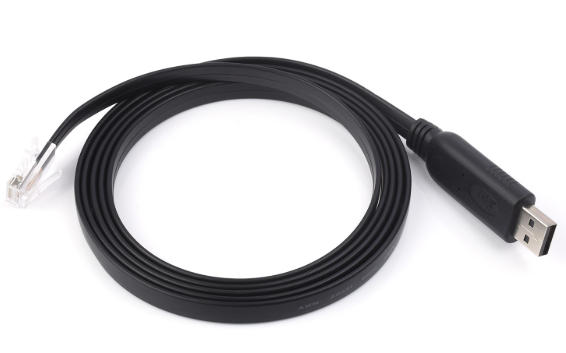
Although RJ45 connectors are used for both console and Ethernet cables, their design and purpose are completely different.
Confusing the two can lead to unnecessary troubleshooting and wasted time.
Key differences include:
| Aspect | Console Cable (RJ45) | Ethernet Cable (RJ45) |
|---|---|---|
| Primary purpose | Management and configuration via command-line interface | Data transmission across local or wide area networks |
| Communication type | Serial communication similar to RS-232 | Ethernet frame transport according to IEEE 802.3 |
| Typical pinout | Often rollover or null-modem style wiring | Straight-through or crossover twisted-pair wiring |
| Interchangeable? | Cannot be used as a network patch cable | Cannot replace a console cable for device management |
| Typical data rate | Low speed (for example 9600 or 115200 bps) | High speed (for example 100 Mbps, 1 Gbps, or higher) |
Using an Ethernet patch cord in a console port, or a console cable in a standard network port, will not establish a valid link and can confuse less experienced technicians.
When selecting console cables for professional environments or OEM projects, consider the following points:
- Device portfolio: Match cable types and connectors to the most common interfaces across your routers, switches, and security appliances.
- Host environment: For modern laptop fleets, prioritize USB console cables with stable driver support for major operating systems.
- Pinout compatibility: Confirm that rollover wiring and pin assignments meet Cisco-style or other platform requirements.
- Cable quality: Choose shielded 8-core designs to minimize interference and improve signal integrity in dense racks and noisy electrical environments.
- Lifecycle cost: One-piece USB-to-RJ45 console cables reduce adapter loss and simplify inventory and spare management.
By standardizing on a small set of well-chosen console cable types, you can make on-site work more efficient and reduce configuration errors.
Console cables integrate naturally into a broader connectivity portfolio that includes USB, VGA, HDMI, DVI, SATA, and other signal cables.
For manufacturers and brand owners, this creates an opportunity to deliver a consistent, unified cabling ecosystem.
With the right production capabilities, you can:
- Offer color-coded management cables to distinguish console connections from standard network links.
- Provide custom lengths, labeling, and branding for system integrators and data center builders.
- Create bundled product sets that include devices, console cables, and adapters in a single package.
This approach turns console cables into value-added accessories that support seamless device deployment and long-term maintenance.
If you are a brand owner, wholesaler, or equipment manufacturer looking for reliable console cable solutions, now is the right time to standardize your management cabling.
By working with a dedicated cable producer, you can design and manufacture custom RJ45, DB9, and USB console cables tailored to your device platforms, packaging needs, and regional markets.
You can request private-label options, custom pinouts, special lengths, and bulk packaging configurations that match your deployment scenarios.
Contact our team to discuss your console cable requirements and receive a tailored quotation for OEM and large-volume projects that support your global growth.
Contact us to get more information!
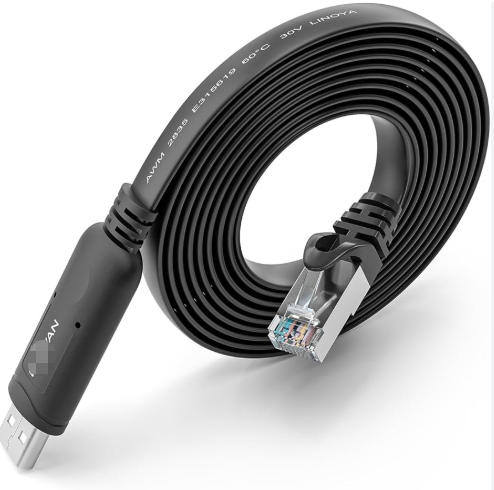
A console cable connects a PC or terminal to the console port of a router, switch, firewall, or similar device so that administrators can configure, manage, and troubleshoot it through a command-line interface.
It is the primary tool for initial setup and for recovery when network-based access is not available.
No, a normal Ethernet cable cannot replace a console cable.
Although both may use RJ45 connectors, console cables are wired for serial communication and follow different electrical and pinout characteristics than Ethernet patch cables.
The most common console cable types are RJ45-to-USB console cables, RJ45-to-DB9 rollover cables, and DB9-to-RJ45 cables used with USB-to-serial adapters.
These variations cover the typical combinations of device console ports and host interfaces found in modern networks.
Most network devices default to the following serial settings for console sessions: 9600 bps, 8 data bits, no parity, 1 stop bit, and no flow control.
If a connection does not display readable output, verify these parameters and consult the device documentation.
In many cases, USB console cables require drivers for the USB-to-serial chipset to function properly, especially on Windows systems.
While modern operating systems can often install drivers automatically, using the latest vendor-provided drivers usually enhances stability and compatibility.
1. https://www.pcm-cable.com/news/brief-introduction-to-console-cable-58158279.html
2. https://ca.pcm-cable.com/news/brief-introduction-to-console-cable-65934736.html
3. https://ascentoptics.com/blog/console-cable/
4. https://blog.j2sw.com/data-center/what-is-a-console-cable-a-guide-to-understanding-its-purpose-and-use/
5. https://www.cablematters.com/Blog/Networking/console-cables
6. https://www.h3c.com/en/d_202211/1714527_294551_0.htm
7. https://www.h3c.com/en/d_202203/1563134_294551_0.htm
8. https://comprehensiveco.com/cisco-console-management-cable-rj45-male-to-db9-female-6ft.html
9. https://www.hellasdigital.gr/computers/cables/rj45-to-db9-console-cable-1.5m/?sl=en


