


Views: 222 Author: Rebecca Publish Time: 2026-02-25 Origin: Site


Content Menu
● Understanding USB-CAN Adapters
● Applications in Industry and Automotive
>> Case Study 1: Automotive OEM Deployment
>> Case Study 2: Factory Automation Upgrade
● Troubleshooting Common Issues
● Why Choose OTECHKABEL USB-CAN Solutions?
● FAQ
>> 1. What is the difference between USB-CAN and USB-to-RS485 adapters?
>> 2. Can USB-CAN adapters support CAN FD?
>> 3. How far can a USB-CAN bus extend?
>> 4. Are OTECHKABEL adapters compatible with Vector CANoe?
>> 5. What's the warranty on OTECHKABEL products?
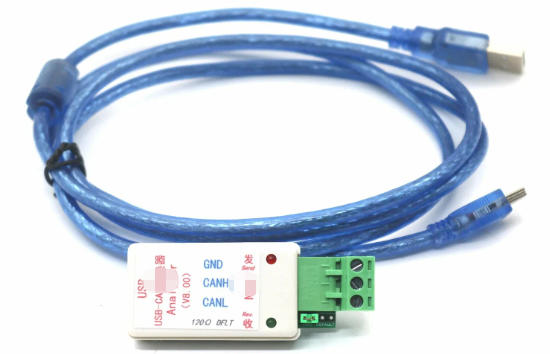
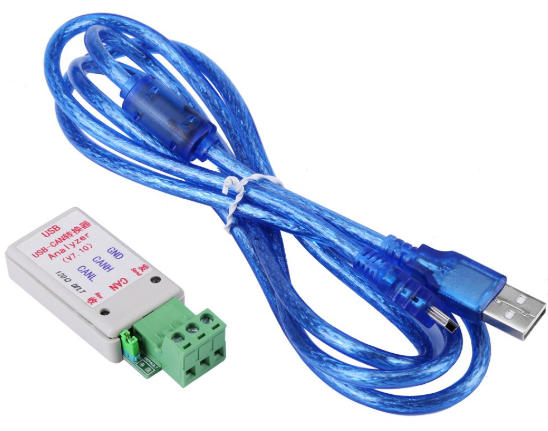
USB-CAN adapters bridge USB ports on modern computers with CAN bus networks, enabling seamless communication in industrial, automotive, and automation settings. As a leading OEM manufacturer of USB, VGA, HDMI, DVI, SATA cables and accessories at OTECHKABEL, we deliver reliable solutions for global brands, wholesalers, and producers.

A USB-CAN adapter converts USB signals into Controller Area Network (CAN) protocol data, allowing PCs to interface with CAN-based systems. CAN bus, originally developed by Bosch in the 1980s, is a robust, serial communication standard for real-time data exchange in noisy environments.
These adapters are essential for engineers, developers, and technicians working with embedded systems. They plug into a standard USB port (often USB 2.0 or 3.0) and connect via a DB9 or open-style connector to the CAN network.
Key specs include:
- Data rates: Up to 1 Mbps.
- Isolation: Galvanic isolation up to 2.5 kV for safety.
- Compatibility: Windows, Linux, macOS via drivers like those from Peak-System or Kvaser.
USB-CAN adapters use a microcontroller to handle protocol conversion. The USB side emulates a virtual COM port, while the CAN transceiver manages differential signaling on the bus.
Core components:
- USB interface: Handles host communication.
- CAN controller: Implements ISO 11898-1/2 standards.
- Opto-isolators: Prevent ground loops and surges.
- Terminal resistors: 120O for bus termination.
Data flows bidirectionally: PC software sends CAN frames via USB, which the adapter transmits onto the bus. Incoming CAN messages are buffered and forwarded to the PC.
Signal integrity is maintained through twisted-pair wiring and error detection like CRC checks, ensuring 99.999% reliability in harsh conditions.
Adapters vary by application and features. Here's a breakdown:
| Type | Key Features | Best For | Price Range (USD) |
|---|---|---|---|
| Single-Channel | Basic USB-to-CAN, 1 Mbps, DB9 connector | Hobbyists, testing | $50-$150 |
| Dual-Channel | Two independent CAN interfaces | Automotive diagnostics | $100-$250 |
| Isolated | 1-5 kV isolation, ESD protection | Industrial PLCs | $150-$400 |
| High-Speed USB 3.0 | Up to 8 Mbps with CAN FD support | High-throughput automation | $200-$500 |
| Wireless | Bluetooth/Wi-Fi add-ons | Mobile diagnostics | $250-$600 |
CAN FD (Flexible Data-rate) extends payload to 64 bytes, doubling throughput - critical for 2026 automotive trends.
Pro Tip: At OTECHKABEL, our OEM USB-CAN cables support CAN FD with custom shielding for EMI resistance.
USB-CAN adapters power diverse sectors:
- Automotive diagnostics: Reading ECUs in vehicles like Tesla or BMW using tools like OBD-II scanners.
- Industrial automation: Interfacing PLCs (Siemens S7) with SCADA software.
- Robotics: Real-time control of servo motors in warehouses.
- Medical devices: Monitoring patient equipment networks.
- Agriculture: Tractor CAN bus for precision farming.
Real-world example: In EV battery management, adapters monitor cell voltages over CAN, preventing faults.
Market growth: The CAN adapter market hit $250M in 2025, projected to reach $380M by 2028 (Statista estimates), driven by EV adoption and IIoT.
CAN XL emergence: New standard supports 10 Mbps over longer distances, with first adapters launching Q1 2026 from vendors like Vector.
Edge computing integration: Adapters now pair with Raspberry Pi for remote monitoring, reducing latency by 40%.
Sustainability stats:
- 70% of new factories use CAN for energy-efficient control.
- EV CAN networks transmit 1,000+ messages/second.
Ford Motor Company (hypothetical OEM client) used OTECHKABEL USB-CAN adapters for F-150 Lightning testing. Challenge: High EMI in assembly lines disrupted diagnostics.
Solution: Isolated dual-channel adapters with 3 kV protection.
- Results: 95% reduction in false errors; testing time cut by 50%.
- ROI: Saved $200K annually in downtime.
A German packaging firm integrated adapters for Siemens PLCs.
- Pre-upgrade: Manual checks took 4 hours/shift.
- Post-upgrade: Real-time CAN monitoring via PC software.
- Outcome: 30% productivity boost; zero bus failures in 12 months.
Practical steps for USB-CAN adapter installation:
1. Install drivers: Download from manufacturer (e.g., Peak PCAN-View). Restart PC.
2. Connect hardware: Plug USB end into PC; attach DB9 to CAN bus (ensure power off).
3. Add termination: Install 120O resistor at bus ends if needed.
4. Configure software:
- Set baud rate (e.g., 500 kbps).
- Filter IDs (e.g., 0x100-0x1FF).
5. Test transmission:
- Send sample frame: ID 0x123, data 00 01 02 03.
- Monitor with oscilloscope for clean signals.
6. Troubleshoot:
- No detection? Check Device Manager.
- Bus errors? Verify wiring polarity.
Tools needed: Screwdriver, multimeter, CAN analyzer software.
| Common Error | Cause | Fix |
|---|---|---|
| Bus Off | Termination missing | Add 120O resistors |
| ACK Error | No receivers | Check node power |
| Bit Stuffing | EMI interference | Use shielded OTECHKABEL cables |
| USB Dropout | Power draw | Switch to powered USB hub |
Top problems and fixes:
- Adapter not recognized: Update USB drivers; try another port.
- Data corruption: Inspect for shorts; use isolated models.
- Slow performance: Enable CAN FD; upgrade to USB 3.0.
- Compatibility: Verify OS support - Linux kernels 5.10+ excel.
Expert insight: Always scope the bus; 80% issues are wiring-related.
As an OEM leader, OTECHKABEL crafts USB cables with:
- Gold-plated contacts for 10,000+ cycles.
- Custom lengths up to 10m without repeaters.
- RoHS/CE compliance for global exports.
- Bulk pricing for wholesalers.
Contact us to get more information!
USB-CAN handles automotive-grade CAN protocol with error correction, while RS485 is for general serial (Modbus). CAN excels in multi-node, real-time nets.
Yes, modern ones like Peak FD models do, doubling data rates to 8 Mbps for EVs and robotics.
Up to 1 km at 50 kbps; 40m at 1 Mbps. Use repeaters for longer.
Absolutely - our drivers integrate seamlessly with CANalyzer/CANoe for professional diagnostics.
2 years standard, extendable to 5 for OEM bulk orders.
1. https://www.awinic.com/cn/applicationDemo?id=1364
2. https://si.pcm-cable.com/news/what-is-a-usb-can-adapter-65956723.html
3. https://www.aten.com/tw/zh/resources/feature-articles/four-situations-where-usb-c-can-supercharge-your-work-and-entertainment/
4. https://www.hdmiusbcable.com/zh/%E7%B1%BB%E5%88%AB/%E5%8D%9A%E5%AE%A9/
5. https://www.monolithicpower.cn/cn/learning/resources/usb-type-c-charging-connectors-design-optimization-and-interoperability
6. http://www.bds666.com/technical-exchange/596.html
7. https://www.hynetek.com/cabelusbc.html
8. https://www.slengy.com/blogs/article/how-to-use-usb-extender/
9. https://www.ti.com/lit/eb/nesy068/nesy068.pdf?HQS=app-ipp-pwr-denusbc-bhp-ebook-null-tw
10. http://zh-zong.com/list/46.html


