
Views: 222 Author: Otechkabel Publish Time: 2026-04-20 Origin: Site


From the outside, most USB to serial adapters look identical: a USB plug on one side, a DB9 or terminal block on the other. Inside, however, there are huge differences in controller chips, supported serial standards, surge protection, and firmware quality. In this guide, I will explain how I evaluate adapters as an OEM cable manufacturer in Shenzhen, and how you can choose the right USB to serial adapter for networking gear, PLCs, industrial machines, and embedded devices. [advantech]

A USB to serial adapter converts a USB interface into a legacy serial port such as RS‑232, RS‑485, RS‑422, or TTL‑level UART so that modern computers can communicate with older or specialized equipment. At a minimum, it must translate USB packets into serial frames reliably, at the correct voltage levels and baud rates. [advantech]
Common serial interfaces you will see:
- RS‑232 for PCs, networking consoles, POS terminals, and many lab instruments. [advantech]
- RS‑485 for long‑distance multi‑drop buses in factories and building automation. [advantech]
- RS‑422 for differential, noise‑resistant point‑to‑point links. [advantech]
- TTL (3.3 V or 5 V) for embedded boards and microcontrollers. [advantech]
On our production side, we also integrate these adapters into custom cable assemblies (USB, VGA, HDMI, DVI, SATA and more) for OEM clients who need a stable serial bridge inside their equipment. [kingwires]
The heart of every adapter is the USB‑to‑serial chipset, and this is where quality diverges sharply. Different chip families have different driver maturity, OS support, and error handling. [usconverters]
The two names you will encounter most often are:
- FTDI: Known for strong driver support on Windows, macOS, and Linux, robust performance on both 32‑bit and 64‑bit systems, and stable operation at higher baud rates. [vcom.com]
- Prolific (and various clones): Widely used and lower cost, but users often report driver issues, especially with older or counterfeit chips and newer Windows builds. [reddit]
In our OEM projects, we typically specify FTDI or other industrial‑grade controllers when the application involves 24/7 industrial automation, PLC programming, or field commissioning work where downtime is very expensive. [usbgear]
Even if two adapters both claim "USB to RS‑232", they may differ in supported baud rates, parity options, and protocol flexibility. Key factors include: [usconverters]
- Supported serial types: RS‑232 only, or switchable RS‑232/RS‑422/RS‑485/TTL. [advantech]
- Maximum baud rate: Many industrial‑grade converters support up to 921.6 kbps, which matters for data‑intensive or real‑time applications. [usconverters]
- Duplex mode for RS‑485: Half‑duplex vs full‑duplex can be critical for your bus design. [advantech]
Our own multi‑protocol cables (USB to RS‑232/RS‑485/RS‑422/TTL) are designed for engineers who frequently move between device types and want to carry one adapter instead of several.
For office use, a basic adapter can be enough. For factories and field work, you need more protection. Higher‑end and industrial‑grade models often add: [usconverters]
- ESD and surge protection on data lines to withstand static discharge and power spikes. [usconverters]
- Wider operating temperature ranges for outdoor or cabinet installations. [usconverters]
- Isolation between USB and serial sides to reduce ground loops. [usconverters]
- Rugged housings, locking connectors, or terminal blocks for vibration‑prone environments. [usbgear]
As an OEM manufacturer, we see fewer RMAs and support tickets from customers who choose protected, industrial‑grade adapters for harsh environments instead of low‑cost consumer ones. [usconverters]
Start by matching the adapter to your target device's serial standard and wiring. Ask: [advantech]
- Does the device use RS‑232, RS‑422, RS‑485, or TTL‑level UART? [advantech]
- Is the RS‑485 bus configured for 2‑wire (half‑duplex) or 4‑wire (full‑duplex)? [advantech]
- What baud rate, data bits, parity, and stop bits does the device require? [advantech]
For embedded boards with 3.3 V or 5 V UART pins, you must use a USB‑to‑TTL adapter; a standard RS‑232 adapter can damage the board because of the higher voltage swings. [advantech]
Single‑port adapters are common for occasional console access or lab work, but many industrial users need more. Options include: [usconverters]
- Single‑port USB to RS‑232 or RS‑485 for simple service tasks. [usconverters]
- Dual‑port or quad‑port adapters for technicians configuring multiple PLCs or serial devices simultaneously. [usconverters]
- Rack‑mount multi‑port hubs for permanent integration into control cabinets. [usbgear]
In our OEM projects, multi‑port adapters are often embedded into panel designs so one USB connection from a host PC can expose multiple COM ports. [usbgear]
A reliable driver is as important as the hardware itself. Before buying, verify: [usbgear]
- Official driver support for your OS versions (Windows 10/11, macOS, major Linux distributions). [usbgear]
- Signed drivers to avoid installation warnings in corporate environments. [usbgear]
- Active maintenance, so new OS updates do not break your adapter. [usbgear]
Experienced network and PLC technicians often recommend FTDI‑based adapters for this reason, reporting fewer surprises after operating system upgrades. [reddit]
Your work environment should strongly influence your choice. Consider: [usconverters]
- Office or lab: Light‑duty adapter, basic shielding, plastic housing may be adequate. [usbgear]
- Industrial floor, outdoor cabinet, or vehicle: You need better ESD protection, extended temperature range, stronger strain relief, and sometimes IP‑rated housings. [usbgear]
Our experience as a cable manufacturer is that many early‑stage projects underestimate electrical noise; later, they return for shielded or industrial‑grade versions after intermittent errors appear in the field. [usbgear]
Low‑cost adapters are attractive, but repeated failures, incompatibility, and engineer time quickly make them more expensive. When calculating value, include: [usconverters]
- Time spent troubleshooting driver issues or random disconnects.
- Site visits or production stops caused by unstable communication links.
- Replacement costs when cheap adapters fail prematurely.
For industrial OEM and system integrator clients, we usually recommend mid‑range or industrial‑grade adapters because their lifetime cost is lower than repeatedly replacing budget models. [usconverters]
Engineers connecting to routers, switches, firewalls, or storage appliances use USB‑to‑RS‑232 adapters multiple times per day. In this scenario, you should prioritize: [reddit]
- FTDI‑based chipsets for strong cross‑platform support. [reddit]
- Flexible COM port mapping and stable behavior after sleep/hibernate. [usbgear]
- Compact but robust housings that survive constant plugging and unplugging. [usbgear]
Many network professionals report long‑term success with FTDI‑based adapters from reputable brands, noting fewer driver conflicts and more predictable COM port assignments. [reddit]
For PLCs, motion controllers, and industrial sensors, communication stability is non‑negotiable. Recommended features include: [industrialmonitordirect]
- Support for RS‑232, RS‑485, and sometimes RS‑422 in one adapter for maximum flexibility in the field. [industrialmonitordirect]
- Higher baud rate support up to 921.6 kbps for fast data logging and firmware updates. [usconverters]
- ESD and surge protection, along with robust shielding, for noisy cabinet environments. [industrialmonitordirect]
- DIN‑rail or panel‑mount options in fixed installations. [usbgear]
Recent industry resources highlight that, for PLC programming, carefully chosen adapters can eliminate many "mysterious" download errors and intermittent connection problems during commissioning. [industrialmonitordirect]
Developers working with evaluation boards, single‑board computers, and microcontrollers rely heavily on USB‑to‑TTL cables. Best practices include: [advantech]
- Matching the voltage level of the adapter (3.3 V or 5 V) to the target board. [advantech]
- Using clearly labeled pinouts (TX, RX, GND, VCC) to avoid mis‑wiring. [advantech]
- Choosing adapters with well‑documented drivers and example configurations for popular IDEs and OSs. [usbgear]
Our multi‑voltage USB‑to‑TTL cables (3.3 V and 5 V selectable) are frequently used in this space because they simplify lab inventory and reduce the risk of over‑voltage damage.
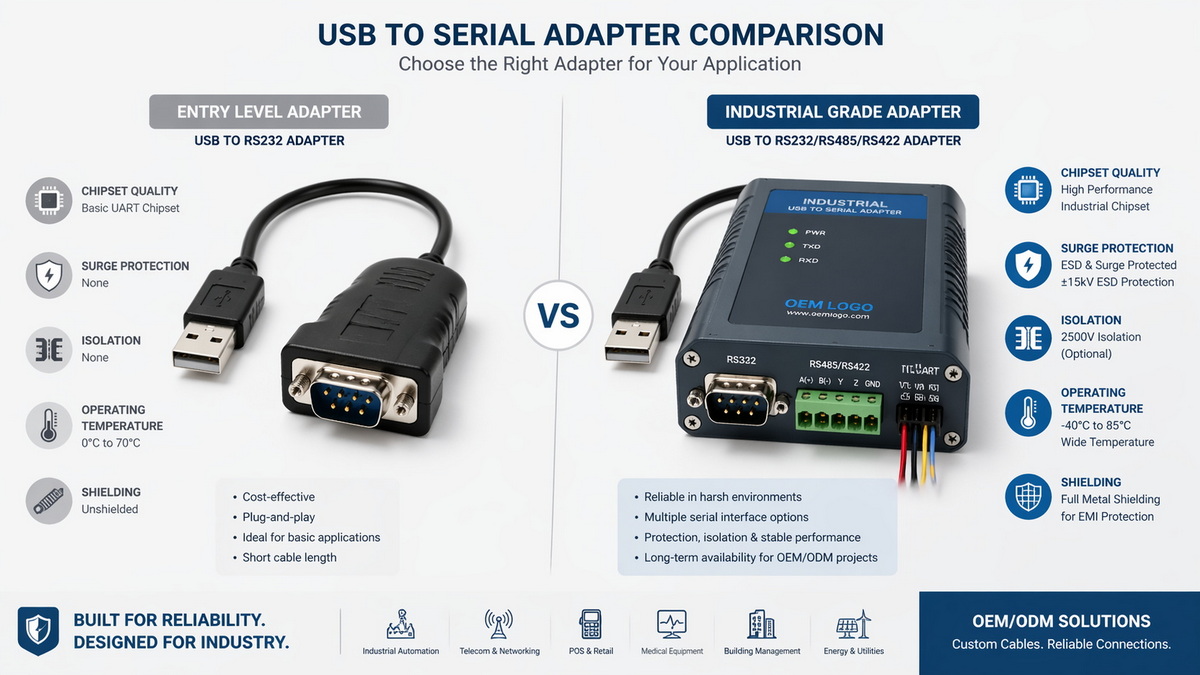
Below is a simplified comparison based on typical market offerings and our OEM experience. [usconverters]
| Feature | Entry‑Level Adapter | Industrial‑Grade Adapter |
|---|---|---|
| Chipset | Mixed, often low‑cost or older designs usbgear | FTDI or industrial‑grade controllers usbgear |
| Serial types | Usually RS‑232 only usconverters | RS‑232 / RS‑422 / RS‑485 / TTL options advantech |
| Max baud rate | Often limited or unstable at high speeds advantech | Stable up to 460.8–921.6 kbps advantech |
| Protection | Minimal ESD protection | Enhanced ESD, surge, and isolation options usconverters |
| Housing | Plastic, light‑duty usconverters | Rugged, sometimes metal or industrial plastic usconverters |
| OS drivers | Basic support, may lag behind OS updates usbgear | Actively maintained drivers, wider OS coverage usbgear |
| Typical use | Home, small office, light lab work | Factories, field service, transportation, automation advantech |
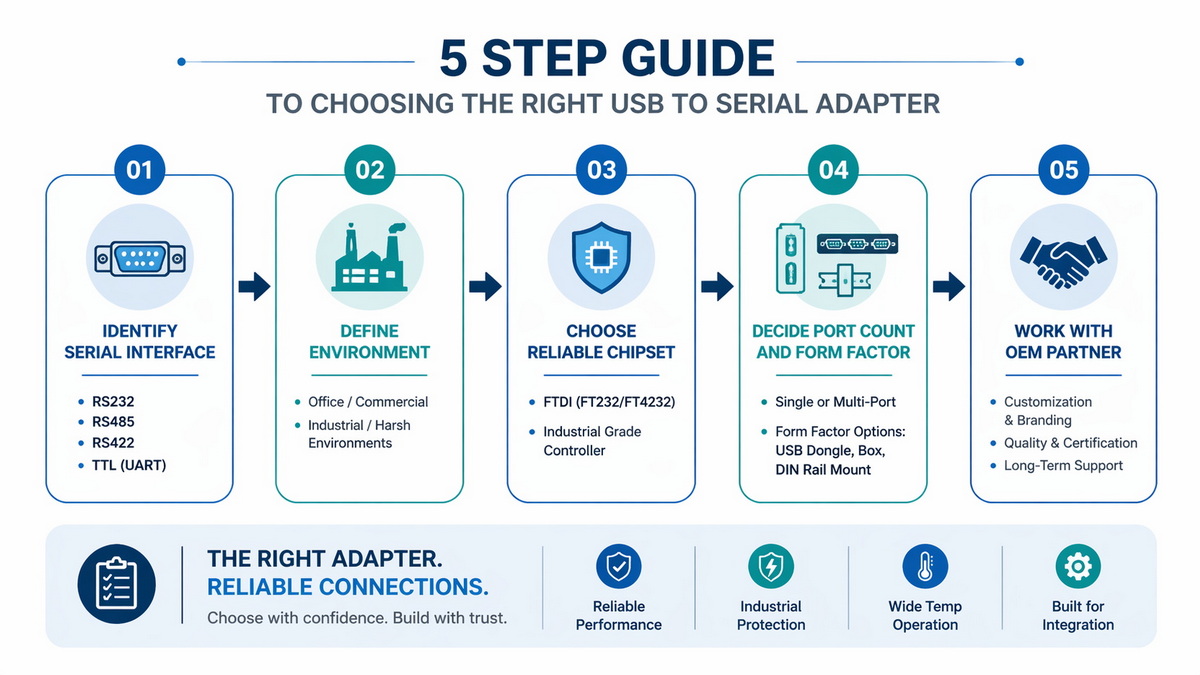
As an OEM cable manufacturer, this is the simple checklist I share with customers before they finalize a model. [usconverters]
1. Identify your serial interface and wiring. Confirm RS‑232, RS‑485, RS‑422, or TTL, along with baud rate and duplex mode. [advantech]
2. Define the environment. Decide if your use is occasional and indoor, or continuous in a harsh industrial or outdoor environment. [usconverters]
3. Choose a reliable chipset. Prefer FTDI or equivalent industrial‑grade controllers for cross‑platform stability and long‑term driver support. [vcom.com]
4. Decide port count and form factor. Select single‑port, multi‑port, or panel‑mount / DIN‑rail options based on your workflow and cabinet design. [usbgear]
5. Work with a proven OEM partner. If you need custom length, connector combinations (USB, VGA, HDMI, DVI, SATA, and serial in one harness), or branding, an experienced OEM/ODM cable manufacturer can design the best fit for your system. [stcforcable]
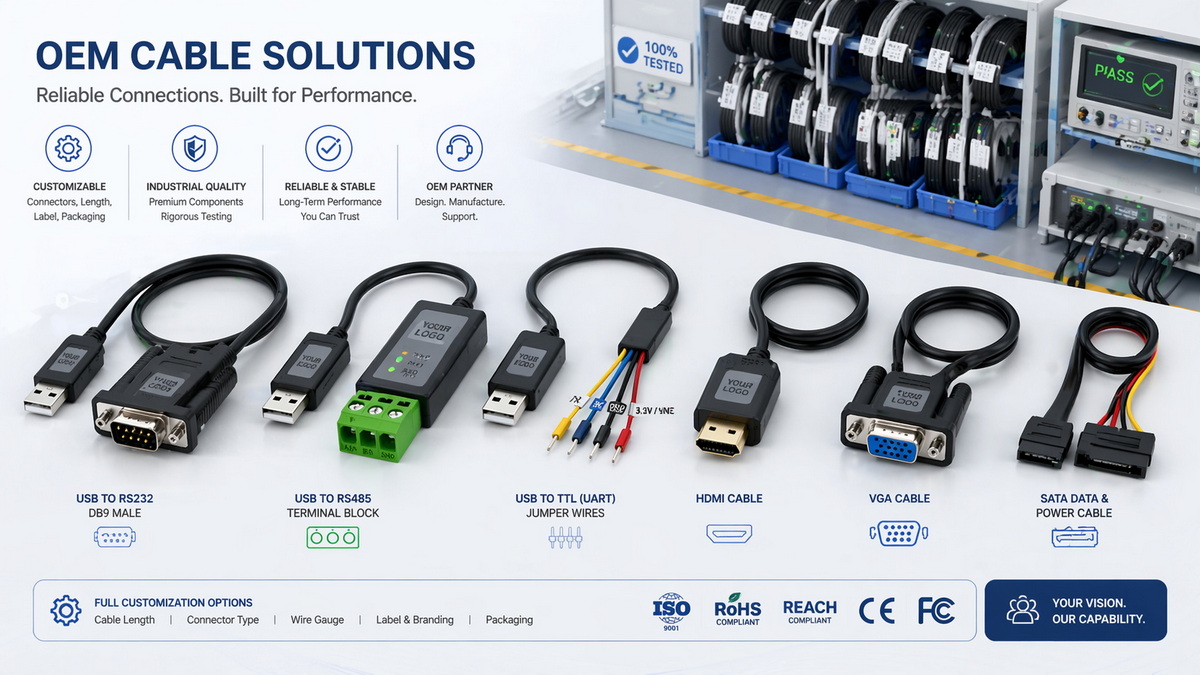
From our perspective as a Chinese OEM specializing in USB, VGA, HDMI, DVI, SATA, and various serial cable assemblies, the adapter is only one part of a reliable connection. The entire cable system—shielding, strain relief, connector quality, and even labeling and packaging—affects real‑world performance for your brand and your end‑users. [exccable]
Working directly with an OEM cable factory allows you to:
- Customize cable length, jacket material, shielding structure, and color to match your product design. [stcforcable]
- Integrate USB‑to‑serial functions into a larger harness, reducing connectors and assembly steps on your production line. [kingwires]
- Add your logo, labeling, and testing requirements so that every adapter reflects your quality standards. [exccable]
For overseas brand owners, wholesalers, and equipment manufacturers, this combination of stable electronics and robust cable engineering is what ultimately delivers a consistent experience to your customers.
If you rely on USB to serial adapters for your products or daily engineering work, treating them as interchangeable commodities is risky. The right combination of high‑quality chipsets, robust industrial design, and customized cable assemblies can dramatically reduce communication failures, support calls, and field returns. [usbgear]
If you are a brand owner, wholesaler, or equipment manufacturer looking for stable, OEM‑grade USB to serial solutions—alongside USB, VGA, HDMI, DVI, and SATA cables—consider partnering with an experienced Chinese cable factory that understands both mass production and real‑world engineering needs. Reach out with your project requirements (target device, environment, volume, and any custom connectors), and we can help you specify or design an adapter and cable assembly that aligns with your performance and cost targets. [stcforcable]
Not necessarily; compatibility depends on the chipset and driver support, so it is best to choose adapters from vendors who provide signed, regularly updated drivers for your specific operating systems. [vcom.com]
Random disconnects often stem from unstable chipsets, weak ESD protection, poor cable shielding, or outdated drivers, which are more common in very low‑cost adapters. [usbgear]
Yes, some multi‑protocol adapters support RS‑232, RS‑422, RS‑485, and TTL in one unit, but you must configure wiring and switches correctly and verify that your model supports the required protocol. [usconverters]
For simple, infrequent tasks in a clean office environment, a basic adapter may be sufficient, but frequent professional use still benefits from more robust chipsets and better driver support. [usconverters]
An OEM cable factory can combine reliable USB‑to‑serial electronics with customized cable assemblies, branding, and testing processes so that your final product is stable, consistent, and aligned with your market positioning. [kingwires]
1. PCM Cable – "Are all USB to serial adapters the same?" (accessed 2026) – <https://www.pcm-cable.com/info/are-all-usb-to-serial-adapters-the-same-102481212.html>.
2. USBGear – "Guide to Selecting a USB to Serial Adapter" – <https://www.usbgear.com/selecting-usb-to-serial-adapters.html>. [usbgear]
3. Advantech – "9 Tips for Selecting the Right USB-to-Serial Converter" – <https://www.advantech.com/en-us/resources/faq/9-tips-for-selecting-the-right-usb-to-serial-converter>. [advantech]
4. U.S. Converters – "USB Serial Adapter RS232 Comparison Chart" – <https://www.usconverters.com/index.php?main_page=page&id=60>. [usconverters]
5. Industrial Monitor Direct – "USB to Serial Adapter for PLC Programming Compatibility Guide" – <https://www.industrialmonitordirect.com/blogs/knowledgebase/usb-to-serial-adapter-for-plc-programming-compatibility-guide>. [industrialmonitordirect]
6. U.S. Converters – "Top Serial Port to USB Adapters | Best Options" – <https://www.usconverters.com/top-serial-port-usb-adapters>. [usconverters]
7. USB to Serial Adapter Wiki – <https://www.usb-serial-adapter.org>. [usb-serial-adapter]
8. VCOM – "A Comprehensive Guide to Choose the Right USB to Serial Cable" – <https://www.vcom.com.hk/shows/169/445.html>. [vcom.com]
9. Shenzhen cable OEM examples – Shenzhen STC Cable – <https://www.stcforcable.com/about-us>. [stcforcable]
10. Shenzhen Kingwire Electronics Co., Ltd. – <https://kingwires.com>. [kingwires]
11. Exc Industry (Shenzhen) Co., Ltd. – <https://www.exccable.com/about-us/>. [exccable]
12. Community feedback on adapter chipsets – r/Cisco and r/PLC discussions – <https://www.reddit.com/r/Cisco/comments/16mewkd/what_usbrs232_adaptors_do_yall_use_and_would_it/>; <https://www.reddit.com/r/PLC/comments/ua8pgy/your_favorite_usb_to_serialethernet_converters/>. [reddit]


