


Views: 222 Author: Otechkabel Publish Time: 2026-06-16 Origin: Site


Content Menu
● How to Choose the Right Industrial USB Hub for Your Installation
● Why Your USB Hub Choice Matters in Industrial Environments
● Start with Your Use Case and Environment
>> Automotive and In‑Vehicle Systems
>> Commercial Kiosks and POS Systems
>> Laboratories, Medical, and R&D
>> Factory Automation and Robotics
● Step 1 – Choose the Right USB Speed
● Step 2 – Decide How Many Ports You Really Need
● Step 3 – Understand USB Port Types and Orientation
>> USB‑A, USB‑B, and USB‑C Roles
>> Port Orientation and Screw‑Locking Connections
● Step 4 – Bus‑Powered vs Self‑Powered Hubs
>> When to Use Bus‑Powered Hubs
>> When to Use Self‑Powered Hubs
● Step 5 – Input Power, Voltage Range, and Protection
>> Voltage Range and Power Input Types
>> Environmental and Electrical Protection
● Step 6 – Output Power, Charging, and Protocols
>> Power per Port and Battery Charging
>> Fast‑Charging Technologies (PD and Quick Charge)
● Step 7 – Mounting Methods and Installation Design
>> Surface, DIN‑Rail, Rack, and Desktop Mounting
● OEM and Custom USB Hub Solutions from Shenzhen
● Practical 7‑Step Checklist Before You Order
● Call to Action – Partner with an Experienced OEM Hub Manufacturer
● FAQs
Selecting the right USB hub for an industrial or commercial installation is no longer just about "adding more ports"—it directly affects system stability, uptime, and long‑term maintenance costs. As an OEM‑focused manufacturer based in Shenzhen, we see daily how a carefully specified hub can eliminate random disconnects, protect expensive equipment, and simplify future upgrades for global brands and integrators. [tp-link]
In industrial and embedded projects, a USB hub often becomes the "nervous system" that connects PLCs, sensors, HMIs, cameras, and data‑logging devices to a central controller. Unlike a home office setup, these hubs must run 24/7 in harsher environments, handle variable power conditions, and maintain stable connections under vibration or interference. [coolblue]
A poorly chosen hub can introduce intermittent device failures, corrupted data transfers, or excessive downtime during maintenance and troubleshooting. By contrast, a properly specified industrial‑grade USB hub improves reliability, simplifies wiring, and reduces replacement costs across the life of the system. [electronics.alibaba]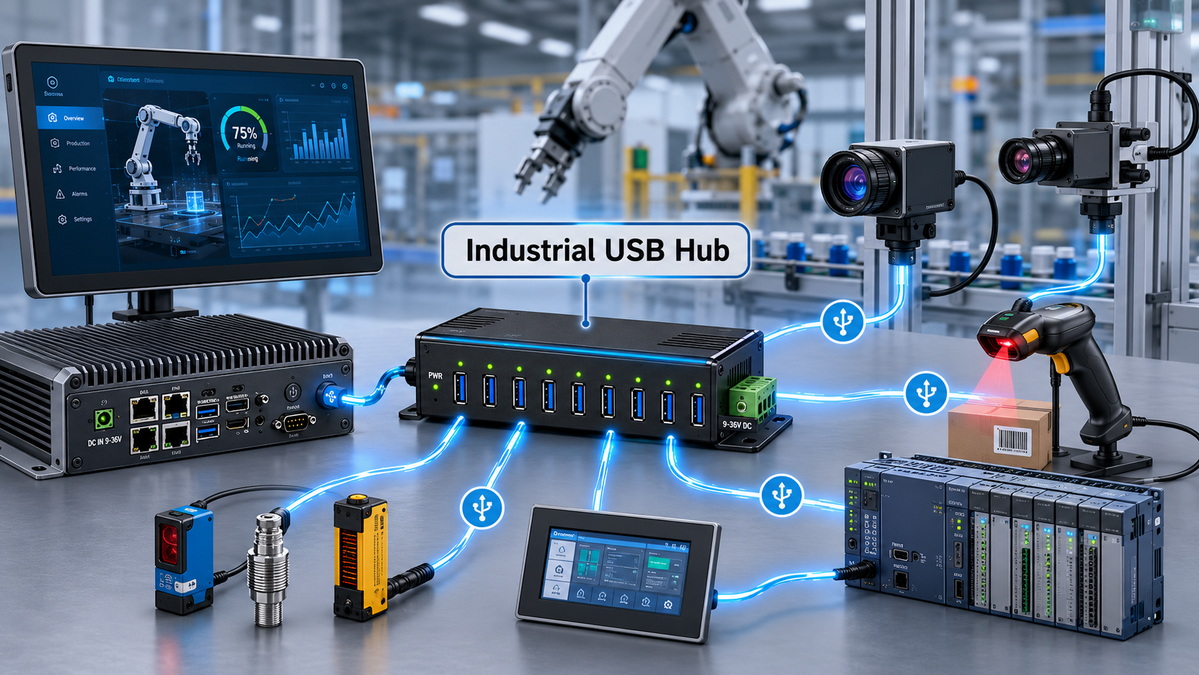
Before comparing technical specs, clarify where and how your USB hub will be used. The correct hub for a point‑of‑sale kiosk is very different from the right hub for a factory robot cell or an in‑vehicle system. [coolblue]
In vehicles, USB hubs act as a bridge between the digital ECU and the analog "nervous system" of sensors, cameras, and infotainment devices. These hubs must tolerate direct battery connection, fluctuating input voltage, and frequent vibration. [electronics.alibaba]
Look for: wide DC input range, robust surge and ESD protection, and screw‑locking USB cables to prevent accidental disconnection in motion. Industrial‑grade hubs with metal enclosures and secure mounting options are strongly preferred over consumer desktop hubs in this scenario. [electronics.alibaba]
Self‑service kiosks, ticketing machines, and retail POS terminals rely on USB hubs to connect printers, barcode scanners, card readers, and customer‑facing displays. In these systems, the key requirements are ultra‑low defect rates, flexible input voltage, and protection against static discharge from frequent user interaction. [tp-link]
Look for hubs with ESD surge protection, support for wide operating temperatures, and clean mounting options inside cabinets or under counters. Stable power distribution is essential to prevent random peripheral resets during peak usage. [coolblue]
Labs and medical environments need USB hubs that are rugged enough for everyday use while remaining easy to access for frequent device changes. Secure mounting, clearly labeled ports, and front‑facing connectors support efficient asset tracking and quick swap‑outs of microscopes, analyzers, or test instruments. [electronics.alibaba]
Here, port orientation and physical layout matter almost as much as electronic specifications. A well‑designed hub reduces cable clutter and the risk of accidental cable removal during experiments or diagnostics. [coolblue]
Industrial and robotics applications subject USB hubs to high temperatures, electrical noise, and airborne dust or oil mist. These projects demand metal chassis hubs with a wide operating temperature range and robust surge and ESD protection. [electronics.alibaba]
DIN‑rail or rack‑mount hubs are typically preferred in control cabinets and network racks, while desktop‑style hubs may work for engineering workstations and temporary setups. In all cases, you should assume 24/7 operation and choose an industrial hub accordingly. [coolblue]
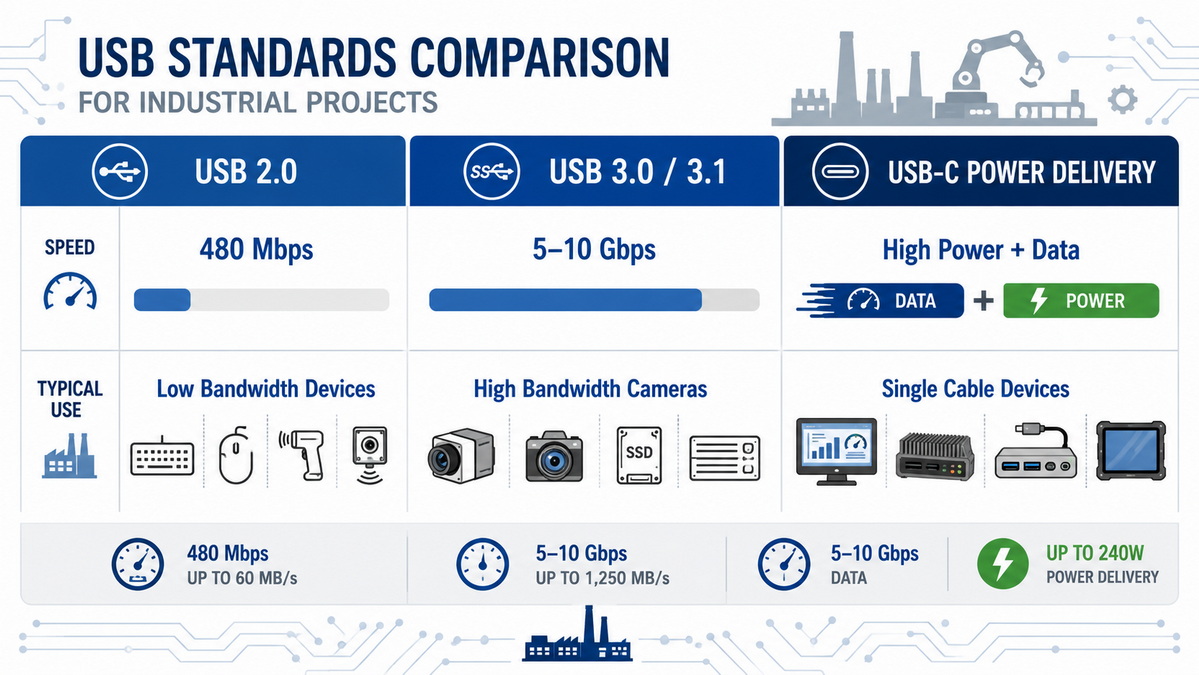
Your first technical decision is USB speed, because it sets both data throughput and power capabilities. However, the effective speed of your system is always limited by the slowest link in the chain (device, hub, cable, or host). [tp-link]
Typical scenarios:
- USB 2.0 is sufficient for keyboards, mice, simple sensors, and low‑bandwidth devices. [tp-link]
- USB 3.0 / USB 3.1 Gen 1 is recommended for external hard drives, SSDs, higher‑resolution cameras, and data‑intensive equipment. [tp-link]
- USB‑C and USB‑C with Power Delivery are increasingly used where fast charging, high‑bandwidth peripherals, or video output are required. [unitek-products]
Key point: There is no benefit in paying for a USB 3.x industrial hub if your entire peripheral set is USB 2.0, but some modern devices will not function correctly at USB 2.0 speeds at all. Matching the hub speed to your most demanding peripheral is the safest approach. [tp-link]
The number of ports dictates not only how many devices you can connect but also how the internal hub chipset is designed. Many industrial hubs use chips that provide one upstream port and four downstream ports, then cascade additional four‑port groups to reach 7 or 10 ports. [electronics.alibaba]
Practical guidelines:
1. List all devices you plan to connect simultaneously (keyboard, mouse, barcode scanner, cameras, drives, sensors, etc.). [electronics.alibaba]
2. Add at least one spare port for future expansion or temporary connections. [electronics.alibaba]
3. If you need 7 or 10 ports, check whether the hub uses a reputable chipset and maintains full bandwidth across all ports under load. [electronics.alibaba]
Most off‑the‑shelf hubs do not offer exact port counts like 5, 8, or 9 because of the way hub controllers are engineered. For specialized projects, an OEM manufacturer can design custom port counts and layouts, which is exactly the type of service a factory like Shenzhen Otechkabel Electronic Co., Ltd. provides for global brand customers. [otechkabel.en.alibaba]
On a typical industrial USB hub, downstream ports (to peripherals) are usually USB‑A, while upstream ports (to host) are often USB‑B or USB‑C. [coolblue]
- USB‑A: The most common connector for keyboards, mice, flash drives, and older measurement devices. [tp-link]
- USB‑B: Frequently used as the upstream port connecting the hub to the host, and for printers or larger peripherals.
- USB‑C: Now common on modern laptops, tablets, and embedded boards, and can carry data, video, and power depending on the implementation. [unitek-products]
Choosing the right combination depends on both your host and peripheral mix. For example, an industrial PC with only USB‑C ports may require a USB‑C upstream industrial hub that still exposes multiple USB‑A downstream ports for legacy devices. [unitek-products]
Port orientation is a small detail with a big impact on install quality. Front‑facing ports simplify user access on desks or equipment panels, while vertical ports are more convenient in DIN‑rail and compact cabinets for cleaner cable routing. [coolblue]
For mission‑critical systems, screw‑locking ports and cables are highly recommended. These connectors use threaded holes and matching screws in the cable shell so that once tightened, they resist vibration, accidental pulls, and routine maintenance activities that might otherwise cause disconnection. [electronics.alibaba]
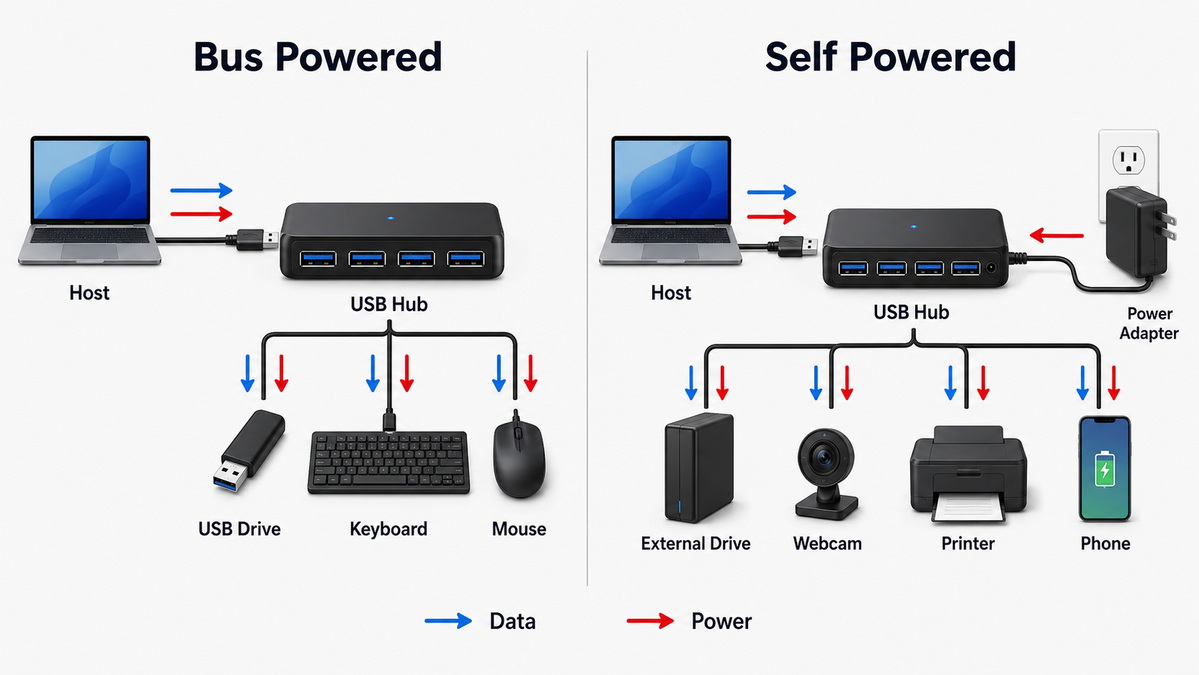
One of the most important decisions is whether your installation should use a bus‑powered or self‑powered hub. [tp-link]
A bus‑powered USB hub draws all of its power from the host computer's USB port and shares that limited current among all connected devices. This approach works for low‑power peripherals such as:
- Keyboards and mice
- Low‑power game controllers
- Simple flash drives
- Basic input devices and sensors
However, when too many devices draw current simultaneously, the total available bus power can be exceeded, leading to disconnections or device errors. For industrial and commercial deployments, bus‑powered hubs are best reserved for strictly low‑power, non‑critical peripherals. [tp-link]
Self‑powered hubs use a dedicated external power supply (for example, an AC adapter) to deliver stable current to each port. They are ideal when you connect: [tp-link]
- External hard drives and SSDs
- Industrial cameras and vision systems
- Printers and scanners
- Medical and lab equipment
- Multiple high‑draw peripherals in parallel
According to USB specifications, a USB 2.0 port typically supplies up to 500 mA (2.5 W), while USB 3.0 / 3.1 ports can supply up to 900 mA (4.5 W) per port. For more demanding applications, USB‑C and Power Delivery (PD) can go much higher, up to 240 W in the latest PD revisions. [unitek-products]
For robust industrial design, powered hubs offering at least 5 V / 0.9 A per port and including a correctly rated AC adapter (for example, 5 V / 2.4 A for a 4‑port hub) are considered a safe baseline. [tp-link]
Beyond the basic powered vs bus‑powered decision, you also need to consider how the hub itself receives power and what protection features are built in. [electronics.alibaba]
Many industrial hubs accept DC input over a specific range, such as 7–24 V DC, which allows them to integrate cleanly into existing control cabinets or vehicle power systems. Common power input connectors include:
- Phoenix terminal blocks (2‑pin or 3‑pin)
- DC barrel jacks
- Molex power connectors
Each connector option serves different wiring preferences and safety requirements in industrial cabinets, racks, or vehicles. Matching the hub's input range and connector types to your available power rails simplifies installation and reduces adapters or custom harnesses. [electronics.alibaba]
ESD, surge, lightning, and over‑current protection are critical for environments with heavy electrical equipment or frequent static discharge. Good industrial hubs integrate these protections to safeguard both the hub and any attached peripherals. [electronics.alibaba]
For example, in a 24/7 factory with high ambient temperature and significant electromagnetic noise, hubs should offer wide operating temperature ranges and robust ESD surge protection as standard. This kind of protection is especially important when hubs are used in conjunction with high‑value devices such as industrial cameras, medical instruments, or production testers. [detail.zol.com]
In many modern installations, hubs are expected to provide not only data connectivity but also charging capability for tablets, handheld terminals, and mobile devices. [unitek-products]
Self‑powered hubs allocate power to each port according to the relevant USB specification:
- USB 2.0: up to 500 mA, 2.5 W
- USB 3.0 / 3.1: up to 900 mA, 4.5 W
- USB Battery Charging 1.2: up to 1.5 A, 7.5 W
- USB‑C current mode (non‑PD): up to 3 A, 15 W
- USB‑C with Power Delivery: up to 240 W, depending on profile
Charging behavior can vary depending on the type of downstream port: Standard Downstream Ports (SDP) follow default USB power, Dedicated Charging Ports (DCP) provide higher current for charging only, and Charging Downstream Ports (CDP) support both data and increased charging power.
USB Power Delivery (USB‑PD) uses USB‑C connectors and coordinated communication between host and device to negotiate higher voltages and currents safely. PD‑enabled hubs are particularly useful in scenarios where laptops, tablets, or high‑power devices must charge while also transferring data. [unitek-products]
Some industrial chargers or hybrid hubs also support Qualcomm Quick Charge (QC) for compatible smartphones and tablets, providing significantly faster charging rates while remaining backwards compatible. This can be valuable in field service or warehouse environments where battery‑powered handhelds need to be recharged quickly between shifts. [unitek-products]
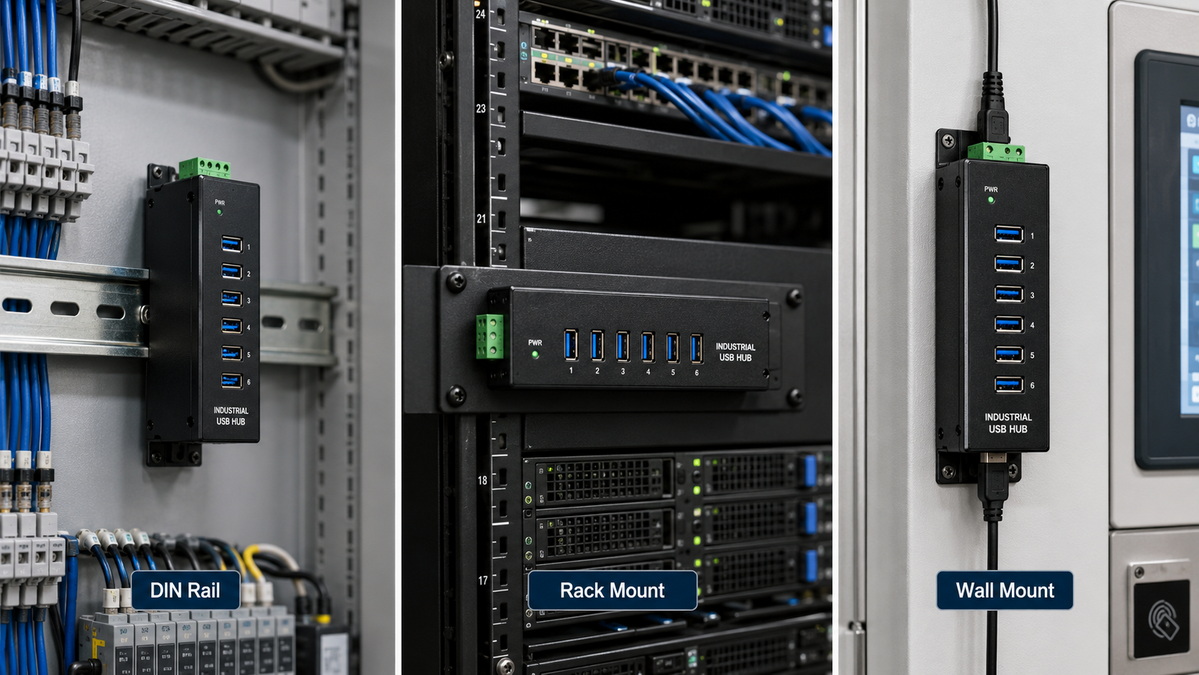
Even the best‑specified hub will underperform if mounted incorrectly or placed where cables are easily disturbed. Choosing the right mounting method improves reliability and serviceability. [coolblue]
Common mounting options include:
- Surface & wall mount: Ideal for fixed positions on flat panels, under desks, or inside control rooms and vehicles.
- DIN‑rail mount: Snaps directly into existing DIN‑rail systems, making it the standard for PLC panels, telco racks, CNC and heavy machinery. [coolblue]
- Rack mount: Fits into 19‑inch server or AV racks, supporting clean, centralized USB connectivity in network and equipment cabinets.
- Desktop hubs: Simple free‑standing units for offices, labs, and hotel or school environments where easy access is more important than ruggedization. [tp-link]
Many industrial hubs offer interchangeable mounting accessories, allowing OEMs and integrators to standardize on one electronics platform while varying the mechanical form factor per project. [electronics.alibaba]
While off‑the‑shelf hubs cover most common scenarios, large deployments and branded solutions often need custom specifications, branding, or form factors. As a China‑based OEM manufacturer, Shenzhen Otechkabel Electronic Co., Ltd. provides: [cnotechkabel]
- Custom port counts and layouts aligned with your device mix
- Tailored input voltage ranges and connector types for your power environment
- Branding, labeling, and packaging to integrate with your product line
- PCB‑only (PCBA) versions for embedding directly into your own housings or systems
By collaborating early in your design process, an OEM partner can help optimize cable routing, power distribution, and long‑term maintainability—reducing the number of adapters, converters, and workarounds you need in the field. [electronics.alibaba]
To bring all of this together, here is a practical, expert‑level checklist you can use before committing to an industrial USB hub model. [electronics.alibaba]
1. Define the environment
- Automotive, kiosk, lab, robotics, or office?
- Temperature range, vibration, dust, and electromagnetic noise conditions?
2. List your peripherals and bandwidth needs
- Which devices are latency‑sensitive or bandwidth‑hungry (cameras, SSDs)? [electronics.alibaba]
- Which are low‑speed (keyboards, barcode scanners)?
3. Decide on USB speed and port count
- Match hub speed to the fastest required device; avoid unnecessary over‑spec. [tp-link]
- Count simultaneous devices and add at least one spare port. [electronics.alibaba]
4. Choose port types and orientation
- USB‑A, USB‑B, USB‑C mix according to host and device interfaces. [coolblue]
- Front‑facing vs vertical ports based on physical layout.
5. Select power architecture
- Bus‑powered only for low‑power, non‑critical devices. [tp-link]
- Self‑powered for anything involving drives, cameras, or multiple peripherals. [electronics.alibaba]
6. Verify protection and compliance
- ESD, surge, and over‑current protections appropriate to your power grid and environment. [electronics.alibaba]
- Confirm operating temperature, certifications, and housing robustness.
7. Plan mounting and cable management
- DIN‑rail, rack, wall/surface, or desktop mounting as required. [coolblue]
- Use screw‑locking connectors where vibration or accidental pulls are likely. [electronics.alibaba]
If you need a reliable industrial USB hub for your current project—or plan to integrate hubs into your own branded solutions—working directly with an experienced OEM manufacturer can dramatically reduce risk and development time. [electronics.alibaba]
Shenzhen Otechkabel Electronic Co., Ltd. specializes in USB cables, hubs, and related accessories, providing OEM and bulk production for overseas brands, wholesalers, and device manufacturers who need stable quality, flexible customization, and competitive lead times. [otechkabel.en.alibaba]
Contact our engineering and sales team to discuss your environment, port requirements, and power constraints, and we will help you specify or customize an industrial USB hub that fits your installation precisely. [cnotechkabel]
Q1: What is the most important factor when choosing an industrial USB hub?
The most important factor is matching the hub's speed, power budget, and protection features to the specific environment and peripherals you plan to connect. [electronics.alibaba]
Q2: Can I use a consumer desktop USB hub in a factory or vehicle?
Consumer hubs are usually not designed for wide temperature ranges, electrical noise, or vibration, so they tend to fail or cause intermittent issues in industrial and automotive environments. [nytimes]
Q3: How many USB devices can I safely connect to a bus‑powered hub?
You should only connect low‑power devices like mice, keyboards, or small dongles to bus‑powered hubs, and keep the total current draw well below the maximum rating of the host port. [tp-link]
Q4: When do I need screw‑locking USB cables?
Use screw‑locking cables in any application where hubs are mounted in vehicles, machinery, or tight cabinets where cables can be bumped, vibrated, or tugged during maintenance. [electronics.alibaba]
Q5: What if I need a USB hub with a non‑standard port count or special mounting?
In that case, it is best to work with an OEM manufacturer that can design and produce custom hub PCBAs or enclosures tailored to your port count, power input, and mounting requirements. [otechkabel.en.alibaba]
1. Coolgear. "How to Choose the Right Industrial USB Hub for Your Install."
<https://www.coolgear.com/guides-informative-articles/how-to-choose-the-right-usb-hub-for-your-install.html>
2. TP‑Link. "Do I Need a USB Hub, & How Do I Choose the Right One?"
<https://www.tp-link.com/ph/blog/1885/do-i-need-a-usb-hub-how-do-i-choose-the-right-one-/> [tp-link]
3. Coolblue. "How Do I Choose a USB Hub?"
<https://www.coolblue.nl/en/advice/choose-usb-hub.html> [coolblue]
4. Unitek. "USB Hub / Dock Buying Guide 2026: How to Choose the Right One."
<https://www.unitek-products.com/blogs/news-blogs/usb-hub-dock-buying-guide-2026> [unitek-products]
5. Alibaba.com. "USB Hub Guide: What to Choose in 2024/2026."
<https://electronics.alibaba.com/buyingguides/usb-hub-guide-what-to-choose-in-2024> [electronics.alibaba]
6. Shenzhen Otechkabel Electronic Co., Ltd. Company Profile.
<https://otechkabel.en.alibaba.com/zh_CN/> [otechkabel.en.alibaba]
7. Otechkabel Official Product Page.
<https://www.cnotechkabel.com/products> [cnotechkabel]
8. Wirecutter by The New York Times. "The Best USB Hubs of 2026."
<https://www.nytimes.com/wirecutter/reviews/best-usb-c-hubs-and-docks/> [nytimes]
9. ZOL. "USB HUB产品资料信息大全."
<https://detail.zol.com.cn/category/682.shtml> [detail.zol.com]
10. Lention. "The Best USB Hubs for 2026."
<https://www.lention.com/blogs/news/usb-hub-buying-guide-2026> [lention]


