


Views: 222 Author: Otechkabel Publish Time: 2026-06-17 Origin: Site


Content Menu
● What Is a USB Hub (In Real-World Use)?
● How USB Hubs Fit Into Modern Connectivity
● Core Components: Upstream vs. Downstream Ports
● Powered vs. Bus‑Powered Hubs: Why It Matters
● Bandwidth, Speed, and Why Multi‑TT Hubs Improve Performance
>> USB Speeds You Actually Need to Care About
>> Single‑TT vs. Multi‑TT Architecture
● Physical Layout, Cable Length, and Signal Integrity
● Advanced Power Delivery and Multi‑Port Adapters
● Practical Applications in Office, Gaming, and Industry
>> Home Office and Remote Work
>> Gaming and Content Creation
>> Industrial, Medical, and Educational Use
● How to Choose the Right USB Hub for Your Project
>> 2. Check Power Requirements
>> 3. Match USB Versions and Performance
>> 4. Consider Mechanical and Environmental Constraints
>> 5. Don't Forget Cable Quality
● Where OEM Cable Manufacturing Adds Value
● Call to Action: Partner With a Reliable USB Cable OEM
● Frequently Asked Questions (FAQ)
A USB hub is a device that takes one USB port from your laptop, PC, or industrial controller and expands it into several additional ports so you can connect more peripherals at the same time. All connected devices share the bandwidth of that single upstream connection, which makes hub design and selection critical when you run multiple high‑demand devices like external SSDs, cameras, or test instruments. [keywordseverywhere]
In our work as an OEM cable and cable‑assembly manufacturer in Shenzhen, we see USB hubs deployed not only on office desks, but also inside kiosks, factory jigs, medical carts, POS systems, and industrial PCs, where reliability and signal integrity of both hubs and cables directly impact uptime.
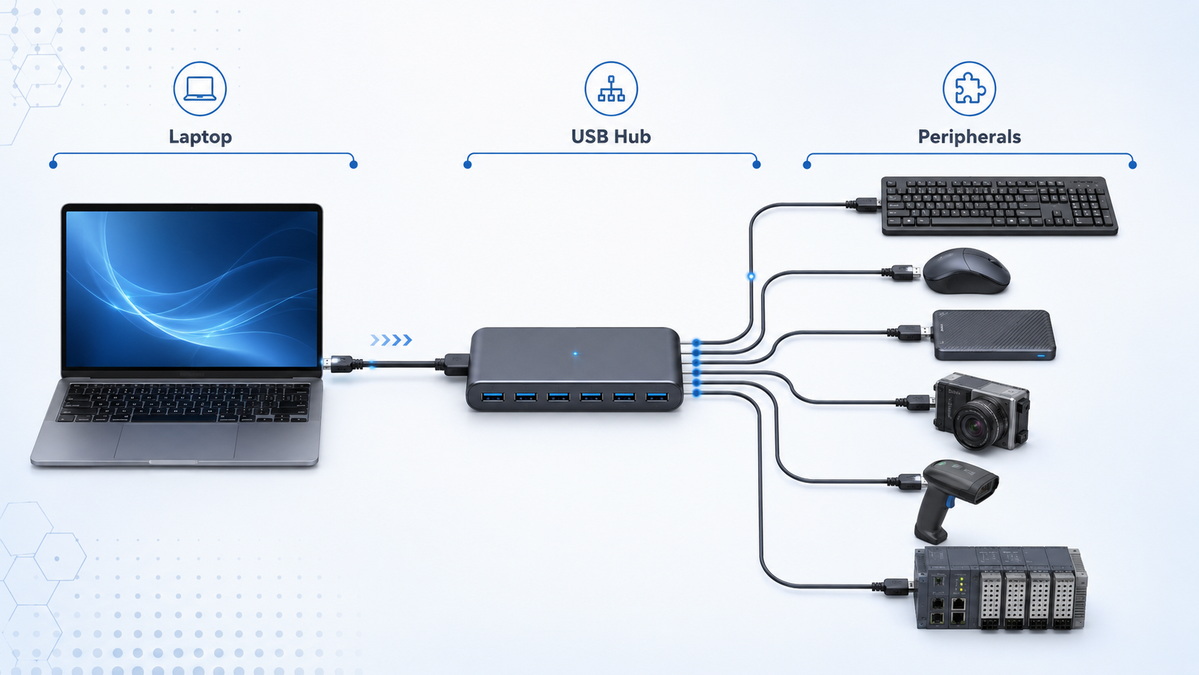
From a system designer's perspective, a USB hub is the "connectivity backbone" that consolidates power and data for multiple peripherals into a single, manageable connection. Almost all modern laptops ship with limited ports, so a hub lets users plug in keyboard, mouse, printer, storage, and specialized devices through one cable they can attach or detach in seconds. [hallam]
In industrial and commercial projects, hubs are often mounted behind panels or inside cabinets, connected via custom USB, USB‑C, or hybrid cables designed to handle EMI, bending, and environmental constraints.
Every USB hub has one upstream port and multiple downstream ports, and understanding the difference helps avoid design mistakes. [keywordseverywhere]
- Upstream port
- Connects the hub back to the host (PC, laptop, thin client, embedded host). [hallam]
- Carries both data and, in bus‑powered scenarios, power from the host.
- Downstream ports
- Connect peripherals such as keyboard, mouse, storage, barcode scanner, or measurement devices. [hallam]
- Number of ports can range from 2–4 for compact desktop hubs to more than 10 for rack‑mount or industrial hubs. [keywordseverywhere]
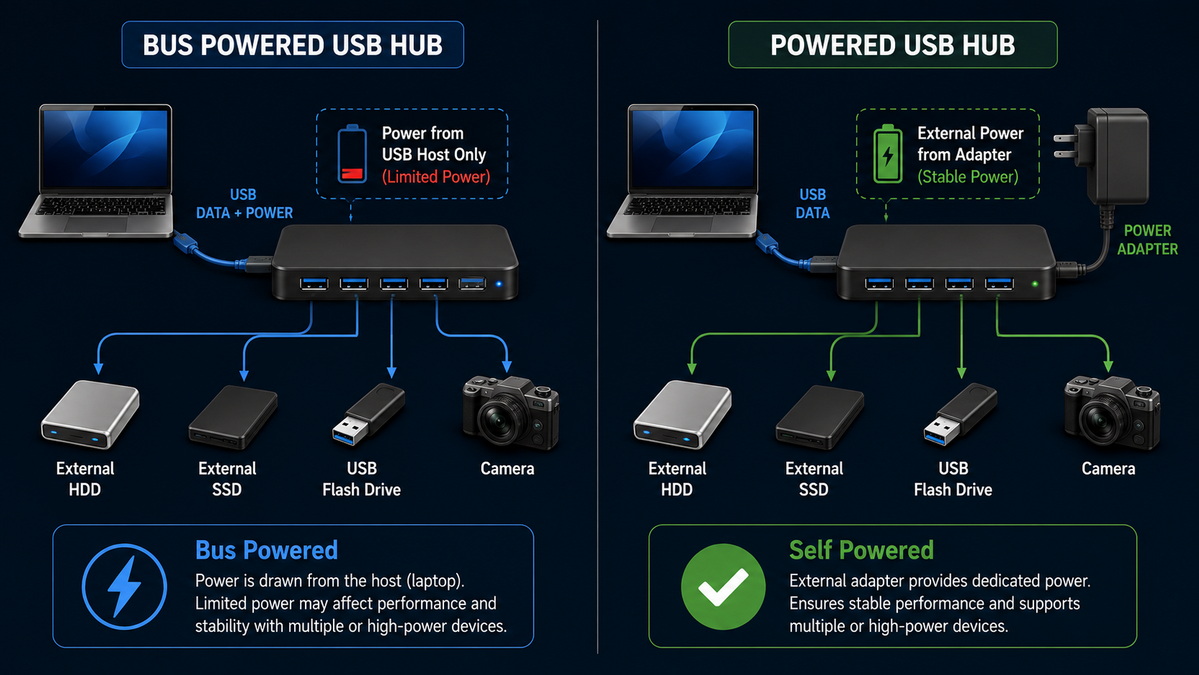
One of the most common real‑world issues we encounter in OEM projects is insufficient power when too many devices draw current from a small bus‑powered hub.
- Bus‑powered hubs (passive)
- Draw all their power from the host's USB port. [keywordseverywhere]
- Limited by the port's current budget; compliant low‑speed devices share up to 500 mA at 5 V in classic USB, and the hub itself consumes part of that. [keywordseverywhere]
- Suitable for low‑power devices (mouse, keyboard, some dongles, USB flash drives). [hallam]
- Self‑powered (active) hubs
- Have an external power supply and can deliver full current on each port for higher‑draw devices such as external drives, cameras, and some instrumentation. [keywordseverywhere]
- Common in professional and industrial environments where stability and full‑load support matter more than absolute cost. [hallam]
In practice, many low‑cost hubs and devices do not strictly follow the power rules, advertising themselves as self‑powered while relying too much on bus power, or drawing more than the declared 100 mA increments. This can make power‑related failures harder to debug, which is why B2B buyers should always request real‑world load test data or certification reports from their suppliers. [keywordseverywhere]
Each USB generation defines a maximum theoretical bandwidth, and that bandwidth is shared across all devices behind a hub. [hallam]
- USB 2.0: up to 480 Mbps. [hallam]
- USB 3.2 Gen 1 (often marketed as USB 3.0): up to 5 Gbps. [hallam]
- USB 3.2 Gen 2: up to 10 Gbps. [hallam]
- USB 3.2 and USB4 variants: up to 20 Gbps and higher, with more advanced signalling. [hallam]
For practical selection, match the hub's highest supported standard to your most demanding devices (e.g., external SSDs, cameras) while remembering that legacy USB 2.0 devices can still be attached but will use lower speeds.
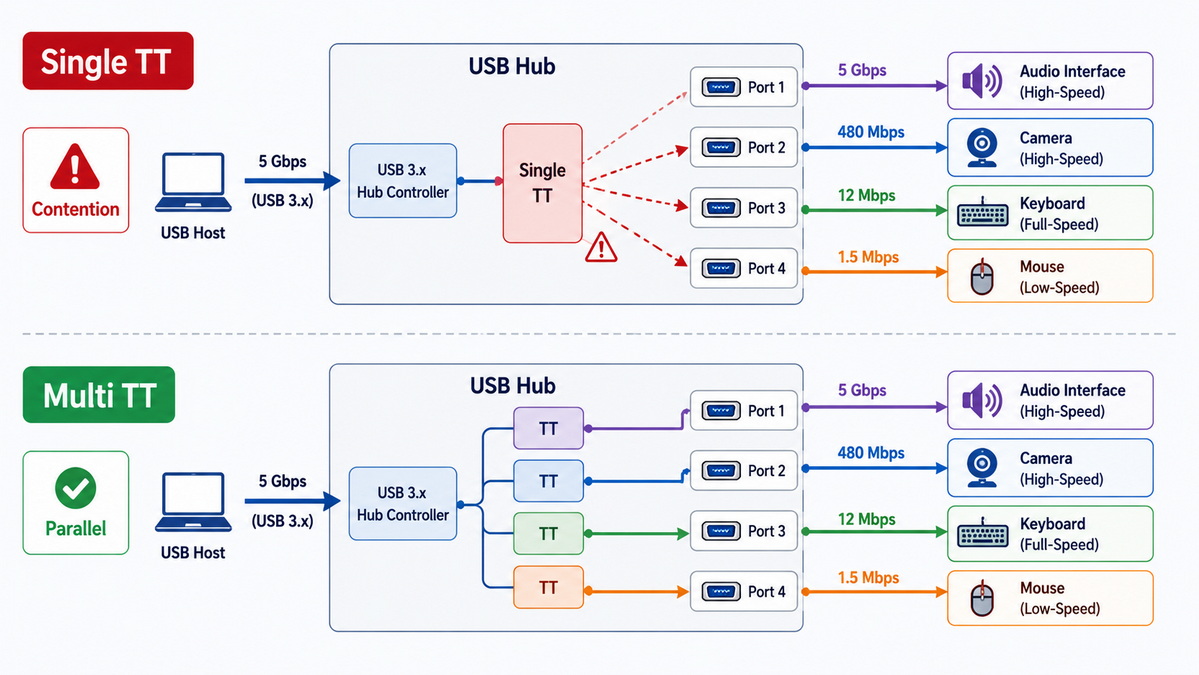
Modern hubs frequently use a transaction translator (TT) to bridge slower devices (USB 1.1/2.0) with high‑speed host links, but the internal design affects how well the hub handles mixed loads. [keywordseverywhere]
- Single Transaction Translator (STT)
- All full‑speed and low‑speed devices share a single translator, creating a bottleneck when you connect multiple bandwidth‑hungry devices like audio interfaces or high‑speed HID devices. [keywordseverywhere]
- Multi‑Transaction Translator (Multi‑TT)
- Each downstream port (or group of ports) has its own translator, allowing multiple devices to transfer data in parallel and reducing contention. [keywordseverywhere]
- Particularly beneficial in professional and industrial setups with mixed‑speed devices connected simultaneously.
For OEM deployments, specifying Multi‑TT hubs and matched high‑quality cables is one of the most effective ways to ensure consistent performance under real‑world loads.
The physical design of hubs and cables often determines whether a system is pleasant to use—or constantly unplugged and rearranged.
- Port spacing and orientation
- Closely spaced horizontal ports can cause wide plugs or dongles to block adjacent ports. [keywordseverywhere]
- "Octopus" or "star" hubs, with short pigtail leads for each port, greatly reduce port blockage and are popular in service and lab environments. [keywordseverywhere]
- Cable length limitations
- For classic USB 1.1 low‑speed devices, USB cables are limited to 3 m per segment; hubs or active repeater cables can extend total reach in 5 m increments. [keywordseverywhere]
- For higher generations, signal integrity and EMI become more critical, and using properly shielded, certified cables from reliable OEMs can prevent intermittent disconnects.
As a cable and harness manufacturer, we regularly customize cable length, shielding, over‑molding, and connector orientation so that hubs can be integrated reliably into control cabinets, kiosks, and compact devices.
Many modern USB‑C hubs and multi‑port adapters combine USB data, power delivery (PD), and video outputs into a single housing. [keywordseverywhere]
- A typical configuration might include a USB‑C PD input (e.g., 100 W), one USB‑C upstream connection, several USB 3.2 ports, HDMI, and Ethernet. [keywordseverywhere]
- Power distribution must account for everything: phone or laptop charging, display power requirements, and the cumulative draw of USB peripherals. [keywordseverywhere]
For example, if a 100 W USB‑C PD adapter provides power to a multi‑port hub plus a smartphone and HDMI display, the available remaining power for other ports may be significantly less than 100 W, and must be budgeted carefully. [keywordseverywhere]
In OEM work, this is where tight coordination between hub electronics, cable specs, and power adapters becomes essential to prevent brown‑outs under peak load.
Hubs are now standard on remote workers' desks, allowing them to attach monitors, keyboard, mouse, webcam, microphone, and storage through a single laptop connection. This "one‑plug docking" experience is often more important to users than knowing technical standards, which is why clear labelling and robust cabling matter. [hallam]
Gamers and streamers often rely on hubs to connect controllers, headsets, capture cards, external SSDs, and RGB accessories. Stable power and bandwidth distribution can directly affect gameplay smoothness and stream reliability, especially when multiple high‑speed devices compete for the same hub bandwidth. [hallam]
- In factories, hubs connect scanners, PLC interfaces, data loggers, and sensors to an industrial PC, often under vibration and temperature stress.
- In medical carts, hubs consolidate patient monitoring devices and peripherals, where secure connectors and medical‑grade cabling are crucial.
- In classrooms, hubs link projectors, document cameras, and student devices for collaborative teaching workflows. [hallam]
In all these environments, B2B buyers typically look for DIN‑rail, rack‑mount, wide‑temperature, or managed USB hubs that match specific environmental and management requirements. [hallam]
From an OEM and system‑designer perspective, selecting a hub is about matching environment, load, and lifecycle—not just counting ports.
- Office / home desk
- Gaming and content creation
- Industrial automation or kiosks
- Medical or educational devices
Different environments demand different form factors, mounting options, and certifications.
1. List all devices, including their maximum current draw or power rating.
2. Decide whether a bus‑powered hub is sufficient, or whether you need self‑powered or dynamic‑powered (can switch modes) hubs. [keywordseverywhere]
3. Add a safety margin for future expansion and peak loads.
- Ensure the hub supports the highest USB standard you actually need (e.g., USB 3.2 Gen 2 for external SSDs). [hallam]
- Confirm whether the hub uses Multi‑TT if you have many mixed‑speed devices. [hallam]
- Required cable length and routing
- Mounting type (desktop, bracket, DIN‑rail, rack‑mount)
- Operating temperature range and expected vibration
A high‑quality hub can still underperform if the cables are poorly shielded, too long, or built with low‑grade connectors. As an OEM cable supplier, we typically recommend specifying:
- Shielding type (e.g., braid + foil for noisy environments)
- Over‑mold and strain‑relief design for frequent plugging/unplugging
- Custom angles or locking mechanisms when needed
Because we manufacture USB cables, data cables, and cable assemblies for global brands, wholesalers, and device manufacturers, we see the full lifecycle of USB hub deployments—from design to field replacement.
Working as an OEM partner, we can:
- Customize cable length, shielding, and connector type for your specific hub and device layout.
- Support large‑scale, brand‑label production with consistent quality control.
- Collaborate with your engineering team to validate hubs and cables together under real‑world loads.

If you are planning your next USB hub deployment, device launch, or branded accessory line, consider working with an experienced cable and assembly OEM who understands both the technical and commercial sides of USB connectivity.
By collaborating early, we can help you:
- Specify the right hub–cable combination for your environment.
- Optimize power and bandwidth design for long‑term stability.
- Deliver private‑label cables and harnesses that match your brand and performance requirements.
You can reach out to discuss your project specs, required certifications, and volume forecasts, and we will help you turn your USB hub concept into a robust, scalable solution.
1. Does a USB hub slow down my devices?
Yes, all devices on a hub share the available bandwidth of that hub's upstream connection, so heavy simultaneous use can reduce throughput for each device. Multi‑TT hubs and higher‑speed USB standards help reduce perceived slowdowns in mixed‑device scenarios. [hallam]
2. How many devices can I connect to USB hubs in total?
The USB specification allows up to 127 devices on a USB network, including hubs, with up to five tiers of hubs between the root hub and the last device. In practice, power and bandwidth constraints usually limit you before you reach this theoretical maximum. [keywordseverywhere]
3. Can I daisy‑chain bus‑powered hubs?
The USB standard discourages chaining multiple bus‑powered hubs because each additional tier further divides the limited power available from the host port. For complex setups, self‑powered or dynamic‑powered hubs are strongly recommended. [keywordseverywhere]
4. What is the difference between a USB hub and a docking station?
A docking station typically combines USB hub functionality with video outputs, Ethernet, audio, and power delivery over USB‑C, acting as a single connection point for laptops. A classic USB hub mainly focuses on expanding USB data and power ports. [hallam]
5. Why do some "USB 2.0" hubs still feel slow?
The USB 2.0 logo can appear on both full‑speed (USB 1.1‑like) and high‑speed devices, so not every "USB 2.0" hub runs at the high‑speed 480 Mbps mode. If performance is critical, confirm the exact supported speed grade and check for Multi‑TT architecture. [hallam]
1. Coolgear – "Understanding USB Hubs: The Backbone of USB Connectivity" (accessed 2026).
https://www.coolgear.com/guides-informative-articles/understanding-usb-hubs-the-backbone-of-usb-connectivity.html [hallam]
2. Wikipedia – "USB hub" (technical definitions, power and protocol details).
https://en.wikipedia.org/wiki/USB_hub [keywordseverywhere]
3. Keywordseverywhere – "Google E‑E‑A‑T Guidelines: an Overview (2026 Playbook)" (E‑E‑A‑T best practices for technical content).
https://keywordseverywhere.com/blog/google-e-e-a-t-guidelines-an-overview/ [keywordseverywhere]
4. QuickCreator – "E‑E‑A‑T for Technical Content: 2025 Best Practice Guide" (advanced author and review recommendations).
https://quickcreator.io/blog/eeat-for-technical-content-2025-best-practice-guide/ [quickcreator]
5. Documoto – "Creating User‑Friendly Technical Manuals: Best Practices for OEMs" (UX patterns for technical documentation).
https://www.documoto.com/blog/creating-user-friendly-technical-manuals-for-oems [documoto]
6. The Pedowitz Group – "How do manufacturers create content for complex products?" (content process for industrial manufacturers).
https://www.pedowitzgroup.com/manufacturers-create-content-for-complex-products [pedowitzgroup]
7. ContentCamel – "SEO Content Hubs – Building Resources for Engagement" (content structure and UX hints).
https://www.contentcamel.io/content-workflow-seo-content-hubs/ [contentcamel]
8. Boostability – "Google E‑E‑A‑T (2024 Ultimate Guide)" (practical ways to demonstrate experience and authority).
https://www.boostability.com/resources/google-e-e-a-t-guide/ [boostability]


