


Views: 222 Author: Otechkabel Publish Time: 2026-04-13 Origin: Site


Connecting RCA cables to an amplifier is simple once you understand what each connector does and how signal flow works in a real-world system. As an OEM cable manufacturer serving global audio brands and installers, I'll walk you through not just the "how", but the practical details that prevent hum, distortion, and premature cable failure. [jingyiaudio]
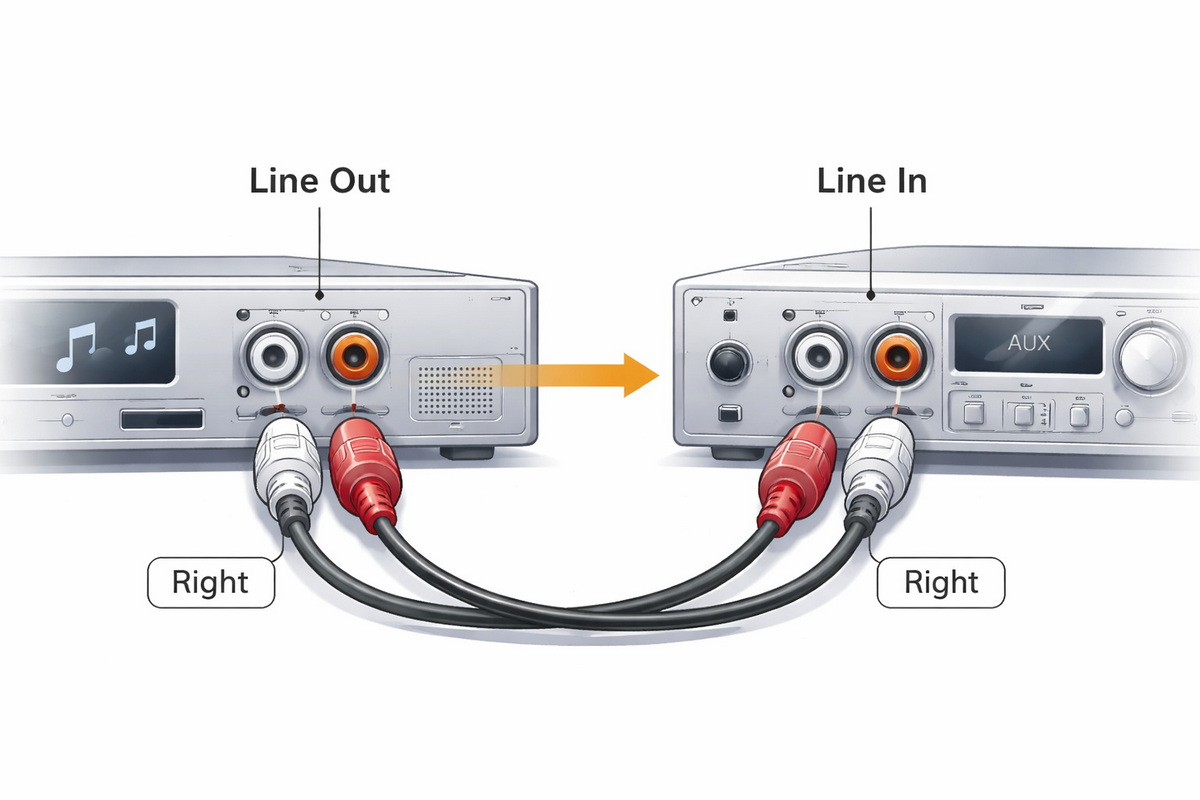
RCA cables are unbalanced analog cables used to carry line-level audio (and sometimes composite video) between devices such as CD players, TVs, DACs, AV receivers, car stereos, and amplifiers. A typical stereo RCA cable has a red plug for the right channel and a white or black plug for the left channel; a yellow plug, when present, carries composite video. [ghtcable]
Because RCA runs are unbalanced, they are more vulnerable to noise and interference than balanced connections such as XLR or TRS, especially when cable length is excessive or routing is poor. This is why cable quality, shielding, and routing matter so much in audio performance, even when the connection looks straightforward. [seetronic]

From an installer's perspective, 80% of connection problems disappear when you follow a consistent process. [reddit]
You will need: [rasantekaudio]
- Amplifier (home, car, or powered speakers with RCA input).
- Source device (CD player, TV, DAC, turntable with built-in or external phono preamp, head unit, etc.).
- A stereo RCA cable of appropriate length (red + white/black).
- Optional: cable ties or Velcro straps, labels, and a flashlight for tight racks.
Before you plug anything in, quickly inspect the RCA cable ends. The outer rings should be round, not crushed, and the center pins should be straight and firmly fixed. Bent pins and loose shields are a common source of crackling or intermittent sound. [uk.rs-online]
Always power off and unplug your amplifier and source device before connecting or disconnecting RCA cables. This reduces the risk of: [crutchfield]
- Loud pops or thumps that can damage speakers.
- Short circuits caused by partially inserted connectors.
- Electric shock when working inside racks or vehicles.
Professional installers treat "power off before patching" as a non‑negotiable rule, especially on high‑power amplifiers and sensitive speakers. [crutchfield]
On the amplifier, you'll typically see a pair (or multiple pairs) of RCA jacks labeled "Line In", "CD", "AUX", "Tuner", "Pre In", or "Input". The color coding is: [uk.rs-online]
- Red jack: Right audio channel.
- White or black jack: Left audio channel.
On multi-channel home theater or car amplifiers, you might find additional pairs (e.g., Front, Rear, Sub, Center). Make sure you connect to the input section that matches how you intend to use the amplifier (for example, "Sub In" for a dedicated subwoofer channel). [crutchfield]
Now locate the RCA outputs on your source device. They may be labeled: [reddit]
- "Audio Out", "Line Out", "Pre Out", "Sub Out", or "L/R Out".
- On AV receivers or processors, "Pre Out" jacks feed external power amplifiers or subwoofers.
Again, red is right, white/black is left. Make sure you are using *outputs* rather than inputs; a very common beginner mistake is to plug into "AUX IN" or "LINE IN" instead of "OUT", resulting in no sound. [uk.rs-online]
With all devices powered off: [reddit]
1. Plug the red RCA plug into the red output jack on the source device.
2. Plug the white/black RCA plug into the matching left output jack.
3. Route the cable to the amplifier, avoiding sharp bends or tight coils. [seetronic]
4. Plug the other end into the corresponding input jacks on the amplifier (red to right, white/black to left).
Push each plug straight in until it seats firmly; you should feel a snug fit, not a loose wobble or excessive force. If you feel resistance, gently wiggle the plug in a straight line—never bend the pin sideways. [seetronic]
Once everything is connected: [crutchfield]
1. Turn down the volume or set the amplifier to minimum.
2. Power on the source device first.
3. Power on the amplifier second.
4. Slowly raise the volume to a comfortable level.
This power‑up sequence prevents sudden spikes and allows you to hear if there is hum or noise at low level before you go louder. [crutchfield]
Play a familiar track and verify: [uk.rs-online]
- Sound is coming from both left and right channels.
- There is no obvious hum, buzz, or crackle.
- The stereo image (vocals, instruments) feels centered and balanced.
If there is an issue:
- No sound: Re‑check that you're using output jacks on the source and input jacks on the amplifier, and confirm you selected the correct input on the amp. [reddit]
- One channel missing: Swap left and right RCA plugs on the amplifier; if the problem moves, the cable or source channel is faulty. [uk.rs-online]
- Hum/buzz: Try moving RCA cables away from power cords, wall adapters, and dimmer circuits, and ensure connectors are fully seated. [seetronic]
As a factory that designs and produces RCA, USB, HDMI, VGA, DVI, SATA and other signal cables for global brands, we see the same field issues repeated in home audio, car audio, and professional installations. These practices significantly improve reliability and sound quality. [jingyiaudio]
RCA is an unbalanced format, so shielding quality directly impacts noise performance. A good RCA cable for audio should feature: [ghtcable]
- Shielded coaxial structure (braid or foil + drain wire).
- Low capacitance cable design to preserve high‑frequency detail. [jingyiaudio]
- Robust strain relief at the connector to prevent internal breaks. [seetronic]
In our experience as an OEM, upgrading from thin, poorly shielded generic cables to properly constructed RCA cables often reduces background hum and restores clarity, especially on longer runs. [zh.ghtcable]
Signal loss and noise pickup increase with length, particularly for analog connections. General guidelines: [seetronic]
- For line-level audio, keep RCA cables under 3–5 m in home systems when possible. [jingyiaudio]
- For sensitive sources like turntables, stay under 2 m unless you use specialized low‑capacitance cable. [jingyiaudio]
- Avoid running RCA in parallel with AC power cables or high-current amplifier power leads; cross them at 90° if they must intersect. [seetronic]
In car audio, it is standard practice to route power cables on one side of the vehicle and RCA signal cables on the opposite side to minimize alternator whine and induced noise. [crutchfield]
Good cable management not only looks professional but also prevents signal issues and simplifies future upgrades. Practical tips: [seetronic]
- Bundle RCA cables loosely with Velcro straps; avoid tight zip-ties that crush the jacket. [seetronic]
- Label both ends with the source name and channel (e.g., "CD‑R", "TV‑L"). [seetronic]
- Use cable clips or raceways to avoid accidental tugs from cleaning or moving equipment. [seetronic]
As an OEM supplier, we frequently build custom-labeled RCA harnesses for brands and integrators because labeled signal paths dramatically reduce installation errors in complex racks and OEM systems. [jingyiaudio]

Even experienced users sometimes overlook small details that lead to poor performance or damage. [reddit]
- Using speaker outputs with RCA cables: RCA is for low‑level line signals, not high‑power speaker outputs. Doing this can damage equipment. [uk.rs-online]
- Connecting passive speakers via RCA: Passive speakers should connect to the amplifier with speaker wire, not directly through RCA. RCA connects source to amplifier or powered speakers. [reddit]
- Forcing connectors: Twisting or forcing RCA plugs at an angle bends the center pin or stretches the jack, causing intermittent contact. [seetronic]
- Overly long, unshielded runs: Using long, cheap, unshielded cables invites hum and high‑frequency roll‑off. [seetronic]
- Ignoring ground issues: In complex systems, a ground loop between devices can create hum that users mistakenly blame on the RCA cable itself. [zh.ghtcable]
Being aware of these pitfalls helps you design more robust systems, whether you're wiring a home theater, a studio rack, or an integrated industrial audio solution. [jingyiaudio]
Real systems are rarely as simple as "one CD player into one amplifier". Here are a few common variations and how RCA connections work in each. [youtube]
Many aftermarket head units have one or more pairs of RCA preamp outputs feeding external amplifiers. When connecting: [youtube]
- Use dedicated car audio RCA patch cables with robust jackets designed for automotive environments. [crutchfield]
- Route RCA cables away from the main power cable to avoid alternator whine. [crutchfield]
- If your head unit has only one RCA output and your amplifier accepts two inputs, you may use Y‑splitter RCA cables to feed both inputs, following the amplifier manufacturer's guidelines. [youtube]
For powered subwoofers or sub channels on multi‑channel amplifiers: [uk.rs-online]
- Use the RCA "Sub Out" or "LFE Out" from your AV receiver or processor.
- Connect it to the subwoofer's RCA input (sometimes labeled LFE, Mono, or Line In).
- Some subs have left/right inputs; using the dedicated LFE/mono input is normally recommended if available. [uk.rs-online]
In mixed setups, you may use converter cables or adapters, such as: [rasantekaudio]
- RCA to USB audio interfaces to digitize analog signals for computers.
- XLR to RCA cables to connect balanced outputs from mixers or processors to consumer amplifiers.
- USB to 2‑male RCA cables to feed DAC or interface outputs into traditional amplifiers.
The key is understanding that adapters do not magically change signal levels or impedance; you still must respect line‑level vs mic‑level vs speaker‑level specifications. When in doubt, consult the amplifier or interface manual before choosing an adapter type. [rasantekaudio]

The following checklist reflects what we use internally when designing cables and supporting OEM customers. [jingyiaudio]
| Aspect | Recommended Practice |
|---|---|
| Cable type | Shielded coaxial RCA with robust strain relief (jingyiaudio) |
| Length | Keep as short as practical, ideally under 3–5 m for line-level (jingyiaudio) |
| Routing | Separate from AC and power cables; cross at 90° if needed (crutchfield) |
| Connector handling | Push straight in, don't twist or bend pins (seetronic) |
| Channel mapping | Red = right, white/black = left on both ends (reddit) |
| System power-up | Source on first, amplifier on second, volume down initially (reddit) |
Following this simple table will prevent most noise and reliability issues in typical RCA‑to‑amplifier installations. [jingyiaudio]
From years of working with international brands, distributors, and installers, we see clear patterns for when a cable upgrade makes a measurable difference. Consider upgrading when: [zh.ghtcable]
- You are extending cable runs behind walls, under floors, or through vehicles. [seetronic]
- You hear persistent hum, hiss, or high‑frequency roll‑off despite proper grounding and gain staging. [zh.ghtcable]
- You frequently plug/unplug equipment (studios, rental, staging), where connector durability is critical. [jingyiaudio]
As an OEM manufacturer, we engineer RCA cables not only for sound quality but also for connector retention force, flex life, and environmental resistance, which are crucial for long‑term reliability in global deployments. [seetronic]
If you want stable, low-noise RCA connections for your amplifier—whether in home audio, car audio, industrial control, or OEM devices—cable quality and design matter as much as the amplifier itself. As a Chinese manufacturer specializing in USB, VGA, HDMI, DVI, SATA, and RCA cables, we provide customized OEM and ODM solutions for brands, wholesalers, and system integrators worldwide. [ghtcable]
You can reach out to our engineering and sales team for:
- Custom length and jacket materials for different environments.
- Private-label RCA cables for your brand or audio product line.
- Complete interconnect solutions covering RCA, HDMI, USB, and more, designed as a coherent system.
Tell us about your amplifier and application scenario, and we'll recommend a matching RCA cable solution that maximizes performance, reliability, and cost efficiency. [seetronic]
No. RCA cables carry low-level line signals, not high-power speaker output. Speakers should be connected to the amplifier using appropriate speaker wire. [uk.rs-online]
Hum usually results from ground loops, long unshielded runs, or RCA cables routed too close to power cables or transformers. Shorter, shielded cables and better routing often fix this. [seetronic]
There is no strict maximum, but for most line-level audio connections, staying within 3–5 m helps minimize noise and signal loss. Sensitive sources like turntables should use even shorter runs. [seetronic]
Yes, using a Y-splitter cable, but you must follow the amplifier and source manufacturer's guidance on loading and gain to avoid overloading outputs or introducing noise. [youtube]
Not always. What matters most is solid construction, adequate shielding, proper length, and reliable connectors. Beyond a certain quality level, improvements become marginal compared with good system setup. [ghtcable]
1. PCM Cable. "How do I connect RCA cables to an amplifier?"
https://www.pcm-cable.com/blog/how-do-i-connect-rca-cables-to-an-amplifier-2600883.html [reddit]
2. VRGHT. "Understanding RCA Cable: A Comprehensive Guide."
https://www.ghtcable.com/article/understanding-rca-cables-a-comprehensive-guide.html [ghtcable]
3. JINGYI. "How to Wire RCA Cable (DIY Guide for Perfect Audio)."
https://www.jingyiaudio.com/news/how-to-wire-rca-cable-the-complete-diy-guide-for-perfect-audio-connections/ [jingyiaudio]
4. Seetronic. "The Ultimate Guide to RCA Connectors: Everything You Need to Know."
https://seetronic.com/blog/the-ultimate-guide-to-rca-connectors/ [seetronic]
5. RS Components. "A Complete Guide to RCA Connectors."
https://uk.rs-online.com/web/content/discovery/ideas-and-advice/rca-connectors-guide [uk.rs-online]
6. Crutchfield. "Car amplifier installation guide."
https://www.crutchfield.com/learn/learningcenter/car/amplifier_installation_guide.html [crutchfield]
7. GHT Cable (Chinese edition).
https://zh.ghtcable.com/article/understanding-rca-cables-a-comprehensive-guide.html [zh.ghtcable]
8. Reddit r/audio. "How to connect speakers RCA to wire amplifier?"
https://www.reddit.com/r/audio/comments/1o3yxz3/how_to_connect_speakers_rca_to_wire_amplifier/ [reddit]
9. Rasantek Audio. "How to Wire RCA Connectors: Step-by-Step Guide with Pro Tips."
https://rasantekaudio.com/connectors/how-to-wire-rca-connectors/ [rasantekaudio]
10. YouTube – "Connect Car Stereo To Amplifer when Radio Has Only 1 Rca Output."
https://www.youtube.com/watch?v=xnmixh3P48c [youtube]


