


Views: 243 Author: Otechkabel Publish Time: 2026-08-17 Origin: Site


Content Menu
● USB Connector Types Overview
● USB Type-A: The Traditional USB Connector
>> Common USB Type-A Cable Applications
● USB Type-B: A Reliable Connector for Equipment
>> When USB Type-B Is Still a Good Choice
● Mini USB and Micro USB Compared
>> Mini USB: An Older Portable Device Connector
>> Micro USB: Still Important for Legacy Products
>> Micro-B USB 3.0: Designed for Storage Devices
● USB Type-C: The Leading Modern Connector
>> What USB Type-C Can Support
>> USB-C Data and Video Capability
● USB-C Does Not Automatically Mean High Performance
>> What to Define Before Ordering USB-C Cables
● How to Choose USB Connector Types for OEM Projects
● Cable Quality Factors Beyond the Connector
>> Common Cable Jacket Materials
● Product Testing for USB Cable Projects
● Choosing a USB Cable Manufacturing Partner
● FAQ
>> What are the most common USB connector types?
>> Is USB Type-C the same as USB 3.0?
>> Can every USB-C cable charge a laptop?
>> Why does a USB-C cable fit but not support video output?
>> What is the difference between Micro USB and Micro-B USB 3.0?
>> What should an OEM buyer include in a USB cable specification?
USB connector types influence much more than whether a cable can physically plug into a device. For brands, wholesalers, and equipment manufacturers, the connector choice can affect charging speed, data reliability, product durability, customer experience, compatibility, and long-term product positioning.
USB Type-A, Type-B, Mini USB, Micro USB, Micro-B USB 3.0, and USB Type-C each serve different applications. While USB-C has become the preferred interface for many modern devices, older USB connectors remain important for replacement markets, industrial equipment, printers, storage devices, and cost-sensitive electronics.
The key point is simple: a connector's shape does not automatically determine its charging power, data-transfer speed, or video capability. A well-specified cable must match the connector, internal structure, protocol, power requirement, intended devices, and use environment.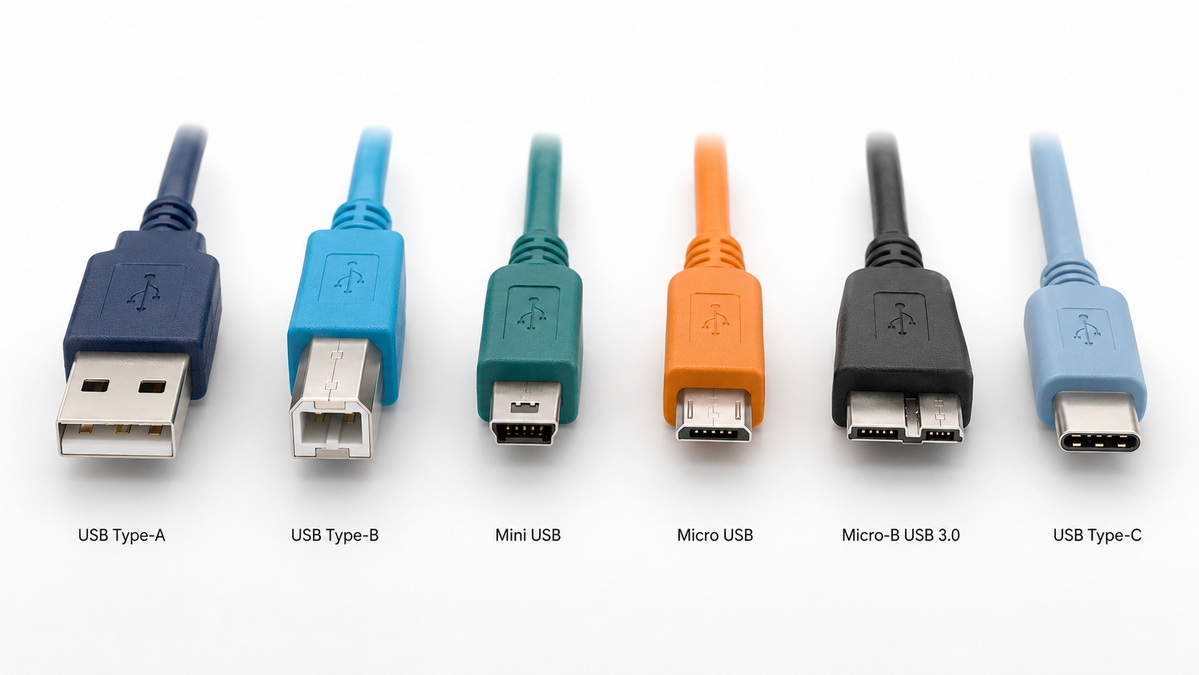
USB connectors have developed from large, directional plugs used on computers and office equipment into compact, multi-function interfaces for phones, laptops, displays, chargers, storage devices, and industrial systems.
| USB Connector Type | Physical Design | Typical Application | Reversible | Market Position |
|---|---|---|---|---|
| USB Type-A | Flat rectangular plug | PCs, chargers, hubs, power banks | No | Widely used |
| USB Type-B | Square-shaped plug with beveled corners | Printers, scanners, industrial equipment | No | Still used in professional equipment |
| Mini USB | Small trapezoidal plug | Older cameras, GPS units, MP3 players | No | Mostly legacy |
| Micro USB | Slim and compact plug | Older mobile devices, accessories, IoT devices | No | Common in legacy products |
| Micro-B USB 3.0 | Wider, two-section connector | External hard drives and storage products | No | Declining but still relevant |
| USB Type-C | Compact, symmetrical connector | Phones, laptops, charging, data, video | Yes | Leading modern standard |
A USB connector type describes the physical plug and port format. It does not always identify the complete technical capability of the cable or device. For example, two USB-C cables may look almost identical, but one may be designed for basic charging while another supports high-power charging, high-speed data transfer, and display output.
USB Type-A is the familiar rectangular connector found on desktop computers, wall chargers, laptops, power banks, televisions, gaming consoles, USB hubs, and vehicle chargers. It has been one of the most common USB connector types for decades.
USB Type-A is usually installed on the host side of a connection. For example, a computer may have a USB-A port, while the connected cable may lead to a Micro USB, USB Type-B, or USB-C device connector.
Its main advantage is broad compatibility. Many homes, offices, factories, and vehicles still rely on USB-A ports. As a result, USB-A to USB-C, USB-A to Micro USB, and USB-A to USB-B cables continue to be important product categories for distributors and accessory brands.
However, USB Type-A also has several limitations:
- It can only be inserted in one direction.
- It is larger than modern compact connectors.
- It is less suitable for slim laptops and mobile devices.
- Its physical appearance does not confirm charging or data performance.
- It is gradually being replaced by USB-C in many new consumer products.
USB-A remains a practical choice for replacement cables, wall chargers, power banks, computer accessories, automotive products, and budget-friendly charging solutions.
Typical USB Type-A cable applications include:
- USB-A to USB-C charging cables
- USB-A to Micro USB replacement cables
- USB-A to USB-B printer cables
- Keyboard and mouse cables
- USB flash drives
- Car charging accessories
- Barcode scanners and point-of-sale equipment
- USB hubs and low-speed peripherals
For an OEM cable project, the cable structure should match the intended use. A USB-A to USB-C cable for a small Bluetooth accessory may require a different conductor gauge and internal design than a cable intended for high-current charging or stable data synchronization.
USB Type-B is a larger connector with a square-like profile and beveled upper corners. It is most commonly associated with printers and scanners, but it is also used in audio equipment, laboratory instruments, industrial controls, point-of-sale devices, and other professional hardware.
Traditionally, USB Type-B is installed on the device or peripheral side of a connection. USB Type-A is often located on the computer or host side, while USB Type-B connects to the printer, scanner, or equipment.
Although it is no longer common in mobile electronics, USB Type-B remains useful in stable, stationary applications. Its larger construction can provide reliable mechanical engagement for equipment that operates over long periods.
USB Type-B remains suitable for:
- Printers and multifunction office devices
- Scanners and label printers
- Audio interfaces
- Industrial control systems
- Medical and laboratory equipment
- CNC machinery and production equipment
- Point-of-sale terminals
For industrial or professional applications, connector selection should not be based on compatibility alone. Buyers should also consider cable shielding, jacket material, connector overmolding, strain relief, bend resistance, operating temperature, and resistance to vibration.
A standard USB-A to USB-B cable may work well for home or office printing. However, an industrial cable assembly may need stronger materials and improved shielding to provide stable performance in demanding environments.
Mini USB and Micro USB were developed to reduce connector size for portable electronics. Both are directional connectors, meaning they must be inserted in the correct orientation.
These connectors played an important role in the growth of digital cameras, mobile devices, GPS units, Bluetooth accessories, and compact electronic products. Today, they are mostly replaced by USB-C in newly developed mainstream products, but they remain commercially relevant in replacement and compatibility markets.
Mini USB was widely used in older digital cameras, GPS devices, MP3 players, handheld game consoles, and portable accessories. It is larger than Micro USB but smaller than USB Type-B.
Mini USB products are now primarily used for maintenance, replacement, and aftermarket supply. Brands developing new consumer electronics rarely select Mini USB because USB-C provides a more modern user experience and broader functional potential.
However, Mini USB cables still have value for distributors and wholesalers serving customers with older devices. A well-organized cable catalog should not ignore this segment, especially when targeting repair markets, electronic hobbyists, industrial maintenance buyers, and legacy-device users.
Micro USB became one of the most widely used connectors in early smartphones, Bluetooth speakers, power banks, e-readers, wireless headphones, wearable products, and small smart devices.
Micro USB is compact and cost-effective, which helped it become a standard solution for many entry-level and mid-range electronics. However, its directional design is less convenient than USB-C. Repeated incorrect insertion can increase wear on the connector or device port, particularly when the connector shell, terminal design, or strain relief is poor.
Micro USB remains relevant in the following cases:
- Replacement cables for older Android devices
- Legacy Bluetooth speakers and headphones
- Low-cost power banks
- Smart-home accessories
- Small IoT devices
- Entry-level electronic products
- Maintenance and repair markets
For Micro USB cable manufacturing, durability should be a major consideration. Connector fit, terminal quality, overmold design, cable flexibility, and bend resistance can strongly influence the lifespan of the final product.
Micro-B USB 3.0 is wider than standard Micro USB and has a distinctive two-part shape. It was commonly used on external hard drives and storage products that required higher-speed data transmission than earlier USB interfaces.
It should not be confused with standard Micro USB. While the connectors may look similar at first glance, they are not interchangeable for full functionality. A standard Micro USB plug cannot provide the complete connection required by a Micro-B USB 3.0 port.
Micro-B USB 3.0 is still found in some external hard drives, data-storage accessories, and older professional equipment. It remains relevant for replacement cables, aftermarket accessories, and storage-device compatibility.
USB Type-C is a compact, symmetrical, reversible connector designed for a wide range of functions. It is now widely used in smartphones, tablets, laptops, monitors, docking stations, chargers, external storage devices, gaming accessories, and professional electronics.
The reversible design improves everyday usability because users can insert the plug in either orientation. For product developers, USB-C offers a more flexible platform because it can support charging, data, video, docking, and accessory connectivity when the complete cable and device system is designed for these functions.
USB-C is also becoming increasingly important for products sold in international markets. Many new portable electronic devices now use USB-C as a standard charging interface, making it a strong choice for brands that want to improve compatibility and simplify product ecosystems.
Depending on cable construction, electronic components, device ports, and system compatibility, USB-C can support:
- Charging for phones, tablets, laptops, and accessories
- USB 2.0 data transfer
- High-speed USB data transfer
- External storage connectivity
- Display output
- Docking stations and hubs
- Multi-function monitor connections
- High-power charging for compatible devices
- Advanced cable identification functions
The capability of a USB-C cable must always be defined clearly. A USB-C connector alone does not guarantee high-speed data transfer, video output, or high-power charging.
USB-C cables can support different charging levels. Some are designed for low-power applications, while others are designed for high-power laptops, monitors, docking stations, and professional equipment.
A cable's power capability depends on factors such as:
- Wire gauge
- Conductor material
- Connector design
- Cable identification electronics
- Device compatibility
- Charger capability
- Heat control
- Cable length
A cable that supports basic charging may not be suitable for a high-power laptop. Likewise, a high-power cable may not provide the expected performance if the charger or device does not support the same charging level.
USB-C cables can also vary significantly in data and video performance. Some USB-C cables are intended mainly for charging and low-speed data synchronization. Others are designed for high-speed storage, professional docking, external displays, or advanced workstation applications.
This difference is important for brands and buyers. If a cable will be used with external SSDs, monitors, docking stations, or high-performance laptops, the product specification should clearly state the required data speed and display function.
One of the most common misunderstandings in the cable market is that every USB-C cable has the same capability. This is incorrect.
Two USB-C to USB-C cables can have the same connector shape, color, length, and outer appearance while offering completely different performance. One cable may only support basic charging and USB 2.0 data transfer. Another may support high-power charging, fast data transfer, and display output.
For this reason, product specifications must go beyond the phrase "USB-C cable."
Before developing or sourcing a USB-C cable, define the following requirements:
1. Required charging power.
2. Required data-transfer speed.
3. Whether video output is needed.
4. Cable length.
5. Device types that will be connected.
6. Cable jacket material.
7. Connector shell material.
8. Cable color and logo requirements.
9. Bend-resistance target.
10. Packaging and labeling requirements.
11. Target sales markets.
12. Testing and quality-control standards.
A complete specification reduces the risk of receiving a cable that fits physically but does not perform as expected.
The best USB connector type depends on the product category, device interface, user expectations, pricing strategy, and expected product lifecycle.
| Project Requirement | Recommended Connector Direction | Important Factors |
|---|---|---|
| Replacement cable for older accessories | USB-A to Micro USB | Plug fit, wire gauge, bend resistance |
| Printer or office equipment cable | USB-A to USB-B | Shielding, length, durability |
| External hard-drive replacement cable | USB-A or USB-C to Micro-B USB 3.0 | Stable data performance, compatibility |
| Modern phone or tablet charging cable | USB-C to USB-C | Charging power, cable durability |
| Laptop charging cable | USB-C to USB-C | Power capability, conductor design |
| Docking or display cable | Full-featured USB-C | Data speed, video function, compatibility |
| Retail replacement cable range | Mixed USB connector types | Market demand, packaging, pricing |
A practical example is a laptop charging cable. A brand should not simply request a "USB-C cable." The product brief should specify the charging requirement, cable length, connector materials, internal cable structure, expected device types, test method, packaging design, and private-label requirements.
This approach helps ensure that the factory, quality team, and buyer are working toward the same product standard.
A USB cable is not just a connector with wire attached. Its real performance depends on the complete structure of the cable assembly.
Important quality factors include:
- Conductor material and wire gauge
- Internal insulation
- Shielding structure
- Connector terminal quality
- Connector-shell design
- Overmolding quality
- Strain-relief structure
- Cable-jacket material
- Plug insertion performance
- Cable flexibility
- Bending resistance
- Charging stability
- Data-transfer stability
- Production consistency
Conductor quality and wire gauge influence charging performance, voltage drop, and heat management. Shielding is especially important for cables designed for stable data transmission or use near electrically noisy equipment.
The connector overmold also deserves close attention. A well-designed strain-relief area can reduce the risk of failure where the cable enters the connector, which is one of the most common stress points during everyday use.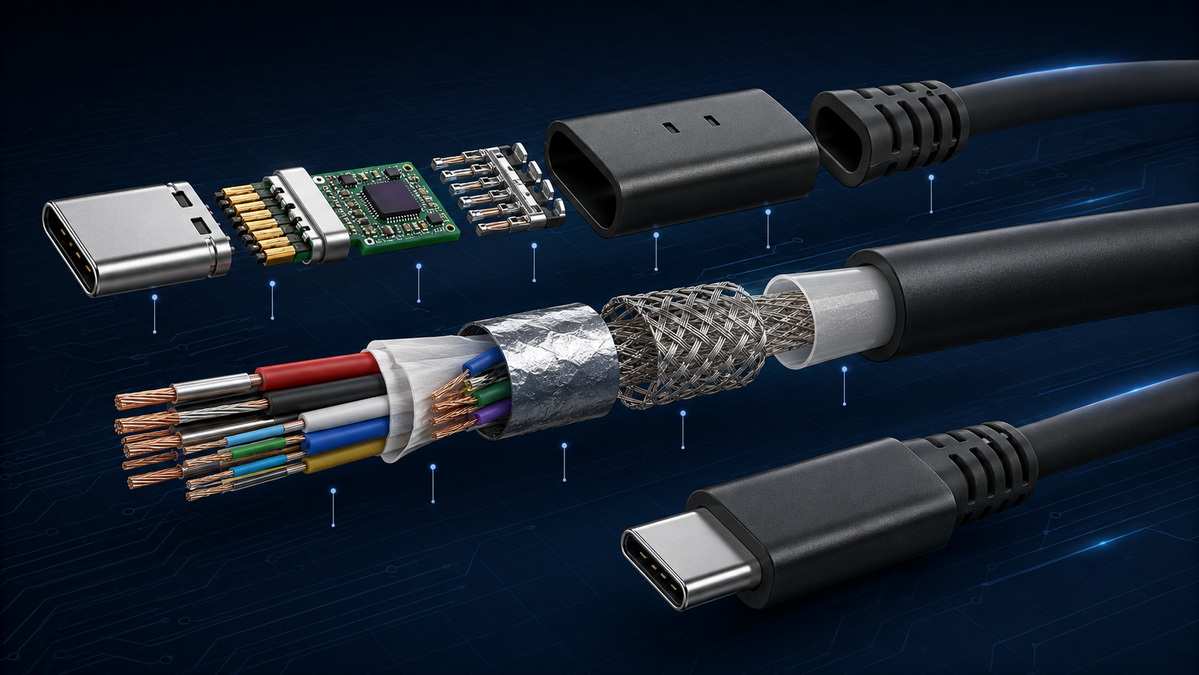
Different cable jackets offer different advantages:
| Jacket Material | Main Advantages | Typical Applications |
|---|---|---|
| PVC | Cost-effective and widely available | Standard charging and data cables |
| TPE | Flexible, smooth, premium feel | Consumer electronics accessories |
| Braided Nylon | Durable and visually distinctive | Retail cables and premium accessories |
| Silicone | Soft, flexible, heat-resistant | Premium charging cables and specialized applications |
The appropriate material depends on the product's target price, appearance requirements, flexibility needs, and intended user environment.
Product testing should match the function promised to customers. A cable designed for basic charging requires different testing from a cable designed for high-power charging, high-speed storage, or display connectivity.
A practical cable evaluation process may include:
1. Confirming connector dimensions and plug fit.
2. Checking continuity and insulation.
3. Measuring charging performance under load.
4. Testing data-transfer stability with intended devices.
5. Evaluating connector temperature during charging.
6. Performing repeated insertion and removal tests.
7. Conducting bend and flex testing.
8. Reviewing visual appearance, overmolding, printing, and packaging.
9. Verifying bulk-production consistency through inspection standards.
Pre-production samples should be tested with the actual devices intended for the final market. A cable may pass a simple continuity test but still show poor performance during sustained charging, large-file transfers, or repeated bending.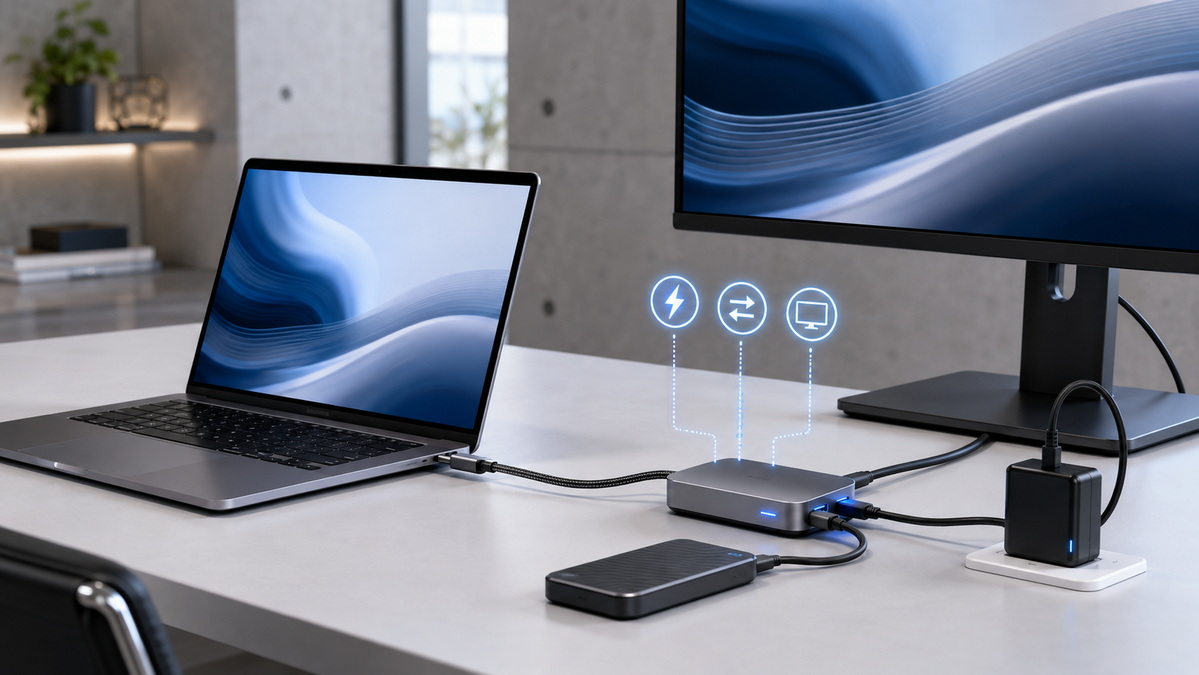
For brands, wholesalers, and equipment manufacturers, selecting a cable supplier involves more than comparing unit prices. The manufacturing partner should be able to understand the intended application and convert it into a clear, measurable cable specification.
Useful questions to ask include:
- Can the factory recommend the appropriate cable structure for the intended device?
- Can samples be developed based on charging, data, or video requirements?
- How are conductor gauge and cable resistance controlled?
- What testing is completed during production?
- Can the supplier support custom length, color, logo, connector style, and packaging?
- How are product consistency and defect prevention managed?
- Can the factory support private-label and OEM requirements?
For OEM projects, early technical communication is essential. Confirming specifications before production helps reduce delays, performance problems, return rates, and unexpected product changes.
USB Type-A, USB Type-B, Mini USB, Micro USB, and Micro-B USB 3.0 remain important for compatibility, replacement, industrial, and aftermarket applications. However, USB Type-C has become the preferred connector for many new consumer electronics, laptop accessories, charging products, and multi-function devices.
The right choice is not simply selecting the newest connector. It is selecting the connector and cable structure that match the device, required charging level, data requirement, intended use environment, target market, and expected product lifespan.
For custom cable projects, a detailed product brief covering connector type, length, charging requirement, data function, material preference, branding, and packaging can help create a more reliable and commercially suitable cable solution.
The most common USB connector types are USB Type-A, USB Type-B, Mini USB, Micro USB, Micro-B USB 3.0, and USB Type-C. USB-C is now the leading option for many modern phones, tablets, laptops, and accessories.
No. USB Type-C refers to the connector shape. USB 3.0 and other USB data standards refer to data-transfer capability. A USB-C cable may support different levels of charging, data, and video performance.
No. Some USB-C cables are intended for low-power charging or basic data transfer. Laptop charging requires a cable that supports the power level needed by the laptop, charger, and connected system.
A USB-C connector can physically fit into a compatible port, but video output requires the cable, device, and display system to support the necessary video function. Connector shape alone does not guarantee display capability.
Yes. Micro USB is still used in older smartphones, Bluetooth devices, power banks, small smart devices, entry-level accessories, and replacement markets. It is less common in newly developed mainstream electronics.
Micro-B USB 3.0 is wider and designed for higher-speed data applications, especially external hard drives. Standard Micro USB is smaller and was widely used for charging and data synchronization in older mobile devices.
An OEM cable specification should include connector types, cable length, charging requirement, data speed, video requirement, cable material, color, logo details, packaging, quality standards, and intended target devices.
1. USB Implementers Forum. [Cables and Connectors] — Information on USB-C cable categories and power-capability labeling. [usb]
2. USB Implementers Forum. [USB Charger (USB Power Delivery)] — Information on USB Power Delivery and USB PD 3.1 charging capability. [usb]
3. USB Implementers Forum. [USB4 Version 2.0 Announcement] — Technical announcement covering USB4 Version 2.0 performance capability. [usb]
4. European Commission. [The EU Common Charger] — Information about common charging requirements for covered device categories. [single-market-economy.ec.europa]
5. European Commission. [EU Common Charger Rules] — Overview of USB-C charging-interface adoption in the EU. [commission.europa]
6. Wandkey. [USB Connector Types] — Topic-coverage reference for USB connector categories. [wandkey]


