


Views: 226 Author: Otechkabel Publish Time: 2026-08-16 Origin: Site


Content Menu
>> Why USB-C Is Widely Adopted
● USB-A vs USB-C: Key Differences
● Connector Design and Daily Usability
● USB-A vs USB-C Charging Performance
>> Typical USB-C Charging Applications
● Understanding USB-C Cable Power Ratings
>> When an E-Marker Is Important
● Can USB-C Support Video Output?
>> Important Video Compatibility Factors
● USB-A and USB-C Compatibility
● USB-A vs USB-C for OEM Cable Projects
>> Recommended Product Strategy
● How to Select the Right USB Cable
>> 1. Confirm the Connector Combination
>> 2. Confirm the Charging Requirement
>> 3. Confirm the Data Requirement
>> 5. Define Materials and Appearance
● Cable Quality Factors That Matter
● FAQ
>> Is USB-C always faster than USB-A?
>> Can a USB-A to USB-C cable charge a USB-C phone?
>> Does every USB-C cable support fast charging?
>> Does every USB-C cable support video output?
>> What is the difference between USB-C and USB4?
>> Can I use a USB-A accessory with a USB-C laptop?
>> Is a 240W USB-C cable necessary for every laptop?
USB-A and USB-C are two widely used connector formats, but they serve different product generations and user needs. USB-A remains valuable for legacy devices, chargers, industrial equipment, and cost-sensitive accessories. USB-C offers a reversible design, broader charging potential, faster data options, and greater flexibility for modern smartphones, laptops, tablets, displays, and docking stations.
For cable brands, wholesalers, and product manufacturers, the connector shape alone is not enough to define performance. The final result depends on the cable's power rating, data specification, internal structure, chip configuration, shielding, length, and compatibility with connected devices.
USB-A, also known as Standard-A, is the traditional flat rectangular USB connector found on many computers, wall chargers, power banks, vehicle chargers, printers, keyboards, and industrial devices.
It has been used in consumer and commercial electronics for decades. A USB-A port is commonly found on the host side of a connection, such as a desktop computer, laptop, charging adapter, or power bank.
The connector is familiar and practical, but it has one major limitation: it can only be inserted in one direction. Users often need to turn the plug over before it fits into the port.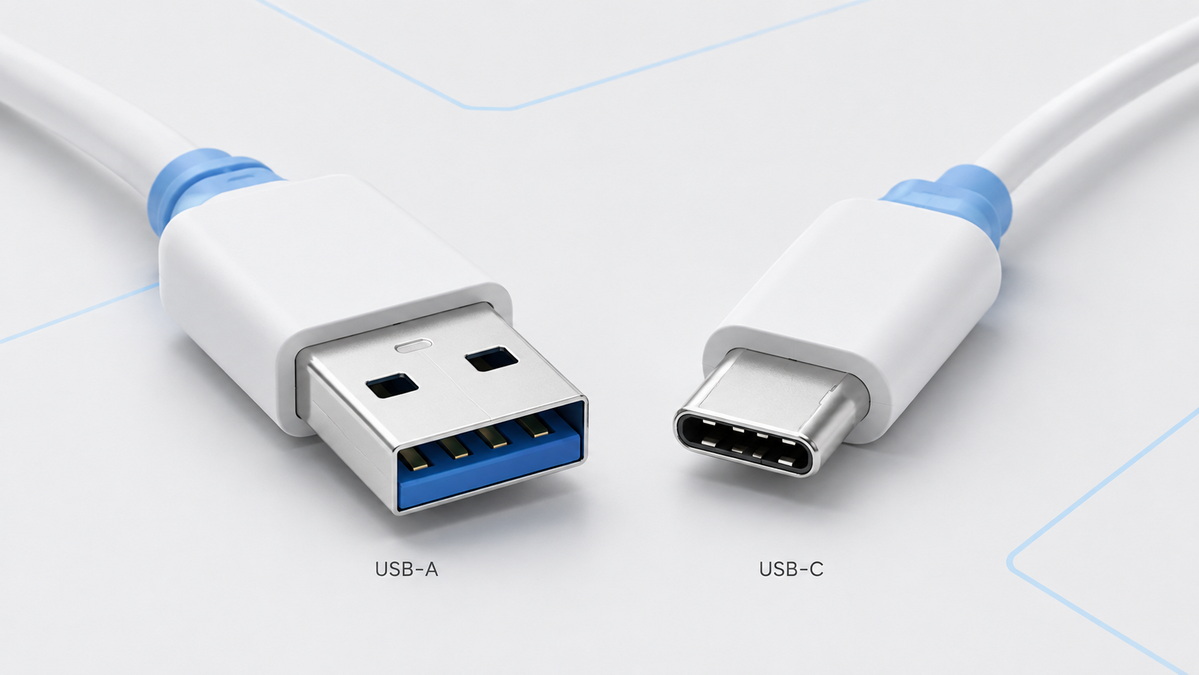
USB-A continues to be a suitable choice for products that require broad compatibility and simple functionality.
Typical USB-A cable applications include:
- USB-A to USB-C charging cables
- USB-A to Micro-USB cables
- USB-A to Lightning cables
- USB-A extension cables
- Computer keyboards and mice
- Printers, scanners, and barcode readers
- Car charging accessories
- Industrial control equipment
- Legacy charging adapters
- USB flash drives and basic peripherals
For brands serving repair markets, automotive accessory channels, entry-level electronics, or legacy-device users, USB-A remains an important product category.
USB-C, also called USB Type-C, is a compact and reversible connector designed for modern electronic devices. It is commonly used on smartphones, tablets, laptops, portable monitors, docking stations, external SSDs, headphones, cameras, and gaming devices.
Its symmetrical design allows users to insert the plug in either direction. This makes daily charging and connectivity easier, especially for mobile products where convenience matters.
USB-C can support multiple functions through one connector. Depending on the cable and connected devices, it may carry power, data, display signals, and other supported functions.
USB-C helps manufacturers reduce the number of connector types used across a product range. Instead of using separate ports for charging, data, and display output, compatible devices can use one USB-C port for multiple functions.
This creates a cleaner product design and a more convenient user experience.
USB-C is also increasingly important for brands selling consumer electronics in international markets. In particular, USB-C has become a key consideration for product planning, cable compatibility, packaging design, and long-term inventory decisions.
| Feature | USB-A | USB-C |
|---|---|---|
| Connector shape | Flat rectangular | Small rounded rectangle |
| Plug orientation | One-way insertion | Reversible insertion |
| Size | Larger | Smaller and more compact |
| Typical devices | PCs, chargers, peripherals, industrial devices | Phones, tablets, laptops, docks, displays |
| Charging capability | Usually lower and protocol-dependent | Supports advanced USB Power Delivery options |
| Data capability | Can support USB 2.0 and selected USB 3.x versions | Can support USB 2.0, USB 3.x, USB4, and newer options |
| Video support | Limited and application-specific | Can support compatible display functions |
| Long-term product fit | Strong for compatibility-focused products | Strong for modern and high-performance products |
The basic difference is simple: USB-A is designed around established compatibility, while USB-C is designed for greater versatility.
USB-A is larger and has a fixed insertion direction. Although users are familiar with it, the connector can be inconvenient in low-light environments or when connecting accessories in tight spaces.
USB-C is smaller and reversible. Users can plug it in without checking which side faces up. This reduces insertion errors and creates a more refined product experience.
For brands, this small physical improvement can have a meaningful impact. A cable that is easy to use can improve customer satisfaction, reduce confusion, and support a more premium product position.
USB-C can support much faster data transfer than USB-A, but this is not guaranteed by the connector shape alone.
A USB-C cable may support basic USB 2.0 data transfer at 480 Mbps. Another USB-C cable with a similar appearance may support 5 Gbps, 10 Gbps, 20 Gbps, 40 Gbps, or even 80 Gbps under compatible conditions.
This is because USB-C describes the physical connector format, while USB 2.0, USB 3.2, USB4, and USB4 Version 2.0 describe the underlying data standards.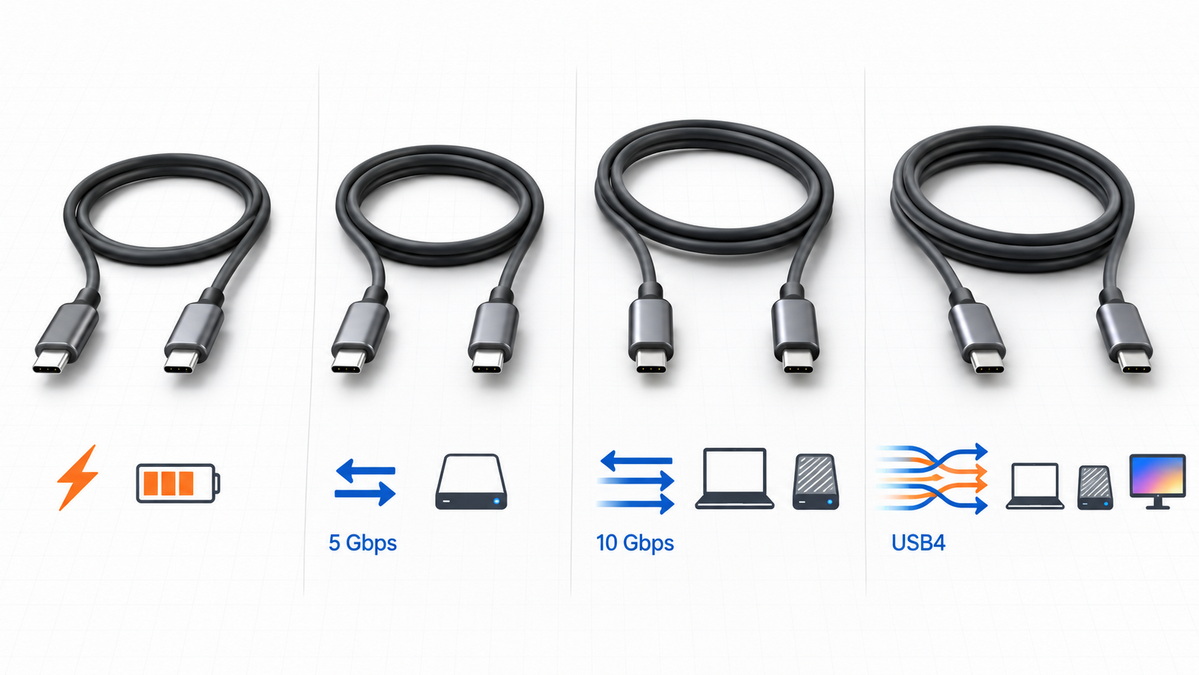
| USB Standard | Maximum Theoretical Data Rate | Typical Use |
|---|---|---|
| USB 2.0 | 480 Mbps | Basic charging cables and peripherals |
| USB 3.2 Gen 1 | 5 Gbps | External drives and everyday accessories |
| USB 3.2 Gen 2 | 10 Gbps | Fast storage and professional peripherals |
| USB 3.2 Gen 2×2 | 20 Gbps | Selected high-speed USB-C equipment |
| USB4 | Up to 40 Gbps | Docks, displays, external SSDs |
| USB4 Version 2.0 | Up to 80 Gbps | Advanced workstations and next-generation accessories |
A cable should never be described only as a "USB-C cable" if speed is important to the buyer. The product specification should clearly state the actual data rate.
Two cables may both have USB-C connectors, but one may be designed only for charging while another is built for high-speed data, video output, and laptop charging.
Clear labeling helps customers choose correctly.
Useful product labels include:
- USB-C to USB-C, USB 2.0, 480 Mbps
- USB-C to USB-C, 5 Gbps, 100W
- USB-C to USB-C, 10 Gbps, 100W
- USB-C to USB-C, USB4, 40 Gbps, 240W
- USB-C to USB-C, USB4 Version 2.0, 80 Gbps
A detailed specification reduces misunderstandings, lowers return rates, and improves confidence in the product.
USB-C is generally the better choice for modern charging applications because it can support USB Power Delivery. This allows compatible chargers, cables, and devices to communicate and negotiate the appropriate charging level.
USB-C charging can be used for small devices such as wireless earbuds and smartphones, as well as larger devices such as tablets, laptops, portable monitors, and selected workstations.
However, not every USB-C cable supports the same charging power.
A standard USB-C cable may be suitable for basic charging, while higher-wattage cables require appropriate construction and, in many cases, an electronic marker chip.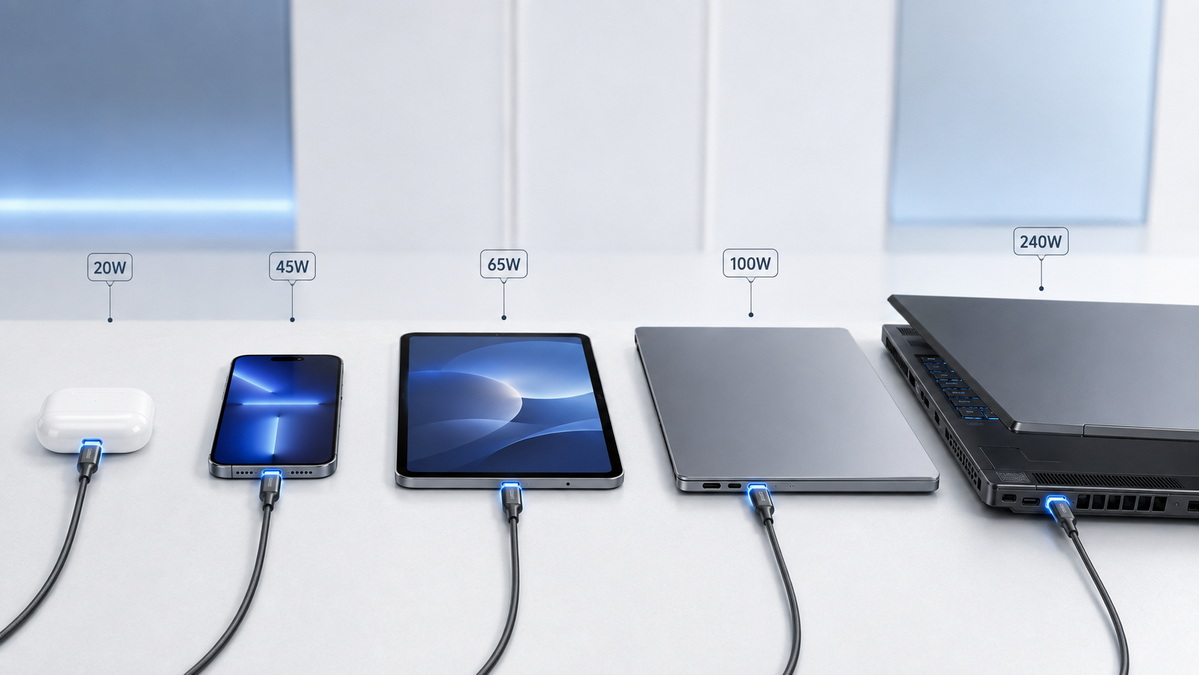
| Device Type | Common Charging Requirement | Recommended Cable Type |
|---|---|---|
| Wireless earbuds | Low power | USB-A to USB-C or USB-C to USB-C |
| Smartphones | 18W to 45W | USB-C to USB-C |
| Tablets | 20W to 45W | USB-C to USB-C |
| Lightweight laptops | 45W to 65W | USB-C to USB-C |
| Standard laptops | 65W to 100W | USB-C to USB-C |
| High-performance laptops | 100W to 140W | USB-C to USB-C |
| Advanced power applications | Up to 240W | USB-C to USB-C with suitable design |
USB-A can still provide reliable charging for many devices. It remains useful for wall chargers, power banks, vehicle chargers, and replacement cables. However, USB-A is less suitable for the highest-power charging applications.
A USB-C cable should be selected according to the intended device and charging environment.
A cable designed for a smartphone may not be appropriate for a laptop. A cable built for a 65W laptop may not be suitable for a 240W charging system.
- 60W cables are suitable for many smartphones, tablets, and lightweight laptops.
- 100W cables are commonly used for laptop charging and higher-power accessories.
- 140W cables support selected high-performance charging applications.
- 240W cables are designed for advanced USB Power Delivery systems with compatible chargers and devices.
The complete charging system must be compatible. The charger, cable, and device all need to support the required power level.
If one component has a lower rating, the system will operate at the lower capability.
An E-marker chip is a small electronic component built into certain USB-C cables. It communicates the cable's supported capabilities to connected devices.
This can include information related to current capacity, power rating, and advanced functions.
E-marker chips are especially important for cables designed for higher-current charging, high-wattage applications, or advanced data transfer requirements.
An E-marker should be considered for:
- 5A charging cables
- 100W, 140W, and 240W power applications
- USB4 cables
- High-speed data cables
- Video-capable USB-C cables
- Premium laptop and docking-station cable products
For OEM cable projects, the chip specification should be discussed before sampling begins. The selected chip must match the target power, speed, and product function.
USB-C can support video output when the cable, source device, display, and connected accessories are compatible.
For example, a USB-C laptop may connect to a monitor through a compatible USB-C cable, docking station, or adapter. The same connection may also carry charging power and USB data.
However, video support is not available on every USB-C cable.
A basic USB-C charging cable may only support USB 2.0 data and charging. It may not be designed for display output. A high-performance cable intended for docking stations or external monitors requires the correct internal design and signal performance.
Before selecting a USB-C video cable, confirm:
- The laptop or source device supports video output through USB-C.
- The monitor or display supports the intended input method.
- The cable supports the required data and display capability.
- The cable length is suitable for the target resolution and refresh rate.
- The dock, adapter, or hub is compatible with the complete setup.
For professional users, such as designers, engineers, video editors, and office workstation teams, cable performance can directly affect display stability and productivity.
USB-A and USB-C devices can work together through suitable cables, adapters, and hubs.
For example, a USB-A wall charger can charge a USB-C smartphone through a USB-A to USB-C cable. A USB-A flash drive can connect to a USB-C laptop through a USB-C hub or adapter.
However, compatibility does not automatically improve performance.
A USB-A charger connected to a USB-C phone will remain limited by the charger's original capability. A USB-A peripheral connected through an adapter will remain limited by its own data standard.
The performance of a cable system is determined by its weakest component.
This may be the:
- Charger
- Cable
- Host port
- Adapter
- Hub
- Connected device
- Internal device controller
For example, a 240W USB-C cable cannot make a 20W charger deliver 240W. A USB4 cable cannot provide USB4 data speed when connected to a USB 2.0 port.
This principle should be clearly communicated on product packaging, user manuals, and online product pages.
For OEM buyers, the correct connector choice depends on the target market and product application.
USB-A is a practical choice for replacement cables, legacy accessories, vehicle chargers, industrial equipment, and price-sensitive product lines.
USB-C is a stronger choice for modern consumer electronics, laptop accessories, charging solutions, external storage products, docking stations, displays, and high-performance digital devices.
A balanced cable portfolio often includes both connector types.
| Product Category | Recommended Cable Option |
|---|---|
| Legacy charger replacement cables | USB-A to USB-C |
| Basic smartphone accessories | USB-A to USB-C and USB-C to USB-C |
| Fast-charging phone cables | USB-C to USB-C |
| Laptop charging cables | USB-C to USB-C, 60W to 140W |
| High-power charging cables | USB-C to USB-C, up to 240W |
| External SSD cables | USB-C high-speed cables |
| Docking station cables | USB-C or USB4 cables |
| Vehicle charging cables | USB-A to USB-C and USB-C to USB-C |
| Industrial equipment cables | USB-A, USB-C, or custom cable assemblies |
The product range should be built around actual customer use cases rather than connector trends alone.
Before confirming a cable project, define the performance requirement in detail.
Common options include:
- USB-A to USB-C
- USB-C to USB-C
- USB-A to Micro-USB
- USB-A extension cable
- USB-C extension cable
- USB-C to HDMI cable
- USB-C to USB-A adapter cable
Specify the expected charging power.
Examples include:
- 18W for smartphone charging
- 30W for tablets
- 60W for compact laptops
- 100W for standard laptops
- 140W for selected high-performance devices
- 240W for advanced charging systems
Clearly state the required data standard.
A charge-only cable is not the same as a USB 2.0 cable. A USB 2.0 cable is not the same as a USB 3.2 cable. A USB 3.2 cable is not the same as a USB4 cable.
Cable length affects convenience, electrical resistance, and signal performance.
Short cables are often preferred for power banks, desktop charging, and high-speed data applications. Longer cables are useful for home, office, vehicle, and bedside charging, but they require careful design to maintain stable performance.
An OEM cable project can be customized through:
- PVC jacket
- TPE jacket
- Nylon braided jacket
- Silicone jacket
- Aluminum alloy shell
- Zinc alloy shell
- Custom connector overmolding
- Custom cable color
- Private-label printing
- Retail packaging
- Bulk packaging
Material selection should balance appearance, durability, flexibility, target price, and intended customer use.
A high-quality cable is not defined only by its outer appearance. Internal materials and production control have a major influence on final performance.
Key quality factors include:
- Conductor material and wire gauge
- Connector terminal quality
- Soldering process
- Shielding design
- E-marker chip selection
- Strain-relief construction
- Overmolding quality
- Jacket material
- Cable flexibility
- Pull strength
- Bend resistance
- Charging stability
- Data-transfer consistency
For high-speed and high-power cables, small design differences can create significant performance differences. Product development should include sample testing with the actual charger, laptop, phone, dock, monitor, or storage device that the cable is intended to support.
USB-A remains a dependable connector for legacy compatibility, replacement accessories, industrial applications, and everyday charging products. USB-C offers greater flexibility for modern devices because it can support reversible insertion, advanced charging, high-speed data transfer, and compatible display functions.
The best cable choice is not based only on connector shape. It depends on the complete performance requirement.
Before production begins, define the connector type, power rating, data standard, cable length, chip requirement, materials, color, packaging, and testing expectations. This approach helps create a cable product that matches customer expectations and supports stable long-term sales.
For USB-A, USB-C, high-wattage charging, high-speed data transfer, or customized cable projects, Shenzhen Otechkabel Electronic Co., Ltd can support product specification discussions, sample development, custom branding, cable design, packaging options, and OEM manufacturing requirements.
No. USB-C is a connector type, not a guaranteed speed level. A USB-C cable may support USB 2.0 at 480 Mbps or much higher USB4 data rates. Always check the cable's stated data specification.
Yes. A USB-A to USB-C cable can charge a USB-C phone when used with a compatible USB-A charger. However, charging speed depends on the charger, cable, phone, and supported charging protocol.
No. Some USB-C cables are designed for low-power charging or USB 2.0 data. High-wattage charging requires a cable with the appropriate current rating, internal design, and, in some cases, an E-marker chip.
No. Video output requires compatibility between the cable, source device, display, and related adapter or docking equipment. Basic charging cables may not support display signals.
USB-C refers to the physical connector shape. USB4 refers to a data-transfer standard that can use USB-C connectors. Not all USB-C cables support USB4.
Yes. You can use a USB-A accessory with a USB-C laptop through a compatible adapter, hub, or cable. The actual performance will remain limited by the capabilities of the accessory, adapter, and laptop port.
No. A 240W cable is only needed for devices and chargers designed to use that level of power. Many laptops operate effectively with 60W, 100W, or 140W USB-C charging cables.
1. [European Commission — EU Common Charger Rules] — Overview of USB-C common charging requirements for covered electronic devices in the European Union. [commission.europa]
2. [USB-IF Announcement: USB4 Version 2.0 Specification] — Information on USB4 Version 2.0, USB 80 Gbps capability, and asymmetric display bandwidth options. [en.hynetek]
3. [OnLogic — USB-C and USB Standards Explained] — Technical overview of USB-C, USB Power Delivery, USB4, and USB4 Version 2.0 capabilities. [onlogic]
4. [Total Phase — The Relationship Between USB4 and USB Type-C] — Explanation of the relationship between USB4 technology and USB Type-C connectors. [totalphase]
5. [Wandkey — USB-A vs. USB-C: Which Should You Choose?] — Topic reference covering USB-A and USB-C connector differences. [wandkey]


