


Views: 276 Author: Otechkabel Publish Time: 2026-08-20 Origin: Site


Content Menu
● Main Applications of RCA Cables
>> Home Audio and Hi-Fi Systems
>> Retro Gaming Consoles and Legacy AV Equipment
>> Composite Video Connections
>> Digital Coaxial Audio Connections
● RCA Cable Types and Signal Differences
● How to Choose the Right RCA Cable
>> Identify the Signal Type First
>> Select the Appropriate Cable Length
>> Consider Shielding Requirements
>> Check Connector Construction
● Common RCA Cable Problems and Troubleshooting
>> No Sound From an RCA Audio Connection
>> Hum, Buzzing, or Interference
>> No Picture Through Yellow RCA Video Cable
>> Digital Coaxial Audio Is Not Working
● Custom RCA Cable Manufacturing Considerations
● FAQ
>> What are RCA cables mainly used for?
>> Are all RCA cables the same?
>> Can a regular RCA cable be used for digital coaxial audio?
>> Why are RCA audio cables red and white?
>> What is the yellow RCA cable used for?
>> Can RCA cables support 4K video?
>> How can I reduce humming noise in an RCA audio cable?
An RCA cable is a cable assembly that uses RCA connectors, also known as phono connectors. Each RCA connector includes a center pin for the signal and an outer metal contact that supports grounding and shielding.
RCA cables are commonly recognized by their colored connector housings. These colors help users identify the intended channel or signal during installation.
| Connector Color | Typical Signal | Common Use |
|---|---|---|
| Red | Right-channel analog audio | Amplifiers, speakers, car audio |
| White or black | Left-channel analog audio | Audio players, receivers, audio systems |
| Yellow | Composite video | TVs, DVD players, retro consoles |
| Green, blue, red | Component video | Legacy HD video systems |
| Orange | Digital coaxial audio | AV receivers, DACs, CD players |
Although color coding is useful, it should not be the only factor used to identify a connection. Users should also check the labels printed on devices, ports, cables, and product manuals.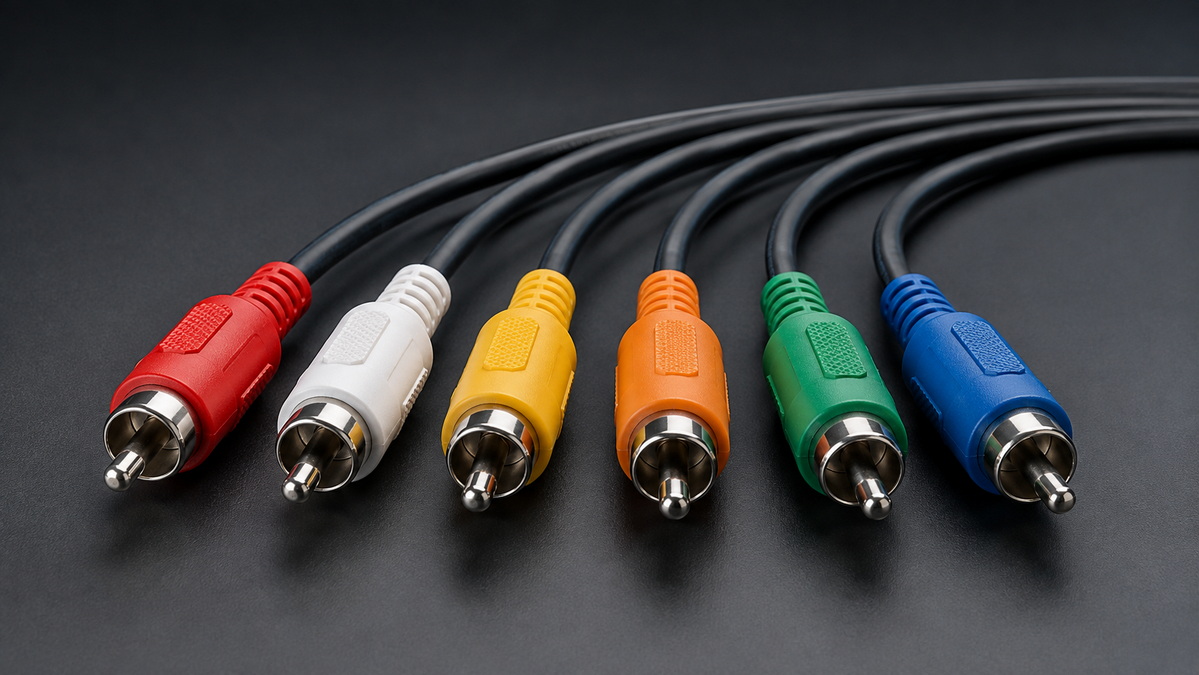
One of the most common uses of RCA cables is connecting home audio equipment. Stereo RCA cables are widely used for line-level analog audio transmission between source devices and audio equipment.
Typical audio devices that use RCA connectors include:
- CD players
- Turntables with phono preamps
- Digital-to-analog converters
- Media players
- Integrated amplifiers
- AV receivers
- Equalizers
- Powered speakers
- Active subwoofers
- External power amplifiers
In a standard stereo system, the white connector normally carries the left audio channel, while the red connector carries the right audio channel. This simple layout makes RCA cables easy to install and suitable for a wide range of consumer audio products.
For example, a user may connect a CD player to an integrated amplifier through a dual RCA cable. Another common setup is connecting a digital-to-analog converter to active speakers or an amplifier.
For home audio applications, buyers should focus on stable connector contact, suitable shielding, consistent channel marking, and flexible cable construction. These details can improve installation efficiency and reduce the risk of intermittent audio problems.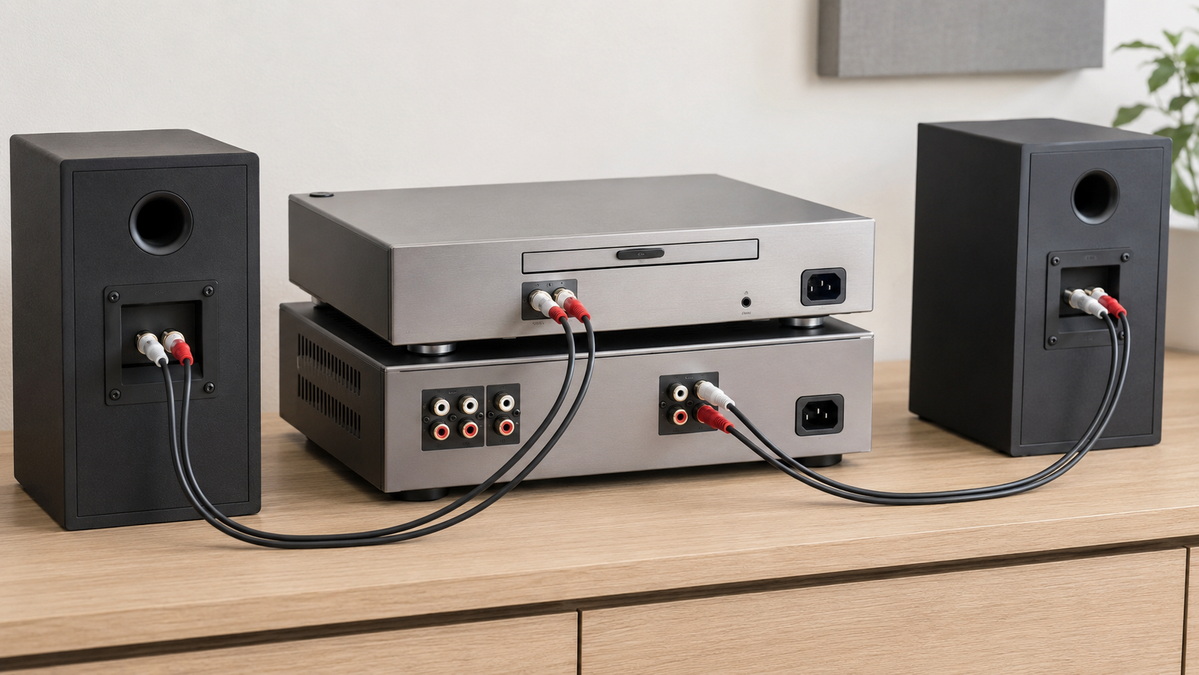
RCA cables are also widely used in car audio installations. They are commonly installed between head units, audio processors, amplifiers, equalizers, and active subwoofers.
A car amplifier often receives low-level audio signals through RCA inputs. The cable transmits the signal from the head unit or digital signal processor to the amplifier, where the audio is amplified before being sent to speakers or subwoofers.
Car audio environments can be challenging because cables may be routed close to vehicle power wiring, ignition systems, electronic modules, and other potential sources of electrical interference.
For this reason, car audio RCA cables should be designed with attention to:
- Shielding performance
- Cable flexibility
- Connector retention
- Durable strain relief
- Noise resistance
- Color-coded channel identification
- Cable length options
- Protective outer jackets
A properly specified automotive RCA cable helps installers route cables more easily and gives end users a cleaner, more reliable system.
RCA cables continue to be important for retro gaming and older audio-video equipment. Many classic game consoles, VCRs, DVD players, camcorders, CRT televisions, and analog video switchers use RCA ports.
A standard composite AV cable usually includes three connectors:
1. Yellow for composite video
2. White for left-channel audio
3. Red for right-channel audio
This connection format is often found on older entertainment systems. It allows users to connect a source device directly to a television, monitor, AV receiver, or video switcher.
Retro gaming enthusiasts often need replacement RCA cables because original console cables may be damaged, missing, or worn after years of use. A replacement cable should fit securely, provide clear color identification, and use durable materials suitable for repeated use.
For brands serving the retro gaming market, custom cable length, molded plugs, console-specific connector designs, logo printing, and retail packaging can create a stronger product offering.
Composite video is one of the most familiar RCA cable applications. It normally uses a yellow RCA connector to carry analog video.
This connection type was widely used in older televisions, DVD players, VCRs, game consoles, surveillance monitors, and AV distribution systems. Composite video combines multiple video elements into one signal path, making it simple to connect but less capable than modern high-definition video interfaces.
Composite RCA video remains useful when maintaining or repairing older systems. It is also common in aftermarket accessories, retro gaming setups, educational equipment, hospitality AV systems, and certain test environments.
Users should understand that a yellow RCA video connector is generally intended for standard-definition composite video. It is not the same as a modern high-definition digital video interface.
Component video also uses RCA-style connectors, but it separates the video signal into three channels. These connectors are often color-coded green, blue, and red.
This format was used by many older HD televisions, DVD players, media devices, and game consoles. Component video can offer better image quality than composite video because it separates video information into multiple paths.
A component video installation may also require separate red and white RCA connectors for stereo audio. This means a complete component video cable set can include five RCA connectors:
- Green for one video component
- Blue for one video component
- Red for one video component
- White for left audio
- Red for right audio
The two red connectors serve different functions. One may carry video, while the other carries right-channel audio. Clear labeling is especially important to prevent connection mistakes.
RCA connectors can also be used for digital coaxial audio. This application is often found on AV receivers, CD players, DACs, game consoles, televisions, media players, and home theater systems.
Digital coaxial audio uses an electrical signal format that is different from standard analog stereo RCA audio. It commonly uses a 75-ohm coaxial cable design and may be identified by an orange RCA connector.
A digital coaxial cable may connect:
- A CD player to an AV receiver
- A media player to a DAC
- A television to an audio receiver
- A game console to a surround sound system
- A digital source device to a home theater processor
It is important to distinguish digital coaxial RCA cables from ordinary analog audio cables. While the connector style may look similar, the cable construction and impedance requirements can differ.
For dependable digital audio transmission, buyers should select cable assemblies designed for digital coaxial use rather than relying only on the connector shape.
RCA connectors can support several types of signals. Selecting the right cable requires understanding the difference between these applications.
| Cable Type | Signal | Typical Connector Colors | Common Equipment |
|---|---|---|---|
| Stereo RCA audio cable | Analog left/right audio | Red and white | Amplifiers, CD players, speakers |
| Composite AV cable | Analog video and stereo audio | Yellow, red, white | DVD players, retro consoles, TVs |
| Component video cable | Analog component video | Green, blue, red | Legacy HD TVs and media devices |
| Digital coaxial cable | Digital audio | Orange or black | DACs, AV receivers, CD players |
| Car audio RCA cable | Low-level analog audio | Red, white, or custom colors | Head units, amplifiers, DSPs |
The connector alone does not define the cable's performance. The internal conductor, shielding, insulation, impedance, connector materials, and assembly method all influence the cable's final performance.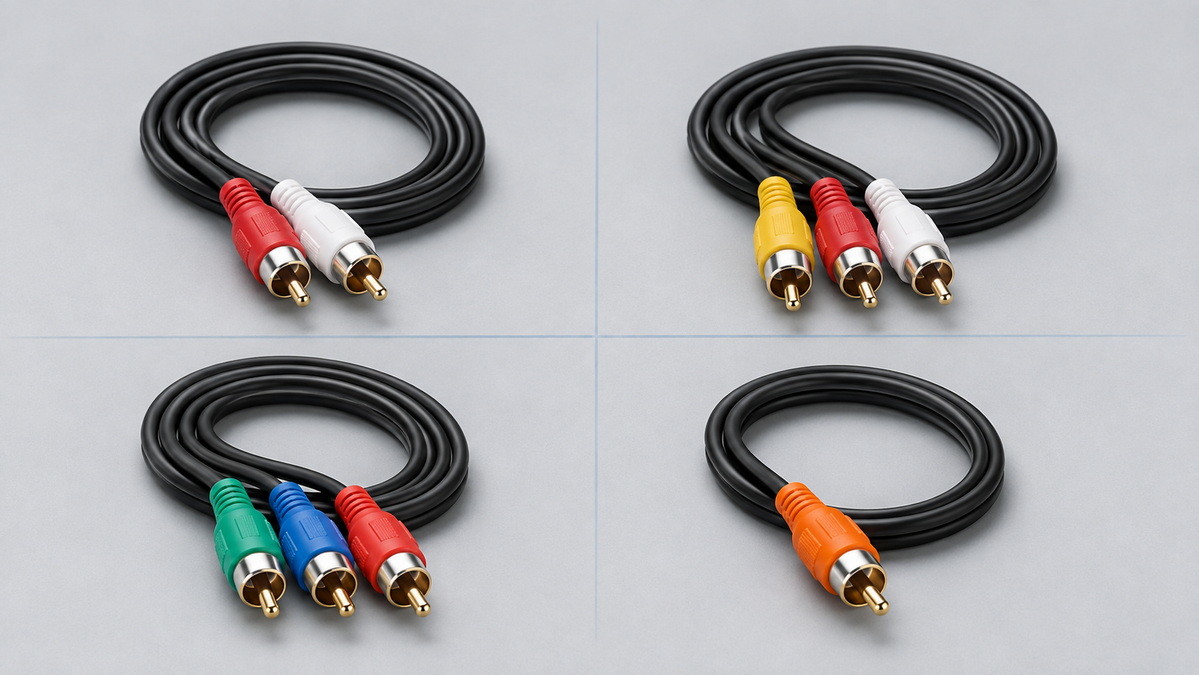
The first step is identifying the signal carried by the cable. Before purchasing or specifying a cable, confirm whether the device requires analog audio, composite video, component video, or digital coaxial audio.
For example, a stereo amplifier input normally needs an analog left-and-right RCA audio cable. A port labeled "Coaxial" or "Digital In" may require a 75-ohm digital coaxial cable instead.
Selecting the wrong cable may lead to connection problems, poor audio quality, video failure, or unreliable operation.
Cable length should match the installation environment. Short cables are suitable for desktop systems, compact audio racks, and home entertainment cabinets. Longer cables may be needed for vehicle installations, conference systems, retail displays, equipment racks, and custom AV setups.
Avoid using excessively long cables when a shorter length is sufficient. Longer cable runs can increase clutter and may make cable routing more difficult.
For branded cable programs, offering multiple standard lengths can improve customer choice. Common options may include 0.5 m, 1 m, 1.5 m, 2 m, 3 m, 5 m, and custom lengths.
Shielding is especially important for analog audio cables and car audio installations. Effective shielding can reduce the impact of nearby electrical noise and help maintain a cleaner audio signal.
Cable routing also affects performance. In sensitive analog audio systems, RCA cables should be kept away from AC power cables, high-current vehicle power wiring, transformers, and other potential interference sources where possible.
For automotive applications, braided shielding, foil shielding, or combined shielding structures may be considered depending on the product position and target market.
RCA connector quality affects the user experience. Loose connectors, poor plating, weak strain relief, or poorly molded housings can lead to connection failure over time.
When evaluating RCA cable assemblies, consider:
- Center-pin alignment
- Secure outer-contact fit
- Connector plating options
- Overmold material
- Strain-relief design
- Pull resistance
- Cable-to-connector bonding
- Color consistency
- Logo customization options
For retail products, connector appearance also matters. Metallic shells, colored rings, molded brand marks, and premium cable jackets can improve shelf appeal and brand recognition.
If an RCA audio connection produces no sound, first confirm that the red and white plugs are connected to the correct input and output ports. Check that the amplifier or receiver is set to the correct input source.
Then inspect the cable for loose connectors, bent pins, damaged jackets, or visible wear. Testing with another working RCA cable can help determine whether the issue is caused by the cable or the device.
Hum or buzzing may be caused by poor shielding, loose connections, cable damage, grounding issues, or routing near power cables.
Try moving the RCA cable away from power adapters and AC wiring. Reconnect both ends firmly and test with another cable if possible. In vehicle systems, check the routing of the RCA cable relative to power wiring and grounding points.
If there is no image, make sure the yellow plug is connected to the video output on the source device and the composite video input on the display or converter.
Some modern displays do not include composite video inputs. In that case, an active video converter may be required. Confirm the direction of the converter before installation because not all adapters work in both directions.
Check whether the device is configured to output digital audio through its coaxial port. Also verify that the receiving device supports the selected audio format.
Make sure the cable is connected to the digital coaxial input, not an analog RCA audio input. A proper digital coaxial cable should be used for systems that require stable digital signal transmission.
For international brands, distributors, wholesalers, and equipment manufacturers, RCA cables can be developed as customized products rather than standard off-the-shelf accessories.
A complete custom specification may include:
- Cable type and conductor size
- Cable length and tolerance
- Shielding structure
- Jacket material and color
- Connector type and plating
- Connector housing design
- Color rings or channel identification
- Logo printing or molding
- Packaging design
- Barcode labels
- Bundle configuration
- Electrical testing requirements
- Pull-force and visual inspection standards
Shenzhen Otechkabel Electronic Co., Ltd. supports OEM cable projects for audio, video, computer, consumer electronics, and industrial accessory markets. Whether you need a standard red-and-white audio cable, a yellow-red-white AV cable, a digital coaxial cable, a car audio interconnect, or a customized multi-connector assembly, the project can be developed around your product requirements.
Share your target application, cable drawing, desired length, connector style, packaging idea, and estimated quantity to begin building a suitable cable specification.
RCA cables remain a reliable and versatile option for analog audio, legacy video, car audio, retro gaming, home theater, and digital coaxial audio applications. Their long-term value comes from their compatibility with a wide range of equipment and their simple, recognizable connection format.
The best RCA cable is one that matches the signal type, installation environment, length requirement, shielding level, and product positioning. For OEM buyers, careful attention to cable construction, connector quality, customization, and packaging can turn a basic cable into a dependable branded accessory.
RCA cables are mainly used for analog stereo audio, composite video, component video, car audio, and digital coaxial audio connections. They are common in amplifiers, speakers, TVs, DVD players, game consoles, AV receivers, and audio processors.
No. RCA cables can be designed for stereo analog audio, composite video, component video, or digital coaxial audio. The connector shape may be similar, but the cable construction and intended signal can differ.
A regular RCA cable may physically connect to a digital coaxial port, but a dedicated 75-ohm digital coaxial cable is generally the better choice for this application.
Red usually identifies the right audio channel, while white or black identifies the left audio channel. This color convention helps users make correct stereo connections.
The yellow RCA cable is normally used for composite analog video. It is commonly found on older TVs, DVD players, VCRs, retro consoles, and AV equipment.
Standard RCA composite cables are not designed for 4K video. Modern 4K video systems normally use digital interfaces designed for high-resolution video transmission.
Use a properly shielded cable, ensure connectors fit securely, keep the cable away from power wiring, inspect for damage, and check for grounding issues in the connected equipment.
1. [Shenzhen Otechkabel Electronic Co., Ltd. — What Are the Applications of RCA Cables?]
2. [RadioShack — What Is an RCA Cable and When to Buy One?]
3. [Lindy — S/PDIF Connections Explained]
4. [StarTech.com — SPDIF Digital Coaxial or Toslink to Stereo RCA Audio Converter Manual]


