


Views: 225 Author: Otechkabel Publish Time: 2026-07-07 Origin: Site


USB 3.0 ports are not always blue because color is only a loose visual convention, not a universal standard. In real products, manufacturers often choose different colors, shapes, or no color at all to match branding, improve aesthetics, reduce cost, or avoid confusion across multiple USB generations and charging functions. USB port color alone is never as reliable as the port label, logo, or the actual transfer specification. [industry-electronics]
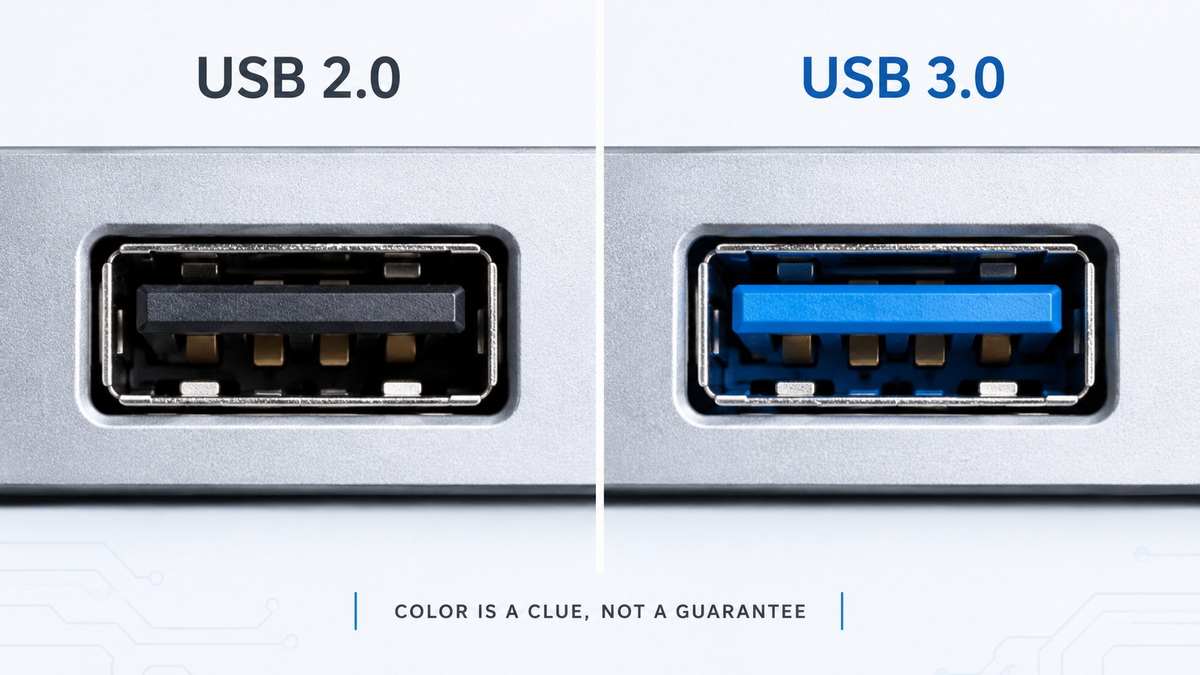
USB 3.0 is a data interface standard designed for faster file transfers than USB 2.0, and it is commonly associated with 5 Gbit/s performance. In practice, many people still call it "USB 3.0," even when a device may be marketed under newer USB naming such as USB 3.1 or USB 3.2. That naming overlap is one reason why visual cues like blue ports became popular, but also why they can be misleading. [igorslab]
For buyers, engineers, and sourcing teams, the key point is simple: speed depends on the controller and the full implementation, not on the color of the plastic insert alone. A blue port may indicate SuperSpeed support, but a non-blue port can also support the same standard if the manufacturer labels it accordingly. [industry-electronics]
There are several practical reasons why USB 3.0 ports are not always blue:
- Branding and design consistency. Some manufacturers prefer black, gray, white, red, or custom colors to fit their product identity.
- Cost and production flexibility. Color-matched inserts can add complexity to tooling and assembly.
- Multiple USB functions on one device. A laptop or hub may include charging-only ports, data ports, and high-speed ports, so color alone would not be enough.
- Regional or product-line differences. A brand may use different color schemes across consumer, industrial, and OEM products.
- Newer standards reduced color reliability. As USB generations evolved, manufacturers relied more on icons, labels, and marketing terms than strict color coding. [igorslab]
This is why two devices can both support USB 3.x speeds while looking completely different. In many modern products, the printed specification matters more than the visual cue.
Blue became popular because it gave users an easy way to distinguish USB 3.0 from USB 2.0 at a glance. A blue insert usually suggested a SuperSpeed port, while older ports were often black or white. This convention improved user experience during the early adoption of USB 3.0, especially for desktops, laptops, and external storage devices. [industry-electronics]
However, blue was never a guarantee. Some OEMs used blue inconsistently, and some devices used blue even when the port behavior was limited by the host controller, cable quality, or device firmware. In other words, the color helped, but it was never the whole story. [igorslab]
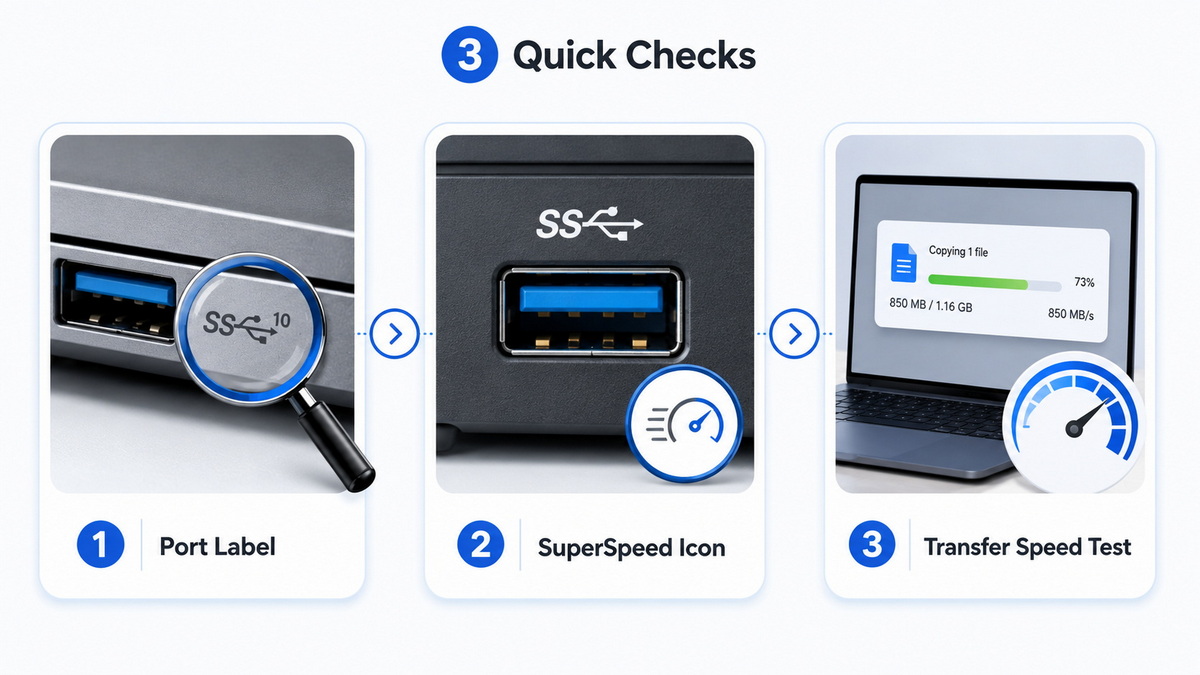
If you are buying, designing, or testing cables and devices, use this checklist instead of relying on color alone:
1. Check the printed label. Look for "SS," "SuperSpeed," "5 Gbps," or the USB logo.
2. Read the product specification. The manual or technical sheet should list the port standard clearly.
3. Inspect the connector type. Some devices use USB-A, USB-C, or other interfaces with different speed capabilities.
4. Test actual transfer speed. A storage benchmark or device manager readout is more reliable than color.
5. Verify the cable rating. A USB 3.0 port can still underperform if the cable is not rated for SuperSpeed. [industry-electronics]
For OEM projects, this is especially important because the end user may assume the port color communicates the full specification. Clear labeling reduces returns, support tickets, and product confusion.
For cable manufacturers and brand owners, port color confusion is not just a technical issue. It is also a customer experience issue. If a buyer expects blue to mean faster data transfer, but the device uses a different color convention, support requests rise and perceived quality can fall.
This matters in three ways:
- Packaging accuracy. Product pages should clearly state supported USB versions.
- Channel trust. Distributors and wholesalers need simple, consistent product language.
- After-sales support. Fewer misunderstandings mean fewer complaints about "slow USB 3.0 ports." [igorslab]
For Shenzhen Otechkabel Electronic Co., Ltd, this is a useful message because cable buyers care about both performance and clarity. When a brand ships USB, HDMI, VGA, DVI, or SATA cables internationally, the technical promise must match the visible design and documentation.

From an industry perspective, the best practice is to treat color as a secondary cue and documentation as the primary source of truth. Modern hardware teams increasingly rely on clear iconography, compliance labeling, and spec sheets rather than a single color rule. That shift improves consistency across product families and helps users avoid making assumptions based on appearance alone. [industry-electronics]
In B2B manufacturing, this aligns with E-E-A-T principles: show real expertise, explain the product precisely, and reduce ambiguity. When a technical article does that well, it performs better for both search engines and human readers.
If you are sourcing USB cables or USB-enabled hardware, use the following workflow:
- Confirm the target USB generation in the RFQ.
- Ask for the port type, data rate, and power capability separately.
- Request labeling mockups before mass production.
- Verify cable construction and shielding for the target speed.
- Test a sample batch with real devices, not only with visual inspection.
This approach is especially valuable for OEM and ODM projects where the final product may ship under a customer's brand. A small mismatch in labeling or color can create unnecessary friction later.
If your audience includes distributors, OEM buyers, or product managers, place a CTA near the end such as:
Need reliable USB, HDMI, VGA, DVI, or SATA cable OEM support? Contact Shenzhen Otechkabel Electronic Co., Ltd for custom cable solutions, clear labeling guidance, and export-ready manufacturing support.
That CTA works because it connects the educational article to a real commercial need without sounding forced.
No. Blue is a common convention, but not a universal rule. Many USB 3.0 ports use other colors or no color at all. [igorslab]
Not always. The color may suggest USB 3.0, but the actual speed depends on the full hardware and software implementation. [igorslab]
Check the label, product spec, and real transfer performance. If possible, test with a known SuperSpeed device and cable. [industry-electronics]
They use different colors for branding, design, cost control, and to distinguish charging or data functions across products. [industry-electronics]
Yes, but performance will be limited by the slower cable. To get SuperSpeed performance, both the port and cable need to support it. [industry-electronics]
1. [USB Port Colors Explained: White, Black, Blue, Violet] — explanation of USB port color conventions and modern usage. [industry-electronics]
2. [USB Colors Explained: Why White, Black, Blue, or Red Ports Often Cause More Confusion Than Clarity] — industry discussion of why color is not a reliable technical indicator. [igorslab]
3. [SEO for Manufacturing Companies: The 2026 Strategy Guide] — manufacturing SEO framing and B2B content strategy. [blog.saleslayer]
4. [SEO for Manufacturers: Strategies to Dominate Search in 2025] — manufacturing search strategy and content structure guidance. [robertsiegers]
5. [About Us - Shenzhen Otechkabel Electronic Co., Ltd] — company identity reference for brand positioning. [cnotechkabel]


