


Views: 240 Author: Otechkabel Publish Time: 2026-07-14 Origin: Site


Content Menu
● Understanding USB 2.0 and USB 3.0
● Data Transfer Speed Differences
● Visual and Physical Differences
● Backward Compatibility and Real‑World Behavior
● Internal Cable Structure and Construction Quality
● Typical Use Scenarios for USB 2.0
● Typical Use Scenarios for USB 3.0
● Pricing and Value Considerations
● Mixed Environments and Future Readiness
● Practical Steps for Choosing Between USB 2.0 and USB 3.0
● Manufacturing Perspective on USB Cable Quality
● Summary
● FAQ
When you compare USB 2.0 and USB 3.0 cables, you are really comparing two different generations of performance, reliability, and long‑term usability in everyday and professional device setups. Choosing between them affects how fast data moves, how stable the connection is, and how well your system can handle current and future devices. This guide approaches the topic from the perspective of a professional cable manufacturer that has supplied global brands, wholesalers, and equipment makers for many years, and focuses on what actually matters in daily use and purchasing decisions.
USB 2.0 and USB 3.0 are iterations of the same connection standard, but they serve different levels of performance needs. USB 2.0 was introduced as a versatile interface for common accessories, while USB 3.0 was designed to handle much higher data rates and more demanding applications.
USB 2.0 became the default for keyboards, mice, printers, and basic storage devices, and it remains widely used because it is stable, mature, and cost‑effective. USB 3.0, often labeled as "SuperSpeed," dramatically increases throughput and improves how external drives, cameras, hubs, and advanced peripherals communicate with computers and other host devices. For users and buyers, the key point is that USB 2.0 and USB 3.0 are not competing standards but complementary options that should be selected according to actual needs.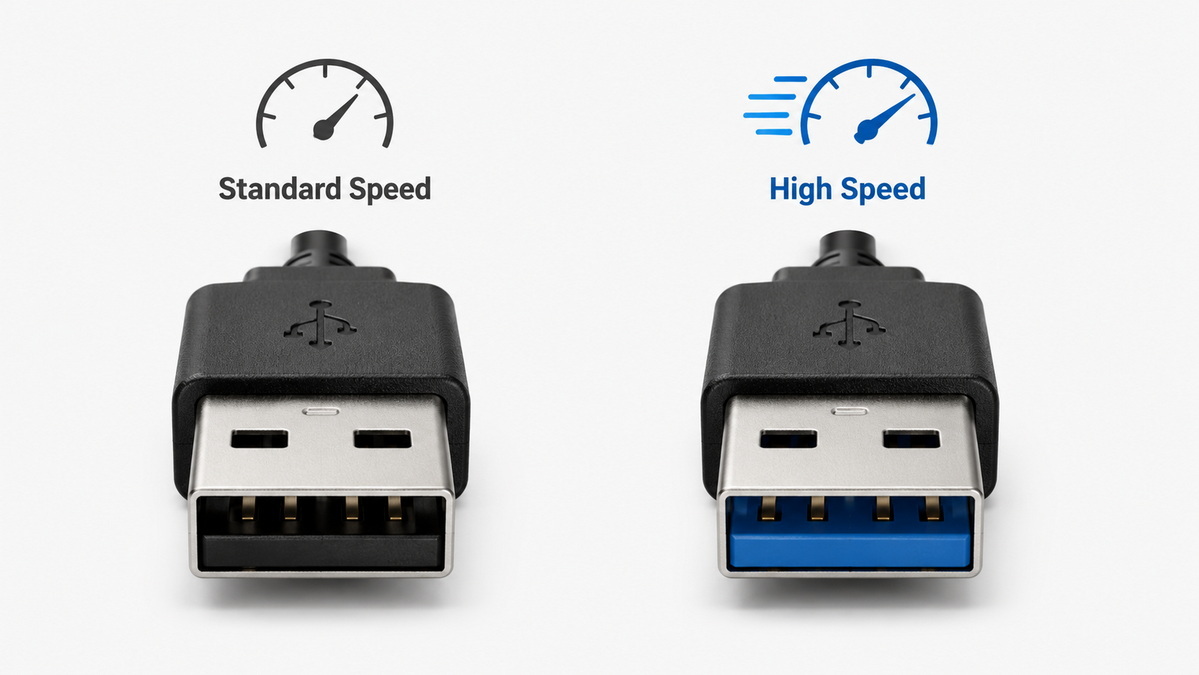
Speed is the most obvious difference between USB 2.0 and USB 3.0 cables. USB 2.0 supports data transfer rates up to 480 Mbps, which is sufficient for low‑bandwidth peripherals and routine office tasks such as printing documents or reading small files from basic flash drives. USB 3.0 increases the theoretical maximum speed to 5 Gbps, more than ten times higher than USB 2.0 in typical scenarios.
In practice, this means that large file transfers and high‑resolution video streams benefit significantly from USB 3.0 connections. Copying a large project folder, backing up an external hard drive, or working with an external SSD becomes much faster when both the cable and the ports are USB 3.0. On the other hand, if you are only connecting a keyboard or a barcode scanner, the extra speed of USB 3.0 will not be noticeable. A sensible approach is to match the cable version to the bandwidth requirements of the device rather than assuming that newer is always necessary.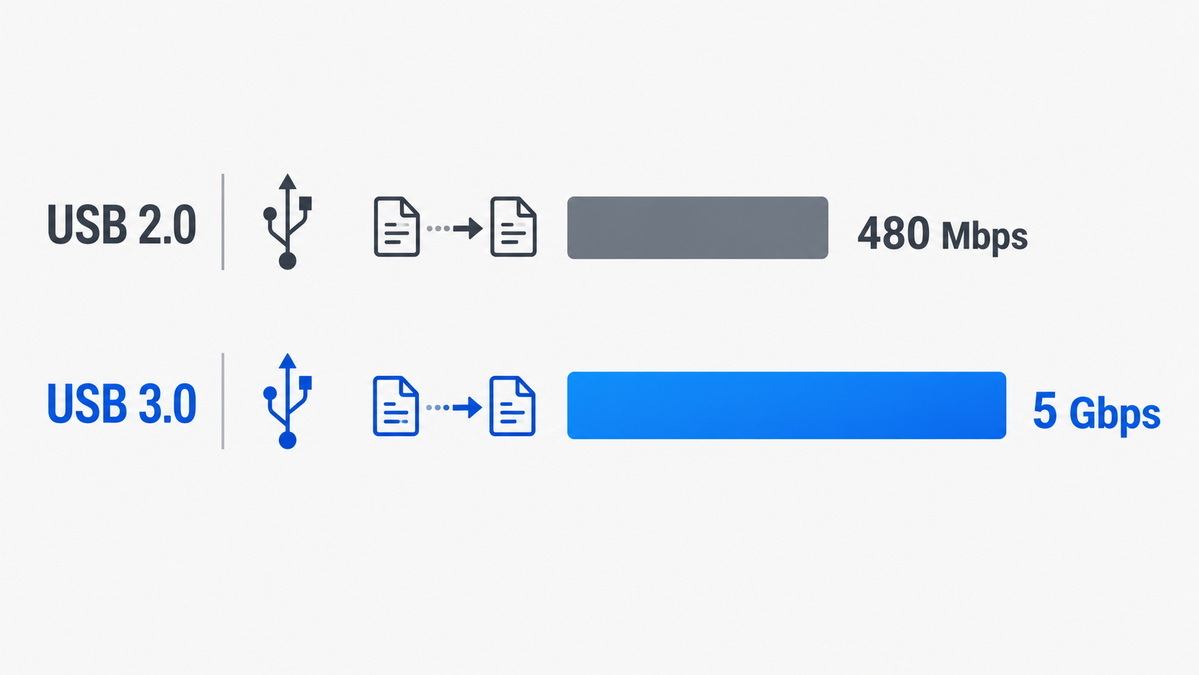
Although USB 2.0 and USB 3.0 cables can look similar at first glance, there are several visual and physical cues that help distinguish them. Many USB 2.0 connectors have black or white plastic inside the plug, while USB 3.0 connectors commonly use blue plastic inserts as a quick visual signal. This color convention makes it easier for users to see whether a port or cable is intended for higher‑speed operation.
Beyond color, USB 3.0 cables are often slightly thicker and more robust. The added thickness is not merely cosmetic; it reflects a more complex internal structure with additional conductors and improved shielding. USB 2.0 cables tend to be thinner and more flexible, which can be convenient for short runs and tight spaces but offers less margin for high‑speed signal integrity. Over time, these small physical differences can influence durability, handling, and performance, especially in environments where cables are frequently connected, disconnected, bent, or moved.
One of the strengths of the USB ecosystem is that newer standards retain backward compatibility with older devices. A USB 3.0 cable can be plugged into a USB 2.0 port, and a USB 2.0 cable can be used with a USB 3.0 device, as long as the connector types match. This helps protect existing equipment investments and makes it easier to introduce new devices into established setups.
However, backward compatibility does not mean that the full capabilities of USB 3.0 are always available. When a USB 3.0 cable connects to a USB 2.0 port, the connection behaves like USB 2.0 in terms of speed and power delivery. The overall performance is determined by the lowest version in the chain. This is important to explain to end users, who may assume that using a "blue" cable automatically guarantees maximum speed even if the host port is older. Clear labeling and documentation help avoid misunderstanding and prevent disappointment after upgrades.
The internal design of a cable has a direct impact on performance, especially at higher speeds. A typical USB 2.0 cable contains four main conductors: two for data transmission and two for power. This simple structure supports common peripherals and is sufficient for modest cable lengths and straightforward office environments.
USB 3.0 cables, by contrast, generally contain nine conductors. The additional wires provide extra data lanes and more sophisticated signaling so that higher data rates can be maintained reliably. These cables usually feature tighter twists, better shielding, and more controlled construction to minimize interference and signal loss. The outer jacket of a USB 3.0 cable is often slightly thicker, providing more mechanical strength and protection.
From a manufacturing and purchasing perspective, internal structure affects more than just speed. It influences maximum recommended length, resistance to bending and physical stress, and susceptibility to electromagnetic noise. High‑quality construction becomes particularly important in industrial settings, laboratories, and professional studios where cables route around machinery, power supplies, and other sources of interference.
Despite being an older standard, USB 2.0 remains entirely appropriate for a wide range of devices and environments. It serves well wherever data loads are small and timing is not critical. Common examples include keyboards, mice, simple printers, low‑end webcams, barcode scanners, and other human‑interface peripherals.
These devices mostly send short bursts of control information rather than continuous streams of high‑volume data. Even intensive use of such peripherals rarely comes close to saturating the bandwidth that USB 2.0 provides. In these situations, the main factors driving cable choice are cost, reliability, and mechanical design rather than maximum speed. For large deployments and price‑sensitive markets, using USB 2.0 cables can help keep the overall system budget under control without sacrificing user experience.
USB 3.0 shines in situations where data throughput and responsiveness are crucial. External hard drives and solid‑state drives benefit enormously from the higher bandwidth, allowing faster backups, file transfers, and access to large datasets. High‑definition webcams and video capture devices rely on fast connections to maintain smooth, high‑resolution streams without frame drops or compression artifacts.
Professional audio interfaces, 3D scanners, scientific instruments, and industrial test equipment often demand sustained, high‑quality data communication. When these devices are paired with appropriate host ports and USB 3.0 cables, they can operate at their full potential. For systems that need to handle demanding workflows, specifying USB 3.0 cables is a practical way to prevent bottlenecks and keep the entire setup responsive under load.
In earlier years, USB 3.0 cables carried a noticeably higher cost compared to USB 2.0, largely because of their more complex construction and lower initial production volumes. As production technology improved and high‑speed USB became widespread, the price difference narrowed. Today, the cost gap is often modest, especially when cables are purchased in volume.
USB 2.0 cables generally remain the least expensive option and are still the default choice for basic peripherals. USB 3.0 cables, although slightly more costly on average, deliver a better value in scenarios where speed and future compatibility matter. When factoring in long‑term usage, potential device upgrades, and user satisfaction, investing in USB 3.0 for certain product lines can prove more economical than it appears at first glance.
Modern offices and industrial workplaces frequently operate mixed environments, where older PCs and equipment coexist with newer laptops, docking stations, and advanced devices. Some ports support only USB 2.0, others support USB 3.0, and many newer machines add different types of connectors, including USB‑C and later standards.
In such environments, planning cable strategy becomes more complex. It is important to understand the installed base of host devices and anticipate how it will change over time. Selecting USB 3.0 cables for new product shipments and installations can help ensure that connections remain efficient as older hardware is replaced. At the same time, keeping a stock of USB 2.0 cables for legacy systems avoids unnecessary costs and maintains compatibility with existing infrastructure.
When considering future readiness, the goal is to balance immediate practicality with a realistic view of how technologies will evolve over several years. Thoughtful cable selection helps avoid frequent replacements, minimizes confusion for users, and maintains stable performance across different generations of equipment.
To make the choice between USB 2.0 and USB 3.0 more systematic, it is useful to follow a straightforward decision process:
1. Identify the type of device and its typical data workload. Devices that primarily send small commands or status information rarely need high‑speed cables, while those handling large files or streams benefit strongly from higher bandwidth.
2. Review the host ports commonly used in the target market. If most computers and hubs support newer standards, more advanced cables will integrate better and avoid bottlenecks.
3. Consider user expectations and typical tasks. Users working with multimedia content, external storage, and complex workflows tend to notice and appreciate faster connections, whereas users of simple office peripherals may not.
4. Evaluate cable length and installation environment. Longer runs and areas with electrical noise put more stress on the connection, increasing the value of carefully built, well‑shielded high‑speed cables.
5. Compare the cost difference against expected lifetime and upgrade plans. When equipment is intended to remain in service for many years, choosing cables that support higher speeds offers more flexibility as new devices and software are introduced.
Following these steps leads to consistent and well‑reasoned cable specifications, rather than ad‑hoc choices made under time pressure.
From the viewpoint of a dedicated cable manufacturer, the discussion about USB 2.0 versus USB 3.0 is closely linked to design, process control, and quality assurance. Producing reliable cables at scale requires attention to conductor materials, shielding, connector molding, strain relief, and physical durability.
Professional manufacturers invest in design tools and testing equipment to verify cable performance under different environmental conditions and usage patterns. They subject cables to bending, pull, and flex tests, and they check electrical parameters such as resistance, signal integrity, and insulation quality. For projects requiring specific standards compliance, additional tests and documentation are carried out to confirm adherence to relevant regulations.
Long‑term cooperation with brands and equipment makers allows manufacturers to tailor cable specifications to particular needs. This may involve customized lengths, special jacket materials, distinctive colors, labeling, or unique connector shapes to fit compact devices or harsh environments. By combining engineering expertise and production experience, manufacturers can provide USB 2.0 and USB 3.0 cables that not only meet formal specifications but also perform reliably over years of real‑world use.
When deciding between USB 2.0 and USB 3.0 cables, it is helpful to focus on actual device behavior rather than on version numbers alone. USB 2.0 remains a solid choice for everyday peripherals where low cost and dependable function are more important than speed. USB 3.0 is the better fit for data‑heavy tasks, modern external storage, advanced cameras, audio interfaces, and professional equipment that needs consistent high performance.
In many situations the most balanced approach is to use both standards intelligently: USB 2.0 for simple devices and legacy systems, and USB 3.0 for new installations, performance‑critical applications, and products intended to stay relevant as hardware continues to evolve. Careful planning, attention to real‑world use cases, and coordination with experienced manufacturers lead to cable selections that serve users well and support long‑term reliability.
1. Do I always get maximum speed with a USB 3.0 cable?
No. The actual speed of a connection depends on both the cable and the devices at each end. If either the host port or the device only supports USB 2.0, the connection will operate at USB 2.0 performance levels even when a USB 3.0 cable is used.
2. Can I safely use USB 3.0 cables with older devices and computers?
Yes. USB 3.0 is designed to work with older equipment as long as the connector types match. The connection remains stable, but the performance is limited by the capabilities of the older device or port.
3. Why are some USB cables noticeably thicker than others?
Thickness can indicate more internal conductors, better shielding, or a stronger outer jacket. USB 3.0 cables often require additional wires and more robust construction to support high speeds, which naturally leads to a thicker design.
4. Is upgrading every cable from USB 2.0 to USB 3.0 necessary?
Upgrading is not necessary for all devices. For peripherals with light data loads, USB 2.0 cables will continue to work without issues. Upgrading makes the most sense for systems where large files, streaming media, or high‑bandwidth devices are common.
5. What should I pay attention to when selecting cables for new products?
Focus on the typical data workload, the host ports your customers use, expected service life, and any special environmental or mechanical requirements. Matching cable specifications to these factors produces better performance, fewer issues, and more satisfied users.
1. Wandkey – "USB 2.0 vs 3.0 Cables: Speed, Compatibility & Buying Guide" https://wandkey.com/usb-2-0-vs-3-0-cables/
2. Anker – "USB 2.0 vs 3.0: What's the Difference and Which to Use?" https://www.anker.com/ca/blogs/cables/usb-2-0-vs-3-0
3. GeeksforGeeks – "Difference Between USB 2.0 and USB 3.0" https://www.geeksforgeeks.org/computer-networks/difference-between-usb-2-0-and-usb-3-0/
4. Romtronic – "USB 2.0 vs 3.0 vs 3.1 Cable Assemblies: Speeds, Compatibility & Use Cases" https://www.romtronic.com/usb-2-0-vs-3-0-vs-3-1-cable-assemblies-speeds-compatibility-use-cases/
5. CableDo – "USB 2 vs 3: Speed, Compatibility & Buying Guide (2025)" https://www.cabledo.com/usb-2-vs-3/
6. Shenzhen Otechkabel Electronic Co., Ltd – About Us https://www.otechkabel.net/aboutus.html
7. Shenzhen Otechkabel Electronic Co., Ltd – Corporate Site https://www.otechkabel.net/


