


Views: 260 Author: Otechkabel Publish Time: 2026-07-23 Origin: Site


Content Menu
● What Makes USB-C Cables Different?
>> High-performance USB4 cables
● Why Cable Construction Matters
● Power, Data, and Video Are Not the Same
● What OEM Buyers Should Check Before Ordering
● How Different Applications Need Different Cables
>> Laptops and docking stations
>> External storage and professional devices
● How to Identify a Better Cable
● Manufacturing and Quality Control
● FAQ
>> 1. Why do USB-C cables look the same but work differently?
>> 2. Can every USB-C cable charge fast?
>> 3. Do all USB-C cables support data transfer?
>> 4. Can every USB-C cable output video?
>> 5. What should OEM buyers check before placing an order?
USB-C is a connector standard, not a guarantee of performance. Two cables can both use USB-C plugs and still deliver very different results in real use. One cable may be designed mainly for charging, while another may support fast data transfer, video output, and higher power delivery.
The difference comes from what is inside the cable. Factors such as conductor design, shielding, wire gauge, internal chips, and supported protocol all affect how the cable performs. That is why a cable that looks simple on the outside may be built for only basic use, while another is engineered for demanding applications.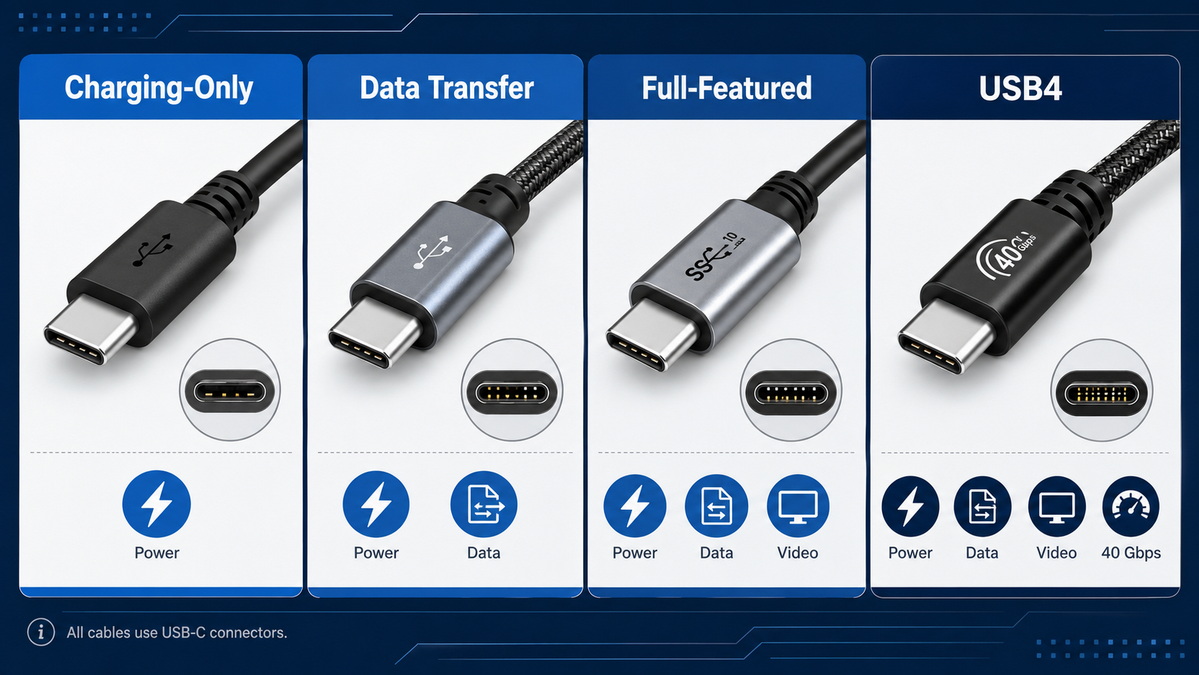
USB-C cables can be grouped by what they are designed to do. Understanding these categories helps buyers choose the right product more efficiently.
These cables are made mainly for power delivery. They are common for smartphones, tablets, earphones, and other low- to mid-power devices. Some support only basic data transfer, while others are optimized almost entirely for charging.
These cables are built to move files between devices more efficiently. They are often used with external drives, cameras, hubs, and docking stations. A better data cable usually has stronger shielding and a more advanced internal structure.
Full-featured USB-C cables can support charging, data transfer, and video output at the same time. These cables are more useful for laptops, monitors, and professional workflows because they handle more tasks with one connection.
USB4 cables are designed for more advanced use. They can support very high data rates and higher power levels, making them suitable for premium notebooks, docking systems, and high-bandwidth applications. These cables usually require stricter design and testing.
A USB-C cable is more than a wire with two connectors. Its internal structure determines how much power it can carry, how fast it can transfer data, and whether it can maintain stable performance under heavy use.
Shielding plays an important role in protecting the signal from interference. In high-speed applications, poor shielding can reduce stability or cause performance loss. Wire thickness and conductor quality also affect heat resistance, power delivery, and durability.
Some cables also use internal identification chips. These help devices recognize the cable's capability and adjust power or data behavior accordingly. This is especially important in higher-power or high-performance cables.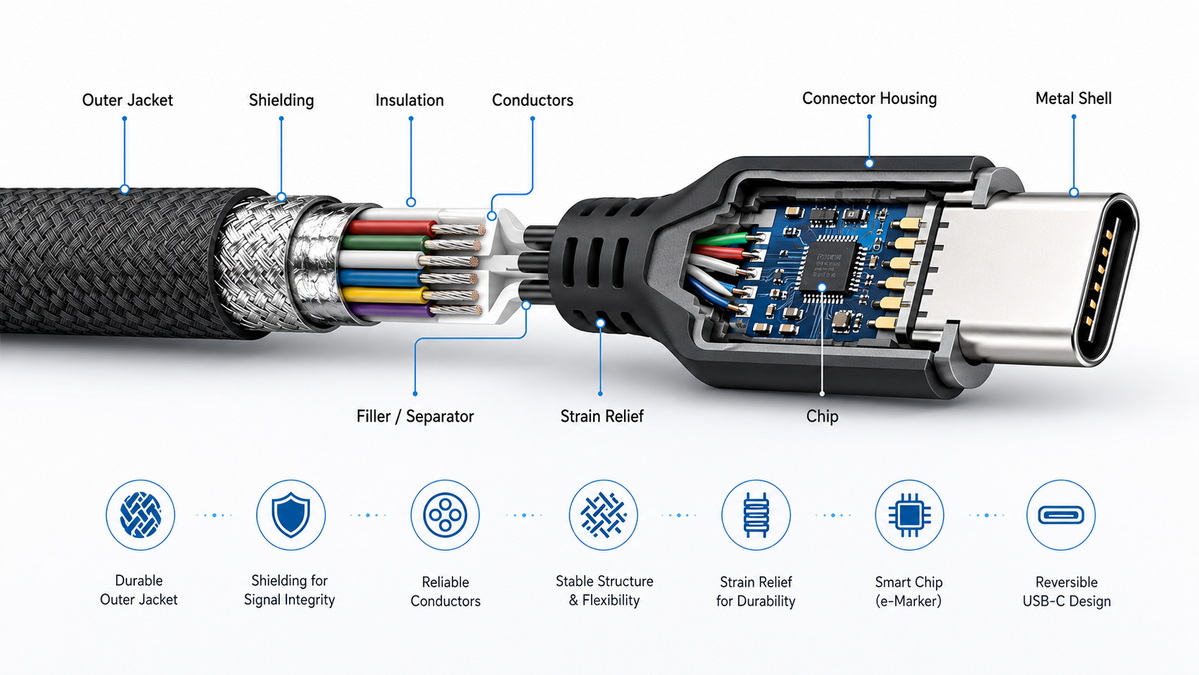
Many users assume one USB-C cable can do everything. In reality, power, data, and video support are separate capabilities, and not every cable supports all three.
A cable may charge a device successfully but fail to transfer files at high speed. Another may transfer data well but not support display output. A third may support video on one device but not another because the source device and display also need compatible functions.
That is why buyers should always check the cable specification instead of relying on appearance alone.
For OEM projects, choosing the right USB-C cable starts with the end use. A cable for a phone charger is not the same as a cable for a laptop dock or industrial accessory.
Before placing an order, buyers should confirm:
- Required charging wattage.
- Required data transfer speed.
- Whether video output is needed.
- Target cable length.
- Required durability level.
- Packaging and branding requirements.
- Testing and quality documentation.
These details help ensure the final cable matches the product application and reduces the risk of returns or compatibility complaints.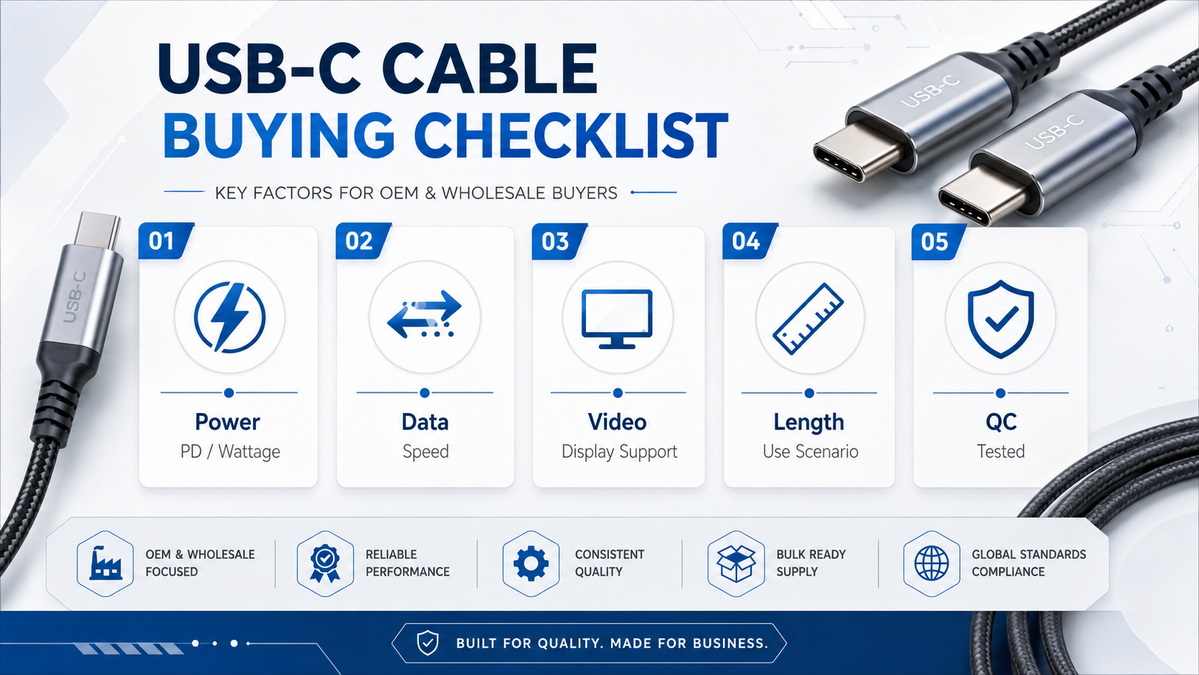
Different use cases require different cable designs. A basic charging cable may be enough for consumer accessories, but a workstation or docking setup needs a more capable product.
For mobile devices, a charging cable with the right power rating is usually enough. If file transfer is needed, a better data cable may be more suitable.
For laptops, the cable must handle higher power and often more complex data or display needs. In this case, a full-featured or USB4 cable is often the better choice.
External SSDs, cameras, and industrial devices benefit from cables with better signal integrity and stable high-speed performance. A weak cable can become a bottleneck even when the device itself is fast.
For branded products and export markets, consistency matters as much as performance. Buyers should focus on stable quality, clear specification, and dependable manufacturing control.
One of the most common mistakes is choosing a cable only by price. A lower-cost cable may look similar but may not support the required speed or power level.
Another mistake is assuming all USB-C cables are interchangeable. They are not. A cable built for charging may not support video. A cable built for basic devices may not perform well with high-power laptops or high-speed storage.
A third mistake is failing to check the length requirement. Longer cables can sometimes create more signal loss or reduce performance if they are not designed properly.
A better USB-C cable usually gives clear information about its capabilities. Buyers should look for:
- Clearly stated charging rating.
- Clearly stated data speed.
- Clear support for display if needed.
- Strong connector fit.
- Durable jacket and strain relief.
- Reliable packaging and labeling.
If the product description is vague, that is often a warning sign. Good cable suppliers usually explain exactly what the product can and cannot do.
From a manufacturing perspective, USB-C cable quality depends on design consistency, material selection, and testing. Even small differences in conductor quality or assembly can affect the final result.
Stable quality control helps ensure that every batch performs the same way. This is important for OEM customers who need repeatable results across large orders. It is also important for export customers who must meet market expectations and reduce after-sales issues.
For manufacturers, the strongest selling point is not just the connector type. It is the ability to deliver the right cable for the right application, with consistent performance and reliable specification.
If the cable is only for charging, choose a model with the correct power rating. If it must also move data, check the speed requirement carefully. If it must support monitors or docking, confirm display compatibility before ordering.
A simple rule works well: the more tasks one cable must handle, the more important the internal design becomes. That is why high-performance cables cost more. They require better materials, more precise engineering, and stricter testing.
For OEM brands, the most efficient approach is to define the application first, then select the cable structure, power level, and data capability to match.
USB-C cables are different because their internal design and supported functions are different. The connector may look the same, but the actual performance can vary widely in charging, data transfer, and video support.
For buyers, the best approach is to choose based on the device and application, not on appearance alone. For OEM brands and wholesalers, clear specifications and stable manufacturing are the key to a better user experience and fewer compatibility problems.
Because the connector shape is the same, but the internal design and supported features can be very different.
No. Charging speed depends on the cable's power rating and internal construction.
No. Some cables are designed mainly for charging and may only support limited data functions.
No. Video support depends on the cable design and the compatibility of the connected devices.
They should confirm power rating, data speed, video support, cable length, durability, and quality documentation.
1. USB Implementers Forum. USB Type-C Cable and Connector Specification, Release 2.0.
[https://www.usb.org/sites/default/files/USB%20Type-C%20Spec%20R2.0%20-%20August%202019.pdf]
2. PCM Cable. Why are USB-C cables different?
[https://www.pcm-cable.com/info/why-are-usb-c-cables-different-95289685.html]
3. Adafruit. Understanding USB Type C: Cable Types, Pitfalls and More.
[https://learn.adafruit.com/understanding-usb-type-c-cable-types-pitfalls-and-more?view=all]
4. Plugable Knowledge Base. USB Type-C Cable Compatibility, Length, and Features.
[https://kb.plugable.com/usb-c-cables/usb-type-c-cable-compatibility-length-and-features]
5. NTC Distributing. USB4 Cables | USB-IF Certified & Thunderbolt Compatible.
[https://www.ntcdistributing.com/usb4-cables/]
6. CTI Group. USB4 Gen4 80Gbps 240W USB Type-C Cable Certification.
[https://www.cticable.com.tw/news/USB4_Gen4_80Gbps_240W_USB_Type-C_Cable_Certificat]
7. USB-IF certification guidance and industry compliance overview.
[https://www.spilma.com/en/guides/usb-if-usb-c-certification/]


