


Views: 213 Author: Otechkabel Publish Time: 2026-08-22 Origin: Site


Content Menu
● What Is the Difference Between a Fast Charging Cable and a Normal Charging Cable?
● How Fast Charging Cables Deliver More Power
>> Conductor Thickness and Copper Quality
>> Connector Quality and Contact Stability
>> Why E-Marker Accuracy Matters
● Fast Charging Cable Compatibility
● Safety, Heat, and Battery Performance
>> Common Causes of Cable Heating
>> Practical Product Quality Checks
● How to Choose the Right Charging Cable
>> Recommended Cable Categories for Brands
● FAQ
>> 1. Can a fast charging cable make every phone charge faster?
>> 2. Do all USB-C cables support 100W charging?
>> 3. Do 100W USB-C cables need an E-marker chip?
>> 4. Is a 240W USB-C cable necessary for smartphones?
>> 5. Is a braided charging cable always more durable?
>> 6. Can a charging cable overheat?
>> 7. What information should be printed on cable packaging?
Choosing between a fast charging cable and a normal charging cable is not only about charging speed. For brands, wholesalers, and device manufacturers, it also affects product positioning, compatibility, product safety, customer satisfaction, and after-sales returns.
At Shenzhen Otechkabel Electronic Co., Ltd, we manufacture USB, HDMI, VGA, DVI, SATA cables, adapters, hubs, splitters, and switches for OEM customers. Based on practical cable-development experience, one principle is essential: a charging cable can only deliver the power that its internal design, charger, connected device, and charging protocol can safely support.
A high-wattage cable does not automatically make every device charge faster. The final charging performance depends on the lowest-capability component in the charging system.
A normal charging cable is generally designed for low-power everyday charging. It is commonly used for smartphones, Bluetooth devices, entry-level power banks, small accessories, and overnight charging.
A fast charging cable is designed to support higher current, higher voltage, or both. It is commonly used with USB-C chargers, smartphones, tablets, laptops, portable monitors, docking stations, and high-capacity power banks.
For example, a 100W USB-C cable connected to a 20W charger will not produce 100W charging. The maximum available charging power will still be limited by the 20W charger and the connected device.
| Feature | Normal Charging Cable | Fast Charging Cable |
|---|---|---|
| Primary purpose | Basic charging and daily accessory use | Higher-speed charging for modern devices |
| Typical current capacity | Often 2A or 3A | Commonly 3A or 5A |
| Typical power support | Basic charging or up to 60W | 60W, 100W, 140W, or 240W options |
| Internal construction | Often simpler conductor structure | Lower-resistance conductors and stronger design |
| E-marker chip | Usually not needed for basic designs | Required for many high-power USB-C designs |
| Target devices | Phones, earbuds, small accessories | Phones, tablets, laptops, power stations |
| Product positioning | Economy or entry-level | Mid-range, premium, and professional |
| Cost level | Lower | Higher due to materials and electronics |

Fast charging is not only about using thicker wire. It is a controlled power-delivery process involving electrical construction, communication between devices, and thermal management.
A cable must safely carry the requested current without excessive voltage loss or heat buildup. When current increases, cable resistance becomes much more important.
If current rises while resistance remains high, the cable can lose more energy as heat.
This is why high-power charging cables require stronger internal design than basic charging cables.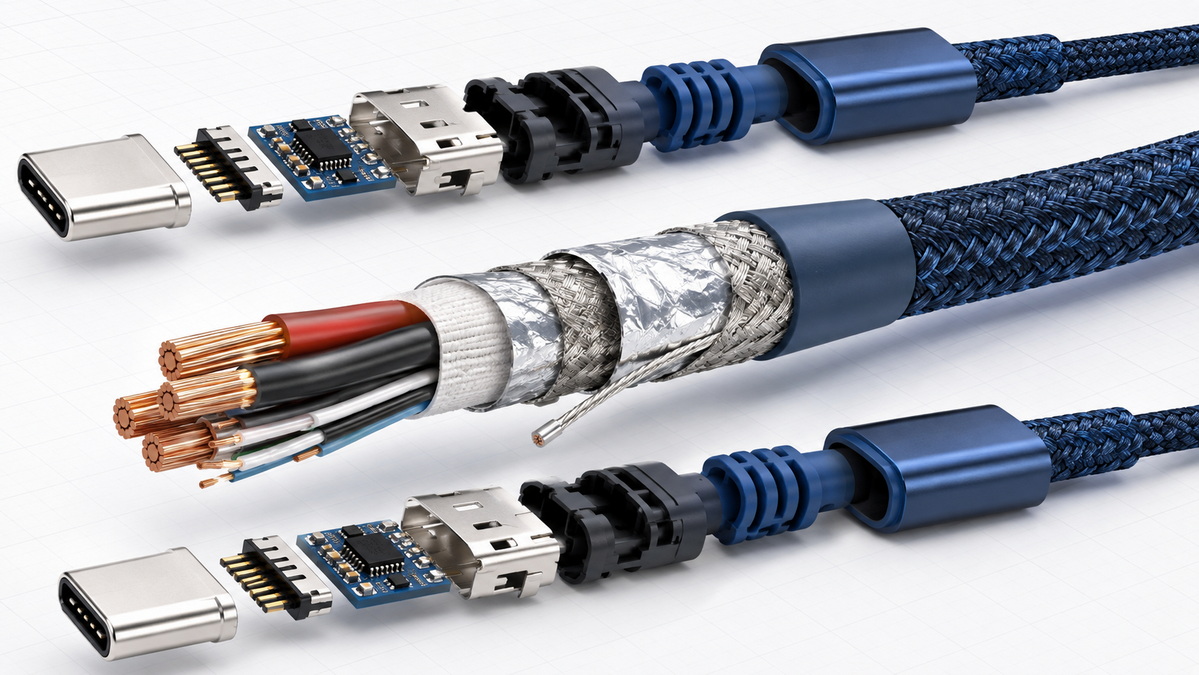
The conductor is the core electrical component inside a charging cable. It carries power from the charger to the device.
A normal charging cable may use smaller conductors because it is intended for lower current. A fast charging cable often uses larger or more carefully designed copper conductors to reduce resistance and support higher current.
However, wire gauge alone does not determine quality. Two cables with similar external thickness may perform very differently.
Important construction factors include:
- Copper purity and conductor material
- Actual conductor cross-sectional area
- Number of copper strands
- Cable length
- Connector contact resistance
- Soldering or welding quality
- Insulation materials
- Shielding design
- Production consistency
A longer cable normally has more resistance than a shorter cable. Therefore, a 3-meter charging cable requires more careful conductor design than a 1-meter cable when both are expected to deliver the same charging performance.
The connector is another important part of a fast charging cable. High current passes through small contact areas inside USB-C, USB-A, Lightning, or other connector types.
Poor connector design can create unstable charging, intermittent connection, slow charging, or heat near the plug.
A well-designed fast charging cable should include:
- Secure connector terminals
- Stable contact plating
- Reinforced strain relief
- Heat-resistant connector materials
- Reliable internal welding or solder joints
- Strong pull-force performance
- Repeated bending resistance
- Accurate pin configuration
A braided cable can improve abrasion resistance and create a premium appearance. However, braided outer material alone does not prove electrical quality. The internal conductor, connector structure, and manufacturing process remain more important.
An E-marker chip is a small electronic component installed inside certain USB-C cables. It allows the cable to communicate its power and data capabilities to connected devices.
For basic charging, an E-marker may not be necessary. However, it becomes important when a cable is designed for higher current, higher wattage, or advanced data performance.
For example, USB-C cables that support 5A charging current and power levels above 60W generally require an E-marker chip. This helps compatible chargers and devices identify the cable's rated capability before higher power is delivered.
The E-marker does not create power by itself. Instead, it provides information that supports safe power negotiation.
A properly configured E-marker helps prevent mismatched charging conditions. It allows the connected system to recognize whether a cable is suitable for a specific power profile.
For an OEM product, the E-marker specification should match the cable's real construction and intended application.
Common product categories include:
| Cable Category | Typical Application | Common Power Positioning |
|---|---|---|
| Basic USB-C charging cable | Phones, earbuds, small accessories | Up to 60W |
| 5A E-marked USB-C cable | Tablets, laptops, power banks | Up to 100W |
| High-power USB-C cable | High-performance laptops and workstations | 140W or higher |
| Extended power cable | Specialized high-power USB-C equipment | Up to 240W |
The product claim, packaging language, cable label, connector design, and internal E-marker configuration should all match. Inconsistent claims can lead to customer confusion and avoidable returns.
A fast charging cable only works at its best when the charger and device also support the same charging standard.
USB-C has become widely used because it can support power, data transfer, and video output. However, the USB-C connector shape alone does not guarantee the same charging speed or data performance.
One USB-C cable may only support basic charging and USB 2.0 data. Another may support 100W charging, high-speed data transfer, external displays, or docking applications.
| Charging Setup | Expected Result |
|---|---|
| Basic cable + basic charger + phone | Standard charging speed |
| Fast charging cable + basic charger | Charging remains limited by charger output |
| Basic cable + high-power laptop charger | Lower power or reduced charging performance |
| 100W cable + compatible PD charger + laptop | High-power charging within device limits |
| 240W cable + compatible high-power system | Higher power capability when all components support it |
| Fast charging cable + incompatible device | Device charges only at its supported level |
A compatible iPhone fast-charging setup, for example, can charge supported models to approximately 50 percent in around 30 minutes. Actual results vary according to battery condition, temperature, charger output, device model, cable design, and usage during charging.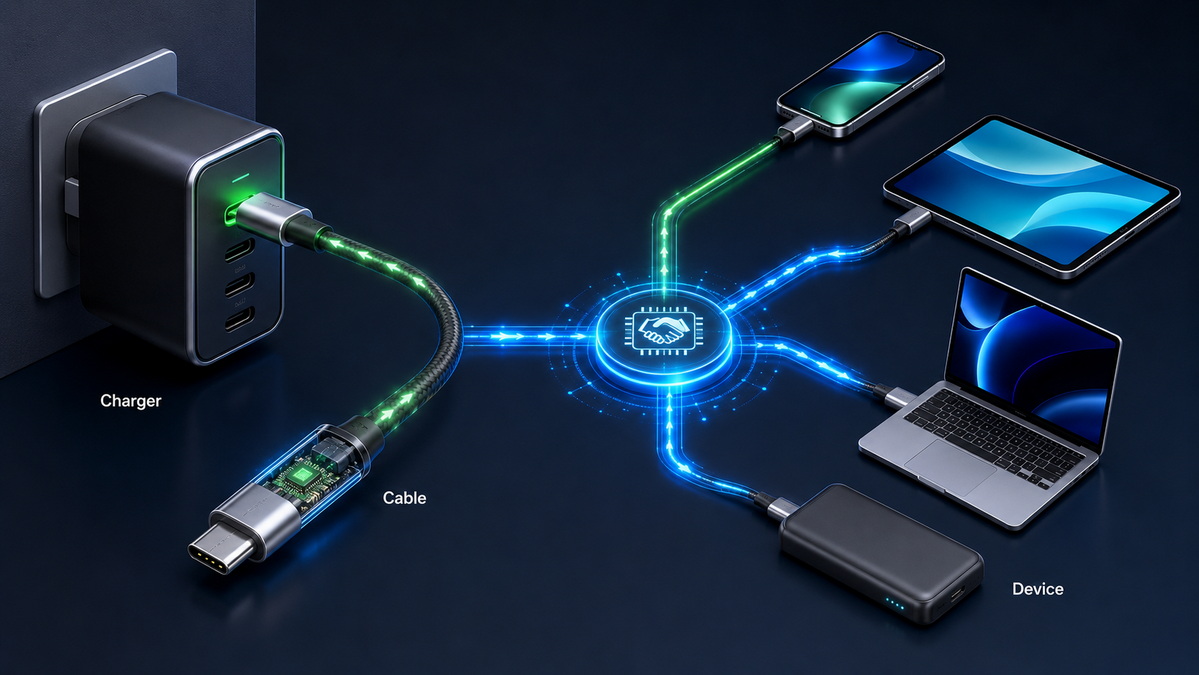
A properly manufactured fast charging cable is designed to work safely within its rated electrical limits. It does not independently force a device to accept more power than the device can handle.
Modern smartphones, tablets, and laptops contain charging-management systems that regulate charging power. These systems reduce or adjust charging speed when the battery is hot, near full capacity, or operating outside normal conditions.
However, poor-quality cables can create problems. High resistance, weak solder joints, damaged insulation, loose connector contacts, or incorrect internal wiring can increase heat and reduce charging stability.
- Cable conductors that are too small for the claimed current
- Low-quality copper or copper-clad aluminum conductors
- Poor connector contact design
- Loose USB-C connector fit
- Damaged cable insulation
- Repeated sharp bending near the connector
- High current combined with excessive cable length
- Inaccurate power-rating claims
A cable may feel slightly warm during high-power charging, especially when charging a laptop or large power bank. Excessive heat, burning smell, discoloration, charging interruptions, or loose connectors should not be ignored.
Before selecting a cable supplier or finalizing an OEM specification, buyers should confirm the following points:
1. Required charging power, such as 18W, 20W, 30W, 60W, 100W, 140W, or 240W.
2. Required cable length and acceptable charging-performance targets.
3. Connector types, such as USB-C to USB-C, USB-A to USB-C, or USB-C to Lightning.
4. Charging protocol compatibility.
5. Data transfer requirements.
6. Whether display output or docking functions are needed.
7. E-marker requirement and programming specification.
8. Conductor material and conductor gauge.
9. Connector pull-force and bending requirements.
10. High-current charging and temperature testing requirements.
11. Packaging claims and product labeling.
12. Batch-level quality-control procedures.
The right cable depends on the end user, connected device, target price range, and product position.
A normal charging cable can be suitable for basic mobile accessories, promotional products, low-power devices, and economy retail packages.
A fast charging cable is usually the better choice for modern phone accessories, USB-C power banks, tablets, laptops, business travel kits, and premium retail products.
| Product Series | Recommended Cable Type | Suitable Customer Segment |
|---|---|---|
| Essential Series | USB-A to USB-C or USB-C to USB-C basic charging cables | Value-focused retail and promotional markets |
| Mobile Fast Charge Series | 20W to 60W USB-C charging cables | Smartphone and tablet users |
| Laptop Power Series | 100W USB-C to USB-C E-marked cables | Laptop, monitor, and docking users |
| Professional Power Series | 140W or 240W high-power USB-C cables | High-performance devices and technical users |
| Multi-Function Series | USB-C cables with charging, data, and display support | Business users and workstation environments |
For distributors and private-label brands, a tiered product range makes selection easier. It also helps end users understand why one cable costs more than another.
Clear labeling is essential. Instead of only printing "fast charging," consider stating the connector type, cable length, maximum supported wattage, data capability, and intended use.
The difference between a fast charging cable and a normal charging cable goes far beyond the words printed on the packaging. A reliable fast charging cable requires suitable conductor design, controlled resistance, durable connectors, accurate electronic identification, stable manufacturing, and compatibility with the charger and device.
For brands, wholesalers, and product manufacturers, the goal should be to match cable specifications with real customer needs. A basic cable is suitable for simple everyday charging, while high-power USB-C cables are better suited for fast charging, laptops, tablets, docks, and premium electronics accessories.
A clearly structured product range—with accurate wattage claims, suitable cable lengths, defined data capability, and documented quality requirements—can improve customer confidence and reduce product-return risks.
Shenzhen Otechkabel Electronic Co., Ltd supports customized cable and accessory manufacturing for USB, HDMI, VGA, DVI, SATA, adapters, hubs, splitters, and switches. Product specifications can be developed according to your target power level, cable length, connector type, market positioning, packaging requirements, and quality standards.
No. Charging speed depends on the cable, charger, device, and charging protocol. If the charger or device supports only basic charging, the cable cannot increase power beyond that limit.
No. USB-C is a connector format, not a guaranteed power rating. Some USB-C cables support only basic charging, while others are designed for 60W, 100W, 140W, or 240W charging.
In most cases, yes. USB-C cables designed to support 5A current and power levels above 60W generally use an E-marker chip to communicate their capabilities.
Usually not. Most smartphones require much less power. A 240W cable is more suitable for high-power laptops, workstations, power stations, and future-ready USB-C product lines.
Not always. Braiding can improve abrasion resistance and appearance, but actual durability also depends on conductor quality, connector construction, strain relief, internal welding, and bending performance.
A properly designed cable should remain within safe operating temperatures under its rated load. Poor-quality conductors, damaged insulation, weak contacts, loose connectors, or incorrect power claims can increase heat.
Useful packaging information includes connector type, cable length, maximum supported power, charging capability, data speed, display support if applicable, and compatibility notes.
1. USB Implementers Forum. [USB Charger (USB Power Delivery)]
Information on USB Power Delivery Revision 3.1 and its potential power-delivery capability of up to 240W.
2. USB Implementers Forum. [Cables and Connectors]
Information on USB-C cable certification, capability labeling, power rating marks, and cable compliance requirements.
3. Apple Support. [Fast Charge Your iPhone]
Information on compatible iPhone fast-charging performance.
4. Total Phase. [What Is an E-Marker in a USB Type-C Cable and How Does It Work?]
Technical explanation of E-marker chips in USB-C cables.
5. Zuo, D. X., et al. [Aging Characteristics of Lithium-Ion Battery Under Fast Charging]
Research covering battery aging characteristics and thermal considerations during fast charging.
6. USB Implementers Forum. [USB-IF Announces New Certified USB Type-C Cable Power Rating Logos]
Background information on USB-C cable power-rating logos.


