


Views: 210 Author: Otechkabel Publish Time: 2026-07-25 Origin: Site


Content Menu
● OEM Cable Design Considerations
● Why This Knowledge Helps Buyers
● FAQ
>> 2. Does every USB-C cable support charging and data?
>> 3. Is USB-C the same as USB 3.0?
>> 4. Can USB-C carry video signals?
>> 5. Why do some USB-C cables cost more than others?
>> 6. How should an OEM choose a USB-C cable?
The USB-C ecosystem has grown rapidly because it offers flexibility across consumer and commercial devices. A single connector can now serve smartphones, laptops, docking stations, displays, industrial products, and a wide range of accessories.
However, the outer appearance of a USB-C product does not reveal its real capability. Two cables may look identical but perform very differently depending on their internal wiring, conductor quality, shielding, and support for power and data features.
For OEM sourcing, this makes the pinout more than a technical detail. It becomes a direct factor in product reliability, compatibility, and user satisfaction.
A full-featured USB-C connector uses 24 pins arranged symmetrically. This layout allows the plug to be inserted in either direction while maintaining full functionality.
These pins are grouped into several functional categories. Some carry power, some carry data, and others handle orientation detection, negotiation, and alternate modes. Together, they create the versatility that has made USB-C the default interface for many modern products.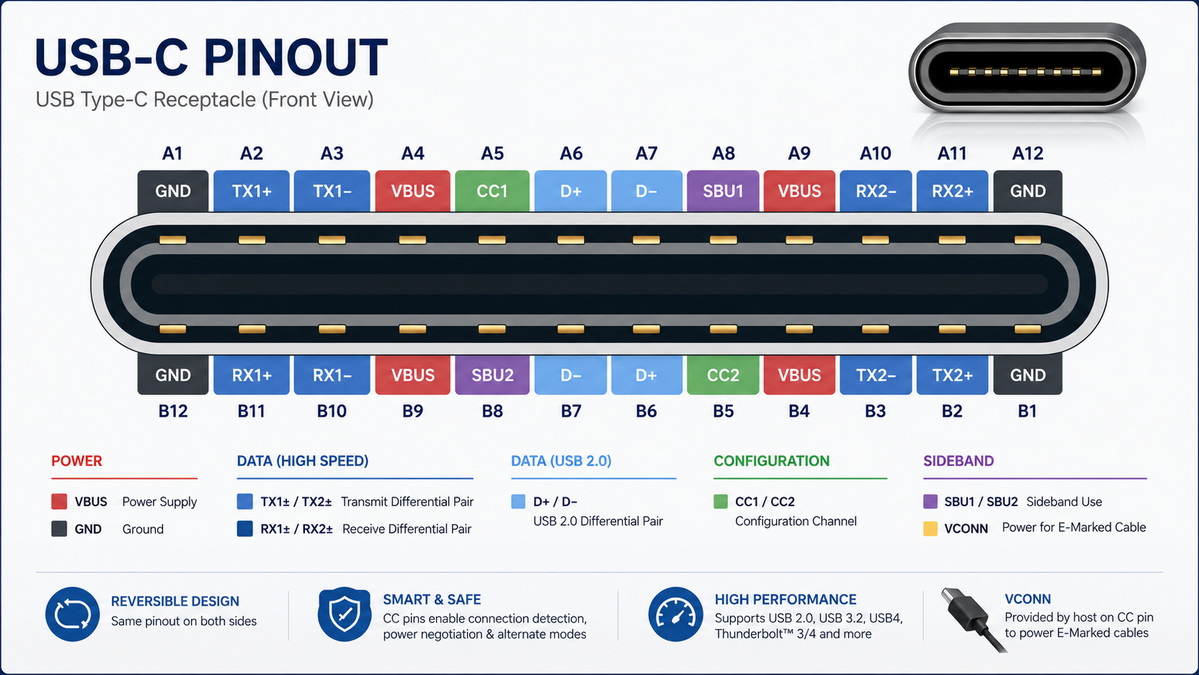
| Pin Group | Function | Purpose |
|---|---|---|
| VBUS and GND | Power and ground | Provide device power and return path |
| D+ and D- | USB 2.0 data | Support legacy and basic communication |
| TX and RX pairs | High-speed data | Enable SuperSpeed and advanced data transmission |
| CC1 and CC2 | Configuration channel | Detect orientation and manage power negotiation |
| SBU1 and SBU2 | Sideband use | Support alternate modes such as video |
| VCONN | Cable power | Supply power to active cable electronics |
One of the most valuable features of USB-C is Power Delivery. Instead of relying on a fixed power level, USB-C devices can negotiate voltage and current based on what the connected device needs.
This makes USB-C suitable for everything from small accessories to high-power laptops. In modern implementations, USB Power Delivery supports much higher power than earlier USB charging methods, which is why USB-C has become common in both consumer and professional equipment.
For manufacturers, this means the cable and connector must be designed for the correct power class. A cable meant for a phone charger is not automatically suitable for a laptop, even if both use USB-C.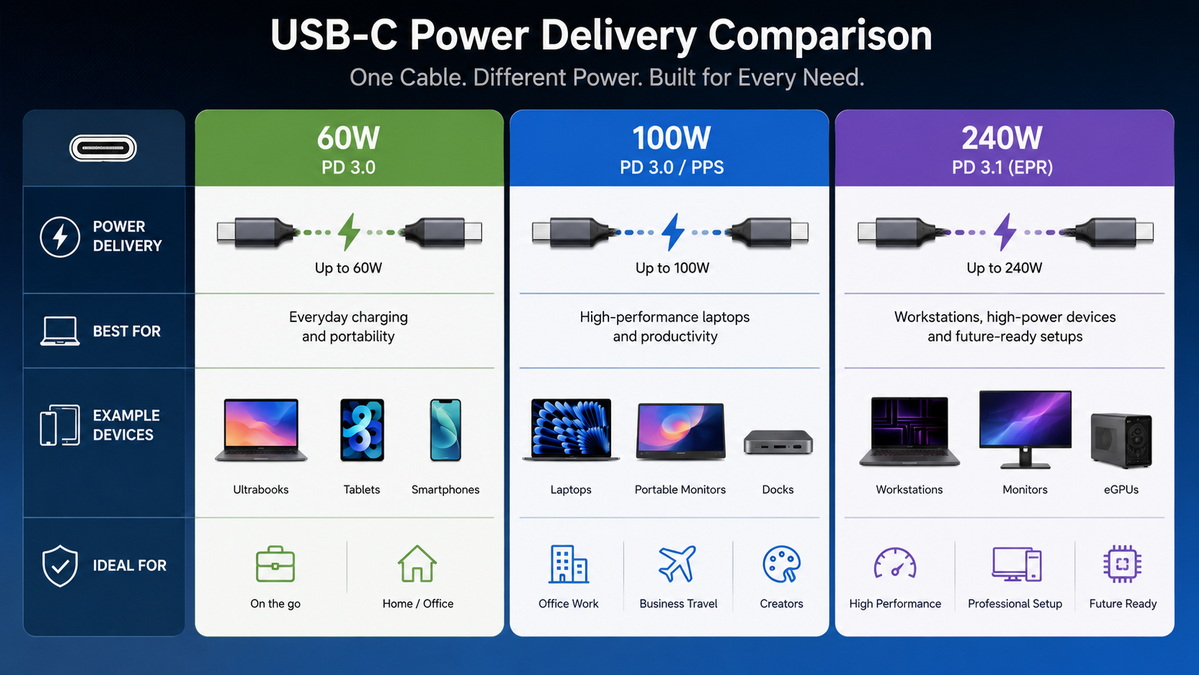
USB-C can support several levels of data performance. At the basic level, it can carry USB 2.0 signals through the D+ and D- pins. At higher levels, it can use SuperSpeed lanes for much faster transfer rates.
This is an important distinction for buyers. A USB-C connector does not guarantee high-speed performance by itself. The actual speed depends on the cable design, internal wiring, and the standards supported by the product.
For this reason, cable selection should always match the intended use case. A charging cable, a data cable, and a display cable may all use the same USB-C plug but serve very different technical requirements.
USB-C is also widely used for video output in docking stations, monitors, and multi-function adapters. This is possible because the connector supports alternate modes that can route non-USB signals through the same interface.
In practical terms, this allows one cable to carry power, data, and display signals at the same time. That flexibility is one of the main reasons USB-C has replaced many older connector types in laptops and office equipment.
For product planning, video support should always be verified before launch. Not every USB-C port supports display output, and not every cable is built for video-related alternate modes.
USB-C and USB 3.0 are often confused, but they are not the same thing.
USB-C refers to the physical connector shape. USB 3.0 refers to a data standard. A USB-C cable may support only USB 2.0 speeds, or it may support much higher performance depending on how it is built.
This distinction matters in sourcing and product development. Buyers should not assume that a USB-C cable automatically delivers fast data transfer, high power, or video compatibility. Those features depend on the internal design and the intended specification.
- USB-C does not automatically mean fast charging.
- USB-C does not automatically mean high-speed data.
- USB-C does not automatically mean video output.
- Cable appearance alone does not confirm performance.
For OEM manufacturing, USB-C design should begin with the end application. The right cable for a charger, a hub, a monitor, or a laptop dock will not be the same.
The most important design points include power level, data requirement, cable length, shielding quality, connector construction, and labeling. These factors directly affect usability and field performance.
When developing a USB-C product line, it is also important to match the product claims with actual technical capability. Clear specification control reduces returns, confusion, and compatibility issues.
1. Define the power requirement.
2. Define the data requirement.
3. Confirm whether video support is needed.
4. Select the correct cable class.
5. Verify termination and shielding quality.
6. Check labeling and product communication.
7. Validate performance in real use cases.
Choosing the right USB-C cable or accessory becomes much easier when the application is clear.
If the product is for charging only, a basic cable may be enough. If it must transfer data, a higher-grade cable is needed. If it must support docking, display output, or multi-device use, the internal design becomes even more important.
For buyers and engineers, the safest approach is to specify the required function first and then match the cable architecture to that requirement. This helps avoid performance gaps and ensures the product behaves as expected in the field.
USB-C is powerful because it can do many things with one connector. But that same flexibility also creates confusion when buyers assume all USB-C products are equal.
A clear understanding of pinout, power delivery, and data support helps buyers choose the correct cable or accessory for each project. It also helps manufacturers deliver products that are more stable, more compatible, and more suitable for international markets.
For OEM projects, this knowledge supports better product planning, more accurate sourcing, and fewer technical problems after shipment.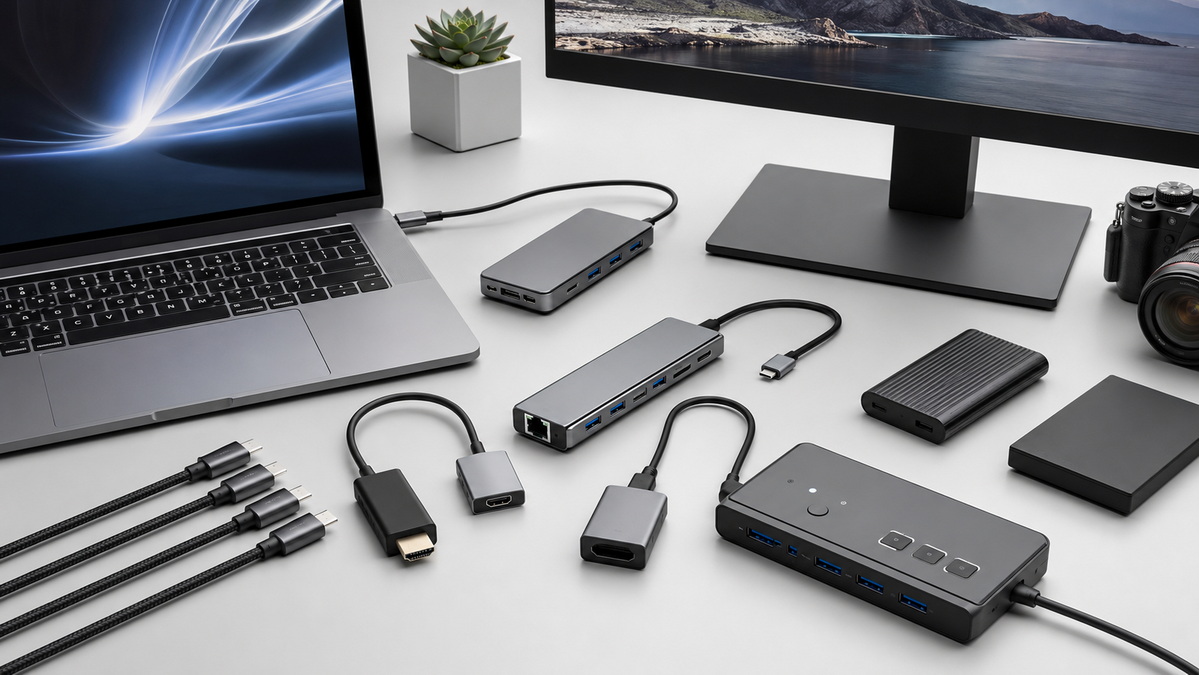
USB-C pinout knowledge is essential for anyone involved in cable sourcing, accessory development, or OEM product planning. It helps ensure the right match between device requirements and product performance.
Shenzhen Otechkabel Electronic Co., Ltd can support custom development for USB cables, adapters, hubs, splitters, and switches tailored to the needs of overseas brands, wholesalers, and manufacturers.
USB-C pinout is the internal arrangement of pins inside a USB-C connector. It determines how the connector handles power, data, orientation, and alternate functions.
No. Some USB-C cables support charging only, while others support both charging and data transfer. The actual capability depends on the internal wiring and design.
No. USB-C is the connector type, while USB 3.0 is a data standard. A USB-C cable can support different USB standards depending on how it is built.
Yes, but only if the port and cable support the relevant alternate mode. Not every USB-C product includes video support.
Higher-priced cables often use better materials, support higher power or data levels, and include additional internal components needed for advanced features.
The choice should be based on power needs, data needs, video support, cable length, and the final product application.
1.USB-IF. USB Charger (USB Power Delivery).
https://www.usb.org/usb-charger-pd
2.Coolgear. Usb-C Pinout.
https://www.coolgear.com/news/usb-c-pinout-guide.html
3.Coolgear. Taking advantage of USB 3.0 Spec.
https://www.coolgear.com/news/taking-advantage-usb-3-0-spec.html
4.USB-IF. Cables and Connectors.
https://www.usb.org/cable_connector
5.USB-IF. USB Type-C Spec R2.0.
https://www.usb.org/sites/default/files/USB%20Type-C%20Spec%20R2.0%20-%20August%202019.pdf
6.Texas Instruments. An Engineer's Guide to USB Type-C.
https://www.ti.com/lit/eb/slyy228/slyy228.pdf?ts=1759892558029
7.USB-IF. USB4 Specification.
https://www.usb.org/sites/default/files/usb4_language_product_and_packaging_guidelines_final__0.pdf


