


Views: 230 Author: Otechkabel Publish Time: 2026-08-03 Origin: Site


Content Menu
● USB-C Pin Functions Explained
>> VBUS and GND
>> CC1 and CC2
>> D+ and D−
>> Common USB-C cable categories
● Power Delivery and Modern USB-C Use
● What Makes USB-C Different from Older Connectors
● Common Design and Quality Issues
● How to Choose the Right USB-C Product
● OEM Manufacturing Perspective
● FAQ
>> 2. Is USB-C the same as USB 3.2 or USB4?
>> 3. Why are there two configuration channel pins in USB-C?
>> 4. Can USB-C support 240W charging?
>> 5. Do all USB-C cables support video output?
>> 6. What should buyers check before ordering USB-C cables?
USB-C is now the default connector for many modern devices, but its internal structure is often misunderstood. Behind the compact, reversible plug is a 24-pin interface that supports power delivery, data transfer, and alternate modes such as video output. Understanding how USB-C pinout works helps engineers, buyers, and product teams choose the right cable or adapter for each application.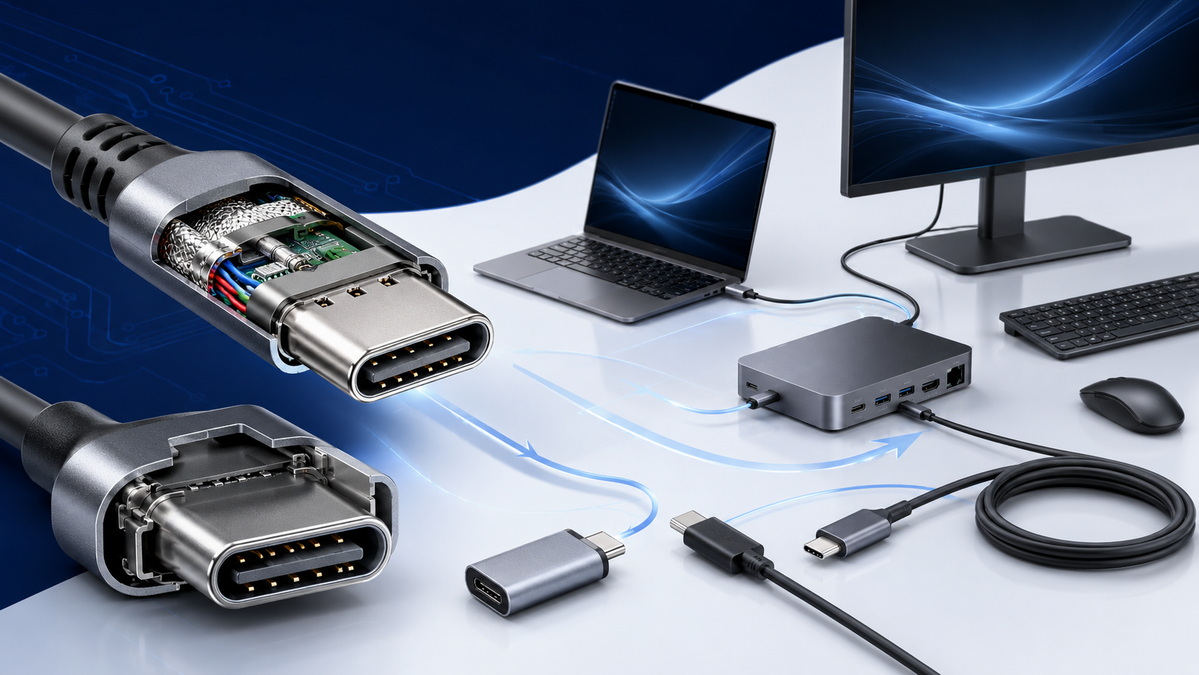
USB-C is more than a connector shape. It combines power, legacy USB 2.0 data, SuperSpeed data, and sideband signaling in one small interface. That flexibility is one reason it has replaced many older ports in laptops, smartphones, hubs, monitors, and industrial devices.
For manufacturers and importers, the pinout is important because not every USB-C cable or accessory supports the same functions. Some products are designed for charging only, while others support high-speed data, video transmission, or both. Choosing the wrong type can lead to compatibility problems, poor performance, or customer complaints.
A standard USB-C receptacle includes power pins, ground pins, configuration channel pins, USB 2.0 data pins, sideband pins, and SuperSpeed differential pairs. The connector is symmetrical, which allows the plug to be inserted in either direction without changing the user experience.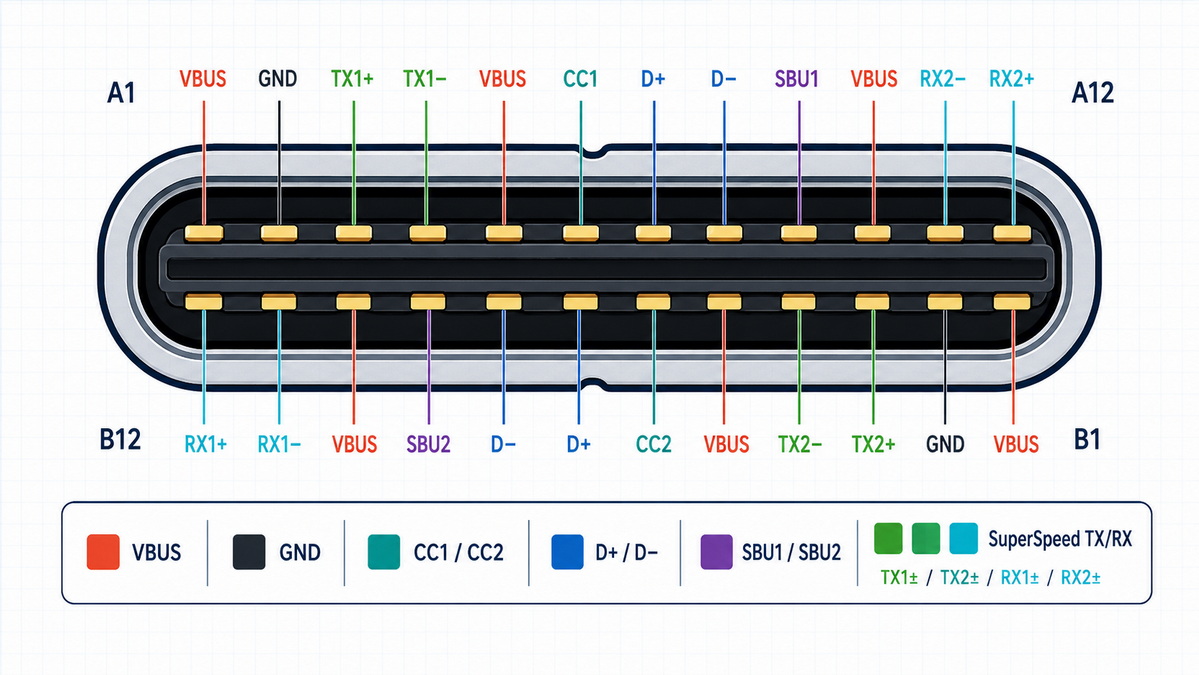
| Pin Group | Main Function | Typical Use |
|---|---|---|
| VBUS | Power delivery | Supplies operating power and charging current |
| GND | Ground return | Completes the electrical path and improves stability |
| CC1 / CC2 | Configuration channel | Detects attachment, orientation, and power roles |
| D+ / D− | USB 2.0 data | Supports legacy communication and low-speed peripherals |
| SBU1 / SBU2 | Sideband use | Supports alternate modes and auxiliary signaling |
| SuperSpeed pairs | High-speed data | Enables advanced data transfer and video-related functions |
VBUS carries power from the source to the device, while GND provides the return path. USB-C uses multiple VBUS and GND contacts to reduce resistance and support higher current levels. This is one of the reasons USB-C can be used for fast charging and high-power applications.
The configuration channel pins are essential to how USB-C operates. They determine cable orientation, identify connected devices, and help negotiate power roles and alternate modes. Without CC pins, the reversible and intelligent behavior of USB-C would not be possible.
The D+ and D− pair is used for USB 2.0 communication. Even though newer USB standards offer much faster speeds, this pair remains important for compatibility, detection, and fallback communication in many devices and accessories.
USB-C includes multiple high-speed differential pairs that support advanced data transmission. These pairs are used for faster USB standards and can also support other high-bandwidth applications depending on the device and cable design. Proper routing and signal integrity are critical for reliable operation.
SBU pins are used for sideband signaling and alternate modes. They are commonly associated with functions such as DisplayPort auxiliary channels. These pins are not general-purpose data lines and should only be used according to the intended specification.
Not all USB-C cables are built the same. A cable may look identical on the outside while supporting very different capabilities on the inside.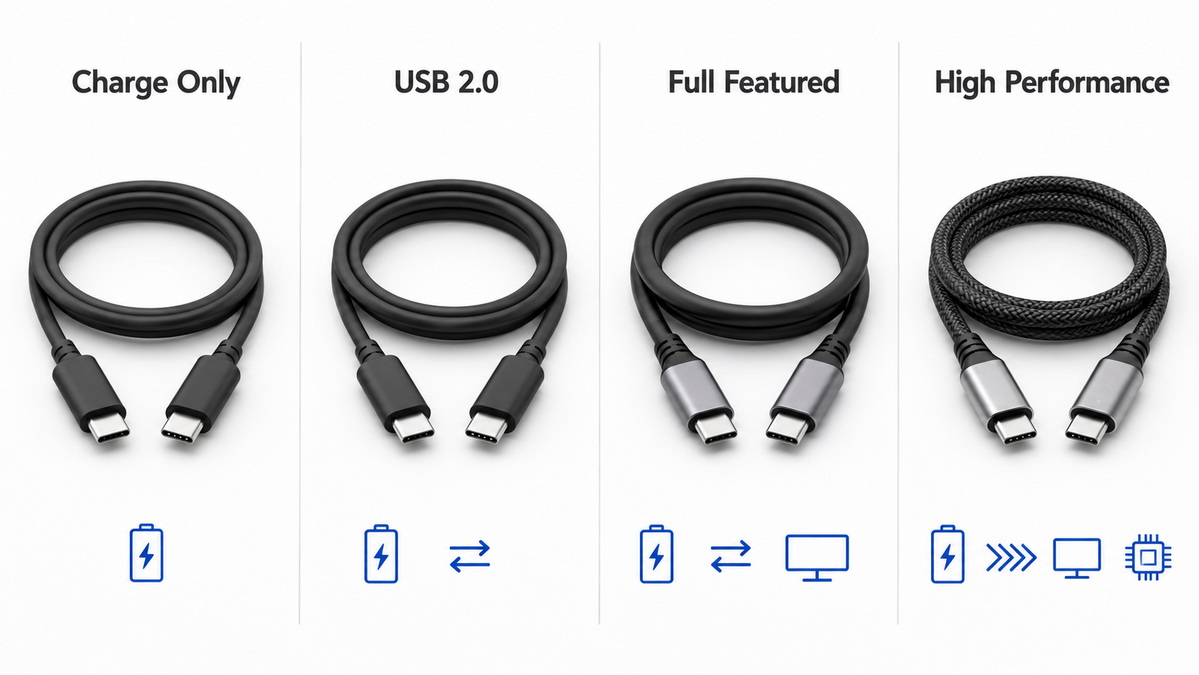
| Cable Type | Capability | Best For |
|---|---|---|
| Charge-only cable | Power only | Basic charging applications |
| USB 2.0 cable | Power + basic data | Simple accessories and low-speed devices |
| Full-featured cable | Power + high-speed data + video support | Docks, laptops, monitors, and premium accessories |
| High-performance cable | Advanced data and power support | Professional and demanding applications |
For sourcing and product planning, it is important to confirm whether a cable is charge-only or full-featured. This distinction affects compatibility, pricing, and end-user expectations.
USB-C has evolved from a simple charging connector into a platform for higher power and faster communication. With USB Power Delivery 3.1, some implementations support up to 240W under Extended Power Range conditions. This makes USB-C suitable for devices with much higher power demands than earlier USB ports could support.
USB4 has also expanded what USB-C can do. In modern implementations, the same connector can carry high-speed data, power, and display signals through a single interface. However, actual capability depends on the cable, controller logic, and device design.
Older ports typically served one purpose at a time. USB-C was designed to combine several functions into one standardized interface. That is why it can be used for charging, data, docking, display output, and accessory connectivity.
This versatility is a major advantage, but it also means buyers must pay attention to product specifications. A USB-C connector alone does not guarantee a certain speed, power level, or video feature. The complete product design determines the final performance.
In real-world use, many USB-C problems come from implementation rather than the connector itself. The most common issues include the following:
- Incorrect cable labeling.
- Poor shielding or weak signal integrity.
- Connector wear from repeated insertion cycles.
- Inadequate protection against electrostatic discharge.
- Mismatch between advertised and actual capability.
- Confusion between charge-only and full-featured cables.
These issues can affect charging speed, data stability, and device compatibility. For B2B buyers, they can also increase support costs and reduce customer satisfaction.
Selecting the right USB-C cable, adapter, hub, splitter, or switch depends on the intended use. A simple charging application has very different requirements from a dock that must support video output and high-speed data.
1. Define the application clearly.
2. Confirm the required charging wattage.
3. Check the needed data speed.
4. Verify whether video output is required.
5. Confirm whether the product is charge-only or full-featured.
6. Review connector durability and build quality.
7. Match the cable type to the device ecosystem.
This approach reduces procurement mistakes and helps ensure the product performs as expected in the target market.
For brand owners, wholesalers, and equipment manufacturers, USB-C products must be reliable, repeatable, and suitable for scale production. The connector may be standardized, but manufacturing quality still determines long-term performance.
An OEM supplier should be able to support stable electrical performance, consistent assembly quality, branding requirements, and customized product packaging. For export-focused businesses, those details are often as important as the connector specification itself.
USB-C is a versatile connector that supports power, data, and video through one compact interface. To use it effectively, buyers and engineers must understand the pinout, cable types, and actual performance limits of each product.
For OEM and wholesale projects, the best results come from matching the connector design to the exact application. When the electrical structure, build quality, and product purpose are aligned, USB-C can deliver reliable performance across a wide range of devices.
USB-C pinout is the arrangement and function of the 24 pins inside a USB Type-C connector. These pins handle power, ground, data, configuration, and sideband signaling.
No. USB-C is the connector type, while USB 3.2 and USB4 are data standards. A USB-C cable may support only charging, basic data, or advanced high-speed functions.
USB-C has two configuration channel pins so the connector can work correctly in either plug orientation. They also support device detection and power negotiation.
Yes, some USB Power Delivery 3.1 implementations support up to 240W under Extended Power Range conditions, provided the cable and devices are designed for that level.
No. Video output requires a full-featured cable and compatible devices. Charge-only and USB 2.0 cables do not support video transmission.
Buyers should check charging wattage, data speed, video support, cable type, connector quality, and whether the product matches the intended application.
1. [USB-C Pinout In Depth: A Comprehensive Technical Guide]
2. [USB-C Connector Pinout: What to know]
3. [USB Type-C® Cable and Connector Specification]
4. [USB4 Specification]
5. [USB Power Delivery Specification]


